


IIS Client Certificate Mapping Authentication is a feature in Internet Information Services that allows web servers to authenticate users based on their client certificates. A client certificate is a form of digital identity usually issued by a trusted Certificate Authority (CA), and it confirms the identity of the client trying to connect to a server. Some well-known trusted certificate authorities include DigiCert, Let’s Encrypt, Comodo, Entrust, GlobalSign, etc. This post will guide you through how to enable the IIS Client Certificate Mapping Authentication Feature in Windows 11 using simple steps.
Key Steps:
- To enable this feature on Windows 11, we will use Windows Features.
- To access Windows Features, open Run and execute the following command.
appwiz.cpl - On the Programs and Features window, click on Turn Windows Features on or off from the left pane.
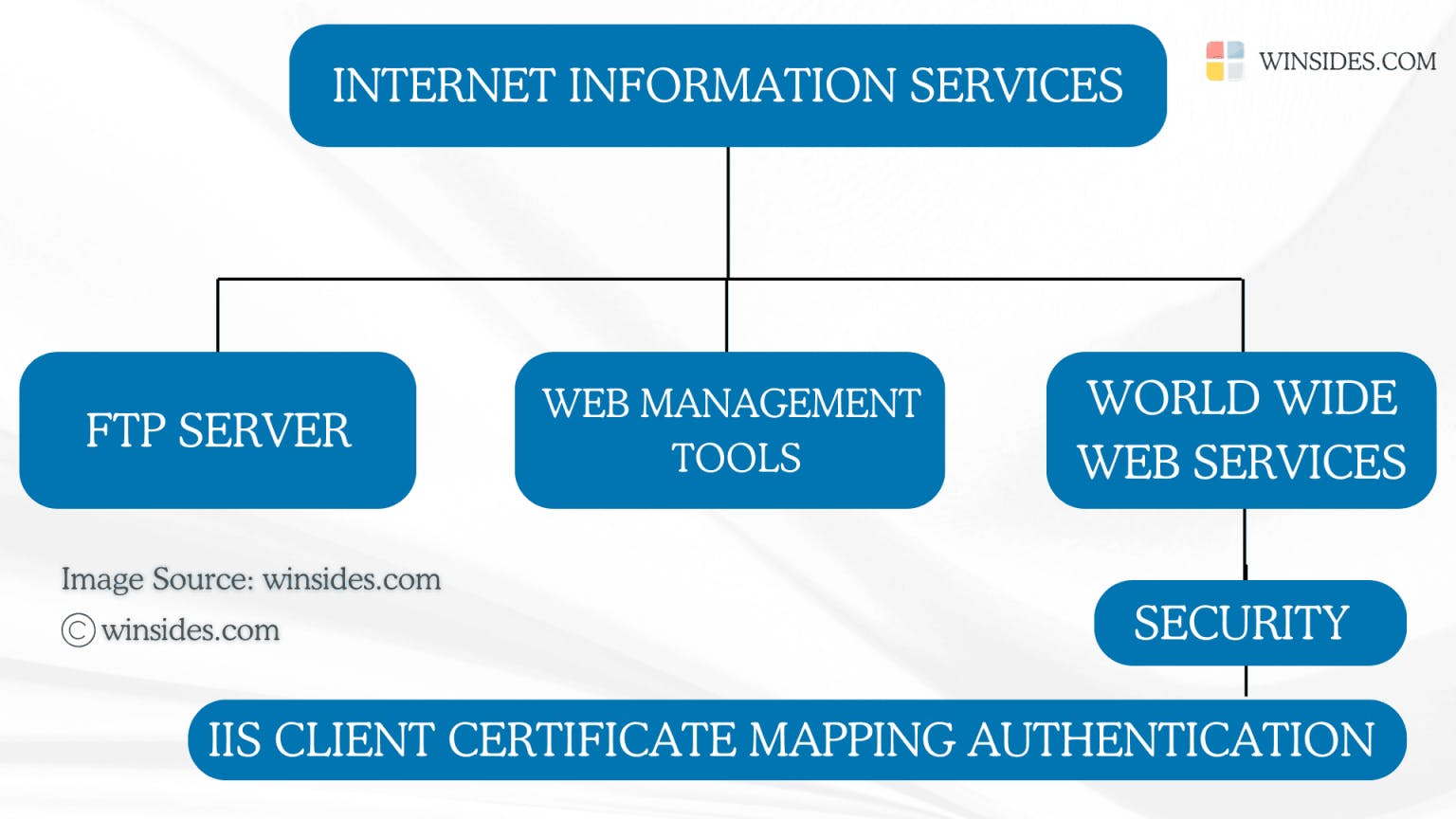
- Windows Features dialog will open now. Locate Internet Information Services and expand the tree.
- Then, expand World Wide Web Services.
- Finally, expand Security.
- Now, you can find IIS Client Certificate Mapping Authentication. Click on the checkbox to enable it. Click OK.
- That is it. The system will enable IIS Client Certificate Mapping Authentication on your Windows 11 OS.
Directions to reach IIS Client Certificate Mapping Authentication in Windows 11
- The first step is to go to the Run command. You can either use the Start menu or the keyboard combination Win Key + R.
- Once you are on the Run command, execute the following command
appwiz.cpland click OK. This command will open the Programs and Features window.
- When the Programs and Features window opens, click on the Turn Windows Features on or off option from the left pane.
- This action will open the Windows Features dialog. Here, you can find all the available optional features. Most of these features are essential for developers and IT Professionals.
- Go to Internet Information Services from the list of services available and expand it.
- Now, you will find FTP Server, Web Management Tools, and World Wide Web Services. Expand the World Wide Web Services.
- You will find various optional features such as Application Development Features, Common HTTP Features, Health and Diagnostics, etc. Expand the Security tree.
- Here, you can find IIS Client Certificate Mapping Authentication. Click on the checkbox next to it to enable it and then click OK.
- Windows will search for the required files.
- The system will apply the necessary changes.
- Finally, Windows will complete the requested changes. You may be either prompted to close the window or restart now. We highly recommend restarting the system so that the changes made will take effect.
- IIS Client Certificate Mapping Authentication is now enabled on your Windows 11 OS.
Two main Types of Mapping:
In IIS Client Certificate Mapping Authentication, there are two main types of mapping used to associate client certificates with user accounts.
- One-to-One Certificate Mapping
- Many-to-One Certificate Mapping
One-to-One Certificate Mapping Mechanism
During authentication, IIS compares the client certificate’s unique details, such as certificate thumbprint or subject, against pre-configured mappings. If there’s a match, IIS grants the user access according to the permissions of the mapped user account.
Many-to-One Certificate Mapping Mechanism
This type of mapping allows multiple certificates to be mapped to a single user account. The certificates can share certain attributes, such as issuer or subject properties, allowing a group of certificates to be authenticated under the same user account.
Frequently Asked Questions
What is the difference between a Client Certificate & SSL Certificate?
Client certificates are issued to individual users or devices, proving their identity, whereas SSL certificates are issued to servers to ensure secure communications.
How do I configure IIS to trust a Certificate Authority (CA)?
Ensure that the CA’s root certificate is installed in the server’s Trusted Root Certification Authorities store, and the client certificate used for authentication should be issued by a CA trusted by IIS.
Can I use self-signed certificates for Client Certificate Mapping Authentication?
While possible, using self-signed certificates is generally not recommended for production environments.
Takeaway
Enabling IIS Client Certificate Mapping Authentication on Windows 11 adds an extra layer of security by allowing client certificates to verify users before granting access. With both One-to-One and Many-to-One mapping options, Windows 11 provides flexibility to authenticate single users or groups based on their certificates.
Have Queries?
We hope you are satisfied with our article, and if you have any queries, kindly let us know in the comments section. For more interesting articles, visit Winsides.com. Happy Coding! Peace out!