
When I began building the SlideMaker app, I wasn’t trying to create another presentation tool. I wanted to solve a frustration I had felt for years. Creating slides is slow, repetitive, and strangely exhausting, even when you know exactly what you want to say. I kept imagining an experience where you type a topic, click one button, and then simply watch a presentation come alive in front of you. No templates, no dragging text boxes around, no “presentation anxiety.” Just ideas turning instantly into polished presentations. That single thought became an obsession, and over the next eighteen months, it grew intothe SlideMaker app, an AI system that now generates more than 500 fully designed presentations every day in under 20 seconds.
The Stack
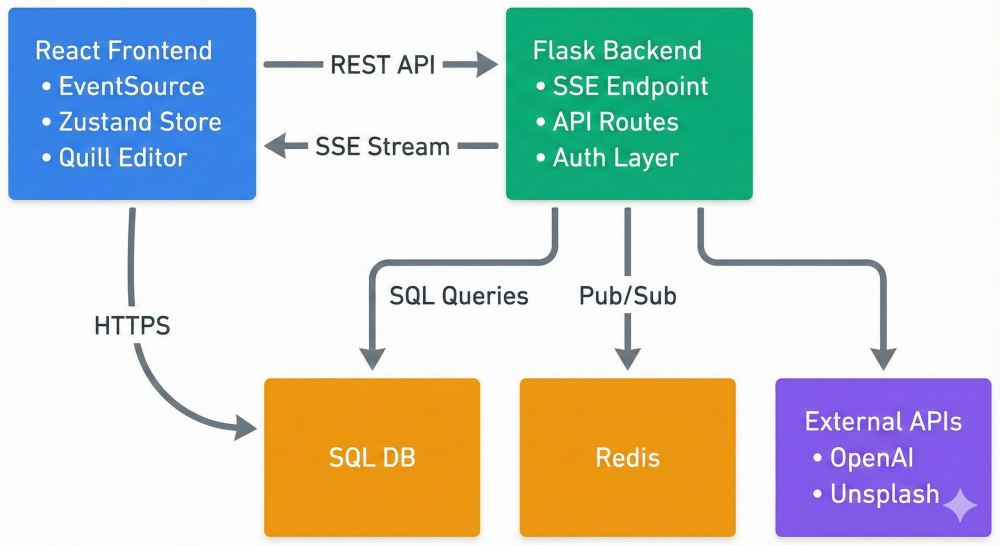
Frontend
- React 18 (functional components)
- Zustand (state management)
- Quill.js (rich text editing)
- EventSource API (SSE streaming)
Backend
- Flask (Python web framework)
- LangChain (OpenAI orchestration)
- Redis (pub/sub + sessions + caching)
- MySQL (persistent storage)
- Gunicorn + Nginx (production)
External APIs
- OpenAI GPT-4 (content generation)
- Unsplash API (image sourcing)
Why These Choices?
- Zustand over Redux: 90% less boilerplate for the same functionality. Redux requires action types, action creators, reducers, and connect functions. Zustand just needs a store definition, and you're done.
- Flask over FastAPI: Better ecosystem for complex auth and session management. FastAPI is great for simple APIs, but Flask gave me more flexibility for the auth patterns I needed.
- MySQL over PostgreSQL: Simpler managed hosting. As a solo developer, I needed to minimize operational overhead. MySQL on AWS RDS just works.
- Redis for everything: One service handles pub/sub, sessions, rate limiting, and caching. Instead of running four different services, I run one Redis instance that does it all.
The Core Problem: Real-Time AI Streaming
The biggest architectural challenge wasn't generating slides. It was making the experience feel instant.
The Old Way
- User clicks "Create"
- Spinner shows for 60 seconds
- All slides appear at once
- Users think it's broken, refresh the page
My Solution
- User clicks Create
- A clear 0 to 100 percent progress bar appears with meaningful status updates
- Slides appear one by one the moment they are generated
- Full presentation completes in about 15 seconds
Problem 1: How Do You Stream from a Long-Running Backend Process?
Answer: Server-Sent Events (SSE)
I evaluated WebSockets vs SSE. WebSockets are bidirectional (client to server and back), but I only needed one-way communication from server to client. SSE gave me native browser API (EventSource), automatic reconnection on connection drops, HTTP/2 multiplexing (multiple streams over one connection), and simpler server implementation (just HTTP, no handshake protocol).
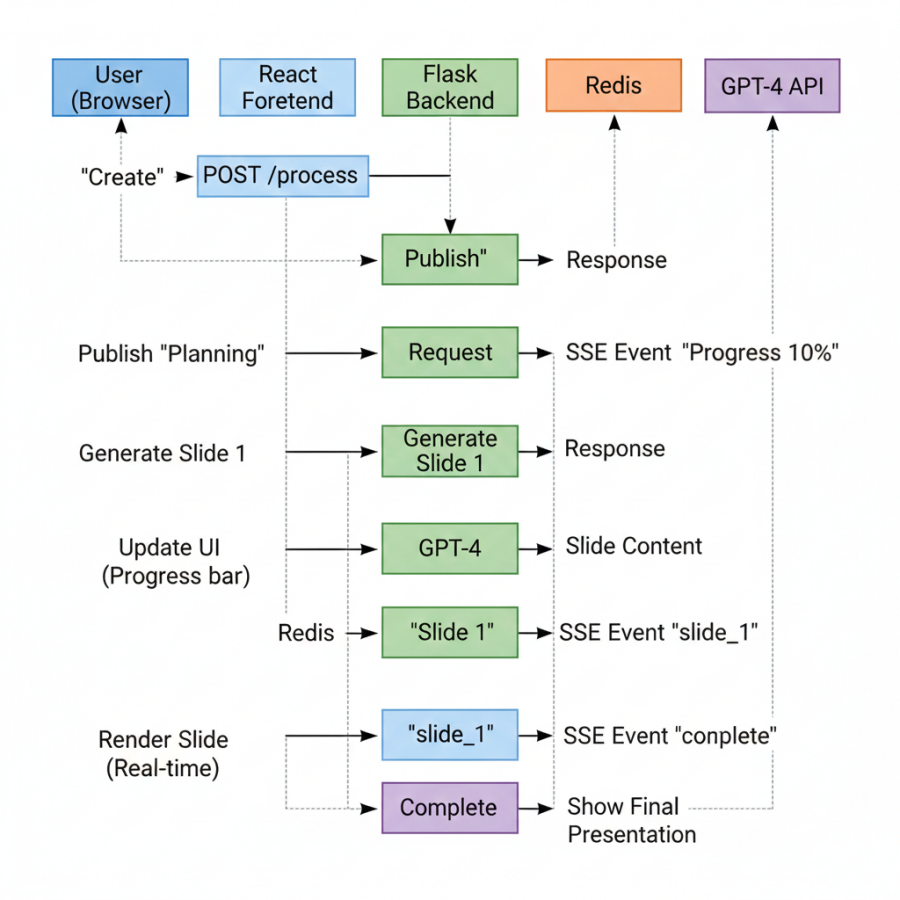
Architecture pattern:
Backend generates slide → Publish to Redis → SSE endpoint listens → Browser receives → React renders
Problem 2: How Do You Route Events to the Correct User?
With 50 concurrent generations, user A shouldn't see user B's slides.
Answer: Session-isolated Redis channels
Here's the pattern:
- Each user gets a unique session ID (UUID, stored in localStorage).
- Backend publishes to channel: session_{user_session_id}.
- SSE endpoint subscribes only to that user's channel.
- Zero cross-contamination.
This was crucial. Early versions used a global channel and had race conditions where users saw each other's slides briefly before filtering kicked in.
Problem 3: How Do You Handle Connection Drops Mid-Generation?
Users refresh pages. Networks fail. Browsers throttle background tabs.
Answer: Idempotent state recovery
Here's the pattern: Store generation metadata in Redis with TTL (share_url, slide_id, status). When the client reconnects, check Redis for in-progress generation. If found, reconnect to the same channel and resume streaming. Backend worker continues regardless of client connection state. The generation runs independently of the SSE connection. The SSE endpoint is just a "view" into the generation process.
The Five-Phase Generation Pipeline
Here's what happens when a user types "Artificial Intelligence in Healthcare":
Phase 1: Planning (0-20% progress)
Topic analyzed by GPT-4 to determine audience, tone, and depth. Outline generated with slide count, titles, and types. Total slides known upfront, which allows showing "Slide 1 of 5". Outline ensures consistency across slides (no topic drift). Early validation catches bad topics before wasting API calls.
Phase 2: AI Content Generation (20-60% progress)
Each slide was generated sequentially with GPT-4. Context from previous slides included in prompt forcoherence. Slide streamed immediately when complete.
Why sequential, not in parallel?
Slide 3 needs to reference Slide 2. Parallel generation causes repetition and contradictions.
Key architectural decision: Stream each slide the moment it's generated. Don't wait for all 5 slides.
Phase 3: Image Processing (60-80% progress)
Image search queries extracted from slide content. Unsplash API called for 3 images per slide. Images fetched in parallel (5 concurrent requests).
Why parallel here? Unlike slides, images don't depend on each other. Threading cuts time from 10s to 2s. ThreadPoolExecutor with 5 workers → 5 Unsplash API calls → Results collected → Slides updated
Phase 4: Theme Application (80-90% progress)
Controversial decision: Themes applied on the frontend, not backend. Why? Instant theme switching means users can change themes without regenerating (saves $0.04 per switch). Reduced backend load since no server-side rendering needed. Better UX because frontend has direct DOM access for layout calculations. Backend sends raw data, frontend transforms it to positioned elements.
Phase 5: Database Persistence (90-100% progress)
Dual storage strategy: I store two copies of each presentation. Original AI output (slide_json_data) is immutable. User-editable copy (user_slide_json) is synced with edits. Why? Theme switching re-applies original data, but preserves manual edits. User generates slides with Theme A, edits title on Slide 2, switches to Theme B. Result: Theme B applied, but edited title preserved.
State Management: Why I Chose Zustand
Early versions used Redux. 200+ lines of boilerplate for simple state updates.
Redux pattern: Define action types (constants), create action creators (functions), write reducers (switch statements), connect components (mapStateToProps, mapDispatchToProps), update state.
Zustand pattern: Create store with initial state and actions, use in components. That's it.
Key benefits: No provider wrapping, no action/reducer boilerplate, direct state updates (no dispatch), functional updaters prevent stale closures, DevTools support, 1KB vs 15KB bundle size. This reduced state management code by 90% and eliminated an entire class of bugs.
Authentication: Hybrid Anonymous + OAuth
The requirement: Anonymous users can create presentations (no signup friction). Logged-in users get saved history. Anonymous users can "upgrade" to logged-in without losing work.
My solution: UUID sessions + Redis mapping.
Anonymous users: Frontend generates a UUID on the first visit, stored in localStorage. Every API request includes the Session-ID header. Backend maps session ID to anonymous user data in Redis.
Upgrade flow: Anonymous user creates 3 presentations, logs in with Google, backend finds all presentations with matching session_id_ref, updates user_id, and clears session_id_ref. User now sees all 3 presentations in their account.
Auto-Save: Debouncing Database Writes
Users edit slides in real-time with Quill.js. Every keystroke can't trigger a database write.
Pattern: Debounced batch updates. Edit detected in Quill, trigger debounced save (2-second delay). If another edit happens within 2 seconds, reset the timer. When the timer expires, send all slides to the backend in one request.
Result: Database writes reduced from 60/min to less than 1/min per user. Zero perceived latency (optimistic UI). Batched updates are more efficient (single transaction).
Edge case handled: User closes tab before auto-save completes. Solution: before the unload event triggers an immediate flush.
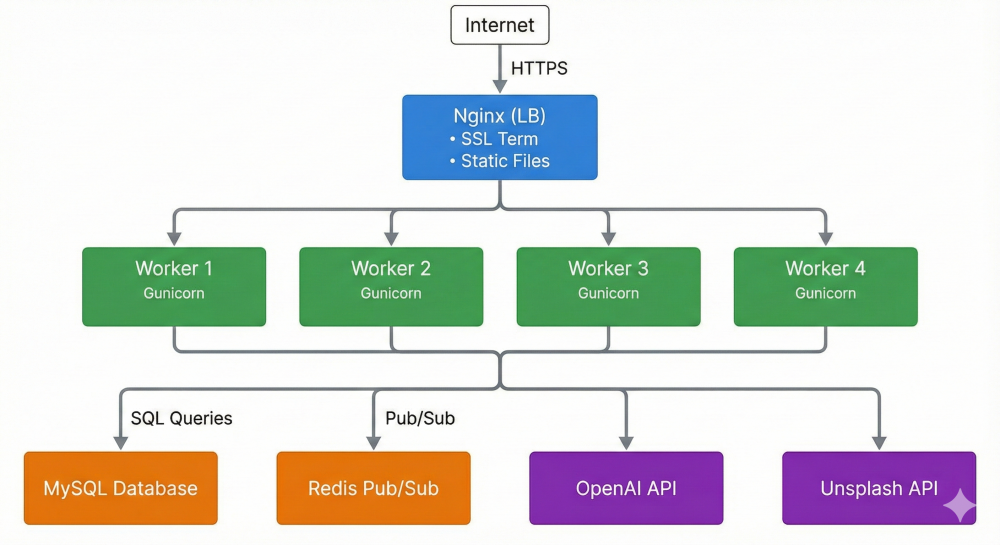
Scaling: Stateless Horizontal Architecture
Why This Scales
- Stateless workers: Any worker can handle any request (Redis has session state)
- Redis pub/sub routing: Messages automatically reach correct SSE connection
- Client-side theme rendering: Backend doesn't render anything
- Connection pooling: SQLAlchemy pools database connections
- Aggressive caching: Themes, rate limits, user data cached in Redis
Current Capacity
- 500 presentations/day
- 100+ concurrent users
- 1 server (8 GB RAM, 2 vCPU)
- 95% uptime
Future Scaling Path
- Add job queue (Celery) for async processing
- Replicate MySQL for read scaling
- CDN for static assets
- Multi-region deployment
Error Handling: Graceful Degradation
AI APIs fail. Here's how I handle it:
- OpenAI failures: Exponential backoff (retry with 2^n second delay). Fallback to GPT-3.5 if GPT-4 unavailable. Generic error message to user.
- Image fetch failures: Try Unsplash first, fallback to generic stock photos. Continue generation without images if all sources fail. Never block on images (slides matter more than images).
- SSE connection drops: Browser auto-reconnects (EventSource built-in). Check generation status on reconnect. Resume streaming if still in progress.
- Philosophy: Never show users a white screen.
Performance Numbers
Generation Time
- Planning: 2-3 seconds
- Content (5 slides): 8-12 seconds
- Images: 2-3 seconds
- Theme + Save: 1-2 seconds
- Total: 13-20 seconds
API Costs (per presentation)
- GPT-4: $0.006 (varies by topic complexity)
- Unsplash: Free tier
- Total: about $0.006 per presentation At 500 presentations/day, that's roughly $100 monthly API cost.
What I'd Do Differently
- Use PostgreSQL instead of MySQL. Better JSON querying with jsonb type, native array support, more robust full-text search.
- Add a job queue from day one. Move long-running tasks off HTTP request threads. Better retry logic. Easier to add async features.
- Implement structured logging. Should use Sentry or DataDog for error tracking. Structured logs for better debugging.
- API versioning. Should be /api/v1/process, not /process. Makes breaking changes easier.
- End-to-end testing. Should have Playwright tests for critical flows. Especially for AI output validation.
Key Architectural Lessons
- SSE is underrated for one-way streaming. WebSockets are overkill if you only need server to client. SSE is simpler and more reliable.
- Session isolation is critical. Never use global channels. Always use user/session-based channels for pub/sub.
- Stream early and often. Users prefer seeing partial results over waiting for complete results.
- Client-side rendering reduces backend load. If it's visual (themes, layouts), let the frontend handle it.
- Debouncing saves money. Auto-save every 2 seconds, not every keystroke.
- Stateless workers scale horizontally. If you need sticky sessions, you're doing it wrong. Use Redis for state.
- Graceful degradation beats perfect reliability. Show cached data if API fails. Disable features, not the entire app.
Try It Yourself
SlideMaker is live at slidemaker.app.
Try this:
- Open browser DevTools and go to the Network tab
- Generate a presentation on any topic
- Watch the EventSource connection stream events in real-time
- See slides appear one-by-one as they're generated
- Edit a slide, wait 2 seconds, check the auto-save indicator
I'm a solo developer building AI-powered tools. If you have questions about the architecture or want to discuss real-time streaming patterns, feel free to reach out.
[story continues]
tags