1. Introduction
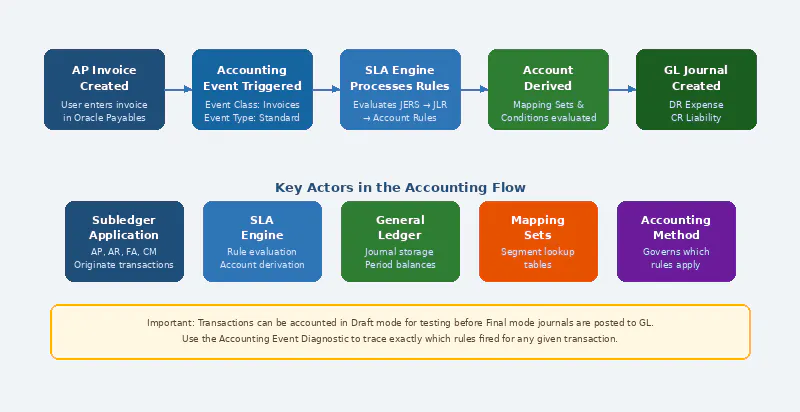
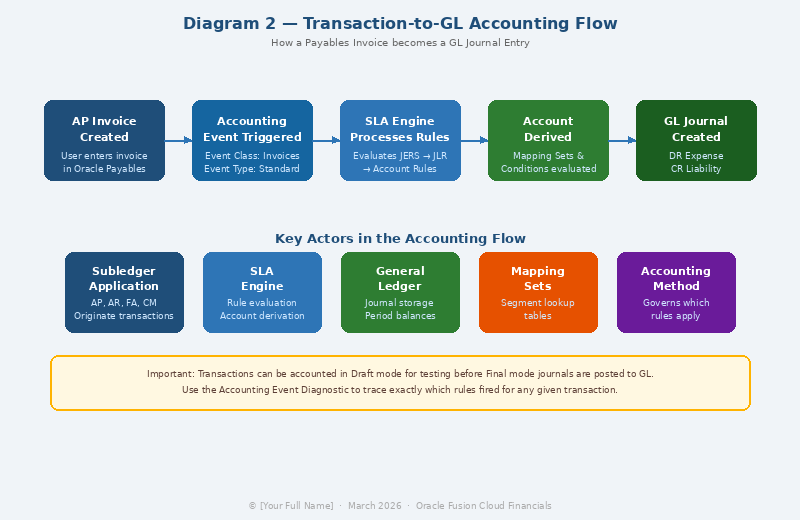
In Oracle Fusion Cloud Financials, every financial transaction— whether it originates from an invoice, payment, receipt, or asset
depreciation — must ultimately produce accounting entries in the General Ledger (GL). The bridge between these subledger transactions and the GL is the Subledger Accounting (SLA) engine.
Unlike Oracle E-Business Suite (EBS), where accounting rules were largely hard-coded or driven by setup profiles, Oracle Fusion Cloud SLA provides a highly flexible, rules-based accounting framework. This allows organizations to define exactly how transactions are accounted for, down to the individual line level, without modifying code.
The flexibility of SLA is both its strength and its complexity. Understanding its architecture is essential before attempting any
configuration.
2. Understanding the SLA Architecture
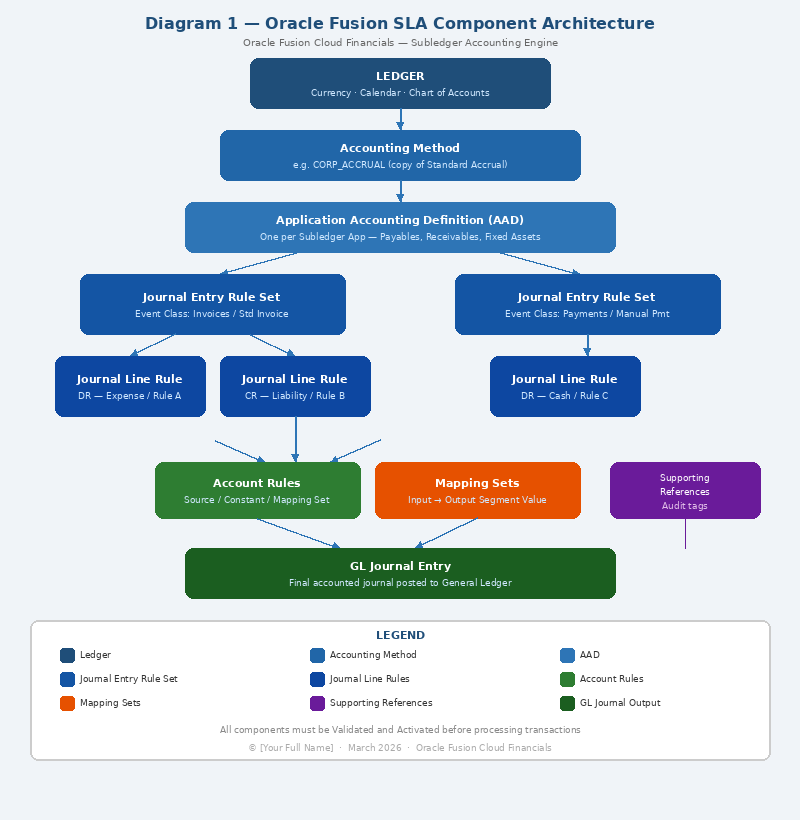
SLA operates on a layered architecture. The key components, from highest to lowest abstraction, are:
Component | Description | Analogy |
Application Accounting Definition (AAD) | The top-level container linking event classes to journal line rules. One AAD is assigned per accounting method. | The rulebook |
Journal Entry Rule Set (JERS) | Groups journal line rules for a specific event class and event type. | A chapter in the rulebook |
Journal Line Rules (JLR) | Determines which side of the entry (Dr/Cr), the accounting class, and conditions. | An individual accounting rule |
Account Rules | Maps segments of the account to specific sources or value sets. | The chart of accounts mapping logic |
Mapping Sets | Lookup tables that map input values (e.g., item category) to GL account segments. | A translation table |
Supporting References | Capture additional reference data on journal lines for reporting. | Audit tags on journal lines |
These components are assembled within an Accounting Method, which is assigned to a Ledger. The accounting method determines which AAD is active for each subledger application registered to that ledger.
3. Pre-requisites and Access Requirements
Before beginning SLA configuration, ensure the following are in place:
- Ledger is fully defined including Ledger Currency, Calendar, and Chart of Accounts
- Accounting Method has been created and assigned to the Ledger
- Required Oracle roles are assigned — typically Financial Application Administrator or General Ledger Application Administrator
- The subledger application (AP, AR, FA, etc.) is provisioned and active
- A thorough understanding of the organization's accounting policies and segment values
Navigation path in Oracle Fusion Cloud:
Financials > Setup and Maintenance > Search: 'Manage Accounting Methods'
OR
Setup and Maintenance > Financials > General Ledger > Subledger Accounting
4. Step-by-Step Configuration Guide
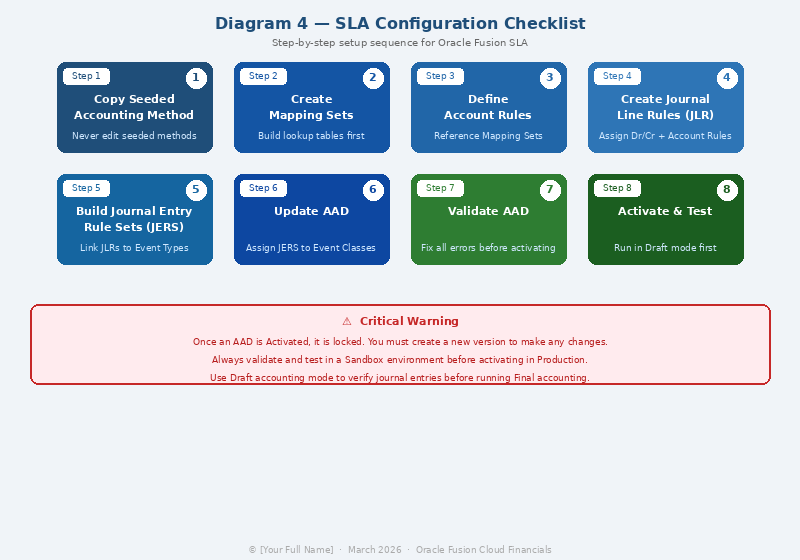
Step 1: Define or Review the Accounting Method
The Accounting Method is the starting point for all SLA configurations. Oracle ships with a standard accounting method called Standard
Accrual. In most implementations, organizations copy this and create a custom accounting method.
1. Navigate to Setup and Maintenance > Manage Accounting Methods
2. Click Create or duplicate the seeded Standard Accrual method
3. Enter a unique Name and Short Name (e.g., CORP_ACCRUAL)
4. Select the Chart of Accounts and Ledger Currency
5. Save and proceed to assigning Application Accounting Definitions
Best Practice: Always work with a copy of the Oracle-seeded accounting method. Modifying seeded methods directly will be overwritten during patch upgrades.
Step 2: Configure Account Rules
Account Rules determine how the system derives GL account segment values for each journal line. This is the most critical and complex
part of SLA configuration. An Account Rule can be configured using one of the following
source types:
- Source — derives the segment value directly from a transaction attribute (e.g., the Distribution Account from an AP Invoice line)
- Constant — hard-codes a specific segment value
- Mapping Set — uses a lookup table to derive the segment value based on input conditions
- Transaction Object Attribute — uses predefined object attributes from the transaction
To create an Account Rule:
6. Navigate to Manage Account Rules
7. Click Create
8. Enter Rule Name, Short Name, and select the Chart of Accounts
9. Define the Segment Rules — for each segment, specify the Source Type and Source Value
10. Optionally add Conditions to apply the rule only under certain criteria
11. Activate the rule when configuration is complete
Segment | Source Type | Source Value / Logic |
Company | Source | AP Invoice Distribution — Company Segment |
Cost Center | Mapping Set | MAP_COSTCENTER — based on Supplier Category |
Account | Source | AP Invoice Distribution — Account Segment |
Intercompany | Constant | 0000 (default) |
Project | Source | Project Code from Distribution |
Step 3: Create Journal Line Rules
Journal Line Rules (JLRs) define the Dr/Cr side of each accounting entry and tie together the Account Rule with an Accounting Class.
12. Navigate to Manage Journal Line Rules
13. Select the Subledger Application (e.g., Payables)
14. Click Create and enter a Rule Name and Short Name
15. Select the Side: Debit or Credit
16. Assign the Account Rule to this line
17. Select the Accounting Class (e.g., Expense, Liability, Cash)
18. Define Conditions if the rule should apply only in specific scenarios
19. Set the Rounding Rule (Up, Down, or Nearest) for currency rounding
Example: For an AP Standard Invoice, a typical JLR configuration would be:
JLR Name | Side | Accounting Class | Account Rule |
AP Invoice Expense DR | Debit | Expense | AP_EXPENSE_ACCOUNT_RULE |
AP Liability CR | Credit | Liability | AP_LIABILITY_ACCOUNT_RULE |
Step 4: Build the Journal Entry Rule Set (JERS)
The Journal Entry Rule Set assembles the Journal Line Rules for a specific Event Class and Event Type combination.
20. Navigate to Manage Journal Entry Rule Sets
21. Select the Subledger Application
22. Click Create
23. Select the Event Class (e.g., Invoices) and Event Type (e.g., Standard Invoices)
24. Add Journal Line Rules — assign each JLR defined in Step 3
25. Define the Description Rule to control journal header and line descriptions
26. Save the JERS
Step 5: Update the Application Accounting Definition (AAD)
The AAD links JER Sets to your accounting method for each event class. Navigate to Manage Application Accounting Definitions, locate your custom AAD, and assign the JERS created in Step 4 to the appropriate Event Class.
27. Open the AAD associated with your accounting method
28. Find the row for the Event Class (e.g., Invoices)
29. Assign the new JERS to the relevant Event Types
30. Save and proceed to validation
Step 6: Validate and Activate
Validation is a mandatory step before the accounting rules can process transactions. Oracle performs schema-level checks to ensure no rules are incomplete or conflicting.
31. In the AAD screen, click Validate
32. Review all validation errors — common issues include missing account rules for required segments and unassigned event types
33. Fix errors and re-validate until zero errors remain
34. Click Activate — note that once activated, the AAD is locked for editing; you must create a new version to modify
Important: Validate in a non-production environment first. Activating an incorrect AAD in production can cause accounting errors across all new transactions.
5. Working with Mapping Sets
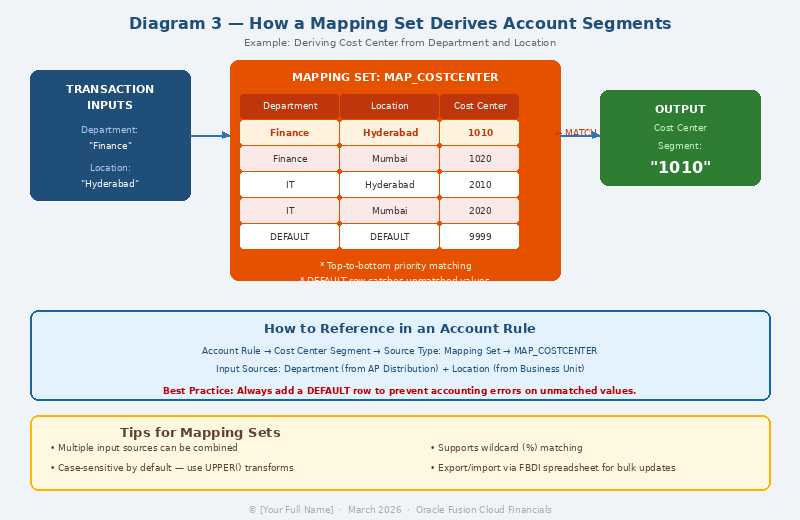
Mapping Sets are among the most powerful features of Oracle SLA. They act as a translation table — given an input value (or combination of values), they return a specific account segment value. Common use cases include:
- Deriving the Cost Center from a combination of Department and Location
- Mapping Inventory Organization to a specific GL Company code
- Translating Supplier Type to a Liability account
Creating a Mapping Set
35. Navigate to Manage Mapping Sets
36. Click Create and provide a Name and Short Name
37. Define Input Sources — these are the transaction attributes used as lookup keys
38. Define the Output — typically a specific account segment
39. Enter the Mapping Table rows — one row per combination of input values and the corresponding output value
40. Add a Default row to handle cases where no match is found
41. Save and reference this Mapping Set in your Account Rules
Example Mapping Set for Cost Center derivation:
Input: Department | Input: Location | Output: Cost Center |
Finance | Hyderabad | 1010 |
Finance | Mumbai | 1020 |
IT | Hyderabad | 2010 |
IT | Mumbai | 2020 |
DEFAULT | DEFAULT | 9999 |
6. Supporting References
Supporting References allow SLA to capture supplemental data on journal lines for reporting and reconciliation purposes. For example, capturing the Purchase Order Number or Supplier Invoice Number on the GL journal line makes reconciliation between subledger and GL significantly easier.
To configure Supporting References:
42. Navigate to Manage Supporting References
43. Create a reference with a Name and the relevant Source (e.g., Invoice Number)
44. Assign the Supporting Reference to the Journal Line Rule
45. Reference the data in OTBI reports or Financial Reporting Studio
7. Common Errors and Troubleshooting
Error / Issue | Root Cause | Resolution |
No accounting rules found for transaction | JERS not assigned to Event Type in AAD | Update AAD and assign the correct JERS |
Account derivation failed — Segment X missing | Account Rule for that segment is incomplete or conditional logic excluded it | Review Account Rule conditions; add a default fallback |
Mapping Set returned no value | Input combination not in mapping table; no DEFAULT row | Add missing input rows or add a DEFAULT row |
AAD validation error: Event Type unassigned | Some Event Types within the Event Class have no JERS | Assign JERS to all Event Types or mark them as Not Applicable |
Journal created with wrong cost center | Mapping Set priority conflict between multiple matching rows | Review row order in Mapping Set; Oracle uses top-down priority |
Cannot edit activated AAD | Oracle locks AADs upon activation | Create a new version of the AAD, make changes, validate, and activate the new version |
8. Best Practices
- Always copy seeded Oracle Accounting Methods — never modify them directly
- Name components consistently with a naming convention (e.g., prefix with project code or company abbreviation)
- Document every account rule, mapping set, and JLR with business justification
- Use Mapping Sets over hard-coded Constants wherever transaction-driven derivation is needed
- Test thoroughly in a sandbox environment using the Create Accounting program in Draft mode before activating
- Use the Accounting Event Diagnostic Report to trace why a specific transaction was accounted as it was
- Assign Supporting References for all key business references to simplify audit and reconciliation
- Create a versioning strategy for AADs — use version numbers in the Short Name (e.g., CORP_ACCRUAL_V2)
- Engage the business finance team during design —accounting rules are ultimately a finance team responsibility
9. Testing and Validation
Before go-live, the following test cycles should be performed:
Unit Testing
- Create test transactions for each Event Type in a sandbox environment
- Run Create Accounting in Draft mode
- Review the Draft Accounting report — verify Dr/Cr sides, account derivation, and amounts
Integration Testing
- Run the full subledger-to-GL accounting cycle
- Verify journal entries appear correctly in the GL
- Check period balances and trial balance reconciliation
Diagnostic Tools
Oracle provides several diagnostic tools for SLA:
- Accounting Event Diagnostic Report — traces accounting for individual transactions
- Create Accounting Execution Report — shows errors and warnings for batch accounting runs
- Journal Entries Report in Subledger Accounting — provides a detailed view of all generated journals
To run the Accounting Event Diagnostic:
Navigator > Financials> Journals > Accounting Event Diagnostic.
Select the transaction, click Diagnose, and review the rule evaluation trace
10. Conclusion
Subledger Accounting in Oracle Fusion Cloud is a sophisticated, rule-driven accounting engine that provides unparalleled flexibility for complex accounting requirements. When configured correctly, it eliminates the need for manual journal adjustments, ensures consistent
accounting treatment and dramatically simplifies period-end reconciliation.
The keys to a successful SLA implementation are thorough understanding of the component hierarchy, meticulous design of account rules
and mapping sets, and rigorous testing before activation. Organizations that invest time in building a well-structured, well-documented SLA configuration will benefit from a highly auditable, automated accounting foundation that scales with business growth.
As Oracle Fusion Cloud continues to evolve, SLA is increasingly integrated with AI-powered accounting suggestions and enhanced analytics through Oracle Fusion Analytics Warehouse — making it even more critical for finance professionals to master this fundamental component.
References
• Oracle Fusion Cloud Financials: Implementing Subledger Accounting — Oracle Documentation, docs.oracle.com.
• Oracle Support Note: SLA Configuration Best Practices (Doc ID 1079286.1) — My Oracle Support.
• Oracle Fusion Cloud: Subledger Accounting Implementation Guide — Release 24D.
• UKOUG Scene Magazine — Oracle Financials Special Edition.
• Oracle Learning Library: Subledger Accounting Implementation Training.
[story continues]
tags