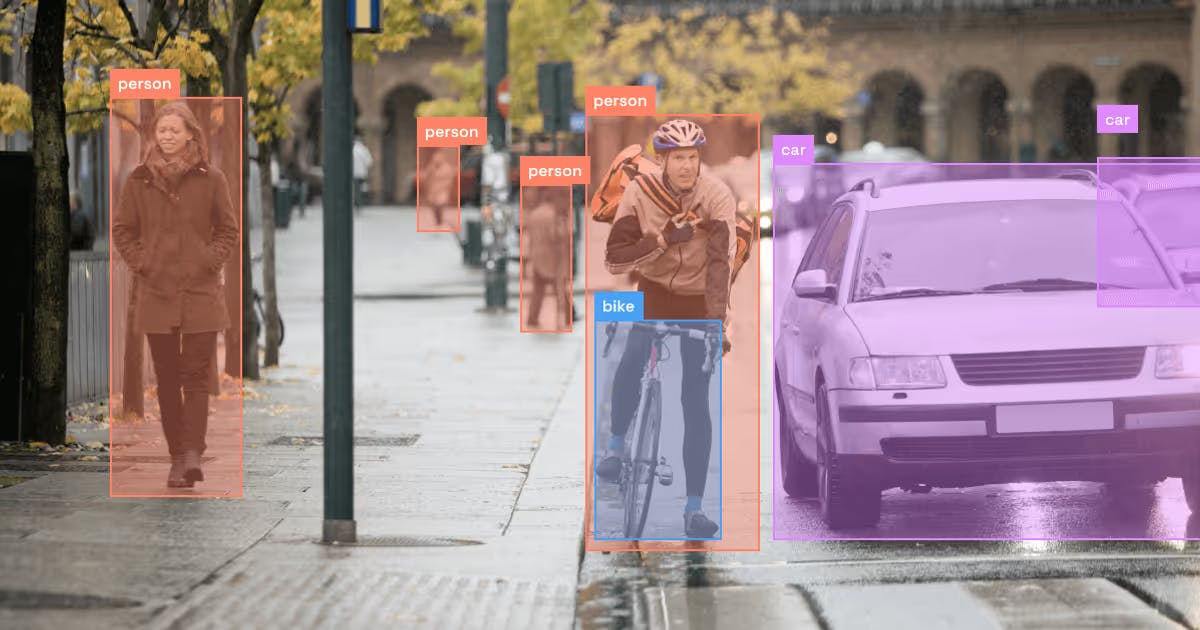
Object detection has become the backbone of a lot of important products like safety systems that know where hands are near dangerous machinery, retail analytics counting products and people, autonomous vehicles, warehouse robots, ergonomic assessment tools, and more. Traditionally, those systems all shared one big assumption: you must decide up front which objects matter, hard-code that label set, and then spend a lot of time, money, and human resources in annotating data for those classes.
Vision-language models (VLMs) and open-vocabulary object detectors (OVD) eliminate this assumption completely. Instead of baking labels into the weights, you pass them in as prompts: “red mug”, “overhead luggage bin”, “safety helmet”, “tablet on the desk.” And surprisingly, the best of these models now match or even beat strong closed-set detectors without ever seeing that dataset’s labels.
In my day job, I work on real-time, on-device computer vision for ergonomics and workplace safety, think iPads or iPhones checking posture, reach, and PPE in warehouses and aircraft cabins. For a long time, every new “Can we detect X?” request meant another round of data collection, labeling, and retraining. When we started experimenting with open-vocabulary detectors, the workflow flipped: we could prompt for new concepts, see if the signals looked promising in real video, and only then decide whether it was worth investing in a dedicated closed-set model.
This article walks through:
- How we got from HOG + SIFT to modern deep detectors
- Why closed-set object detection is painful in production
- What open-vocabulary / VLM-based detectors actually do
- Benchmarks comparing classical, deep closed-set, and open-vocabulary models
- A practical pattern: use OVDs as annotators, then distill to efficient closed-set models
1. Object detection 101: what and why?
Object detection tries to answer two questions for each image (or video frame):
- What is in the scene? (class labels)
- Where is it? (bounding boxes, sometimes masks)
Unlike plain image classification (one label per image), detection says “two people, one laptop, one chair, one cup” with coordinates. That’s what makes it useful for:
- Safety – detecting people, PPE, vehicles, tools
- Automation – robots localizing objects to pick or avoid
- Analytics – counting products, tracking usage, analyzing posture
- Search – “find all images where someone is holding a wrench”
In traditional pipelines, the object catalog (your label set) is fixed, for example, 80 COCO classes, or 1,203 LVIS classes. Adding “blue cardboard box”, “broken pallet”, or a specific SKU later is where things start to hurt.
2. A very quick history: from HOG to deep nets
2.1 Pre-deep learning: HOG, DPM, Regionlets
Before deep learning, detectors used hand-crafted features like HOG (Histograms of Oriented Gradients) and part-based models. You’d slide a window over the image, compute features, and run a classifier.
Two representative classical systems on PASCAL VOC 2007:
- Deformable Part Models – a landmark part-based detector; later versions reached 33.7% mAP on VOC 2007 (no context).
- Regionlets – richer region-based features plus boosted classifiers; achieved 41.7% mAP on VOC 2007.
VOC 2007 has 5,011 train+val images and 4,952 test images (9,963 total).
2.2 Deep learning arrives: R-CNN, Fast/Faster R-CNN
Then came CNNs:
- Fast R-CNN (VGG16 backbone) trained on VOC 2007+2012 (“07+12”) improved VOC 2007 mAP to 70.0%.
- Faster R-CNN (RPN + Fast R-CNN with VGG16) pushed that further to 73.2% mAP on VOC 2007 test using the same 07+12 training split.
The 07+12 setup uses VOC 2007 trainval (5,011 images) + VOC 2012 trainval, giving about 16.5k training images.
So on the same dataset, going from hand-crafted to CNNs roughly doubled performance:
Table 1 – Classical vs deep detectors on PASCAL VOC 2007
|
Dataset |
Model |
# training images (VOC) |
mAP @ 0.5 |
|---|---|---|---|
|
VOC 2007 test |
DPM voc-release5 (no context) |
5,011 (VOC07 trainval) |
33.7% |
|
VOC 2007 test |
Regionlets |
5,011 (VOC07 trainval) |
41.7% |
|
VOC 2007 test |
Fast R-CNN (VGG16, 07+12) |
≈16.5k (VOC07+12) |
70.0% |
|
VOC 2007 test |
Faster R-CNN (VGG16, 07+12) |
≈16.5k (VOC07+12) |
73.2% |
That’s the story we’ve been telling for a decade: deep learning crushed classical detection.
But all of these are closed-set: you pick a fixed label list, and the model can’t recognize anything outside it.
3. Why closed-set deep detectors are painful in production
Closed-set detectors (Faster R-CNN, YOLO, etc.) are great if:
- You know your label set in advance
- It won’t change much
- You can afford a full collect → annotate → train → validate → deploy loop each time you tweak it
In practice, especially in enterprise settings:
- Stakeholders constantly invent new labels (“Can we detect and track this new tool?”).
- Data is expensive – bounding box or mask annotation for niche industrial objects costs real money.
- Model teams end up with a backlog of “can we add this label?” tickets that require yet another retrain.
Technically, closed-set detectors are optimized for one label space:
- Classification heads have fixed size (e.g., 80 COCO classes, or 1,203 LVIS classes).
- Adding classes often means changing the last layer and re-training or at least fine-tuning on freshly annotated data.
- If you’re running on-device (phones, tablets, edge boxes), you also need those models to stay small and fast, which constrains how often you can change them.
This is where open-vocabulary detectors and vision-language models become interesting.
4. Open-vocabulary object detection: prompts instead of fixed labels
Open-vocabulary detectors combine two ideas:
- Vision backbone – like a detector / transformer that proposes regions.
- Language backbone – text encoder (often CLIP-style) that turns prompts like “red cup” or “overhead bin” into embeddings.
Instead of learning a classifier over a fixed set of one-hot labels, the detector learns to align region features and text embeddings in a shared space. At inference time, you can pass any string: “steel toe boot”, “forklift”, “wrench”, “coffee stain”, and the model scores regions against those text prompts.
Examples:
- Grounding DINO – text-conditioned detector that achieves 52.5 AP on COCO detection in zero-shot transfer, i.e., without any COCO training data. After fine-tuning on COCO, it reaches 63.0 AP.
- YOLO-World – a YOLO-style open-vocabulary detector that reaches 35.4 AP on LVIS in zero-shot mode at 52 FPS on a V100 GPU.
These models are usually pre-trained on millions of image–text pairs from the web, then sometimes fine-tuned on detection datasets with large vocabularies.
Visual comparison: promptable Grounding DINO vs. closed-set Fast R-CNN
In the side-by-side image below, the open-vocabulary Grounding DINO model is prompted with fine-grained phrases like “armrests,” “mesh backrest,” “seat cushion,” and “chair,” and it correctly identifies each region, not just the overall object. This works because Grounding DINO connects image regions with text prompts during inference, enabling it to recognize categories that weren’t in its original training list. In contrast, the closed-set Fast R-CNN model is trained on a fixed set of categories (such as those in the PASCAL VOC or COCO label space), so it can only detect the broader “chair” class and misses the finer parts. This highlights the real-world advantage of promptable detectors: they can adapt to exactly what you ask for without retraining, while still maintaining practical performance. It also shows why open-vocabulary models are so promising for dynamic environments where new items, parts, or hazards appear regularly.
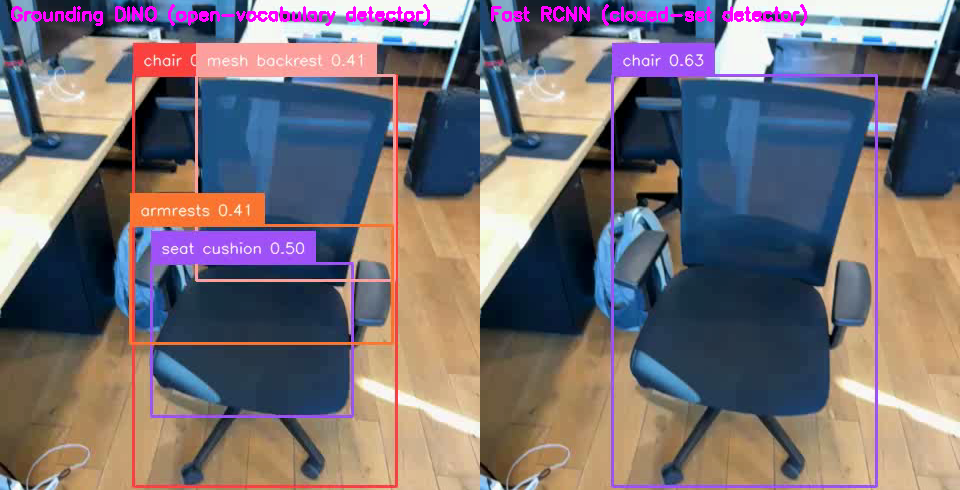
Promptable vs. closed-set detection on the same scene. Grounding DINO (left) identifies armrests, mesh backrest, seat cushion, and the overall chair; Fast RCNN (right) detects only the chair. Photo: © 2025 Balaji Sundareshan: original photo by the author.
5. Benchmarks: closed-set vs open-vocabulary on COCO
Let’s look at COCO 2017, the standard 80-class detection benchmark. COCO train2017 has about 118k training images and 5k val images.
A strong closed-set baseline:
- EfficientDet-D7, a fully supervised detector, achieves 52.2 AP (COCO AP@[0.5:0.95]) on test-dev with 52M parameters.
Now compare that to Grounding DINO:
- 52.5 AP zero-shot on COCO detection without any COCO training data.
- 63.0 AP after fine-tuning on COCO.
Table 2 – COCO closed-set vs open-vocabulary
|
Dataset |
Model |
# training images from COCO |
AP@[0.5:0.95] |
|---|---|---|---|
|
COCO 2017 test-dev |
EfficientDet-D7 (closed-set) |
118k (train2017) |
52.2 AP |
|
COCO det. (zero-shot) |
Grounding DINO (open-vocab, zero-shot) |
0 (no COCO data) |
52.5 AP |
|
COCO det. (supervised) |
Grounding DINO (fine-tuned) |
118k (train2017) |
63.0 AP |
You can fairly say:
An open-vocabulary detector, trained on other data, matches a COCO-specific SOTA detector on COCO, and then beats it once you fine-tune.
That’s a strong argument for reusability: with OVDs, you get decent performance on new domains without painstaking dataset-specific labeling.
In our own experiments on office ergonomics product, we’ve seen a similar pattern: a promptable detector gets us to a usable baseline quickly, and a small fine-tuned model does the heavy lifting in production.
6. Benchmarks on LVIS: long-tail, large vocabulary
COCO has 80 classes. LVIS v1.0 is more realistic for enterprise: ~100k train images, ~20k val, and 1,203 categories with a long-tailed distribution.
6.1 Closed-set LVIS
The Copy-Paste paper benchmarks strong instance/detection models on LVIS v1.0. With EfficientNet-B7 NAS-FPN and a two-stage training scheme, they report:
- 41.6 Box AP on LVIS v1.0 using ~100k training images plus advanced augmentation.
Another line of work, Detic hits 41.7 mAP on the standard LVIS benchmark across all classes, using LVIS annotations plus additional image-level labels.
6.2 Zero-shot open-vocabulary on LVIS
Two representative OVDs:
- YOLO-World: 35.4 AP on LVIS in zero-shot mode at 52 FPS.
- Grounding DINO 1.5 Edge: 36.2 AP on LVIS-minival in zero-shot transfer, while running at 75.2 FPS with TensorRT.
These models use no LVIS training images, they rely on large-scale pre-training with grounding annotations and text labels, then are evaluated on LVIS as a new domain.
Table 3 – LVIS: closed-set vs open-vocabulary
|
Dataset / split |
Model |
# training images from LVIS |
AP (box) |
|---|---|---|---|
|
LVIS v1.0 (val) |
Eff-B7 NAS-FPN + Copy-Paste (closed-set) |
100k (LVIS train) |
41.6 AP |
|
LVIS v1.0 (all classes) |
Detic (open-vocab-friendly, LVIS-trained) |
100k (LVIS train) |
41.7 mAP |
|
LVIS v1.0 (zero-shot) |
YOLO-World (open-vocab, zero-shot) |
0 (no LVIS data) |
35.4 AP |
|
LVIS-minival (zero-shot) |
Grounding DINO 1.5 Edge (open-vocab, edge-optimized) |
0 (no LVIS data) |
36.2 AP |
Takeaway that you can safely emphasize:
On LVIS, the best open-vocabulary detectors reach ~35–36 AP in pure zero-shot mode, not far behind strong closed-set models in the low-40s AP that use 100k fully annotated training images.
That’s a powerful trade-off story for enterprises: ~10k+ human hours of annotation vs zero LVIS labels for a ~5–6 AP gap.
In one of our internal pilots, we used an open-vocab model to sweep through a few hundred hours of warehouse video with prompts like “forklift”, “ladder”, and “cardboard boxes on the floor.” The raw detections were noisy, but they gave our annotators a huge head start: instead of hunting for rare events manually, they were editing candidate boxes. That distilled into a compact closed-set model we could actually ship on edge hardware, and it only existed because the open-vocab model gave us a cheap way to explore the long tail.
7. Limitations of open-vocabulary detection
Open-vocabulary detectors aren’t magic. They introduce new problems:
- Prompt sensitivity & hallucinations
- “cup” vs “mug” vs “coffee cup” can change detections.
- If you prompt with something that isn’t there (“giraffe” in an office), the model may still confidently hallucinate boxes.
- Calibration & thresholds
- Scores aren’t always calibrated across arbitrary text prompts, so you may need prompt-specific thresholds or re-scoring.
- Latency & compute
- Foundation-scale models (big backbones, large text encoders) can be heavy for edge devices.
- YOLO-World and Grounding DINO 1.5 Edge show this is improving: 35.4 AP at 52 FPS, 36.2 AP at 75 FPS, but you’re still in GPU/accelerator territory.
- Governance & safety
- Because they’re text-driven, you have to think about who controls the prompts and how to log/approve them in safety-critical systems.
- Because they’re text-driven, you have to think about who controls the prompts and how to log/approve them in safety-critical systems.
So while OVDs are amazing for exploration, prototyping, querying, and rare-class detection, you might not always want to ship them directly to every edge device.
8. A practical recipe: OVD as annotator, closed-set as worker
A pattern that makes sense for many enterprises:
- Use an open-vocabulary detector as a “labeling assistant”
- Run Grounding DINO / YOLO-World over your video/image streams with prompts like “pallet”, “fallen pallet”, “phone in hand”, “ladder”.
- Let your annotators edit rather than draw boxes from scratch.
- This creates a large, high-quality task-specific labeled dataset cheaply.
- Train a lean closed-set detector
- Define the final label set you actually need in production.
- Train an EfficientDet / YOLO / RetinaNet / lightweight transformer on your auto-bootstrapped dataset.
- You now get fast, small, hardware-friendly models that are easy to deploy on edge devices (iPads, Jetsons, on-prem boxes).
- Iterate by “querying” the world with prompts
- When product asks, “Can we also track X?” you don’t need to re-instrument hardware:
- First, run an OVD with new prompts to mine candidate instances of X.
- Curate + clean those labels.
- Fine-tune or extend your closed-set detector with the new class.
- When product asks, “Can we also track X?” you don’t need to re-instrument hardware:
This gives you the best of both worlds:
- Open-vocabulary detectors act as a flexible, promptable teacher.
- Closed-set detectors become the fast, robust, cheap workers that actually run everywhere.
9. Where this leaves us
If you zoom out over the last 15 years:
- HOG + DPM and friends gave us ~30–40 mAP on VOC 2007.
- CNN detectors like Fast/Faster R-CNN doubled that to ~70+ mAP on the same benchmark.
- Large-scale detectors like EfficientDet hit 52.2 AP on COCO; open-vocabulary models like Grounding DINO match that without COCO labels and surpass it when fine-tuned.
- On LVIS, zero-shot OVDs are only a few AP behind fully supervised large-vocab detectors that rely on 100k densely annotated images.
The story for readers is simple:
- Yesterday: you picked a label set, paid a lot for labels, and got a good closed-set detector.
- Today: you can prompt a detector with natural language, get decent zero-shot performance on new domains, and use that to cheaply bootstrap specialized detectors.
- Tomorrow: the line between “object detection” and “ask a question about the scene” will blur even more, as vision-language models continue to eat classical CV tasks.
If you’re building enterprise systems, it’s a good time to start treating prompts as the new label files and vision-language detectors as your first stop for exploration, before you commit to yet another closed-set training cycle.
[story continues]
tags