
The Problem: Low Actionable Feedback Rates
Here's a common pattern in e-commerce feedback (and these are realistic for most platforms):
Launch a product → 10,000 customers buy → 10–20% leave reviews → 20–30% of those contain actionable insights.
Familiar products like electronics or apparel tend to sit toward the higher end of review volume, while obscure or untrusted products end up with fewer, more uneven reviews. Product decisions often rely on feedback from roughly 2–6% of the shopper base. The silent 94–98% remain largely unknown. Writing reviews requires effort, which naturally filters out customers without strong opinions.
Why traditional feedback struggles?
What users experience:
- High cognitive load: Writing a coherent review takes 2–3 minutes. Most customers won't invest this time unless they feel strongly committed.
- Generic forms: The same feedback prompts—value for money, overall satisfaction, star ratings—are used for everything, whether it’s a smartwatch or a bath mat.
- Uncertain impact: Submit feedback → Hear nothing → Product may not improve → Reduced motivation to provide future feedback.
What businesses see:
- Selection bias: The ecstatic (5-star) and frustrated (1-star) customers are most likely to write reviews. The nuanced middle ("Good, but the battery could be better") usually stay silent.
- Low-signal reviews: Many reviews are vague—“Great product!” or “Terrible quality”—with no details that teams can actually act on.
- Star ratings without context: A 3-star review could mean "Mediocre product" or "Great product with one fixable flaw." Understanding the difference requires manually writing the reviews.
- Delayed pattern detection: By the time a pattern becomes obvious in reviews, thousands—or tens of thousands—more units may already be in customers' hands with the same issue.
- Limited follow-up: "Battery life is poor" raises questions it can't answer. How long does it last? What were you doing? What did you expect? Written feedback rarely allows deeper probing unless the user chooses to elaborate.
The Solution: Intelligent MCQ Interviews
What if we could extract high-signal feedback effortlessly—driving product improvement, building platform trust, and making it easy for users to shape better products? Instead of asking users to write reviews, we interview them with hyper-personalized MCQs. Not generic forms. Not hardcoded decision trees. Adaptive, context-aware questions that are shaped by:
- Product intelligence: What are the known pain points for this product? (Analyzed from existing reviews and description)
- User intelligence: What's their purchase history? How do they typically review? (Behavioral profiling)
- Peer intelligence: What did similar buyers complain about? (Vector similarity across cohorts)
The core insight: MCQs collapse cognitive load while preserving signal. One-click responses can generate as much or more depth than written reviews—if the questions are smart enough.
The potential value for:
- Businesses: More diverse feedback through guided interviews, faster pattern detection for product iteration
- Platforms: Increased engagement through lower-friction feedback collection, richer review data
- Users: Interactive MCQs replace lengthy text writing, direct input into product improvements
Introducing Survey Sensei—a multi-agent system that implements this approach with four specialized agents:
- ProductContextAgent → Analyzes reviews/metadata to understand product strengths and weaknesses
- CustomerContextAgent → Builds behavioral profile from purchase history and review patterns
- SurveyAgent (adaptive MCQ engine) → Generates tailored questions, reshapes follow-ups based on each answer
- ReviewGenAgent → Synthesizes MCQ selections into natural language reviews in the user's voice
The full workflow (end-to-end example):
Step 1 (Product Intelligence): Analyze 213 reviews of this laptop
        → Battery: 67% complain "dies mid-afternoon"
        → Keyboard: 82% praise "excellent typing experience"
        → Performance: 45% mention "handles multitasking well"

Step 2 (User Intelligence): Pull purchase history for this customer
        → Bought 3 laptops in past 2 years (power user pattern)
        → Reviews 85% of purchases, critical but fair (3.6★ average)
        → Detail-oriented: past reviews averaged 120 words

Step 3 (Adaptive Question 1):
        "You've purchased 3 laptops recently. What drove this upgrade?"
        ○ Better performance
        ● Longer battery life        ← USER SELECTED
        ○ Lighter/more portable
        ○ Other: [text]

Step 4 (Adaptive Follow-up):
        "How long does the battery last on a typical workday?"
        ○ All day (12+ hours)
        ● 4-8 hours                   ← USER SELECTED
        ○ Less than 4 hours

Step 5 (Probing Deeper):
        "Does this meet your battery expectations?"
        ○ Exceeds expectations
        ● Falls slightly short        ← USER SELECTED
        ○ Major disappointment

[Agent continues for 10-12 total questions, probing keyboard quality,
 performance, portability based on this user's priorities...]

Step 6 (Review Synthesis): Convert MCQ selections → natural language
        "Upgraded hoping for better battery. Lasts 4-8 hours—falls short
         of all-day claims, but manageable for office work. Keyboard is
         outstanding for typing. Performance handles multitasking well."
Contrast with generic tools:
- Generic survey: "Rate this product 1-5. Any comments?" (No context and high inertia)
- Survey Sensei: Adaptive interview that knows you're a repeat buyer with battery concerns and generates 10-12 contextual MCQs to extract nuanced feedback in a minute.
Why Now? What Changed to Make This Possible
The convergence of cheaper, more intelligent models with rapidly declining token costs has made AI-powered personalization economically viable at scale.
2020 (GPT-3 era):
- Language models: Variable outputs with heavy reliance on prompt engineering
- Embeddings: Early-stage and largely experimental, with limited production infrastructure
- Stateful agents: Custom-built state machines for each workflow
- Economics: Relatively higher token costs made multi-step, interactive workflows difficult to justify at scale
2025 (GPT-4 / GPT-5 era and evolving):
- Language models: Reliable reasoning and structured outputs (this prototype uses GPT-4o-mini but advanced models can also be leveraged)
- Embeddings & retrieval: Production-ready vector databases with mature tooling
- Agent frameworks: First-class support for stateful, multi-step workflows
- Economics: Token costs low enough for personalized, interactive flows at scale
What This Enables
1. Per-user personalization:
- Questions adapt to purchase history and behavioral patterns
- Depth and complexity match user engagement level
- Topic selection reflects individual product concerns
2. Adaptive vs. static workflows:
- Traditional: Fixed question sequences regardless of responses
- AI-powered: Follow-up questions probe deeper based on answers
3. Natural language synthesis:
- Traditional templates: Generic phrasing, obvious patterns
- AI synthesis: Contextual details, varied expression
4. Economic accessibility:
- Earlier LLM costs limited surveys to high-value scenarios
- Current pricing makes this solution viable
- Lower costs enable experimentation and iteration
Two-Part Architecture
Before diving into the details, it's critical to understand how the project is structured. The diagram below shows the complete system architecture—from the UI layer through the orchestrator to the multi-agent framework, along with data pipelines and database schema:

Before diving into the details, it's critical to understand how the project is structured:
Part 1: Simulation Infrastructure (Testing Layer)
Purpose: Development scaffolding—to test the core system without production data.
MockDataOrchestrator creates a semi-realistic sample of an e-commerce ecosystem. For example:
- Products: RapidAPI fetch (real Amazon data) + 5 similar products and 3 diverse products (mocked)
- Users: Main user + N mock personas
- Reviews: RapidAPI reviews (real) + LLM-generated reviews
- Transactions: 40-60% have reviews (matches reality)
- Embeddings: Generated in batch, parallelized for efficiency
In production: Skip this entirely and integrate with real e-commerce databases and pipelines.
Part 2: Agentic Survey Framework (Core USP)
Purpose: The actual product—adaptive survey generation + authentic review synthesis.
This is the heart of Survey Sensei. The 4-agent system decomposes into specialized agents, each with focused responsibility:
Agent 1: ProductContextAgent
Builds a mental model of the product before generating questions.
Three-path adaptive logic:
- Direct Reviews Path (Confidence: 70-95%)
- Condition: Product already has reviews in database
- Ranking heuristic: Recency (50% weight, exponential decay with 180-day half-life) + Quality (40%, review length) + Diversity (10%, bonus for 3-4 star reviews)
- Confidence formula: 0.70 + (num_reviews / 100), capped at 0.95
- Extracts: Key features, pain points, use cases, pros/cons, sentiment patterns
- Similar Products Path (Confidence: 55-80%)
- Condition: No reviews for this product, but vector-similar products exist
- Process: Cosine similarity search via pgvector (threshold: 0.7)
- Ranking heuristic: Similarity (40%) + Recency (35%) + Quality (20%) + Diversity (5%)
- Extracts: Inferred experience from analogous products
- Generic/Description Only Path (Confidence: 40-50%)
- Condition: New product, zero reviews anywhere
- Process: Parse title, description, category metadata
- Extracts: Educated guesses (e.g., "Wireless device → ask about battery")
Output schema:
class ProductContext:
  key_features: List[str]
  major_concerns: List[str]
  pros: List[str]
  cons: List[str]
  common_use_cases: List[str]
  context_type: str
  confidence_score: float
Agent 2: CustomerContextAgent
Builds a behavioral profile to personalize question depth and tone.
Three-path adaptive logic:
- Exact Interaction Path (Confidence: 85-95%)
- User bought THIS exact product before
- Ground truth on what they thought
- Similar Products Path (Confidence: 55-80%)
- Ranking heuristic: Similarity (45%) + Recency (30%) + Engagement (25%)
- Infer preferences from purchase patterns (e.g., "Bought 3 noise-canceling headphones → cares about ANC quality")
- Demographics Path (Confidence: 35-45%)
- Brand new user, zero purchase history
- Generic baseline persona
Output schema:
class CustomerContext:
  purchase_patterns: List[str]
  review_behavior: List[str]
  product_preferences: List[str]
  primary_concerns: List[str]
  expectations: List[str]
  pain_points: List[str]
  engagement_level: str    # highly_engaged | moderately_engaged | passive_buyer | new_user
  sentiment_tendency: str  # positive | critical | balanced | polarized | neutral
  review_engagement_rate: float
  confidence_score: float
Personalization:
- Critical + highly engaged → Deep technical MCQs
- Passive buyer → Simple MCQs
Agent 3: SurveyAgent (Stateful)
Conducts adaptive surveys where questions evolve based on answers. Uses LangGraph StateGraph for conversation state. Questions are generated in mini-batches to optimize API costs while maintaining adaptive flexibility. Performance optimization: Survey state is kept in memory during the session and written to the database at two points:
- Survey start: Initial contexts frozen to
product_contextandcustomer_contextJSONB columns - Survey completion: Final Q&A written to
questions_and_answersJSONB, complete state tosession_contextJSONB
All intermediate answers are logged asynchronously to survey_details table for analytics (fire-and-forget, non-blocking). Here’s how the survey process is structured:
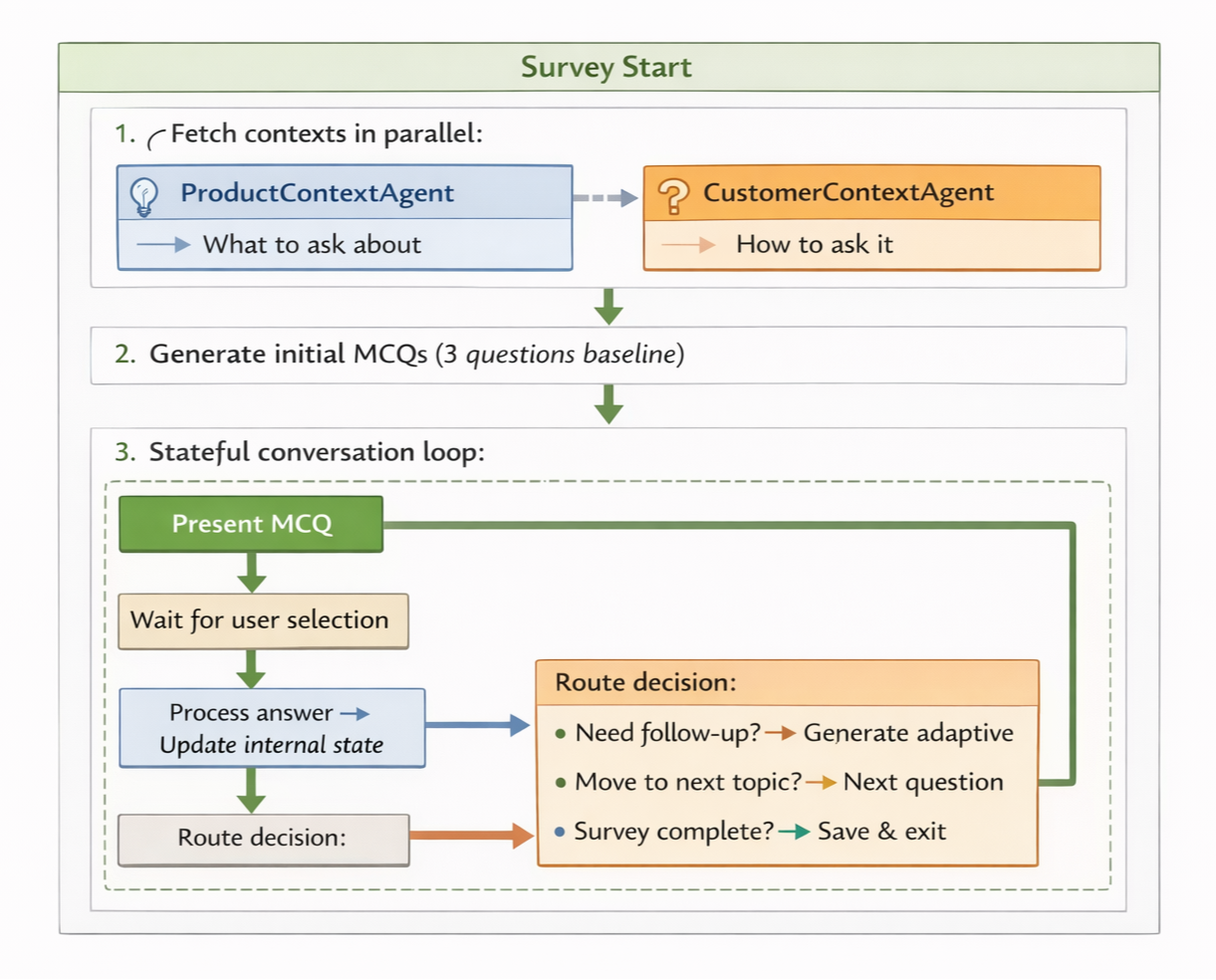
Survey completion rules:
initial_questions_count: 3        # Start with 3 baseline MCQs
min_answered_questions: 10        # User must answer ≥10
max_answered_questions: 15        # Hard stop at 15
max_survey_questions: 20          # Total questions asked
max_consecutive_skips: 3          # 3 consecutive skips → must answer to continue
Adaptive questioning example:
Question 5: "How long does the battery last on a typical workday?"
  ● Less than 4 hours       ← USER SELECTED

[Agent's internal state update:
  - Battery performance: Below average
  - Action: Generate follow-up to quantify impact]

Follow-up Question 6: "When does the battery typically die?"
  ● Mid-afternoon (2-4pm)   ← USER SELECTED

[Agent's internal state update:
  - Specific pain point: Dies at 2-4pm (work hours)
  - Severity: High (impacts productivity)
  - Action: Probe importance for review weighting]

Follow-up Question 7: "How important is longer battery life to you?"
  ● Very important - major inconvenience (USER SELECTED)
Why adaptive matters: Without adaptive AI, feedback systems rely on rigid decision trees like ”Battery life: Excellent | Good | Fair | Poor”. That tells you what someone thinks, but not why. What’s missing is the detail that actually matters: “It dies at 2pm during work hours, which makes it unusable for me.” Adaptive AI doesn’t just branch. It regenerates the next question based on what the user has already said, pulling context forward instead of flattening it.
Agent 4: ReviewGenAgent
Convert MCQ selections into natural language authentic reviews matching user's writing style.
Three-stage synthesis:
- Sentiment Classification → Analyze MCQ answers → Classify as
good | okay | bad - Voice Matching → Fetch historical reviews → Extract tone, vocabulary, sentence structure
- Generate 2–3 variations with different star ratings within the sentiment band:
def _get_star_ratings(sentiment_band: str) -> List[int]:
    if sentiment_band == "good":
        return [5, 4]
    elif sentiment_band == "okay":
        return [4, 3, 2]
    else:  # bad
        return [2, 1]
Example output (sentiment: "okay", user: concise + critical):
[4-star] "Solid build quality and excellent screen. Battery dies around 3pm—acceptable for office use where I have charging access. Keyboard is comfortable for long typing. Performance handles multitasking well. Worth it on sale."

[3-star] "Mixed feelings. Build quality and screen are great, but battery is the main letdown—dies at 3pm despite 'all-day' claims. Keyboard is excellent. If battery isn't a dealbreaker, it's decent."

[2-star] "Disappointed with battery life. Product page advertised all-day battery, but it dies by 3pm daily with moderate use. Screen and keyboard are good, but battery is a major problem for anyone working away from chargers."
User picks framing, edits if needed, submits.
Technical Implementation
This section lists the tech stack used in this project and its main components.
Backend: FastAPI (Python 3.11), LangChain + LangGraph, OpenAI GPT-4o-mini (Input: $0.15/1M, Output: $0.60/1M tokens), Pydantic, Supabase/PostgreSQL + pgvector
Frontend: Next.js 14, TypeScript, Tailwind CSS, Supabase Client
AI/ML: OpenAI embeddings (1536-dim), batch generation (100 texts in 2-3s), IVFFlat indexes (2-3% recall loss for 100x speed)
Database Schema
-- 1. PRODUCTS: Catalog with semantic embeddings
products (
  item_id VARCHAR(20) PRIMARY KEY,
  title, brand, description,
  price, star_rating, num_ratings,
  review_count INTEGER,
  embeddings vector(1536),                -- Semantic search
  is_mock BOOLEAN
)

-- 2. USERS: Behavioral profiles
users (
  user_id UUID PRIMARY KEY,
  user_name, email_id, age, gender, base_location,
  embeddings vector(1536),
  total_purchases INTEGER,
  total_reviews INTEGER,
  review_engagement_rate DECIMAL(4,3),
  avg_review_rating DECIMAL(3,2),
  sentiment_tendency VARCHAR(20),
  engagement_level VARCHAR(30),
  is_main_user BOOLEAN
)

-- 3. TRANSACTIONS: Purchase history
transactions (
  transaction_id UUID PRIMARY KEY,
  item_id → products,
  user_id → users,
  order_date, delivery_date,
  original_price, retail_price,
  transaction_status
)

-- 4. REVIEWS: Multi-source feedback
reviews (
  review_id UUID PRIMARY KEY,
  item_id → products,
  user_id → users,
  transaction_id → transactions,
  review_title, review_text, review_stars,
  source VARCHAR(20),                     -- 'rapidapi' | 'agent_generated' | 'user_survey'
  embeddings vector(1536)
)

-- 5. SURVEY_SESSIONS: Stateful survey orchestration
survey_sessions (
  session_id UUID PRIMARY KEY,
  user_id, item_id, transaction_id,
  product_context JSONB,                  -- Agent 1 output
  customer_context JSONB,                 -- Agent 2 output
  session_context JSONB,                  -- LangGraph state
  questions_and_answers JSONB,
  review_options JSONB,
  status VARCHAR(20)
)

-- 6. SURVEY_DETAILS: Event log
survey_details (
  detail_id UUID PRIMARY KEY,
  session_id → survey_sessions,
  event_type VARCHAR(50),
  event_detail JSONB,
  created_at TIMESTAMP
)
Design decisions:
- JSONB for flexibility → Agent outputs evolve without migrations
- Vector indexes → IVFFlat gives 100x speed for 2-3% recall loss
- Source tracking →
rapidapi(real) |agent_generated(mock) |user_survey(golden path) - Event sourcing →
survey_detailslogs every interaction for debugging
Vector Similarity
All text → 1536-dim embeddings via text-embedding-3-small.
Find similar products:
SELECT item_id, title,
       1 - (embeddings <=> query_embedding) AS similarity
FROM products
WHERE 1 - (embeddings <=> query_embedding) > 0.7
ORDER BY similarity DESC LIMIT 5;
Why vectors beat traditional categories:
Traditional hierarchies (Electronics → Audio → Headphones → Wireless) are rigid. Vector embeddings cluster products by intent and use case:
- Category-based: "Wireless headphones" → Returns ALL wireless headphones
- Vector-based: "Premium noise-canceling headphones for travel" → Returns semantically similar products solving the same problem (Bose QC45, AirPods Max, Sennheiser Momentum 4)
Vector embeddings naturally cluster by intent rather than superficial attributes. "Noise-canceling Bluetooth headphones" is closer to "wireless earbuds with ANC" than to "studio monitor headphones"—even though all three are technically "headphones."
Performance benchmarks:
- Vector search (IVFFlat): 10,000 products in ~50ms
- Batch embeddings: 100 texts in 2-3 seconds
- Brute-force: 10,000 products in ~5 seconds (100× slower)
API Design
The API provides six endpoints that cover the end-to-end survey workflow:

Error handling and edge cases:
1. Session expiration:
- Survey sessions expire after 24 hours of inactivity
- Prevents abandoned surveys from cluttering the database
- User can't submit answers to expired sessions (returns HTTP 410 Gone)
2. Idempotency:
- Answering the same question twice → Updates the answer (no duplicates)
- Submitting the same review twice → Ignored (review already posted)
- Prevents accidental double-submissions from network retries
3. Pydantic validation:
- All API requests/responses validated with Pydantic schemas
- Fail fast: Invalid data rejected at API boundary (before hitting agents)
- Example:
answermust be one of the provided options, not arbitrary text
Running It Locally
Source: github.com/arnavvj/survey-sensei
Prerequisites: Python 3.11+, Node.js 18+, Supabase project (free), OpenAI API key (~$5 credit)
Backend Setup
1. Clone the repo and create a python environment:
git clone https://github.com/arnavvj/survey-sensei.git
cd survey-sensei/backend

conda env create -f environment.yml   # Installs all deps (FastAPI, LangChain, etc.)
conda activate survey-sensei
2. Configure environment variables:
cp .env.local.example .env.local
Edit .env.local with your credentials:
OPENAI_API_KEY=sk-proj-...                         # From platform.openai.com
SUPABASE_URL=https://xxxxx.supabase.co             # From Supabase dashboard
SUPABASE_SERVICE_ROLE_KEY=eyJhbGciOiJIUzI1NiIs...  # From Supabase Settings → API
RAPID_API_KEY=your_rapidapi_key                    # Optional: From rapidapi.com
3. Initialize database:
python database/init/apply_migrations.py  # Applies migrations
# Execute SQL code from `backend\database\_combined_migrations.sql` in your supabase project
4. Start the backend:
uvicorn main:app --reload --port 8000
Frontend Setup
1. Navigate to frontend:
cd survey-sensei/frontend
2. Configure environment variables:
cp .env.local.example .env.local
Edit .env.local:
NEXT_PUBLIC_SUPABASE_URL=https://xxxxx.supabase.co
NEXT_PUBLIC_SUPABASE_ANON_KEY=eyJhbGciOiJIUzI1NiIs...
OPENAI_API_KEY=sk-proj-...
3. Install dependencies and start dev server:
npm install

npm run dev  # Open http://localhost:3000
Testing the Flow
Step 1: Submit product and user information
Enter an Amazon product URL (must include ASIN) and generate mock data (~3–4 minutes when run locally).

The MockDataOrchestrator builds a realistic e-commerce simulation in your supabase project. For example:
|
Entity |
Count |
Composition |
Purpose |
|---|---|---|---|
|
Products |
11 |
1 real (RapidAPI) + 6 similar (LLM) + 4 diverse (LLM) |
Market context for ProductContextAgent |
|
Users |
13-25 |
1 main user + 12-24 mock personas (varied ages, locations, purchase patterns) |
Behavioral diversity for CustomerContextAgent |
|
Reviews |
30-100+ |
10-15 real (RapidAPI) + 20-85 LLM-generated (70% positive, 20% neutral, 10% negative) |
Signal for ProductContextAgent analysis |
|
Transactions |
80-170+ |
Each review → 1 transaction; additional no-review purchases (40% sparsity); 1 "current" delivery (triggers survey) |
Realistic purchase patterns |
|
Embeddings |
200-300 |
All entities → 1536-dim vectors (batch parallel via text-embedding-3-small) |
Semantic similarity search |
Step 2: Launch the survey
Click "Start Survey" and wait 3-5 seconds.
What's happening behind the scenes:
- ProductContextAgent → Analyzes reviews with weighted ranking (e.g., recency 50%, quality 40%, diversity 10%)
- CustomerContextAgent → Profiles purchase behavior and review patterns (e.g., repeat buyer, high review rate, critical tone)
- SurveyAgent → Combines both contexts to generate initial personalized MCQs (e.g., First set of 3 questions tailored to user+product pair)
Step 3: Answer questions (MCQ-based)
Answer 10-12 adaptive MCQ questions. Each response triggers follow-up questions that probe deeper into your concerns (e.g., "battery life" → "how long does it last?" → "does this meet expectations?").

Step 4: Generate and submit review
ReviewGenAgent synthesizes your MCQ responses into 2–3 natural language review variations (different star ratings, same sentiment). Pick one, optionally edit, and submit.

Real-World Impact Simulations
Note: These are projections based on industry benchmarks and reasonable assumptions. Actual results will vary significantly based on implementation, industry vertical, and user behavior. The scenarios below illustrate potential impact, not guaranteed outcomes.
Scenario 1: Mid-Market E-Commerce Business ($8M revenue)
Baseline (Traditional Reviews):
- 50,000 monthly orders → 1,500 reviews → 300 actionable (0.6% of customers)
- Iteration lag: 4-6 weeks to detect patterns
- Returns cost: $200k/year
With Survey Sensei (projected):
- 50,000 orders → 7,500 surveys (15% completion target) → 5,250 actionable (potential 17.5× gain)
- Iteration speed: Potential to detect issues in Week 1-2
- Returns: 2.5% → 1.8% (assumes early issue detection reduces returns)
Potential financial impact:
- Returns reduction: $56k/year potential savings
- Increased repeat purchases: +4% repeat rate → $3.84M/year potential additional revenue
- Better conversion: +0.5% → $40k/year potential additional revenue
- Total potential annual benefit: $3.94M/year
ROI (assuming full impact realization):
- Annual costs: OpenAI API ($180/year) + Infrastructure ($1,440/year) = $1,620/year
- ROI calculation: ($3.94M - $1.6k) / $1.6k = 243,000%
- Even at 10% of projected impact, ROI > 24,000%
Scenario 2: Survey-as-a-Service for Small Businesses
Potential business model:
- Target: 250 small e-commerce businesses
- Pricing: $199/month per business
- Projected ARR: $597k/year
Projected unit economics:
- Revenue: $597k/year
- Estimated costs: $307k/year (API, infrastructure, support, sales)
- Potential gross profit: $290k/year (48.6% margin)
Customer acquisition (estimated):
- Projected CAC: $500/business
- Estimated LTV: $199 × 24 months = $4,776
- Target LTV:CAC ratio: 9.5:1 (healthy SaaS benchmark: 3:1)
From Ideation to Market Adoption: A Potential 4-Month Journey
Month 0: Current MVP State
- Single FastAPI + Supabase + synchronous LLM calls
- 4-agent system functional with adaptive MCQ generation
- Cost: $0.10/mock data scenario + $0.002/survey (GPT-4o-mini baseline; batched question generation keeps costs low)
- Works with mock data; needs real-world validation
Month 1: Production Hardening + Initial Testing
Infrastructure improvements:
- Redis session state, background job queues (Celery/BullMQ)
- Rate limiting, retry logic, circuit breakers
- Observability: Prometheus + Grafana + Sentry
- Deploy: Cloud Run + Vercel + Supabase (~$120/month for 10k surveys/day)
Batch data pipelines:
- Setup batch context generation: Pre-compute ProductContext and CustomerContext nightly for all active products/users
- Implementation: Celery/Airflow jobs running nightly, results cached in Redis/PostgreSQL JSONB
- Benefits: Survey start latency drops from 3-5s to <500ms (contexts already pre-generated)
- Cost optimization: Generate contexts once daily vs. on-demand per survey (~10× API cost reduction at scale)
Early validation:
- Target: 5-10 small Shopify stores (500-2k monthly orders)
- Deployment: Standalone SaaS with manual CSV upload
- Goal: 1,000 real surveys → Measure completion rates, agent quality, user satisfaction
- Key unknowns: Real completion rates vs. mock data, agent consistency across categories
Month 2: Platform Integrations (If Early Metrics Look Promising)
Service layer architecture:
# Embedded API integration example
@app.route('/webhooks/order_delivered', methods=['POST'])
def handle_order_delivered(order_data):
    response = requests.post('https://api.surveysensei.io/v1/surveys/generate', json={
        'transaction_id': order_data['id'],
        'user_id': order_data['customer_id'],
        'product_id': order_data['product_id'],
        'user_context': {...},
        'product_context': {...}
    })
    survey_url = response.json()['survey_url']
    send_email(to=order_data['customer']['email'], body=survey_url)
Initial connectors:
- Shopify app: OAuth + webhooks for order.completed events
- WooCommerce plugin: WordPress plugin triggering post-delivery surveys
- Zapier connector: No-code integration for quick wins
Early data patterns (if scale permits):
- 5-10k surveys → Begin identifying product category patterns
- Embeddings infrastructure: Initial indexing of products and users
- Reality check: Integration complexity often exceeds estimates; OAuth flows require extensive testing
Month 3: Analytics Layer + Scale Testing
Basic intelligence features:
- Admin dashboard: Completion rates, question distribution, sentiment trends
- Simple alerts: Spike detection for complaint patterns
- Search interface: Semantic grouping of similar feedback
Scale validation:
- Test batch processing: Pre-generate contexts nightly
- Target: 30-50k surveys/day infrastructure capacity
- Key validation: Can agent quality maintain at scale? Do costs stay predictable?
Market positioning refinement:
- Focus on validated use cases (likely e-commerce to start)
- Document what works and what needs improvement
Month 4+: Iterative Improvement
Production cost economics (estimated for 100k surveys/month):
- Monthly cost: $3,000-5,000 (~$0.03-0.05 per survey) — 92% per-survey APIs, 6% nightly batch contexts, 2% infrastructure
- Production model considerations: Prototype used GPT-4o-mini ($0.002/survey baseline). Production will likely use latest models (as of writing: GPT-4.5/5, Claude 4 Opus, Gemini 2.0 Ultra at $2.5-6/1M vs. $0.15/1M), raising per-survey costs 15-25× to $0.03-0.05 (batched generation limits cost growth).
Realistic expectations:
- Simulations suggested 10-17× improvement; real-world results will vary
- Pattern detection speed depends on survey volume and data quality
- Network effects require significant scale to materialize
Competitive considerations:
- Embeddings tuning: Weeks of optimization work
- Domain calibration: Requires hundreds of surveys per category
- Deep integrations: 1-2 months per major platform
- First-mover advantage exists but isn't insurmountable
What needs ongoing work:
- Agent prompt tuning based on real user feedback
- Cost optimization as volume scales
- Product-category-specific customization
- Handling edge cases and error modes
- Begin exploring adjacent verticals based on early feedback
Conclusion
Survey Sensei demonstrates a practical path toward better customer feedback by combining modern AI capabilities with contextually adaptive data collection:
What we built:
- 4-agent architecture: ProductContext + CustomerContext + Survey + ReviewGen agents working together
- Adaptive MCQ generation: Questions that evolve based on answers, not rigid decision trees
- Vector similarity search: Semantic matching via pgvector for contextual personalization
- Economic viability: A few cents per survey makes AI-powered feedback broadly accessible across several platforms
Improvements over traditional reviews:
- Structured feedback through guided MCQ interviews (reduces cognitive load)
- Real-time pattern detection with agent-based analysis
- Voice-matched review synthesis (maintains authenticity while saving time)
- Simulations suggest 10-17× more actionable feedback from the same customer base
What needs validation:
- Real-world completion rates with live customers
- Agent consistency across product categories
- Long-term ROI at production scale
The system works today. Clone the repo, run the setup, and test a survey in 10 minutes. The architecture shows how multi-agent patterns handle complex, context-dependent workflows—not just for surveys, but for any system requiring personalization at scale. If you're building customer feedback systems, recommendation engines, or personalization tools, this architecture offers a concrete reference implementation. The pattern (context gathering → adaptive decision-making → personalized output) generalizes well:
- Customer support triage: Ticket context + User history → Prioritized response
- Personalized onboarding: Product features + User goals → Custom walkthrough
- Content recommendations: User preferences + Content embeddings → Ranked suggestions
The shift toward specialized agents collaborating on tasks represents a practical middle ground between monolithic models and over-engineered microservices. It's early, but the economics and technical patterns are sound enough to build on.
References and Further Reading
Questions? Ideas? Feedback?
- GitHub: github.com/arnavvj/survey-sensei
- Contributions are welcome—feel free to open an issue or leave a star ⭐
Academic Papers
- Automated Survey Collection with LLM-based Conversational Agents (arXiv, 2024) - Framework for phone-based surveys using conversational LLMs with 98% extraction accuracy
- Embedding in Recommender Systems: A Survey (arXiv, 2023) - Comprehensive survey on embedding techniques for recommender systems at scale
- Unified embedding: Battle-tested feature representations for Web-scale ML systems (Google Research, NIPS '23) - Real-world deployment of embeddings in production systems
Industry Reports
- Global Study: How Consumers Share Feedback, 2025 (Qualtrics XM Institute) - Analysis of 23,000+ consumers showing direct feedback declining while indirect feedback increased 60%
- The State of Customer Experience Management, 2025 (Qualtrics XM Institute) - Annual CX management trends and priorities
- Power forward: Five make-or-break truths about next-gen e-commerce (McKinsey, 2024) - E-commerce trends with focus on AI and generative AI adoption
- The agentic commerce opportunity (McKinsey, 2024) - How AI agents are transforming consumer shopping experiences
Multi-Agent Systems Resources
- LangGraph: Multi-Agent Workflows (LangChain Blog, 2024) - Building multi-agent systems with LangGraph
- Multi-agent network tutorial (LangChain Documentation) - Step-by-step guide to multi-agent collaboration patterns
Technical Documentation
- LangChain: python.langchain.com
- LangGraph: langchain-ai.github.io/langgraph
- pgvector: github.com/pgvector/pgvector
- OpenAI Embeddings: platform.openai.com/docs/guides/embeddings
All code examples and architecture diagrams are from the Survey Sensei codebase.
[story continues]
tags