If you are a new developer, you have probably hit the “subscription wall.” You have $20 a month to spend on an AI coding assistant, but you don’t know which one to pick.
Just a few years ago, developers were debating whether AI could help them write code. Today, that question is gone. AI is already part of the workflow.
Now the real question is: Which AI coding assistant should you use?
Two tools are currently dominating conversations among developers: GPT-5.3 Codex and Claude Opus 4.6. Both promise faster development, smarter debugging, and the ability to build real applications in minutes. Both are available on roughly similar entry-level plans.
But if you are a new developer, choosing the wrong tool can slow your progress. The right one, on the other hand, can dramatically accelerate your learning.
To understand the real differences, I tested both models across multiple developer tasks, from building apps to debugging code to creating a playable game.
If you want to know what actually happened. Please read this article or watch my YouTube video
https://youtu.be/qsYcOn1fKIk?si=3zKTDlWoNkDotoab&embedable=true
Testing Approach
For this comparison, I intentionally avoided complex prompts.
Why? Because beginner developers rarely write perfect instructions. Most people simply describe what they want and expect the AI to figure it out.
So I used simple, realistic prompts and ran both tools side by side:
- Claude Opus 4.6 inside Claude Code
- GPT-5.3 through Codex CLI
The goal was not to chase benchmarks. It was to observe how these models behave in real development scenarios.
Building a Full-Stack Application
The first test was straightforward: create a full-stack to-do application.
At first, Codex looked faster. It immediately started generating code, while Claude paused to produce a structured plan.
This difference is more important than it might seem.
Claude’s plan acts like a blueprint. If something is wrong, you can fix the direction early — before hundreds of lines of code are written. For beginners, especially, this reduces confusion later.
Surprisingly, Claude finished the entire app in about four minutes. Codex followed roughly two minutes later.
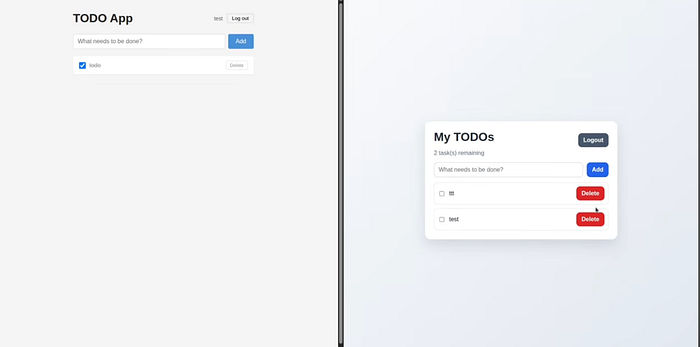
Codex delivered a more polished interface and even included basic form validation. Claude’s version looked simpler and skipped validation, but its internal structure felt more deliberate.
What I’ve noticed is that Codex is often optimized for results, whereas Claude is optimized for the process.
Neither approach is inherently better; it depends on what you value.
The Hidden Reality: Usage Limits
Pricing between these tools appears similar at first glance, but the real difference shows up in daily usage limits.
Eventually, both platforms may push you toward API usage, which adds extra cost. However, Codex typically allows larger daily workloads before hitting restrictions.
For beginners who are experimenting, breaking things, and trying again, this matters more than most people realize.
Running into a limit in the middle of a project is not just annoying; it interrupts learning.
Debugging a Broken Application
Next, I deliberately removed the backend from the app and asked both models to diagnose the problem.
Claude identified the issue in about thirty seconds and fixed it using minimal context.
Codex also solved it correctly, but took roughly twice as long and used significantly more tokens.
The difference highlights something fundamental: Debugging is not about speed; it is about reasoning. Claude clearly demonstrated strength in that area.
Analyzing Architecture
When asked to review the codebase and suggest improvements, both models performed well.
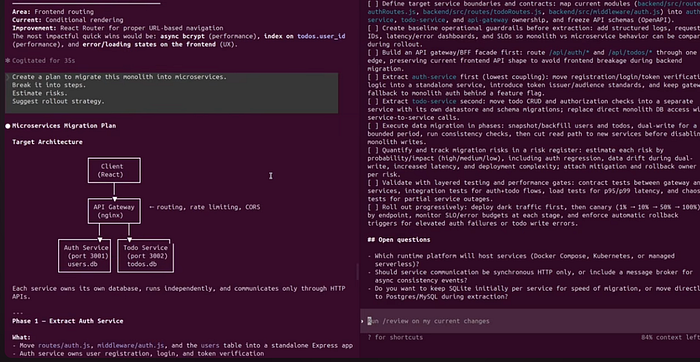
However, Claude produced more detailed feedback. Its suggestions were clearer, better formatted, and easier to follow.
Codex was not far behind; it simply felt less granular.
For an experienced engineer, that gap might not matter. For a beginner, clarity can make a huge difference.
I cover some more examples in my video:
https://youtu.be/qsYcOn1fKIk?si=3zKTDlWoNkDotoab&embedable=true
The Most Important Insight
After all the tests, one pattern became impossible to ignore.
Codex behaves like an executor. It moves quickly, writes code immediately, and focuses on momentum.
Claude behaves like an architect. It plans, clarifies requirements, and carefully structures solutions.
This is not a matter of superiority. They are built for different ways of working.
So Which One Should You Choose?
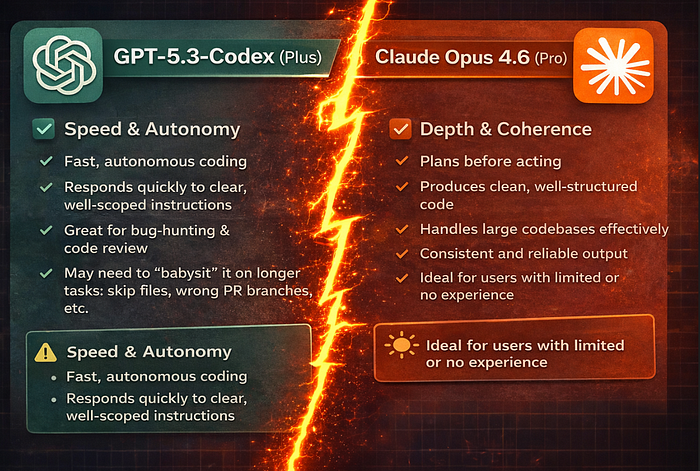
If you already subscribe to ChatGPT Plus, sticking with Codex makes sense. It is fast, capable, and its larger limits support frequent experimentation.
If you are already using Claude Pro, there is little reason to switch. Claude excels in planning, architecture, and the production of structured code.
However, note that higher usage may require higher-tier plans.
For developers starting from zero, the decision becomes more nuanced.
Codex is often the easier entry point simply because you can use it more without hitting limits. More usage means more practice, and practice is what builds skill.
Later, as your projects grow more complex, Claude becomes highly valuable for more complex engineering tasks.
In simple terms:
- Codex helps you move faster.
- Claude helps you think better.
The strongest developers will likely use both.
Use them wisely, keep learning, and focus on fundamentals.
Let me know which one you choose in the comments below!
Cheers, proflead! ;)
[story continues]
tags