







Teaching computers to see and act across any device
For years, AI has been remarkably good at reading text. Give it a document, an email, a webpage, and it can understand meaning, answer questions, extract information. But ask it to look at your phone screen or desktop and actually do something—click a button, fill out a form, complete a workflow—and the fragility becomes obvious. Early GUI agents showed promise. They could look at a screenshot and propose an action. Yet they stumbled when moving between devices. A model trained on Windows would fail on macOS. Mobile agents didn't generalize to browsers. The moment you asked them to switch contexts, they broke.
This isn't a minor limitation. Real work happens across multiple devices. A business might need to automate the same process on employee laptops, customer phones, and web portals. A personal assistant should handle your calendar on your computer and your phone without relearning everything. Current systems couldn't do this gracefully.
GUI-Owl-1.5 changes that. Instead of building separate agents for each platform, the system treats multi-platform operation as a core feature, not a side effect. It comes in five sizes (2B, 4B, 8B, 32B, 235B parameters), runs on phones and desktops simultaneously, and improves through real-world interaction. More surprisingly, smaller models in this family often outperform larger competitors from previous approaches.
The breakthrough isn't a bigger model. It's recognizing that GUI agents need three things working in concert: a flexible architecture that handles visual variety, a training pipeline that learns from both simulated and real environments, and a reinforcement learning approach that respects fundamental platform differences. When these align, the system becomes genuinely capable.
The problem with visual interfaces
Asking a model to understand one interface is hard. Asking it to understand all of them is a different kind of problem entirely.
Vision and language models have made remarkable strides, but GUI understanding demands something fundamentally different. A language model reads text that was explicitly written to communicate meaning. A GUI agent must interpret visual designs where the same concept looks completely different depending on context. In Android, a floating action button is a circle at the bottom right. In iOS, it might be a plus sign in a navigation bar. On Windows, it's a ribbon menu. These are functionally equivalent—all serve as entry points for actions—but visually they share almost nothing.
The structural challenges run deeper than appearance. The action space itself changes between platforms. On a touchscreen, you swipe and tap. On a desktop, you click and drag. A model learning "how to navigate" faces contradictory training signals: the same task requires different movements depending on which device you're on.
Consider what happens when researchers try to build a universal agent. Mixing Android, iOS, Windows, and web data in training creates a collision problem. The model must learn which rules apply to which context. But the visual features that identify "this is an Android screen" are often irrelevant to solving the actual task. The model gets confused about what to pay attention to. It overfits to platform markers instead of learning task logic.
Historical approaches sidestepped this by building separate systems per platform. One model for mobile, another for desktop, another for web. These worked reasonably well in isolation—Android agents achieved decent automation—but they didn't scale and they abandoned the core problem: how do you build agents that actually work anywhere?
A family of models, not a universal one
The insight behind GUI-Owl-1.5 is deceptively simple. Instead of forcing one model to handle everything, the system offers a family. Think of it like having tools for different jobs. A small model is fast and efficient for simple tasks. A large model handles complex reasoning. You deploy what you need.
Overview of Mobile-Agent-v3.5 showing multi-platform support across desktop, mobile, browser and cloud-edge collaboration capabilities
Mobile-Agent-v3.5 architecture supporting multiple platforms and model sizes for cloud-edge collaboration.
The five sizes (2B, 4B, 8B, 32B, 235B) serve different roles. A smartphone might run the 2B model locally, handling quick decisions without cloud connectivity. A complex workflow needing multi-step reasoning escalates to the 235B model running in the cloud. This flexibility matters practically because not every task needs maximum compute. A simple click-finding task and a multi-step workflow requiring memory and reasoning have completely different demands.
The architecture also enables something subtle: cloud-edge collaboration. Instead of either-or deployment where you pick one size and stick with it, the system can work at multiple levels simultaneously. Local models handle immediate responses; cloud-based models handle complex reasoning. This mirrors how humans work, delegating simple decisions locally and escalating only when needed.
Each model comes in two variants: standard and "thinking." The thinking variants explicitly show their reasoning before acting, similar to how recent advances in language models work with chain-of-thought prompting. This is not a small distinction. GUI agents have historically been reactive: look at screen, pick action. The thinking variants force articulation: "I see a login screen. The email field is top-left. I need to click there." This intermediate reasoning step, even though it's hidden in the final output, dramatically improves accuracy because the model must justify its actions.
Building training data differently
Raw capability comes from training data. Historically, collecting data for GUI agents has been expensive and limited. You need two types: grounding data showing where elements are on screen, and trajectory data showing how to complete tasks step-by-step. Grounding requires annotators labeling screenshots. Trajectories require either human demonstrations or simulation, both labor-intensive and unrealistic.
GUI-Owl-1.5 uses a hybrid approach that solves the economics problem. Combine simulated environments (cheap, plentiful) with cloud-based sandbox environments (realistic, limited). Use the simulated data to bootstrap learning at scale, then refine on real-world data where it matters most.
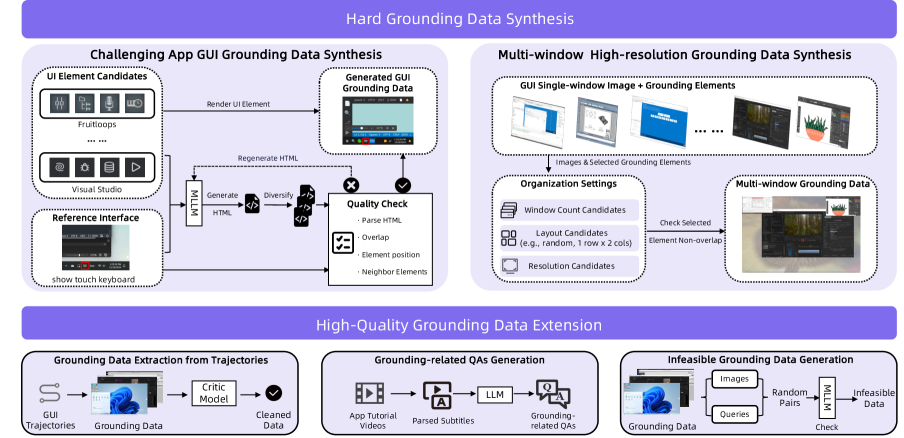
High-quality grounding data construction pipeline showing how UI elements are standardized across platforms
Grounding data construction pipeline standardizing UI element identification across Android, iOS, Windows, and web platforms.
The grounding pipeline is particularly elegant because it solves something fundamental: how do you teach a model that an Android floating action button, an iOS context menu, and a Windows ribbon menu are all "action entry points" despite looking completely different? The answer involves both visual feature extraction and semantic understanding. The system learns to recognize functional equivalents across platforms by understanding what elements do, not just what they look like.
Trajectory collection pipeline showing the hybrid environment approach
Trajectory collection pipeline combining simulated environments with real cloud-based sandbox data.
The trajectory collection pipeline feeds simulated data into real sandbox environments, creating a feedback loop. Simulation provides volume; reality provides grounding. The hybrid approach lets the system get both scale and realism without the full cost of collecting millions of real-world interactions. This is how modern robotics approaches sim-to-real transfer, and the principle applies here: use simulation for breadth, reality for depth.
The second component of this flywheel is the agent capability enhancement pipeline. Beyond raw trajectory data, the system explicitly trains capabilities that agents need: tool-use (calling external functions), memory (remembering earlier information in a task), and multi-agent adaptation (coordinating with other agents).
Agent capability enhancement pipeline showing how reasoning, tool-use, and memory are integrated
Agent capability enhancement pipeline integrating explicit reasoning, tool-use, and memory training.
Reasoning before acting
Reaction isn't enough. If an agent clicks the wrong button, the screen changes unexpectedly and the agent is now lost. Thinking agents reason first. Before predicting an action, the model articulates what it sees, what it needs to do, and why. This requires a different interaction pattern.
Interaction flow showing how system message defines action space, user message contains task and observation
Interaction flow where the system message defines available actions, the user message contains the task and current screen state, and the response produces reasoning and actions.
The system message defines the available action space. The user message contains the task instruction, compressed history of previous actions, and the current observation (screenshot). The response produces both reasoning (in thinking variants) and the predicted action. This structure makes reasoning explicit and trainable.
The benefit is concrete: forcing intermediate reasoning steps dramatically improves accuracy. The model must commit to understanding what's on screen before proposing an action. In practice, this means fewer misclicks, better recovery from unexpected states, and more robust task completion. When things go wrong, a thinking agent that articulated its assumptions can debug more effectively.
Explicit reasoning also enables something deeper: multi-agent coordination. In complex workflows, multiple agents might need to work together. When reasoning is transparent, agents can communicate about what they're doing and why. One agent can say "I'm looking for the user profile" and another can understand whether that helps or conflicts with its own goals.
Learning from failure at scale
Training data helps. Real improvement comes from learning from mistakes. This is where reinforcement learning enters, but RL for GUI agents has historically been fragile. The core problem: the environment is different on each platform. An action that succeeds on Android might break on Windows. Traditional RL treats this as noise to average away. MRPO treats it as the central feature to handle.
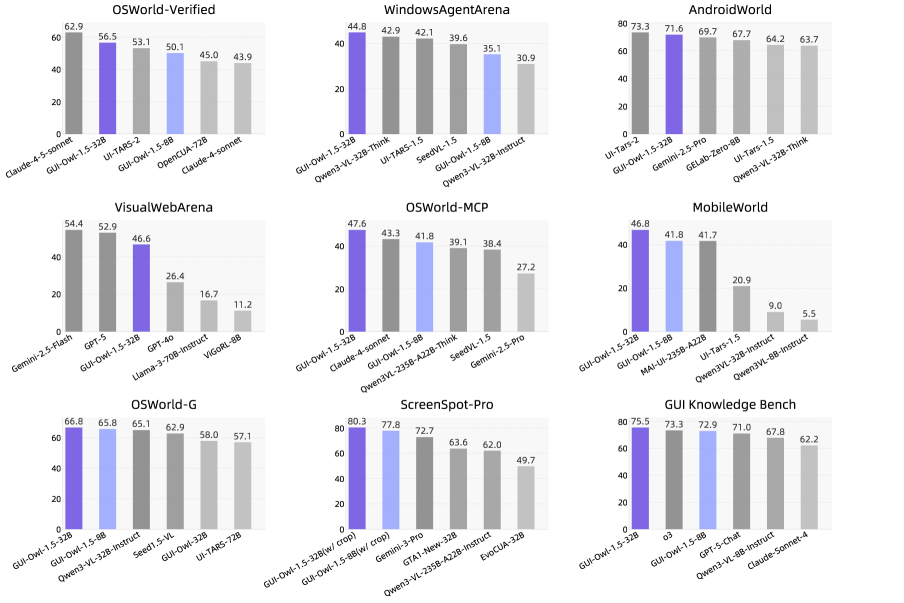
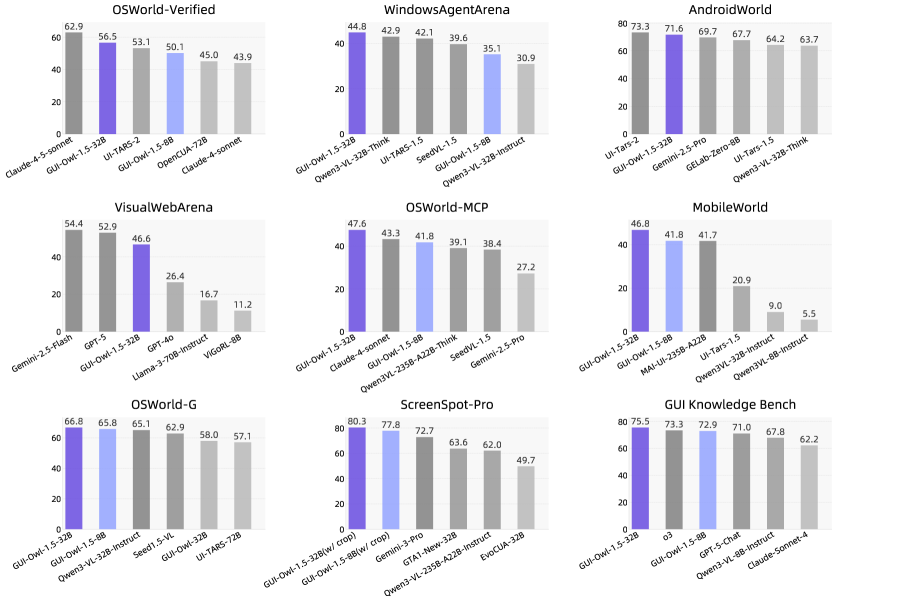
Performance overview on mainstream GUI automation, grounding, and knowledge benchmarks
Performance overview showing state-of-the-art results across multiple benchmark categories.
The algorithm explicitly learns platform-specific behavior instead of pretending it doesn't matter. This is crucial because it means agents don't just learn abstract patterns that supposedly transfer everywhere. They learn concrete, platform-aware strategies that actually work.
The practical advantage is substantial: instead of collecting perfect training data for every possible platform and edge case, the system can ship with reasonable performance and improve through deployment. This is how modern AI systems work in production. Gmail's spam filter doesn't rely on static training data; it learns from user feedback. As GUI agents are deployed, they encounter novel platforms, unexpected interface designs, and corner cases the training data never covered. RL lets them improve from actual use.
Ablation study on RL training strategies showing task selection and multi-platform training effects
Ablation study demonstrating the relative contribution of task selection and multi-platform training strategies to final performance.
Long-horizon tasks are particularly challenging for RL because rewards are sparse. Completing a workflow by clicking 20 buttons means 19 steps feel like failure until the final reward arrives. MRPO addresses this with improvements to credit assignment and exploration that work better specifically for GUI tasks. The ablation study shows empirically which improvements matter most, proving this isn't just theoretically sound but actually produces measurable gains.
Performance across all the ways agents matter
Capability matters only if it produces results. GUI-Owl-1.5 was evaluated on four types of tasks that cover how agents get used in practice.
Automation tasks test whether the agent can actually complete workflows. OSWorld measures this on realistic desktop environments with a score of 56.5. AndroidWorld tests mobile automation with 71.6. WebArena tests web automation across multiple sites with 48.4. These aren't toy problems. OSWorld involves tasks like "find a flight on a booking website, check the luggage policy, and send a summary to an email address." That requires visual understanding, navigation, memory, and tool use.
Grounding tasks test whether the agent can locate elements on screen. ScreenSpotPro requires identifying specific UI elements with 80.3 accuracy. This is foundational—if the agent can't find the button it needs to click, everything else fails.
Tool-calling tasks test integration with external systems. OSWorld-MCP measures this with 47.6, and MobileWorld with 46.8. Real agents don't work in isolation. They call APIs, run scripts, search the web. Integration matters.
Knowledge tasks test memory and reasoning. GUI-Knowledge Bench achieves 75.5. In a multi-step workflow, the agent needs to remember what happened earlier, extract information, and use it later.
The pattern matters more than individual numbers. GUI-Owl-1.5 doesn't excel in only one category. It's broadly competent across all of them. More importantly, smaller models in this family often outperform larger competitors from previous approaches. A 4B thinking model beats an 8B model from earlier versions. This isn't just incremental progress; it's fundamental efficiency improvement. The system does more with less.
Seeing it work
Understanding the benchmarks abstractly is useful. Seeing the system work concretely is different.
Complete operation process on Android platform where agent searches and summarizes social media information
Complete operation on Android platform: the agent searches social media, identifies relevant information, and summarizes findings—requiring visual grounding, navigation, and information synthesis across multiple steps.
On Android, the system handles realistic workflows. The agent receives a task like "search for information about a topic on social media and summarize what you find." It navigates to the right app, searches, reads multiple posts, extracts key information, and provides a summary. This requires understanding different screen layouts, managing session state, and reasoning about what information matters.
Complete operation process on Windows platform requiring agent to memorize on-screen information
Complete operation on Windows platform: the agent reads and remembers key information from multiple screens, then uses that information to complete subsequent tasks.
On Windows, the system handles tasks requiring memory. The agent needs to read information from one screen, remember it, navigate elsewhere, and use it to make decisions. This tests whether the agent actually understands context or just reacts to the current view.
Operation process on desktop combining extended tools and computer use actions
Complete operation on desktop: the agent uses multiple tools, switches between applications, and coordinates complex actions requiring both vision and external function calls.
On desktop, the system demonstrates tool use and multi-application workflows. The agent uses vision to understand what's on screen, then calls external tools—searching the web, running computations, accessing databases—and integrates results back into visual decisions. This is how real automation works.
What becomes possible now
Six months ago, if you wanted an AI agent to automate tasks across your laptop, phone, and web services simultaneously, the answer was "build three separate systems and hope they're compatible." The barriers were fundamental: different visual designs, different action spaces, different training data.
GUI-Owl-1.5 removes those barriers. The system works across platforms because it was built expecting platform differences, not despite them. It improves over time because deployment teaches it. It scales to different hardware because it comes in five sizes. It reasons before acting because reasoning is built into the architecture.
This opens concrete possibilities. Businesses can automate workflows that currently require context-switching between devices. Personal assistants can actually be personal, understanding your specific devices and interfaces. Organizations can deploy lightweight agents locally for privacy and speed, with heavier models handling complex reasoning in the cloud.
The deeper insight is about how to build agents for a world where devices are diverse and changing. Rather than pretending there's a universal interface, build systems that understand variety and learn from it. This philosophy—accepting heterogeneity rather than fighting it—likely transfers to other domains where AI needs to operate across multiple contexts.
The open-sourcing of these models and the availability of a public demo lower the barrier to experimentation. Researchers and practitioners can test the system, identify limitations, and contribute improvements. This is how good systems develop: through real-world use, not just benchmarks.
For now, GUI-Owl-1.5 represents the most capable family of open-source GUI agents. It's not perfect. Automation success rates in the 50-70% range mean it's still handling simpler tasks better than complex ones. But the direction is clear. As more real-world interaction data accumulates, as RL refines behavior, as the system encounters more edge cases and learns from them, capability will continue improving.
The moment when computers can reliably understand and act on visual interfaces—not perfectly, but robustly enough to be useful—is arriving. And it's arriving across all the devices you actually use.
This is a Plain English Papers summary of a research paper called Mobile-Agent-v3.5: Multi-platform Fundamental GUI Agents. If you like these kinds of analysis, join AIModels.fyi or follow us on Twitter.