
Problem: Regular HAR mocks quickly stop working - dynamic parameters break request matching, and the content contains sensitive data that can’t be committed.
Approach: We introduced automatic HAR normalization (replacing users, tokens, IDs) and a logic layer on top of Playwright that correctly handles dynamic parameters.
What we did: We taught Playwright to find the correct HAR entry even when query/body values change and prevented reusing entities with dynamic identifiers.
Result: E2E tests became environment-independent, run stably in CI/CD, don’t need the backend, and don’t contain personal data.
Why mock the network in E2E tests at all?
Even though E2E tests are meant to test the application “as a whole,” in practice you almost always need to isolate the UI from real network calls. Main reasons:
1. Test stability
A real API can:
- be unavailable
- be slow
- return unpredictable data
Mocks eliminate randomness and make tests reproducible.
2. Speed
Even with sequential test runs, mock responses are returned instantly, without real network calls.
This makes tests several times faster compared to hitting the real backend.
3. Reducing load on the backend
When E2E tests run in parallel, they generate a lot of concurrent requests. This can:
- create load spikes on the test server,
- lead to rate-limit errors,
- basically “DDoS” your own backend.
Mocks completely remove network load - the backend doesn’t participate in the test run at all.
4. Independence from external services
Stripe, S3, geocoders, OpenAI - anything that can fail will eventually fail.
Mocks turn E2E tests into a fully autonomous layer that doesn’t depend on third-party APIs.
But there’s a downside: if an external service changes its contract or goes down, a mocked test will never know and will happily stay green.
How Playwright mocks the network
Playwright has a low-level interface for intercepting and substituting requests:
browserContext('**/api/users', route => {
  route.fulfill({
    status: 200,
    contentType: 'application/json',
    body: JSON.stringify(mockUsers),
  });
});
Any request matching the pattern (in this example, ending with /api/users) will be handled locally - without going to the internet, and the data passed to fulfill will be returned “to the client” as the response for this request.
What is a HAR file and why is it convenient for testing?
HAR (HTTP Archive) is a JSON file that contains:
- all page requests
- request parameters
- server responses
In other words, HAR is a recording of real network activity.
If you create a HAR once (for example, log in, open a list, load a product card), you can then use this file as a source of mocks that completely reproduce real API behavior.
That’s why HAR is perfect when you:
- need to fix the network state
- want to test the UI without starting the backend
- need a deterministic scenario that is as close to real as possible
How Playwright uses HAR files for mocking
Playwright can:
- Record HAR
- Replay HAR without real network calls
Both operations are done via the routeFromHAR method on browserContext:
browserContext.routeFromHAR(harFilePath, options);
1) Recording HAR
browserContext.routeFromHAR(harFilePath, {update: true, url: /api\./});
Playwright automatically intercepts everything happening in the browser (unless exclusions are configured in options) and saves it into *.har file(s)
2) Replaying HAR
browserContext.routeFromHAR(harFilePath, {update: false, url: /api\./});
Now, if a test makes a request that exists in the HAR, Playwright immediately returns the saved response without going to the network.
You can read more about recording and replaying HAR in the Playwright
Advantages of HAR mocking
1. Realistic data
HAR contains real server responses, and the UI sees them exactly as they were at the moment of recording.
2. Full isolation
No server needed. Tests run even on a local machine without a backend.
3. High speed
HAR responses are returned instantly - tests run at maximum speed.
4. Ideal for complex flows
For example:
- authentication
- complex filters
- request chains
- pages with dozens of API calls
Generating such mocks by hand is hard, and HAR solves it automatically.
Why HAR mocks can unexpectedly break
A recorded HAR file is a snapshot of network requests made while hitting the real backend during test execution. As a result, the file may contain dynamic data, user IDs in URLs, and sensitive information (auth tokens, emails, etc.).
In our project we ran into 4 problems with data in HAR files:
-
tied to the user under which the HAR was recorded
-
dynamic parts of URLs
-
dynamic request bodies
-
sensitive data that can’t be committed
1.Tied to the user under which the HAR was recorded
In practice, developers recorded HAR files while logged in as different users, which led to URLs with user IDs becoming a problem right away.
Example:
In our app, a user can use chat and also view a list of received emails on a separate page.
Tests for the chat page use mocks from chats.har, which contains a user list request for a user with ID unique-user-id-1:
GET /unique-user-id-1/users/list
{
  "entries": [
    {
      "request": {
        "method": "GET",
        "url": "/unique-user-id-1/users/list"
      }
    }
  ]
}
Tests for the emails page use mocks from emails.har, which also contains a user list request, but it was recorded under a user with ID unique-user-id-2:
GET /unique-user-id-2/users/list
{
  "entries": [
    {
      "request": {
        "method": "GET",
        "url": "/unique-user-id-2/users/list"
      }
    }
  ]
}
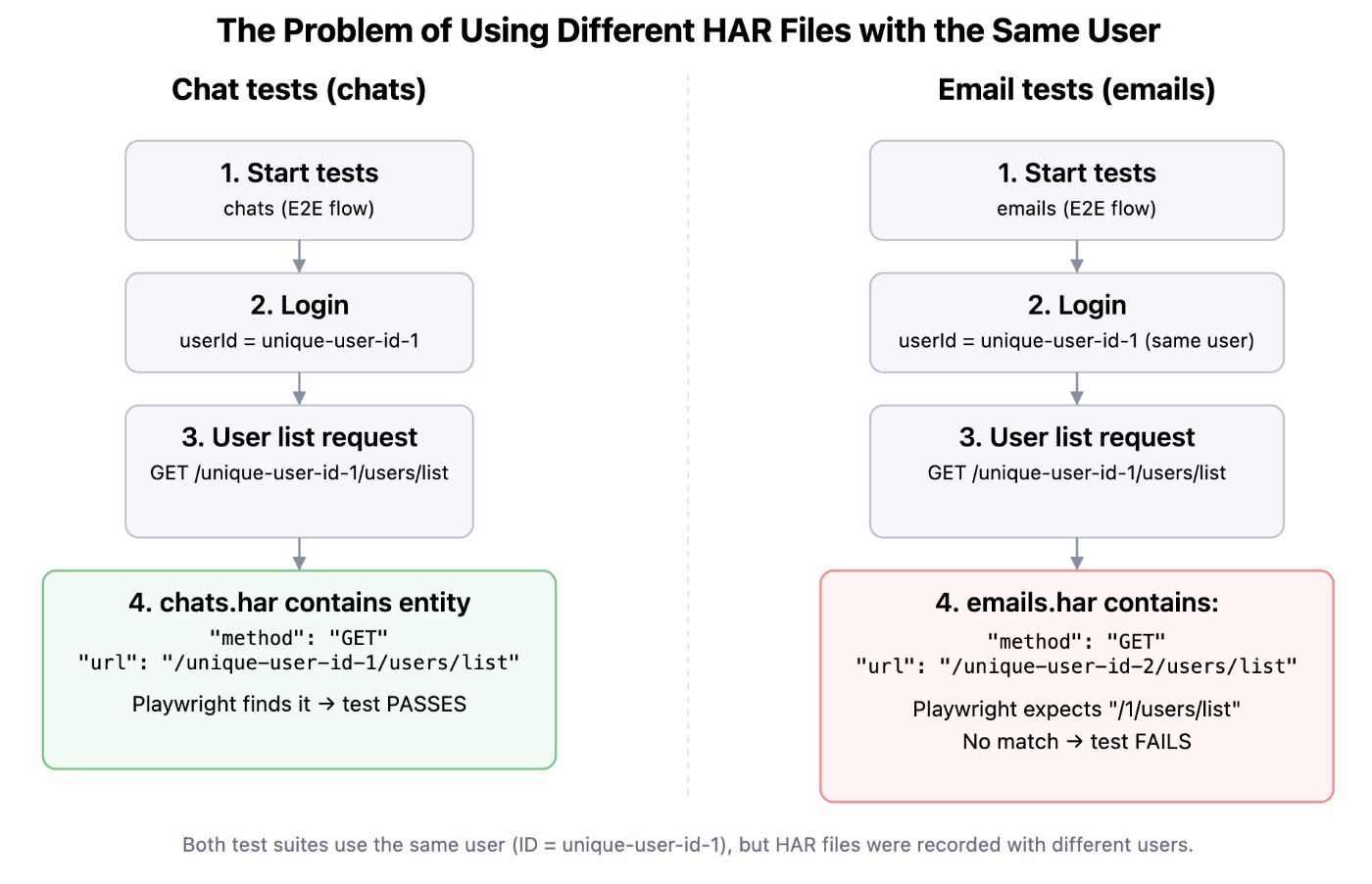
Consequences:
Playwright, when replaying, matches requests strictly by URL, method, and body, so even a small mismatch breaks the mock.
If we run all tests logged in as the user with ID unique-user-id-1, Playwright won’t be able to find the needed entity in emails.har when running the email page tests, because the endpoint GET /unique-user-id-2/users/list was recorded for user unique-user-id-2, while Playwright will look for /unique-user-id-1/users/list.
2. Dynamic parts of URLs
Example:
The HAR file may contain an entry with a request-id generated on the client side:
{
  "entries": [
    {
      "request": {
        "method": "GET",
        "url": "/generate?request-id=fc21b48a-e84d-4b-92-a494d65a280a"
      }
    }
  ]
}
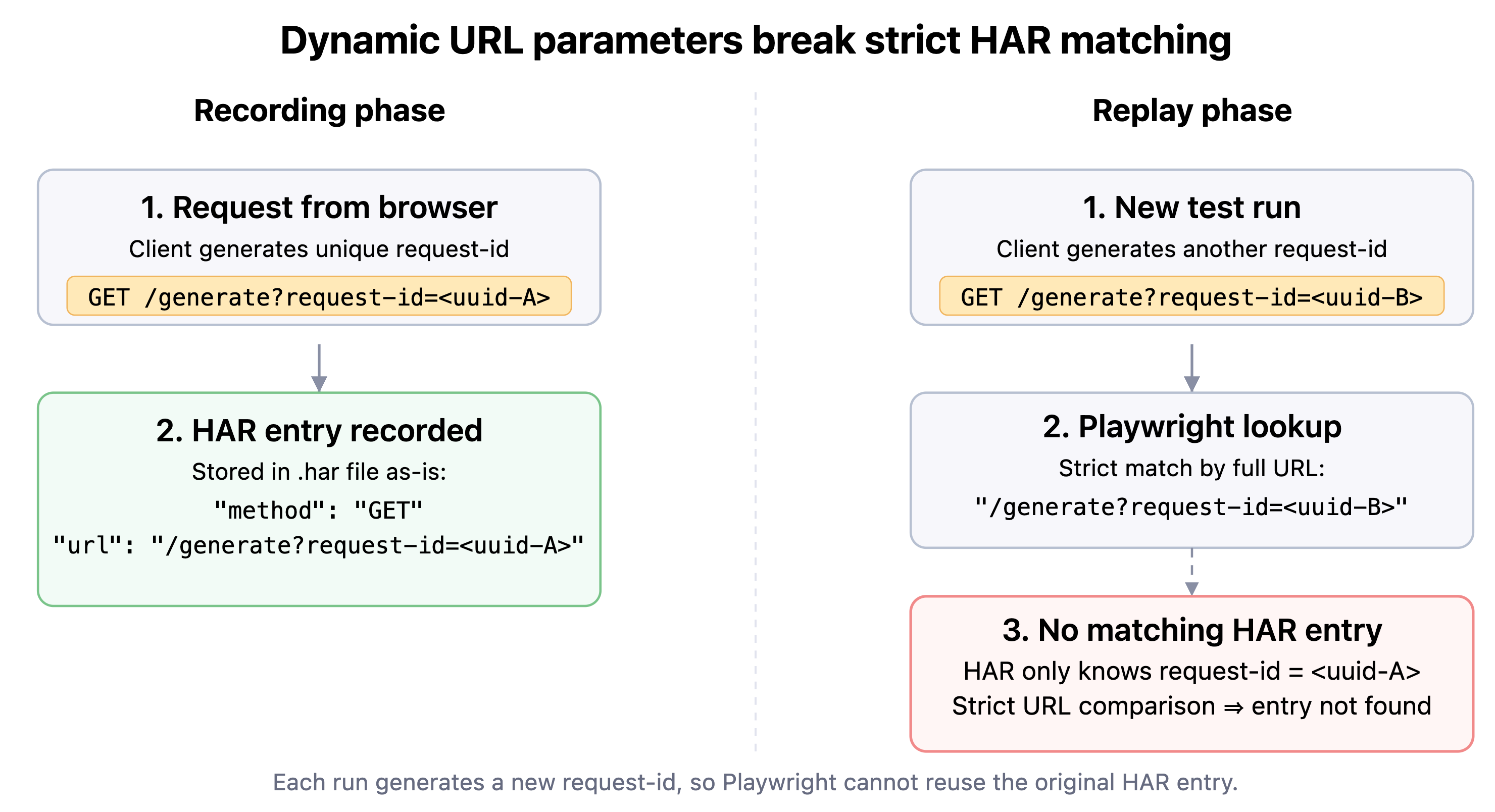
Consequences:
request-id will be unique each time (one value at recording time, another at replay time), so Playwright will never find this entry on subsequent test runs, again because Playwright strictly compares URL data when searching.
3. Dynamic request body
Dynamic parameters can appear not only in the URL, but also in the request body. If the body contains values that must match data obtained at a previous step (for example, request-id from /generate), Playwright will only be able to find the correct HAR entry if these values match exactly.
Although such parameters are unique by nature, their value must be the same across all related requests in the test. If the request-id passed to /generate doesn’t match request_id in the subsequent request body, Playwright won’t be able to find a matching entry, and the mock just won’t work.
Example where the previously generated request-id is passed in the body of a subsequent request:
{
  "entries": [
    {
      "request": {
        "method": "POST",
        "url": "/generate-result",
        "postData": {
          "text": "{\"request_id\":\"fc21b48a-e84d-4b-92-a494d65a280a\"}"
        }
      }
    }
  ]
}
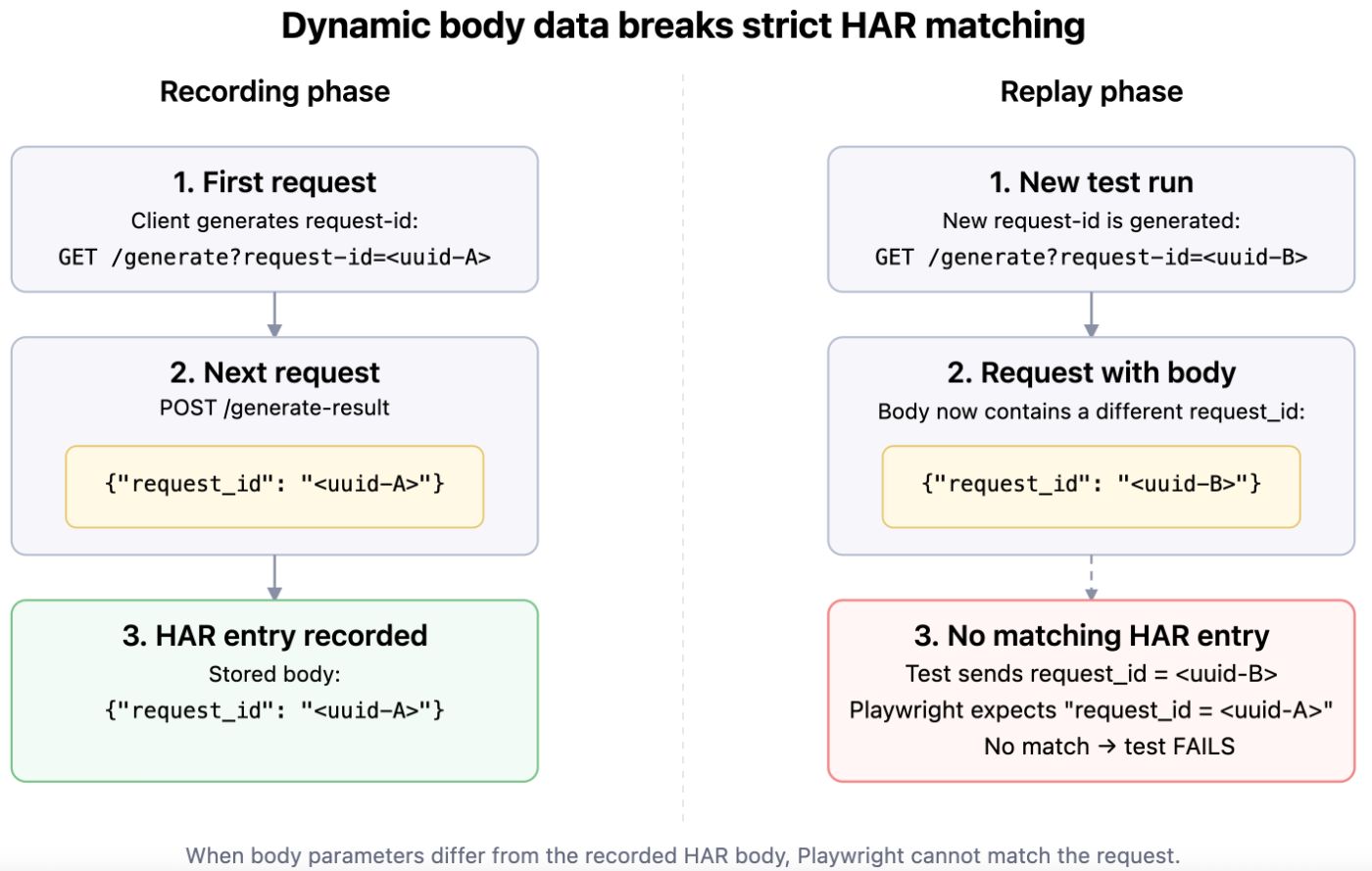
Consequences:
If request_id differs from what was in the /generate request, Playwright won’t find the corresponding entry in the HAR.
4. Sensitive data that can’t be committed
Example:
{
  "entries": [
    {
      "request": {
        "method": "POST",
        "url":  "api/auth",
        "postData": {
		  "mimeType": "application/json",
	      "text": "{\"email\":\"test@test.com\",\"password\":\"strongPassword\"}"
        }
      }
    }
  ]
}
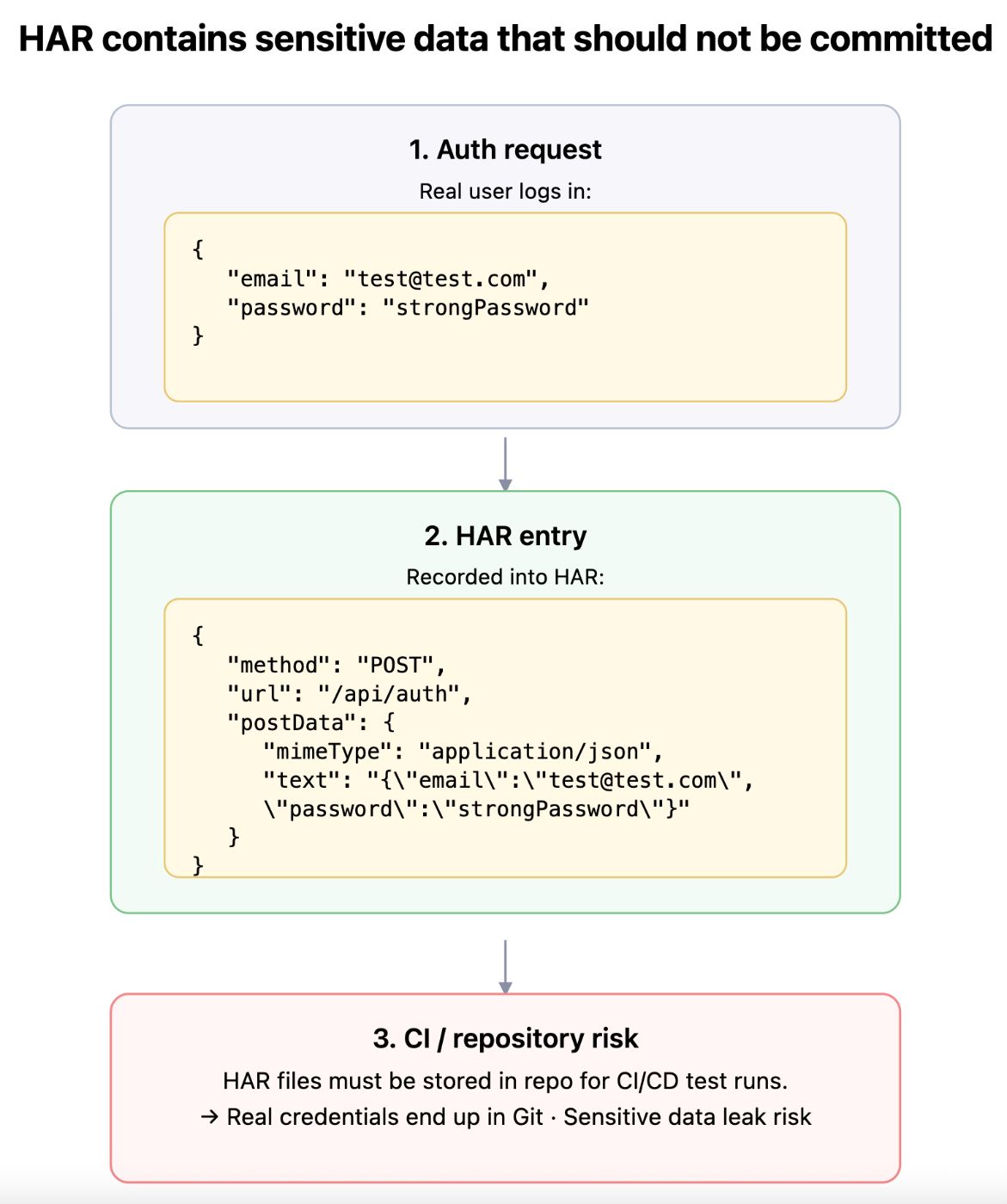
Consequences:
Real user data can end up in the repository, because HAR files must be in the repo for CI/CD test runs.
And hopefully your auth endpoint doesn’t accept such data in plain text in real life
We ended up with these tasks:
- HAR files must not depend on the user they were recorded under and must not contain sensitive data
It shouldn’t matter where we recorded them - we want to use them without depending on users and their data. Every test should run with the same test credentials.
The file must not contain real personal user data - only controlled test values.
- We need to teach our tests to work with dynamic data
Endpoints with dynamic data must be found in HAR and used in the test only once, just like with real backend calls: a specific request - a specific response.
If test logic needs to call an endpoint with data from another endpoint, the strictly corresponding HAR entry must be used.
How to approach the solution
- HAR normalization - a separate script that:
-
finds “original” user data in the HAR and replaces it with test values
-
can normalize previously created HARs so we don’t have to re-record them. Some tests require special conditions for the user in order to reproduce them for recording
- Dynamic data interception
- requests to URLs with dynamic data are intercepted, and the correct HAR entry is returned in the response.
HAR normalization
Since we need to normalize previously generated HARs, the task comes down to automatically detecting user credentials (userId, email, token) and replacing them with controlled test values.
We split the process into two major steps:
- Extract real user data from the auth request, because this is the only place where we can reliably find the correct user data:
- userId
- authentication token
Walk through all HAR entries and replace user-sensitive data with test data everywhere:
- in all URLs
- in request/response headers
- in request/response bodies
Below is a simplified version of how such normalization can be implemented, already split into logical parts.
Step 1. Extract user data from HAR
First, we find a successful auth request (/auth with 200 status) and pull out userId, email, and token. These data will be the “originals” we’ll replace.
interface IdentityData {
  userId: string
  email: string
  token: string
}

const testData: IdentityData = {
  userId: '123456789',
  email: 'test@test.com',
  token: '936598harmageddoniscancelled5351',
};

function extractUserData(harContent: Har): IdentityData | null {
  const entries = harContent.log.entries;

  for (const entry of entries) {
    const url = entry.request?.url || '';
    const status = entry.response.status;

    if (url.includes('/auth') && status === 200) {
      const responseBody = JSON.parse(entry.response.content.text);

      const token = entry.response.headers.find(
        h => h.name.toLowerCase() === 'token'
      )?.value;

      return {
        userId: responseBody.id,
        email: responseBody.email,
        token: token,
      };
    }
  }

  return null;
}
You can see the HAR file type in more detail here:
Step 2. Normalize URLs
Next, we need to get rid of the dependency on a specific userId in URLs:
function normalizeUrl((url: string, identityData: IdentityData, testData: IdentityData): string {
  // Replace userId – our IDs are unique enough that the chance of
  // encountering them somewhere else is essentially zero
  return url.replaceAll(identityData.userId, testData.userId);
}
Step 3. Normalize headers
Headers often contain tokens and other things that shouldn’t appear in the repository.
function normalizeHeaders(headers: Header[], identityData: IdentityData, testData: IdentityData): Header[] {
  return headers.map(header => {
    let value = header.value || '';

    // Replace token in the `token` header
    if (header.name?.toLowerCase() === 'token' && value === identityData.token) {
      value = testData.token;
    }

    return { ...header, value };
  });
}
If needed, you can also add replacement logic for Authorization, X-User-Id, and other custom headers here.
Step 4. Normalize request and response bodies
function normalizeContent(text: string, identityData: IdentityData, testData: IdentityData): string {
  let normalized = text;

  for (const key of Object.keys(identityData) as (keyof IdentityData)[]) {
    const original = identityData[key];
    const replacement = testData[key];

    if (!original || !replacement) continue;

    normalized = normalized.replaceAll(original, replacement);
  }

  return normalized;
}
Result: putting it all together in normalizeHarFile
Now that we have all helper functions, the final step is to walk through all entries and apply normalization to all parts of the requests/responses.
/**
* Normalizes a HAR file by replacing real user data with test data
 * @param {Har} harContent - HAR file content
 * @param {Object} testData - test data used for replacement (userId, email, token)
 */
function normalizeHarFile(harContent: Har, testData: IdentityData) {
  const entries = harContent.log.entries || [];

  // 1. Extract real user data from the auth request
  const identityData = extractUserData(harContent);

  // 2. Normalize each entry in the HAR file
  const normalizedEntries = entries.map(entry => {

    // Normalize request URL
    if (entry.request.url) {
      entry.request.url = normalizeUrl(
        entry.request.url,
        identityData,
        testData
      );
    }

    // Normalize request headers
    if (entry.request.headers) {
      entry.request.headers = normalizeHeaders(
        entry.request.headers,
        identityData,
        testData
      );
    }

    // Normalize response headers
    if (entry.response.headers) {
      entry.response.headers = normalizeHeaders(
        entry.response.headers,
        identityData,
        testData
      );
    }

    // Normalize request body
    if (entry.request.postData?.text) {
      entry.request.postData.text = normalizeContent(
        entry.request.postData.text,
        identityData,
        testData
      );
    }

    // Normalize response body
    if (entry.response.content.text) {
      entry.response.content.text = normalizeContent(
        entry.response.content.text,
        identityData,
        testData
      );
    }

    return entry;
  });

  // 3. Return normalized HAR content
  harContent.log.entries = normalizedEntries;
  return harContent;
}
Dynamic data interception
In our system, there are several related endpoints: one receives request-id in query parameters (generated on the client), and later the same request-id must appear in the body of another POST request.
When replaying HAR, Playwright strictly matches by url + method + body and has no idea that two different requests are logically connected by the same request-id. So we had to add our own layer on top of routeFromHAR.
Sequence of steps
We split the work with dynamic data into several steps
-
Basic HAR wiring through routeFromHAR
Playwright still replays everything it can strictly match.
-
Add a HarMocks wrapper that:
- loads HAR into memory,
- can search for the correct entry taking dynamics into account (removing query params, searching in body, etc.)
- stores already used request-idvalues to avoid reusing the same entry
- Intercept problematic URLs via context.route:
-
first request: request-id comes in the query (/with-dynamic-request-id)
-
second request: the same request-id is in the body (/with-request-id-inside-body)
-
additional case: static URL + dynamic request_id only in the body (/api/**/with-dynamic-inside-post)
- Every time Playwright can’t match a HAR entry out of the box, we:
- intercept the request,
- find the correct entry manually,
- use it once via route.fulfill(),
- mark the request-id as used.
Step 1. Basic HAR setup via routeFromHAR
Let’s start with a simple class that can load HAR and attach it to Playwright.
async function setupHarMocks(context: BrowserContext, harFileName: string): Promise<void> {
  const harFilePath = path.join(__dirname, '..', 'har-files', harFileName);

  if (!fs.existsSync(harFilePath)) {
    throw new Error(`HAR file not found: ${harFilePath}`);
  }

  const harMocks = new HarMocks(context, harFilePath);
  await harMocks.setupHarMocks();
}

export class HarMocks {
  private context: BrowserContext
  private harFilePath: string
  private harContent: HarContent

  constructor(context: BrowserContext, harFilePath: string) {
    this.context = context;
    this.harFilePath = harFilePath;

    try {
      this.harContent = JSON.parse(fs.readFileSync(this.harFilePath, 'utf8'));
    }
    catch (error) {
      throw new Error(`Failed to load HAR file ${this.harFilePath}: ${error}`);
    }
  }

  async setupHarMocks(): Promise<void> {
    await this.context.routeFromHAR(this.harFilePath, {
      // Use for API requests
      url: /api\./,
      // Use only existing entries
      update: false,
    });
  }
}
At this point Playwright can already replay HAR, but still “falls over” on dynamic parameters. Next we’ll extend HarMocks.
Step 2. State for working with dynamic parameters
We need to:
- store already used request-id values,
- remember request-id values found in one request so we can use them in another.\
export class HarMocks {
  private context: BrowserContext
  private harFilePath: string
  private harContent: HarContent

  // In one request the request-id is in query, in another - in body,
  // so we need to store the found value somewhere
  private foundSearchParams: Record<string, string> = {}

  // Store used request-ids so we don’t reuse the same entry
  private usedRequestIds: Set<string> = new Set()

  // ...
}
Step 3. Helper methods for searching entries in HAR
3.1. URL normalization (removing dynamic query params)
normalize(url: string, removableSearchParams: string[] = []) {
  const urlObj = new URL(url);
  removableSearchParams.forEach((param) => {
    urlObj.searchParams.delete(param)
  });
  return urlObj.toString();
}
3.2. Cache key for found params
getKeyForSearchParams(name: string, param: string) {
  return `${name}_${param}`;
}
3.3. Easy access to query params
getSearchParams(url: string) {
  const urlObj = new URL(url);
  return urlObj.searchParams;
}
3.4. Finding HAR entry by URL/method with normalization and an extra check
findHarEntry({ requestUrl, method, removableSearchParams = [], customCheck }: {
  requestUrl: string
  method: string
  removableSearchParams?: string[]
  customCheck?: (entry: HarEntry) => boolean
}) {
  return this.harContent.log.entries.find((entry: HarEntry) => {
    // Additional check, if provided
    if (entry.request.method !== method || (customCheck && !customCheck(entry))) {
      return false;
    }

    const normHarUrl = removableSearchParams.length > 0
      ? this.normalize(entry.request.url, removableSearchParams)
      : entry.request.url;

    if (normHarUrl !== requestUrl) {
      return false;
    }

    return true;
  })
}
3.5. Finding HAR entry where a parameter is inside the body
findHarEntryWithParamsInsideBody({
  requestUrl,
  method,
  parentParamValue,
  ownParamName,
}: {
  requestUrl: string
  method: string
  parentParamValue: string
  ownParamName: string
}) {
  if (!parentParamValue) {
    return false;
  }

  return this.harContent.log.entries.find((entry: HarEntry) => {
    const postDataText = entry.request.postData?.text;
    if (!postDataText) {
      return false;
    }

    return entry.request.url === requestUrl
      && entry.request.method === method
      && postDataText.includes(ownParamName)
      && postDataText.includes(parentParamValue);
  })
}
3.6. Extracting request_id from request body
extractRequestIdFromPostData(entry: HarEntry): string | null {
  try {
    const postDataText = entry.request.postData?.text;
    if (!postDataText) return null;

    const postData = JSON.parse(postDataText);
    return postData.request_id || null;
  }
  catch {
    return null;
  }
}
Step 4. Intercepting a request with request-id in query
The first endpoint: request-id comes in the query (/with-dynamic-request-id/**). Playwright itself won’t find the HAR entry because of strict URL comparison, so we do it for Playwright.
async setupHarMocks(): Promise<void> {
  await this.context.routeFromHAR(this.harFilePath, {
    url: /api\./,
    update: false,
  });

  // URL where request-id is passed in query
  await this.context.route('**/with-dynamic-request-id/**', async (route) => {
    const url = route.request().url();

    // Remove dynamic request-id from URL
    const normalizedUrl = this.normalize(url, ['request-id']);

    const entry = this.findHarEntry({
      requestUrl: normalizedUrl,
      method: 'POST',
      removableSearchParams: ['request-id'],
      customCheck: (entry) => {
        // Ensure request-id from searchParams hasn’t been used yet
        const searchParams = this.getSearchParams(entry.request.url)
        const requestId = searchParams.get('request-id')
        return !requestId || !this.usedRequestIds.has(requestId)
      },
    });

    if (!entry) {
      console.error('Entry not found for:', url);
      await route.continue();
      return;
    }

    const searchParams = this.getSearchParams(entry.request.url);
    const requestId = searchParams.get('request-id');

    if (requestId) {
      // Save request-id for subsequent requests
      this.foundSearchParams[
        this.getKeyForSearchParams('dynamic', 'request-id')
      ] = requestId;

      // Mark request-id as used
      this.usedRequestIds.add(requestId);
    }

    await route.fulfill({
      status: entry.response.status,
      headers: entry.response.headers,
      body: entry.response.content?.text || '{}',
    });
  })

  // ...other route handlers
}
What’s happening here:
- We intercept the request by pattern **/with-dynamic-request-id/**.
- We remove the dynamic request-id from the URL to find the matching entry in HAR.
- Via customCheck we ensure this request-id hasn’t been used before.
- We save the request-id in foundSearchParams and usedRequestIds.
- We return the response from HAR via route.fulfill() instead of hitting the real backend.
Step 5. Intercepting a request where request-id is in the body
The second endpoint should use the same request-id, but this time inside the request body as request_id:
// URL that sends request-id from previous step in the body of a POST request
await this.context.route('**/with-request-id-inside-body', async (route) => {
  const url = route.request().url();

  const entry = this.findHarEntryWithParamsInsideBody({
    requestUrl: url,
    method: 'POST',
    parentParamValue: this.foundSearchParams[
      this.getKeyForSearchParams('dynamic', 'request-id')
    ],
    ownParamName: 'request_id',
  });

  if (!entry) {
    console.error('Entry not found for:', url);
    await route.continue();
    return;
  }

  await route.fulfill({
    status: entry.response.status,
    headers: entry.response.headers,
    body: entry.response.content?.text || '{}',
  });
})
Logic:
- We take the previously saved request-id from foundSearchParams.
- We search for a HAR entry where this request-id is in the body under the request_id key.
- If found, we return that entry in the test.
Step 6. Static URL + dynamic request_id in the body
An additional case: the URL doesn’t change, but the request body contains a unique request_id, and we want to use each such entry only once.
await this.context.route('**/api/**/with-dynamic-inside-post', async (route) => {
  const url = route.request().url();

  const entry = this.findHarEntry({
    requestUrl: url,
    method: 'POST',
    customCheck: (entry) => {
      // Ensure request_id from the body hasn’t been used yet
      const requestId = this.extractRequestIdFromPostData(entry)
      return !requestId || !this.usedRequestIds.has(requestId)
    },
  });

  if (!entry) {
    console.error('Entry not found for:', url);
    await route.continue();
    return;
  }

  const requestId = this.extractRequestIdFromPostData(entry);
  if (requestId) {
    this.usedRequestIds.add(requestId);
  }

  await route.fulfill({
    status: entry.response.status,
    headers: entry.response.headers,
    body: entry.response.content?.text || '{}',
  });
})
Putting it all together
To make test logic behave the same way as with a real backend, we need to:
- let Playwright use HAR wherever strict matching works,
- for dynamic endpoints intercept requests manually, normalize URL and body, pick the correct entry and ensure each request-id is used only once.
The code above implements exactly this layer on top of routeFromHAR.
What does Playwright think about this?
At the moment, Playwright remains a “simple HAR player” with no normalization layer:
- Strict matching by URL/method/body.
- No cross-environment/baseURL-aware HAR support.
- Playwright doesn’t know your domain logic..
That’s why separate solutions appear in the ecosystem on top of Playwright -
Conclusion
Instead of a bunch of fragile mocks, we ended up with a unified system where:
- HAR is recorded under any user,
- automatically normalized,
- used with completely fake data,
- and works correctly even with dynamic parameters.
This approach is especially useful in large projects with many API calls and parallel development: E2E tests remain fast, deterministic, and independent of real users.
Written by
[story continues]
tags