This story on HackerNoon has a decentralized backup on Sia.
Transaction ID: kDToOoEaeH61q_Keb4ruNqcrDYRS5wm-EPMDVh4davg
Cover

How I Used Python To Make Big Data Seem Small

Written by @masseybr | Published on 2018/8/1

TL;DR
I work as an astrophysics research assistant. This job entails managing and manipulating large datasets. In order to accomplish this, I have to take subsets that mirror the larger dataset. In order to get my computer to be able to run my code without reaching a run time error, I have to take a subset of 10% of the original particles. This gives me a similar image to the original, while still being able to be run on my laptop. To do this, I use numpy.random. An example of how to do this is shown below.
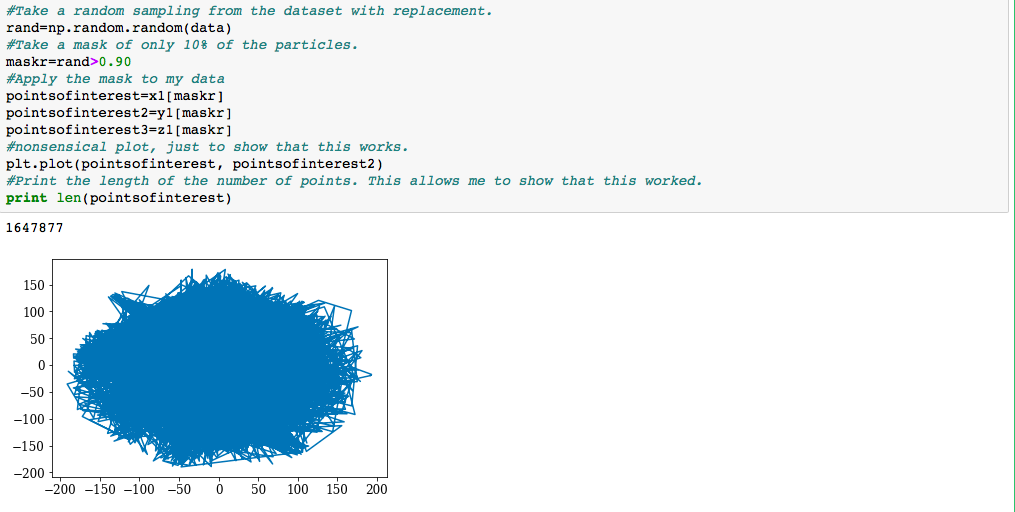
I work as an astrophysics research assistant. This job entails managing and manipulating large datasets. In order to accomplish this, I have to take subsets that mirror the larger dataset. In order to get my computer to be able to run my code without reaching a run time error, I have to take a subset of 10% of the original particles. This gives me a similar image to the original, while still being able to be run on my laptop. To do this, I use numpy.random. An example of how to do this is shown below.

Image of my code.

After I take the random particles, I create a mask of only 10% of the particles. This allows me to get my code to run in a quicker manner and allows me to maintain an accurate depiction of the dataset. These snapshots of the dataset provide valuable information and allows me to more quickly draw conclusions.

I hope you take the time to try this method out for yourself! Happy coding!

Thank you for reading!

[story continues]


Written by
@masseybr
Technical Writer on HackerNoon.

Topics and
tags
machine-learning|big-data|computer-science|programming|python
This story on HackerNoon has a decentralized backup on Sia.
Transaction ID: kDToOoEaeH61q_Keb4ruNqcrDYRS5wm-EPMDVh4davg