Our call center handles a significant volume of cases, creating excessive workload for representatives. Customers frequently have questions that could be addressed quickly, yet extended wait times lead to considerable dissatisfaction. Customer surveys reveal they value
receiving answers, even if not immediate. The business aims to reduce call volume and divert case creation from the call center without sacrificing quality.
This led to the implementation of a self-service portal where customers submit support requests, which are then created as service cases directly in Salesforce, the company's customer relationship management (CRM) system. Customers receive automatic acknowledgement
messages confirming receipt and timely follow-up responses, significantly reducing call volume.
By using Salesforce Experience Cloud, a customer portal platform, and Service Cloud routing, which directs requests to the appropriate agents, we developed a process that streamlines customer inquiry intake and lowers agent workload by over 20%.
Goals of the Experience Site
- Allow customers to create cases through a self-service portal.
- Route cases to queues or individuals based on business rules.
- Notify internal teams and send acknowledgement emails to customers.
- Integrate the portal seamlessly into our existing company website.
Architecture Overview
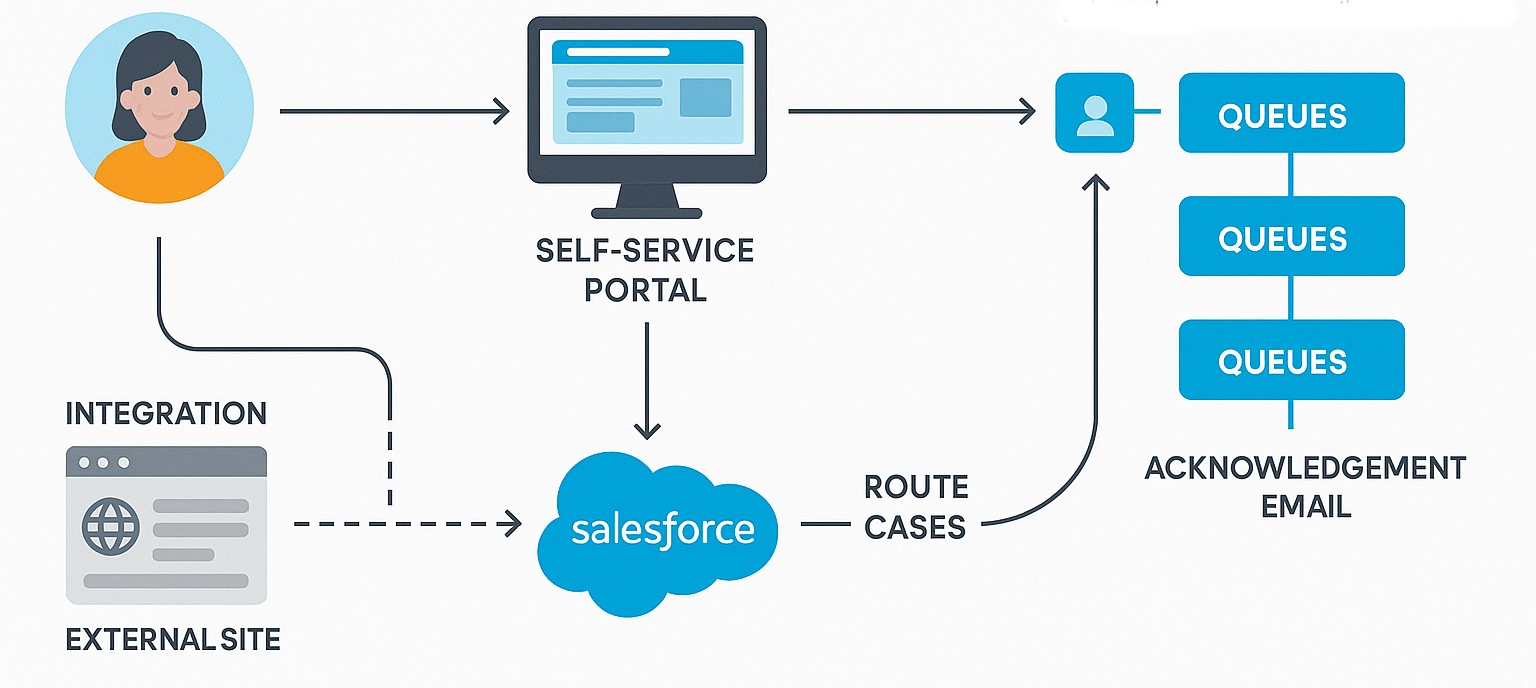
Customers navigate to your website and go to the contact us page, where the case creation form from the experience site is embedded.
Create a public entry point through an experience site – We started by creating a public entry point through a Salesforce Experience Site. This is a customer-facing website built on Salesforce’s platform that serves as the bridge between the outside world and our internal Service Cloud (Salesforce’s help desk solution). All customer enquiries submitted through the “Contact Us” form on our website now flow directly into Salesforce as cases. It began as a web form and evolved into a structure intake mechanism that intelligently routes customer issues, triggers notifications, and reduces manual intervention.
This Experience Site now serves customers in two ways:
- As a standalone self-service portal - customers can create cases without logging in, receive automatic acknowledgements, and track their issue number.
- As a seamlessly embedded component, Lightning Out (a framework for adding Salesforce components to external sites) integrates the Experience Site directly into the company’s existing website, delivering a native, branded user experience.
Access, Permissions, and Automation
Service Agents | Salesforce License with Service Cloud add on |
Customers | No license - Guest site user |
Permissions | Read and create on Case (Create a Permission set as best practice) its
field level security, flows and apex classes (if used). |
Case auto response rules | Trigger auto-response rules for users |
Creating the Site
Step 1 – Enable Digital Experiences
In Setup -> Digital Experiences -> All Sites, click New. To keep things simple, pick the Help Center template (or another template if you prefer full control) and name it something like Customer Portal. Salesforce creates a portal and a dedicated guest user behind it.
Step 2 – Configure Public Access
- Navigate to Site → Public Access Settings.
- Locate the Guest User Profile and open its permissions.
- Grant Read and Create on the Case object only and remove everything else.
Step 3 – Add a Case-Submission Page
Open Experience Builder (Salesforce's tool for designing customer-facing sites) and create a new page named "Submit a Case." You can drop a native Record Form component and later enhance it as needed.
Step 4 – Automating Case Creation with Salesforce Flow
While we have complex processes linked to case creation, we intentionally bypassed most computations in this flow to maintain reliability and deliver a unified experience. By focusing on routing, notification, and acknowledgment, we kept the automation resilient under high load.
A consistent experience for customers, building trust over time. A streamlined flow appears basic, but its core benefit is reliability. By minimizing heavy computation and focusing on routing, notification, and acknowledgment, we kept automation stable under heavy demand.
Declarative automation keeps maintenance simple and transparent for admins.
1. Trigger: Record-Triggered
Flow on Case Create. (A record-triggered flow runs automatically in Salesforce when a new case record is created.)
2. Decisions:
- If
Product__c = Premium--> Assign to Premium Support Queue. - If
Priority = High, send a Slack alert.
3. Actions:
- Update Owner ID (Queue).
- Send an email to the customer with the case number using auto response rules.
- Create a platform event (a Salesforce messaging technology that signals other systems) to notify other subsystems, if needed.
Step 5 – Testing the End-to-End Flow
- Open the public URL in an incognito browser.
- Submit a test case.
- Check that
- The Case appears in Service Cloud with
Origin = Experience Cloud. - The correct Queue owns it.
- The customer receives an email confirmation.
- A guest user cannot view or edit any existing records.
Step 6 – Measuring Success
When we launched the portal, the impact was clear. Time spent on calls, manual case logging, and constant routing quickly diminished. Agents who previously spent half their shift creating or triaging cases could now concentrate on resolving issues. Once everything operated through Experience Cloud, the process became structured and orderly. Cases were automatically created, assigned, and acknowledged without manual input, saving hours every day.
Metric | Before | After | Improvement |
Cases via Email or Phone | ~3,000/month | ~1,200/month | ↓ 60% |
Average Time to Create a Case | 6 min (manual) | < 1 min (automated) | ↓ 80% |
Agent Focus on Actual Resolutions | 40% | 70% | +30% improvement |
Average Customer Wait Time | 25 min | 10 min | ↓ 60% |
Conclusion
It is a huge win, not just technically, but it was a mindset shift. We started out trying to reduce call volume, but what we really did was change how Customers interact with us. This shift positioned us to continually improve operations and stay ahead of evolving needs. By building a stable, scalable foundation, we unlocked new opportunities for innovation within our service model. Looking forward, these
changes will support ongoing growth, enhanced customer satisfaction, and better business outcomes.
Here are a few things that stood out
along the way:
- We kept the first version simple and stable, avoiding the temptation to automate everything at once. Earning customer trust allowed us to add features gradually as needs expanded.
- Simplicity ensures reliability: We had several complex processes linked to case creation, but we intentionally excluded most of them here. We aimed to eliminate failure points and offer a unified, reliable customer experience. Trust builds when systems consistently function as intended.
- Flows over code (until we need code): Salesforce Flow covered most of our automation without a single Apex trigger. That made updates faster and reduced the dependency on developers. Apex came in later, only where we needed logic that Flow couldn’t handle cleanly.
- Visibility changes everything: Once all cases started flowing through the portal, the business finally had real-time visibility into what customers were asking about, something we never had from phone logs or scattered emails.
References
Guide to Salesforce Flows | Flow vs Apex
Configure and build Experience sites in Salesforce
[story continues]
tags