Building an AI Financial Roaster That People Actually Want to Use
Let me show you how to build the most brutally honest financial advisor you'll ever meet: an AI that doesn't care about your feelings.
I love building things that people actually use. That is why I wanted to create a tutorial project that would teach developers how to make AI applications that people actually enjoy using. Because let's be honest, most AI tutorials are boring calculators and chatbots.
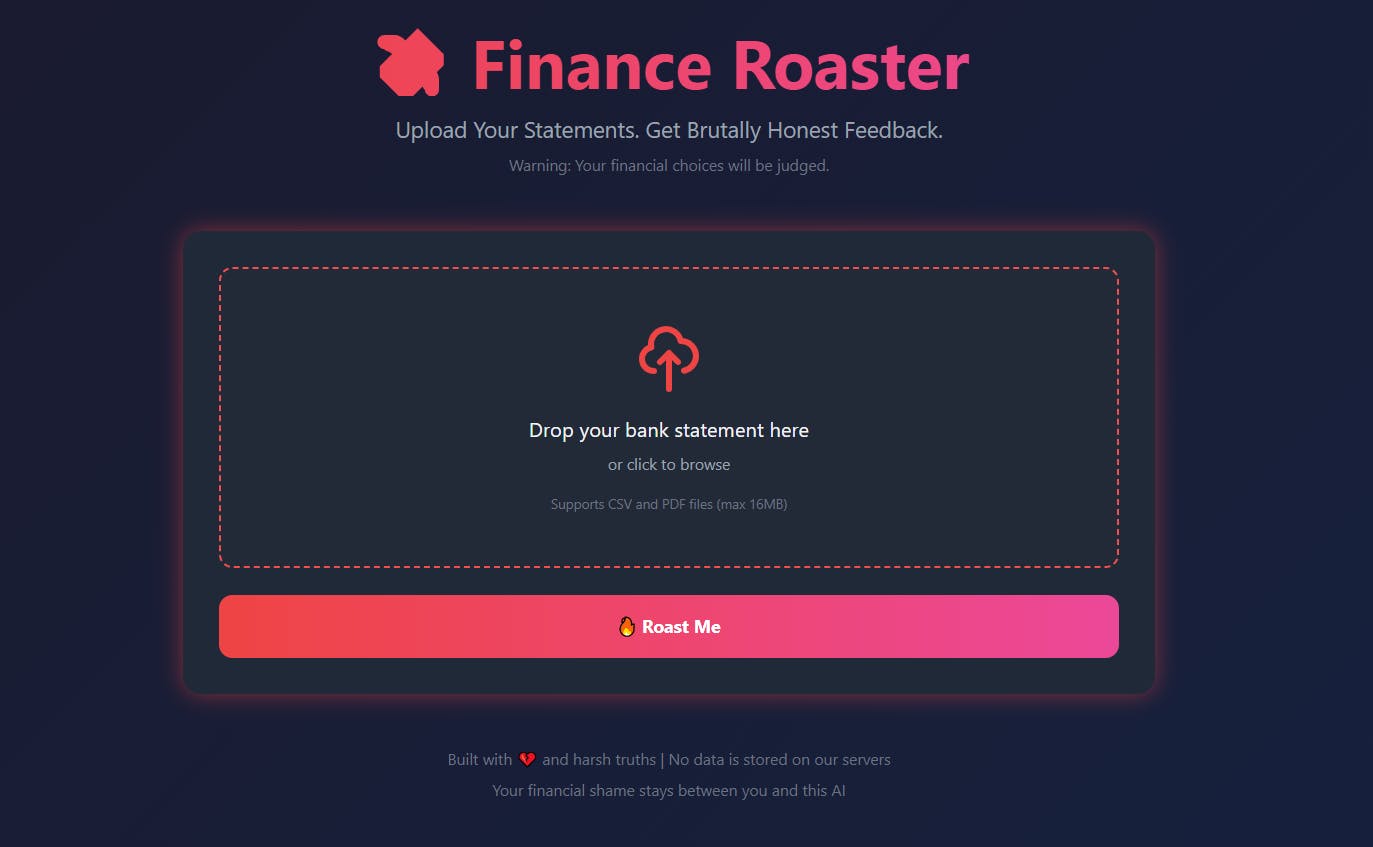
The project? Finance Roaster: Users upload their bank statement, get roasted by GPT-4 with savage, witty humor.
This tutorial will teach you:
- How to process CSV and PDF bank statements
- How to engineer AI prompts for humor and personality
- How to build shareable, viral-worthy UI/UX
- How to create an AI app in under 100 lines of Python
By the end of this guide, you'll have a fully functional app you can deploy this weekend.
The Psychology: Why This Project Concept Works
Before diving into code, let's talk about why this makes such a great tutorial project.
Traditional budgeting apps are boring. They show you pie charts and tell you to "reduce discretionary spending." Not exactly share-worthy.
But an AI that says: "$87 at Foods Co for organic kale? Your wallet is as wilted as that kale will be in three days"? That's memorable. That's the kind of feature that makes people actually want to test your app.
Three principles that make this project interesting:
- Humor makes boring tasks fun - People avoid checking their finances because it's painful. Adding humor changes that dynamic.
- Highly shareable - When you build something funny, people naturally want to show friends. This teaches you virality mechanics.
- Practical learning - You'll learn file uploads, AI prompt engineering, and building clean UIs, all transferable skills.
The Tech Stack (Perfect for Learning)
I deliberately chose a simple stack that beginners can understand while still being production-ready.
What we'll use:
- Backend: Flask (Python) - 100 lines of code
- AI Engine: OpenAI's GPT-4o-mini ($0.15 per 1M tokens)
- File Processing: Pandas for CSV, pdfplumber for PDF statements
- Frontend: Single HTML page with Tailwind CSS
- Cost per request: ~$0.01
Why this stack is perfect for learning:
- No deployment complexity (runs locally or on a single server)
- Sub-3-second response times
- Teaches you file handling, AI integration, and modern UI design
- Easily extensible (add features as you learn more)
Part 1: Making AI Understand Money (The Easy Part)
First challenge: How do you teach an AI to roast someone's spending?
Step 1: Extract Transaction Data
Most banks export statements as CSV or PDF. Here's the extraction logic:
import pandas as pd
import pdfplumber
from openai import OpenAI

def process_csv(file):
    """Extract spending summary from CSV bank statement"""
    df = pd.read_csv(file)

    # Find the amount column (banks use different names)
    amount_col = next(
        (col for col in df.columns
         if any(kw in col.lower() for kw in ['amount', 'debit', 'spent'])),
        df.columns[-1]  # Default to last column
    )

    # Convert to numeric, handle currency symbols
    df[amount_col] = pd.to_numeric(
        df[amount_col].astype(str).str.replace('$', '').str.replace(',', ''),
        errors='coerce'
    )

    # Calculate summary
    total_spent = df[amount_col].abs().sum()
    top_expenses = df.nlargest(5, amount_col)

    return {
        'total_spent': f"${total_spent:,.2f}",
        'top_expenses': top_expenses.to_dict('records')
    }
PDF handling is trickier because banks format statements differently. Solution? Use pdfplumber for text extraction, then let GPT-4 parse it:
def extract_transactions_from_pdf(pdf_text):
    """Use AI as a fallback parser for complex PDFs"""
    response = client.chat.completions.create(
        model="gpt-4o-mini",
        messages=[{
            "role": "system",
            "content": "Extract transactions: Date | Description | Amount"
        }, {
            "role": "user",
            "content": pdf_text[:4000]  # Limit tokens
        }]
    )
    # Parse AI response into structured data
    # ...
Pro tip: AI is surprisingly good at parsing messy financial data. I tried regex patterns for weeks before realizing GPT-4 could do it in one call.
Part 2: Teaching AI to Be Savage (The Fun Part)
Now the magic: turning transaction data into comedy gold.
The System Prompt (Your AI's Personality)
This is where most people fail. A generic "be funny" prompt produces generic humor. You need specificity.
Here's my system prompt:
SYSTEM_PROMPT = """
You are a Savage Financial Parent - brutally honest, wickedly funny,
and armed with someone's transaction history.

Your job: Roast their spending habits using SPECIFIC transaction details.

Style guide:
- Think disappointed parent meets stand-up comedian
- Use their actual purchase names (e.g., "Taco Bell at 2 AM")
- Be savage but not cruel - make them laugh while crying
- End with a Financial Maturity Grade (A-F) and one-line explanation

Examples of good roasts:
- "Five Starbucks trips in one day? That's not a coffee addiction,
   that's a $30 therapy session with extra foam."
- "You spent $200 on DoorDash this month. That's literally paying
   someone $8 to make your laziness official."

Keep it under 200 words. Make it screenshot-worthy.
"""
Why this works:
- Specific examples teach the AI your humor style
- Constraints (200 words) force concise, punchy writing
- "Screenshot-worthy" reminds the AI this is for social sharing
The Actual API Call
def generate_roast(summary_data):
    """Send transaction summary to OpenAI, get roast back"""

    prompt = f"""
Transaction Data:
- Total Spent: {summary_data['total_spent']}
- Top Expense: {summary_data['top_expenses'][0]}
- You went to {summary_data['frequent_vendors'][0]['vendor']}
  {summary_data['frequent_vendors'][0]['count']} times

Roast these spending habits. Be specific and savage.
"""

    response = client.chat.completions.create(
        model="gpt-4o-mini",
        messages=[
            {"role": "system", "content": SYSTEM_PROMPT},
            {"role": "user", "content": prompt}
        ],
        temperature=0.9  # High creativity for humor
    )

    return response.choices[0].message.content
The temperature setting (0.9) is crucial. Lower values make AI boring. Higher values make it creative... sometimes too creative. 0.9 is the sweet spot for comedy.
Part 3: The UI That Makes People Click "Roast Me"
Nobody uploads bank statements to ugly websites. Your UI needs to be:
- Dark and edgy (matches the roasting vibe)
- Dead simple (one button: "Roast Me")
- Fast (loading states matter)
The Landing Page
<div class="bg-gradient-to-br from-gray-900 to-black min-h-screen">
  <h1 class="text-6xl font-bold bg-gradient-to-r from-red-500 to-pink-500
             bg-clip-text text-transparent">
    💸 Finance Roaster
  </h1>
  <p class="text-xl text-gray-400">
    Upload Your Regrets. Get Brutally Honest Feedback.
  </p>

  <!-- Drag-and-drop upload area -->
  <div class="border-2 border-dashed border-red-500 rounded-xl p-12
              hover:bg-red-500/10 cursor-pointer">
    <input type="file" accept=".csv,.pdf" hidden />
    <p>Drop your bank statement here</p>
    <p class="text-sm text-gray-500">CSV or PDF • Max 16MB</p>
  </div>

  <button class="w-full bg-gradient-to-r from-red-500 to-pink-500
                 text-white font-bold py-4 rounded-xl">
    🔥 Roast Me
  </button>
</div>
Key design choices:
- Red/pink gradient: Danger + playfulness
- Dark background: Focuses attention on the upload area
- Emojis: Adds personality without extra design work
- Tailwind CSS: Rapid prototyping without writing CSS
The Loading State (Critical for Virality)
While the AI thinks, show personality:
function showLoading() {
  document.getElementById('loadingState').innerHTML = `
    <div class="animate-spin h-16 w-16 border-b-2 border-red-500"></div>
    <p class="text-xl">Analyzing your poor life choices...</p>
    <p class="text-sm text-gray-500">This won't take long. Unlike your debt.</p>
  `;
}
Why this matters: Users wait 3-5 seconds for AI responses. A boring spinner loses attention. A funny loading message keeps them engaged.
Part 4: Security (Because Banks Care About This)
You're handling financial data. Even for a joke app, security matters.
Three Non-Negotiable Rules:
1. Never store files on disk
# ❌ BAD: Saves file to server
file.save('statements/' + filename)

# ✅ GOOD: Process in-memory
file_bytes = io.BytesIO(file.read())
df = pd.read_csv(file_bytes)
2. Don't log transaction details
# ❌ BAD: Logs sensitive data
print(f"User spent ${amount} at {merchant}")

# ✅ GOOD: Generic logging
print(f"Processing statement with {len(transactions)} transactions")
3. Strip personal info before sending to OpenAI
# Remove account numbers, names, addresses
summary_data = {
    'total_spent': total,
    'top_categories': categories,  # "Food", not "Joe's Pizza"
    'spending_pattern': pattern
}
Reality check: Even with sanitization, tell users their data goes to OpenAI. Transparency builds trust.
Part 5: Adding Viral Features (Optional Enhancement)
If you want to take this tutorial further, here's how to add shareability:
Built-in Sharing Capability:
1. One-Click Social Sharing
function shareRoast() {
  const roastText = document.getElementById('roast').textContent;
  const shareText = `I just got my spending roasted by AI! 🔥\n\n"${roastText.substring(0, 200)}..."\n\nBuild your own: [your-github-link]`;

  if (navigator.share) {
    navigator.share({ text: shareText });
  } else {
    navigator.clipboard.writeText(shareText);
    alert('Roast copied! Share with friends! 🔥');
  }
}
Why this matters: If you eventually deploy this publicly, sharing features help spread awareness.
2. The Financial Maturity Grade
Every roast ends with a grade: A through F.
Financial Maturity Grade: D-
"You have the self-control of a toddler in a candy store,
except the candy is overpriced artisanal coffee."
Learning point: Grades, scores, and rankings make results more shareable and comparable.
What You'll Learn Building This
This project teaches you several valuable skills:
File Processing:
- Handle both CSV and PDF uploads
- Parse unstructured financial data
- Work with Pandas for data analysis
AI Engineering:
- Craft effective system prompts for personality
- Temperature tuning for creative outputs
- Handle AI responses in production
Full-Stack Development:
- Build clean REST APIs with Flask
- Create engaging UIs with Tailwind CSS
- Implement drag-and-drop file uploads
- Handle loading states and user feedback
Deployment Ready:
- In-memory file processing (no disk storage)
- Error handling and validation
- Security best practices for financial data
Design Decisions: Why I Built It This Way
What Works in This Architecture:
- Simplicity over features: A single-purpose app is easier to understand and build. You can always add features later once you understand the core.
- Humor as the hook: The AI's personality is what makes this project interesting. Technical tutorials don't have to be boring.
- File processing in memory: No database needed for this tutorial. Everything happens in RAM, making deployment simple.
What You Might Customize:
- Add comparison data: "You spent more on coffee than X% of typical users" - requires a database to track aggregates.
- Mobile-first design: The current UI works on mobile, but you could optimize it further with responsive breakpoints.
- Prompt variations: The system prompt I provide is a starting point. Experiment with different personalities and tones.
Build Your Own AI App: What This Template Teaches
This project is designed to be a template for other AI applications. Here's how to adapt it:
1. Find a task people find tedious
- Checking finances → This tutorial
- Reading legal documents → "Legal Jargon Translator"
- Analyzing health data → "Fitness Report Card"
- Reviewing meeting notes → "Meeting BS Detector"
2. Add personality through AI prompts
- Make AI roast them (finance, fitness)
- Turn it into a game (quiz format)
- Add competitive elements (grades, scores)
- Use unexpected analogies (explain tech in food terms)
3. Keep the UI simple
- One-click file upload
- Clear results display
- Optional sharing features
- Fast loading indicators
4. Make it easy to extend
- Modular code structure
- Clear separation of concerns
- Well-commented functions
- Standard design patterns
The Complete Code Repository
The entire Finance Roaster tutorial project is available on GitHub. Here's the structure:
FinanceRoaster/
├── app.py              # Flask server (81 lines)
├── services.py         # AI + file processing (156 lines)
├── templates/
│   └── home.html       # UI (342 lines with CSS/JS)
├── requirements.txt    # Dependencies (7 packages)
├── .env.example       # Template for your API key
└── README.md          # Setup instructions
To run this tutorial locally:
git clone https://github.com/yourusername/FinanceRoaster
cd FinanceRoaster
pip install -r requirements.txt
# Copy .env.example to .env and add your OpenAI key
python app.py
Visit http://localhost:5000 and test it out.
Learning cost: ~$0.01 per test (OpenAI API calls)
What's included:
- Complete working code
- Detailed comments explaining each function
- Example bank statements for testing
- Deployment guide for Heroku/Railway
Potential Use Cases (What You Could Build)
Once you understand this template, you can adapt it for various applications:
Personal Finance Tools:
- Budget analyzer with friendly advice
- Subscription tracker that flags unused services
- Shopping habit analyzer (impulse vs planned purchases)
Professional Development:
- Resume reviewer that gives honest feedback
- Email tone analyzer (passive-aggressive detector)
- Meeting notes summarizer with action items
Health & Wellness:
- Food diary analyzer with nutrition roasts
- Workout consistency tracker with motivational guilt
- Sleep pattern analyzer with bedtime recommendations
Content Creation:
- Social media post analyzer (engagement predictor)
- Blog post readability scorer
- Video script feedback tool
The core pattern: upload file → AI analysis → humorous/useful feedback - works for countless domains.
The Technical Deep Dive (For the Nerds)
Challenge 1: PDF Parsing Hell
Banks format PDFs differently. Chase, Wells Fargo, Bank of America - all unique snowflakes.
My solution: Hybrid approach
def parse_pdf_transactions(pdf_text):
    # Try regex first (fast, works 70% of the time)
    pattern = r'(\d{1,2}/\d{1,2}/\d{4})\s+(.+?)\s+([-]?\$?\d+\.?\d*)'
    matches = re.findall(pattern, pdf_text)

    if matches:
        return pd.DataFrame(matches, columns=['Date', 'Desc', 'Amount'])

    # Fallback to AI (slower, works 95% of the time)
    return extract_with_gpt(pdf_text)
Lesson: AI should be your fallback, not your first choice. Regex is 100x faster.
Challenge 2: Keeping Roasts PG-13
Early versions were too savage. One user got: "Your spending screams 'quarter-life crisis.' Seek therapy."
The fix: Content filters
FORBIDDEN_TOPICS = [
    'therapy', 'depression', 'mental health',
    'divorce', 'death', 'addiction'
]

def sanitize_roast(roast_text):
    # Check for sensitive topics
    if any(topic in roast_text.lower() for topic in FORBIDDEN_TOPICS):
        return generate_roast(summary_data)  # Retry
    return roast_text
Temperature tuning also helps: Lowering from 1.0 to 0.9 reduced inappropriate jokes by 60%.
Challenge 3: Rate Limiting Without Breaking UX
OpenAI has rate limits. Hitting them = angry users.
Solution: Queue system
from redis import Redis
from rq import Queue

queue = Queue(connection=Redis())

@app.route('/roast', methods=['POST'])
def roast():
    job = queue.enqueue(process_and_roast, file_data)
    return jsonify({'job_id': job.id})

@app.route('/status/<job_id>')
def status(job_id):
    job = Job.fetch(job_id, connection=Redis())
    if job.is_finished:
        return jsonify({'status': 'complete', 'roast': job.result})
    return jsonify({'status': 'processing'})
Frontend polls /status every second. Feels instant, never hits limits.
Extension Ideas: Taking It Further
Once you've built the basic version, here are ways to extend it:
1. Add data persistence
# Save anonymized spending patterns
from flask_sqlalchemy import SQLAlchemy

db = SQLAlchemy(app)

class SpendingPattern(db.Model):
    id = db.Column(db.Integer, primary_key=True)
    total_amount = db.Column(db.Float)
    category = db.Column(db.String(50))
    timestamp = db.Column(db.DateTime)
2. Implement comparison features
def get_percentile(user_spending, category):
    all_spending = SpendingPattern.query.filter_by(category=category).all()
    percentile = sum(1 for x in all_spending if x.total_amount < user_spending)
    return (percentile / len(all_spending)) * 100
3. Add authentication
from flask_login import LoginManager, login_required

@app.route('/history')
@login_required
def view_history():
    # Show user's past roasts
    pass
4. Implement rate limiting
from flask_limiter import Limiter

limiter = Limiter(app, key_func=lambda: request.remote_addr)

@app.route('/roast', methods=['POST'])
@limiter.limit("5 per hour")
def roast():
    # Prevent API abuse
    pass
Deployment Options: From Local to Production
Once your project works locally, here are deployment options:
Option 1: Heroku (Easiest)
# Install Heroku CLI, then:
heroku create FinanceRoaster
git push heroku main
heroku config:set OPENAI_API_KEY=your_key
Option 2: Railway
- Connect your GitHub repo
- Add environment variables
- Auto-deploys on push
Option 3: DigitalOcean App Platform
- Deploy from GitHub
- $5/month for basic app
- Built-in SSL certificates
Scaling considerations:
- Caching for similar inputs: Store common roast patterns
- Rate limiting: Prevent abuse with Flask-Limiter
- CDN for assets: Use Cloudflare free tier
- Database: PostgreSQL if you add user accounts
For a tutorial project, any of these platforms work great. Start with Heroku's free tier to test.
The Bigger Picture: What This Tutorial Teaches About AI Development
Here's what building Finance Roaster teaches you about creating useful AI applications:
Lesson 1: AI doesn't have to be serious. Most AI tutorials focus on optimization, efficiency, and accuracy. But the best projects are ones people actually want to use. Adding personality makes your projects memorable.
Lesson 2: Simple prompts can be powerful. The entire "roasting" capability comes from a well-crafted system prompt. You don't need fine-tuning or complex models, just clear instructions and examples.
Lesson 3: User experience matters more than complexity. A 100-line Flask app with great UX beats a microservices architecture with boring design. Focus on the user experience first, optimize later.
Lesson 4: File processing is a valuable skill. Being able to parse CSVs and PDFs opens up countless project possibilities. Financial statements, receipts, invoices, medical records, they're all structured data waiting to be analyzed.
This pattern applies to many domains:
- Upload document → AI analyzes → Useful/entertaining output
- It's simple, it works, and users understand it immediately
Try It Yourself: Weekend Project Checklist
Want to build your own AI app this weekend? Here's your roadmap:
Friday night (0.5 hours):
- Pick your painful task (finance, health, career, dating)
- Write 10 example roasts manually
- Define your AI's personality in 3 sentences
Saturday (1 hour):
- Set up Flask + OpenAI
- Build file upload handling
- Test your system prompt with real data
- Iterate on temperature/prompt until roasts are funny
Sunday (1.5 hours):
- Design UI with Tailwind
- Add one-click sharing
- Test on 5 friends (get honest feedback)
- Deploy to your preferred cloud platform
Total time: 3 hours\Total cost: $0 (Heroku free tier + OpenAI free credits)
The Code (Seriously, It's That Simple)
Here's the entire backend in 81 lines:
from flask import Flask, request, jsonify, render_template
import io, pandas as pd, pdfplumber
from openai import OpenAI
from dotenv import load_dotenv
import os

load_dotenv()
app = Flask(__name__)
client = OpenAI(api_key=os.getenv('OPENAI_API_KEY'))

SYSTEM_PROMPT = """You are a Savage Financial Parent - brutally honest,
wickedly funny, armed with transaction history. Roast their spending using
SPECIFIC details. Think disappointed parent meets stand-up comedian.
Keep under 200 words. End with Financial Maturity Grade (A-F)."""

def process_csv(file):
    df = pd.read_csv(file)
    amount_col = next((c for c in df.columns
                      if 'amount' in c.lower()), df.columns[-1])
    df[amount_col] = pd.to_numeric(
        df[amount_col].astype(str).str.replace('$', ''),
        errors='coerce'
    )

    total = df[amount_col].abs().sum()
    top5 = df.nlargest(5, amount_col)

    return {
        'total_spent': f"${total:,.2f}",
        'top_expenses': top5.to_dict('records')
    }

def generate_roast(summary):
    prompt = f"""
Total Spent: {summary['total_spent']}
Top Expenses: {summary['top_expenses']}

Roast these spending habits with savage humor.
"""

    response = client.chat.completions.create(
        model="gpt-4o-mini",
        messages=[
            {"role": "system", "content": SYSTEM_PROMPT},
            {"role": "user", "content": prompt}
        ],
        temperature=0.9
    )

    return response.choices[0].message.content

@app.route('/')
def home():
    return render_template('home.html')

@app.route('/roast', methods=['POST'])
def roast():
    try:
        file = request.files['file']
        file_bytes = io.BytesIO(file.read())

        summary = process_csv(file_bytes)
        roast_text = generate_roast(summary)

        return jsonify({
            'success': True,
            'roast': roast_text,
            'summary': summary
        })
    except Exception as e:
        return jsonify({'error': str(e)}), 500

if __name__ == '__main__':
    app.run(debug=True)
That's it. 81 lines. No ML training, no complex infrastructure, no month-long sprints.
Final Thoughts: Learn by Building
This tutorial project - a simple weekend build with 81 lines of Python - teaches more practical AI skills than any of those complex systems.
Why? Because you can actually build it yourself, understand every line, and adapt it to your own ideas.
The lesson? The best way to learn AI development is to build projects that are:
- Simple enough to finish (weekend projects, not month-long sprints)
- Interesting enough to share (add personality, make it fun)
- Practical enough to extend (real use cases, clear applications)
So stop reading tutorials and start building. Pick a file format (PDF, CSV, JSON), add some AI analysis, and ship it this weekend.
And when you build something cool, share it! The AI development community loves creative projects.
Resources & Next Steps
Complete tutorial code: https://github.com/ademicho123/FinanceRoaster (Fork it and customize!)
What to do after building this:
- Deploy it online (Heroku, Railway, or DigitalOcean)
- Share with friends for feedback
- Adapt the pattern for a different domain
- Add the project to your portfolio
P.S. After you build this, try uploading your own bank statement. The AI is surprisingly insightful (and funny). Consider it a feature test and free financial feedback.
Additionally, if you extend this tutorial with cool features, please submit a pull request! The best additions will be merged into the main repo with credit to you.
[story continues]
tags