


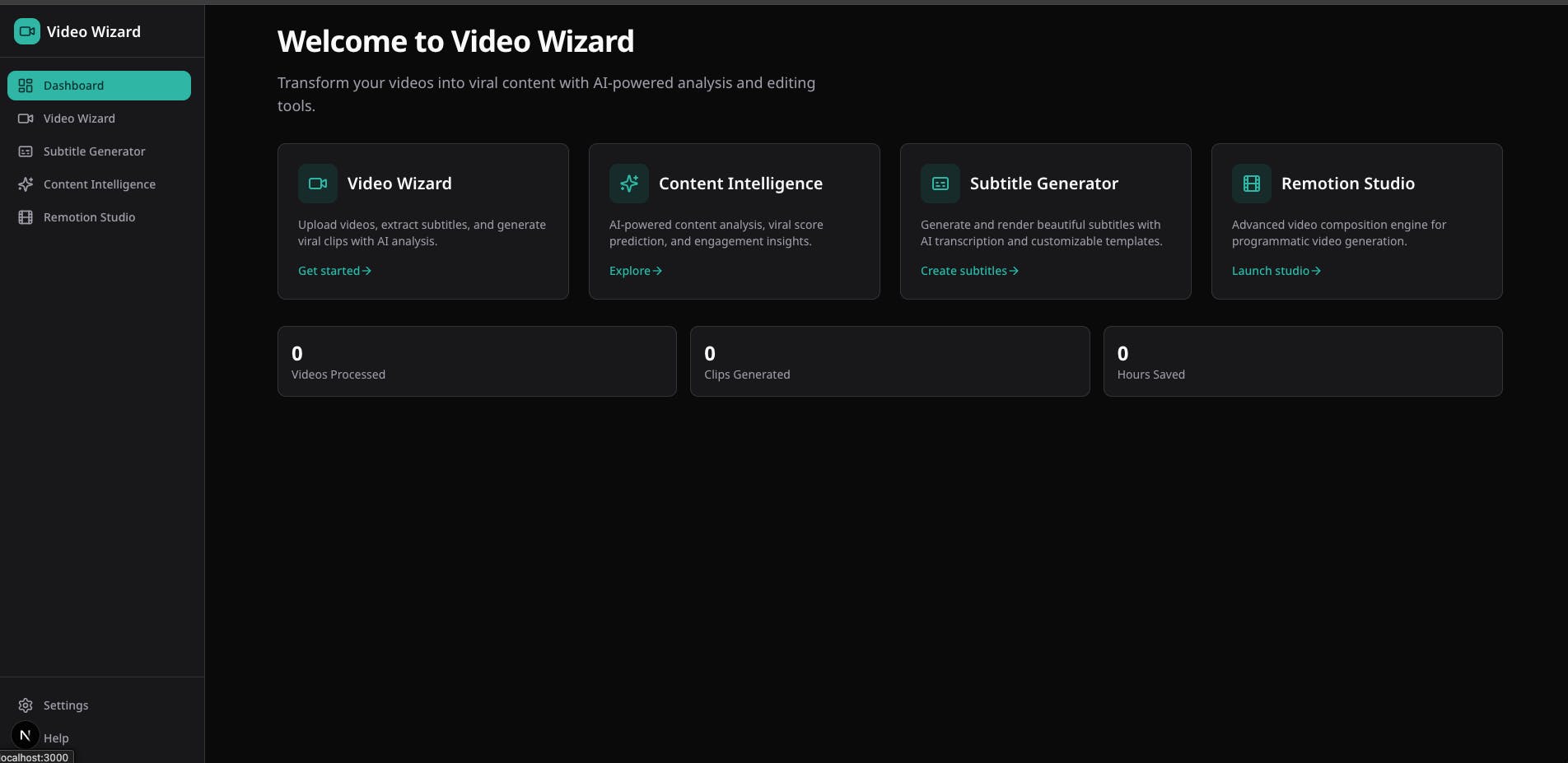
As many of you know, I'm always trying to share knowledge — whether through videos, talks, or interviews. And from every session, I like to extract the most powerful moments and turn them into Shorts.
But there’s a problem.
Most tools that can help me do this easily are paid. And they don't cost just a few bucks; they're quite expensive.
Now, I'm not being cheap. But I thought:
An engineer built this tool. I'm an engineer too. So I can build my own."
And then I reflected:
Well... not just me. **Me + Claude. \ And that's how Video Wizard was born — an open-source, AI-powered tool for turning long-form video into short-form content with subtitles, smart cropping, and professional templates.
In this post, I'll walk you through the architecture, the tech decisions, and what I learned building a production-grade video processing pipeline as a side project.
What Does Video Wizard Do?
Here's the full user flow:
- Upload a video (or paste a YouTube URL)
- AI transcribes the audio using OpenAI Whisper
- GPT analyzes the transcript and detects the most viral moments (scored 0-100)
- Smart cropping with face detection (MediaPipe + OpenCV) reframes for vertical
- Edit subtitles in a visual editor — merge, split, clean filler words
- Pick a template — 9 professional caption styles built as React components
- Render the final video with Remotion
- Download— ready for TikTok, Reels, or YouTube Shorts
But it's not just a clip extractor. There's also a standalone Subtitle Generator that skips the AI analysis and goes straight from upload to rendered subtitles, as well as a Content Intelligencetool for analyzing transcripts without video.
The Tool’s Architecture: Three Services, One Goal
I chose a microservices monorepo approach with Turborepo. Three independent services, each doing what it does best:
Why three services?
- Python has the best video/ML libraries (FFmpeg, MediaPipe, Whisper). There's no good alternative in the JS ecosystem for face detection + smart cropping.
- Remotion needs its own server because it bundles React components into video frames — it's resource-intensive and benefits from isolated rendering.
- Next.js handles the UI, API routing, and orchestration. It's the glue.
Key Insight: Video as React Components
This was the "aha" moment for me.
I choseRemotion because it lets you treat video like a UI. Components, props, composition — but applied to audiovisual content.
Smart Face Tracking: The Python Side
The most interesting algorithmic challenge was the smart cropping. When you convert a 16:9 video to 9:16, you need to decide where to crop — and ideally, you follow the speaker's face.
The processing engine uses MediaPipe's BlazeFace model for detection, then applies aweighted scoring algorithmwhen multiple faces appear
The result? Cinematic-quality camera movement that tracks the speaker without the "security camera" feel. And it's smart enough to skip face detection entirely when the source video already matches the target aspect ratio.
Subtitle Synchronization: The Hard Part Nobody Talks About
Getting subtitles to sync properly across three services with different time formats was the trickiest part.
Stage: Whisper output
Format: Seconds
Example: { start: 0.5, end: 2.3 }
Stage: Frontend editor
Format: Milliseconds
Example: { start: 500, end: 2300 }
Stage: Remotion renderer
Format: Seconds
Example: { start: 0.5, end: 2.3 }
One early bug had 60-second videos rendering as 0.06 seconds because the times were getting divided by 1000 twice. Fun times.
I also added a configurable 200ms subtitle offset to account for the perceptual delay between hearing a word and reading it:
const SUBTITLE_OFFSET = 0.2; // seconds
const adjustedTime = currentTime - SUBTITLE_OFFSET;
It’s a small detail, but it makes the subtitles feel perfectly synced.
The Subtitle Cleanup Toolkit
Beyond basic editing, I built automated detection for common subtitle issues:
- Silence detection — gaps greater than 1 second between segments
- Filler word detection — “um”, “uh”, “like”, “you know” (13 defaults)
- Short segment detection — segments under 300ms (usually noise)
These are pure functions — no side effects, easily testable:
const result = detectIssues(subtitles, config);
const cleaned = removeDetectedIssues(subtitles, result.issues);
With one click, subtitles go from raw Whisper output to clean, professional captions.
Architecture Decisions I’m Proud Of
Screaming Architecture
The folder structure tells you what the app does before you read a single line of code:
features/video/components/   // Renders video UI
hooks/                       // Manages video state
containers/                  // Orchestrates video workflows
types/                       // Defines video data shapes
lib/                         // Provides video utilities
Strict Separation of Concerns
API routes are thin. They only handle HTTP and delegate to services:
export async function POST(request: NextRequest) {
  const body = await request.json();
  const data = await subtitleGenerationService.generateSubtitles(body);
  return NextResponse.json({ success: true, data });
}
All business logic lives in service classes — reusable, testable, and independent of HTTP:
export class SubtitleGenerationService {
  async generateSubtitles(input) { // 1. Call Python transcription // 2. Convert time formats // 3. Structure response }
  async renderWithSubtitles(input) { // 1. Send job to Remotion // 2. Poll until complete // 3. Return video URL }
}
Zod Everywhere
Every external boundary is validated with Zod. Types are inferred, not duplicated:
const BrandKitSchema = z.object({
  logoUrl: z.string().optional(),
  logoPosition: z.enum(['top-left', 'top-right', 'bottom-left', 'bottom-right']),
  logoScale: z.number().min(0.1).max(2),
  primaryColor: z.string().regex(/^#[0-9A-Fa-f]{6}$/).optional(),
});

type BrandKit = z.infer<typeof BrandKitSchema>;
Types come from schemas — not the other way around.
The Tech Stack
- Frontend: Next.js 16 + React 19 \ App Router, server components, API routes
- Styling: Tailwind + shadcn/ui \ Fast, accessible, consistent
- AI Analysis: Vercel AI SDK + GPT-4o \ Structured output for viral clip detection
- Transcription: OpenAI Whisper \ Best multilingual accuracy
- Face Detection: MediaPipe (BlazeFace) \ Lightweight, real-time, no GPU required
- Video Processing: FFmpeg + OpenCV \ Industry standard, battle-tested
- Video Rendering: Remotion \ React-based, programmatic, template-friendly
- Validation: Zod \ Runtime + TypeScript safety
- Monorepo: Turborepo + pnpm \ Fast builds, shared packages
What I Learned
- Engineer + AI = Multiplied Output
This project would have taken months working solo. With Claude as a pair programmer, I went from idea to working prototype significantly faster. Not because the AI wrote everything, but because it accelerated the tedious parts — boilerplate, FFmpeg flags, Remotion configuration — so I could focus on architecture and product decisions.
- Build Your Own Tools
We increasingly depend on external SaaS for everything. Sometimes the best way to learn is to build the tool yourself. You’ll understand video processing, ML pipelines, and rendering engines at a depth that no tutorial can give you.
- Time Formats Will Haunt You
If you’re building anything with subtitles, pick one time format (seconds or milliseconds) and stick with it. Document your conversions. Test edge cases. Your future self will thank you.
What’s Next?
This is still a personal project, but it already includes:
- 9 professional caption templates
- Multi-aspect ratio support (9:16, 1:1, 4:5, 16:9)
- Brand kit customization (logo, colors, fonts)
- Silence and filler word auto-cleanup
- SRT/VTT subtitle export
- YouTube URL support
- Multi-language transcription
Roadmap ideas:
- Batch processing for multiple clips
- Custom template builder (visual editor)
- Cloud deployment with render queue scaling
- Speaker diarization (who said what)
Try It Yourself
The repo is open source. You can run the entire stack locally
I’d love your feedback:
- What feature would you want to see?
- Would you use this for your own content?
- What would you improve?
PRs, issues, and stars are all welcome.
GitHub: https://github.com/el-frontend/video-wizard
Built with Next.js, Python, Remotion, and a lot of help from Claude.