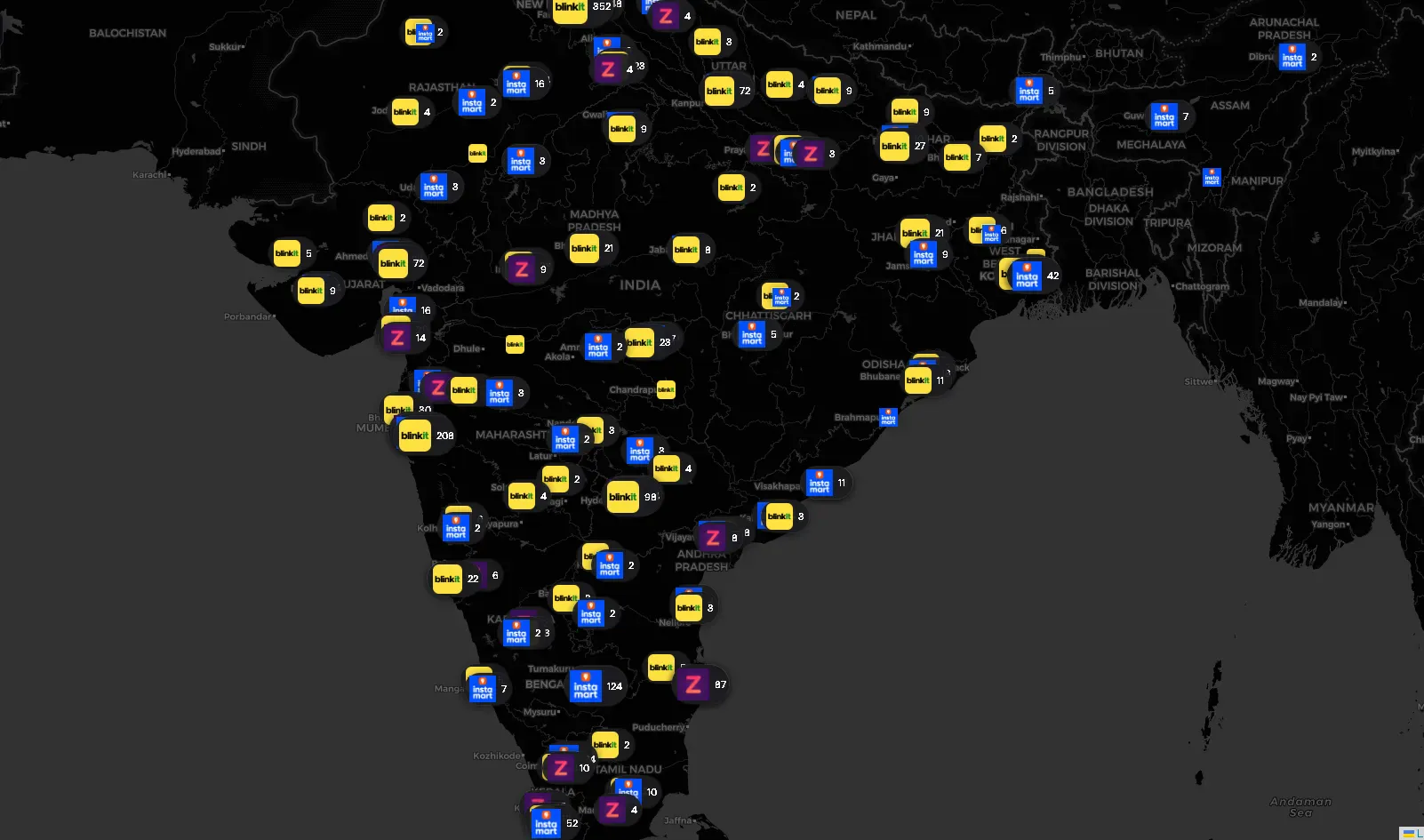
If you order groceries in India and they arrive in 10 minutes, there’s a dark store within 2–3 kilometres of your house. These are small, windowless warehouses — no walk-in customers, no signage, just pickers and riders. Blinkit, Zepto, and Swiggy Instamart collectively operate thousands of them across the country.
I wanted the coordinates of every single one.
Why? Partly curiosity about the infrastructure density of India’s Q-Commerce boom, partly a practical engineering challenge I wanted to document. This post is a breakdown of the full scraping stack — the APIs I reverse-engineered, the defenses I had to work around, and the physical hacks I used when software alone wasn’t enough. If you’re into scraping, reverse engineering, or mobile API analysis, this is for you.
There’s No Store Directory
These platforms don’t expose a public store list. There’s no /api/stores endpoint returning a clean JSON array. Their serviceability APIs are designed around a single question: "Is this GPS coordinate serviceable right now?"
Send a lat/lng, get back whether a store covers you — and if so, which one. That serviceability check is the primitive everything else was built on top of.
The Foundation: Blanket the Country, Filter the Noise
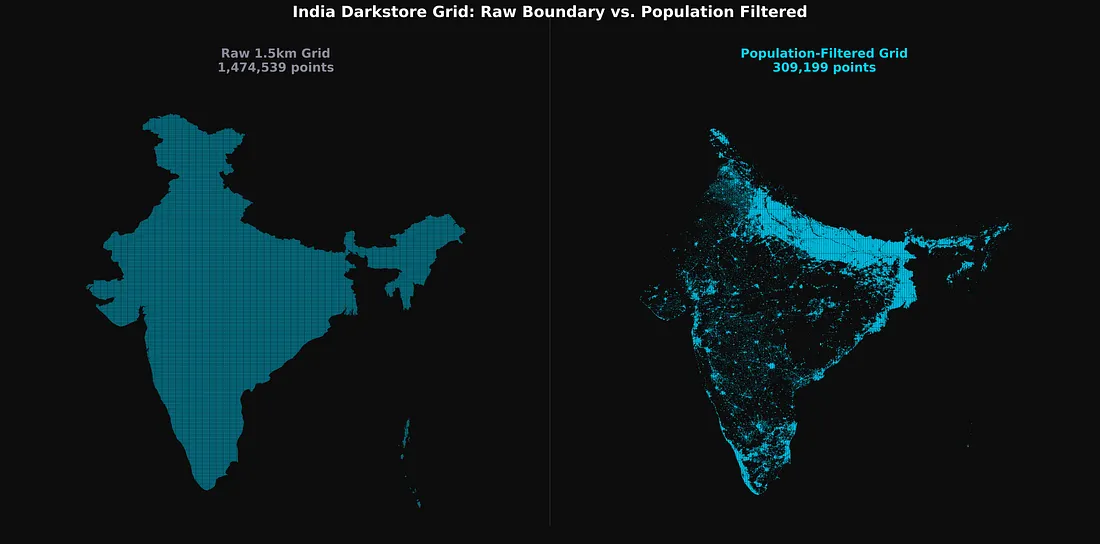
Before writing a single worker, I had to solve a geographic scope problem. India is large. A 1.5–2km coordinate grid over India’s GeoJSON boundary produces roughly 1.4 — 3.3 million points (varies based on grid step) per platform. Most of them sit over mountains, forests, desert, or ocean — places with zero dark stores.
The fix was a population density pre-filter using ind_pd_2020_1km.tif) and dropped any grid coordinate below a population threshold before the scraper ever started.
This single vectorized filter — a boolean mask over a NumPy array — collapsed 1.4 million potential API calls per platform down to a few hundred thousand, concentrated entirely in urban and peri-urban clusters where dark stores actually operate.
How Each Platform Defended Itself
The three platforms had meaningfully different defence profiles, which shaped the approach for each one.
Blinkit was the hardest. HTTP 429 rate limits were frequent, and standard Python HTTP clients were immediately flagged by TLS/JA3 fingerprinting — Cloudflare detecting a non-browser TLS handshake before requests even reached the application layer. The fix was curl_cffi, which impersonates Chrome 110’s TLS footprint at the socket level (impersonate=”chrome110"). One useful discovery mid-project: Indian datacenter IPs worked fine against Blinkit. I moved to a Bright Data datacenter proxy pool for the bulk of the country sweep, which was far faster than mobile IP rotation.
Swiggy Instamart was more unpredictable. Beyond standard 400s range, Swiggy would silently circuit-break — returning 200 OK with either a completely empty body or placeholder-looking data that wasn’t real.
Concurrency had to stay low (10–20 workers) to stay under the WAF threshold. I switched to datacenter proxies with higher concurrency here as well once the data quality looked solid.
Zepto was the most forgiving by far. A single IP could sustain tens of thousands of requests before triggering a rate limit. The discovery phase ran fast.
One thing consistent across all three: the vast majority of scraping used unauthenticated API calls — the same endpoints the app uses before a user logs in. Authenticated requests only became necessary for Zepto’s deep data extraction phase.
Platform 1: Blinkit — Converging 50 Metres
Blinkit’s layout feed endpoint takes GPS coordinates and app identity as custom HTTP headers, and returns the full localized app homepage as a JSON widget tree.
POST https://api2.grofers.com/v1/layout/feed

app_client: consumer_android
lat: 28.6139
lon: 77.2090
auth_key: 45bff2b1437ff764d5e5b9b292f9771428e18fc4XXXXXXXXXXXXXXXXX
battery-level: EXCELLENT
Buried inside the response: merchant_info.id (the store ID) and promise_time_state.DistanceInMeter — the exact road distance in metres from the spoofed coordinate to the nearest dark store.
That distance field became the engine of the convergence algorithm.
The Auto-Convergence Engine
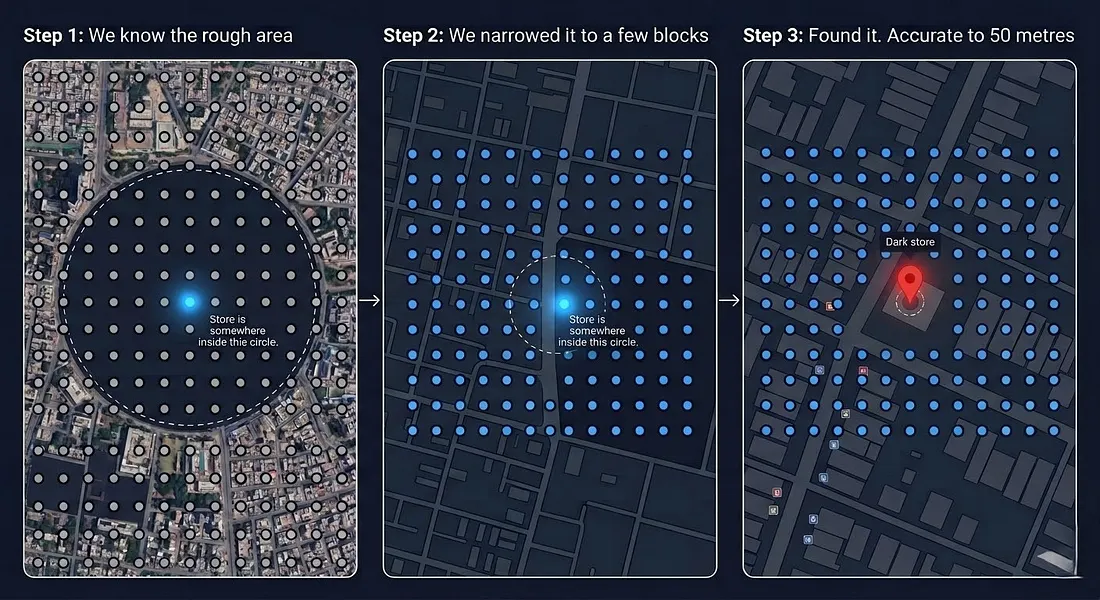
A 1.5km grid sweep confirms a store exists and gives a rough location. Getting to 50-metre accuracy required a second phase.
For every discovered store, I took the last known shortest distance returned by the API and generated an 11×11 micro-grid — 121 new coordinate points arranged within that radius.
I re-submitted this micro-grid, took the new shortest distance, and generated another, tighter micro-grid. Each generation shrinks the search area. After a few iterations, the reported distance converges on near-zero, pinpointing the store’s physical location.
One complication: Blinkit stores occasionally go offline due to surge demand, returning messages like “Due to excess demand, please come back at 6:00 am.” Instead of dropping these, I kept them in a retry queue and waited them out before running the convergence pass.
Platform 2: Zepto — The Store That Hands You Its Own Boundary
Zepto was interesting for a different reason. The discovery phase was easy. The real surprise was what Zepto returned once I hit the right authenticated endpoint.
Phase 1: Discovery
The unauthenticated serviceability endpoint was simple. Send a coordinate, get back a storeId if Zepto covers it. I swept the population-filtered grid at 2km intervals, collecting IDs. Rate limits were rarely a concern at this stage.
The Authenticated Data Pull
Store coordinates, names, and geofences weren’t available from the serviceability endpoint. That data lived in a separate, authenticated internal page endpoint — the app’s homepage payload for a logged-in session.
This required spoofing an Android client (could have done with a web client too, which I realized later) with a valid Bearer token (obtained via a logged-in Zepto web/android session). Something like:
POST /lms/api/v2/get_page HTTP/1.1
Host: api.zepto.com
Content-Type: application/json
Authorization: Bearer eyJhbGc........................
app_version: 26.3.1
User-Agent: okhttp/4.12.0
tenant: ZEPTO
platform: android
Connection: keep-alive

{
  "page_size": 5,
  "latitude": 19.0760,
  "longitude": 72.8777,
  "page_type": "HOME",
  "version": "v2",
  "show_new_eta_banner": true,
  "cartInfo": {
    "removedCampaigns": [],
    "availedCampaignProducts": [],
    "cartProducts": [],
    "zeptoPass": {
      "isPassAdded": false,
      "isBxGyUserOpted": false
    }
  },
  "multi_tab_version": "V2"
}
The response is a large widget tree representing the entire app’s home screen. I deployed recursive JSON traversal hunting for storeDetailsResponse inside it. When found, Zepto returned the store’s real name, precise coordinates, and most notably — servicableGeofence
(Yes, Zepto misspelled it — servicableGeofence is the actual field name in the response.)
   "storeDetailsResponse": {
        "city": {
            "country": "India",
            "name": "Delhi",
            "state": "Delhi"
        },
        "cityId": "c5b3d670-f20e-4cae-a6b7-42e17b8fb08d",
        "closeTime": "20:30:00",
        "estimatedLaunchDate": "2024-12-11T01:30:00Z",
        "id": "3d03e7a7-4ded-458a-9349-2978cd333ef0",
        "initiateSdkNewFlow": true,
        "isActive": true,
        "isFullNightDeliveryEnabled": false,
        "isLive": true,
        "isOnline": true,
        "issueAtStore": false,
        "latitude": 28.641493,
        "longitude": 77.234596,
        "name": "DEL-Connaught Place",
        "openTime": "00:30:00",
        "phase": "LIVE",
        "raining": false,
        "servicableGeofence": [
             ["28.6546246", "77.2365741"],
             ["28.6560326", "77.2366875"],
             ["28.6561437", "77.2344435"],
             ["28.6561287", "77.233521"],
             ...
            ]
}
- And the store’s real name,
- Precise latitude and longitude,
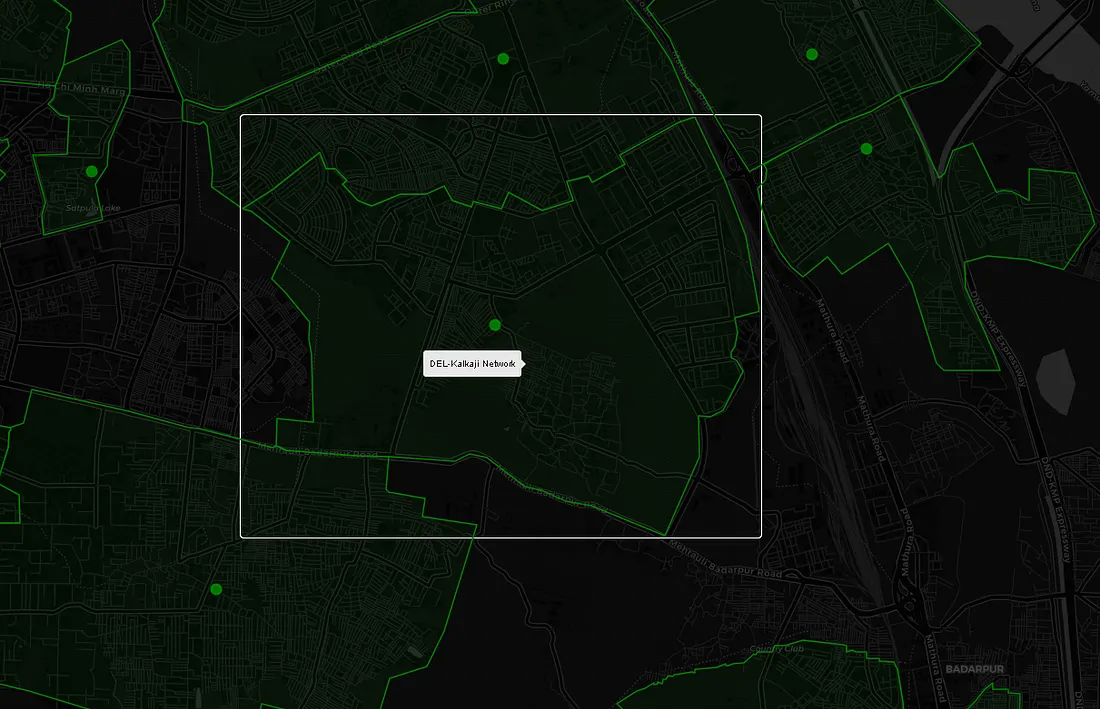
- servicableGeofence — a polygon of GPS coordinates outlining the store’s exact delivery boundary
When a servicableGeofence like this is plotted on a map, it looks like this:
Platform 3: Swiggy Instamart — Working With the Cart API
Phase 1: Pod Discovery
Instamart stores are called “pods” internally. The select-location home API reveals which pod services a given coordinate and returns its podId. Sweeping the population-filtered grid gave me pod coverage across the country.
Getting the Store Data
To retrieve deep store metadata — operational status, internal store info — I hit Instamart’s cart API with a guest cart payload targeting a specific pod.
To construct a cart payload the backend would actually process, I needed a spinId alongside the podId. The spinId is an internal product identifier surfaced during the Phase 1 discovery sweep — I don't know what it maps to semantically, but it was the minimum required field to make the cart payload structurally valid. Without it, the backend rejects the request outright.
POST /api/instamart/checkout/v2/cart?pageType=INSTAMART_CART HTTP/1.1
Host: www.swiggy.com
Content-Type: application/json
Cookie: lat=19.076000; lng=72.877700

{
  "data": {
    "items": [{
      "productId": "",
      "quantity": 1,
      "tradeFreebie": true,
      "spin": "84729103",
      "itemId": "T",
      "meta": {
        "type": "structure",
        "storeId": 10014,
        "freebie": false,
        "isGiftBag": false
      },
      "serviceLine": "INSTAMART"
    }],
    "cartMetaData": {
      "deliveryType": "INSTANT",
      "primaryStoreId": 10014,
      "storeIds": [10014]
    },
    "cartType": "INSTAMART"
  },
  "source": "userInitiated"
}
The geographic cookies are essential. The lat/lng values have to correspond to the pod’s actual service zone — send the wrong coordinates and the response returns nothing useful. With a valid payload and matching location cookies, Instamart’s backend returned a storesInfo array containing the store’s coordinates and operational status.
The Sentinel Loop
Quick-commerce stores go offline transiently — heavy rain, inventory exhaustion, surge demand. When a pod was offline, Swiggy’s API would silently route me to a different nearby store instead. If that was a store I hadn’t seen before, I stored it — but kept the original offline pod in the queue for retry. The sentinel loop re-attempted every offline pod every few minutes until it came back online and returned its own data directly. Without this, a significant chunk of the network would have been missing from the final dataset.
Initial Physical Setup
In the early stages, I wasn’t sure if any of this was feasible. Before spending money on proxies to prove a concept, I went with the cheapest possible IP rotation: a physical Android phone sitting next to the laptop, tethered as a mobile hotspot.
When a 429 hit, a Windows alert popped up, I toggled Airplane Mode manually to get a fresh carrier IP, and hit Enter to resume all workers. Crude, but free — and it was enough to prove the approach worked.
Once validated, I automated this with MacroDroid: a webhook on the Android device that toggled Airplane Mode on/off command. The Python script fired the webhook, waited 18 seconds for the cellular radio to cycle, polled api.ipify.org until a new IP was confirmed, then resumed all async workers.
For the production sweeps on Blinkit and Instamart, I moved to a Bright Data datacenter proxy pool — faster, scalable, and datacenter IPs weren’t being filtered by either platform.
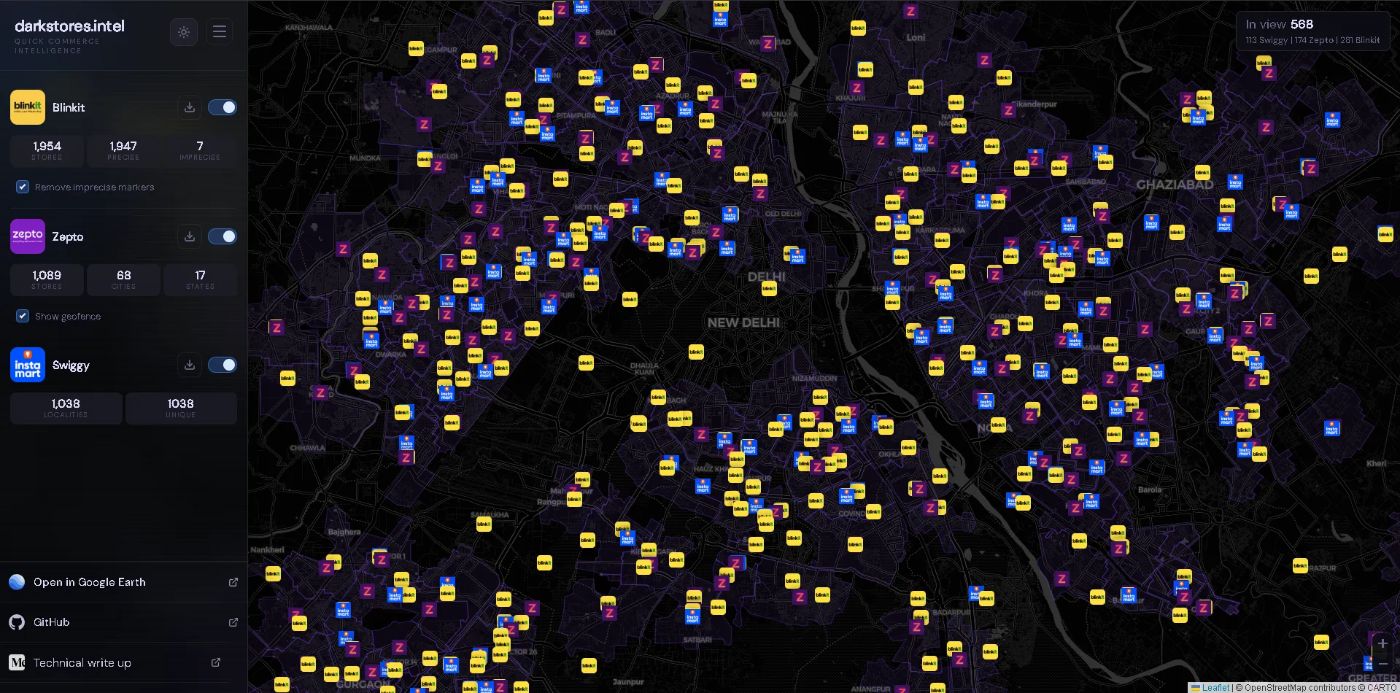
What the Final Dataset Looks Like
After running all three scrapers to completion:
-
Every active Blinkit dark store in India, coordinates converged to within 50 metres
-
Every active Zepto dark store, with exact delivery geofence polygons
-
Every active Swiggy Instamart pod, with coordinates and operational status
Takeaways
- Pre-filter before you scale: Example: 1.4–3.3 million coordinate points per platform is too many. WorldPop + rasterio collapses that to a manageable working set before a single API call is made.
- A
200is not a success: Swiggy's WAF returns200 OKwith an empty or placeholder body. Always validate the response body explicitly, not just the status code. - Validate cheaply before you spend: Mobile hotspot IP rotation is free and effective for proving an approach works. Switch to proxies once you know the data is there.
[story continues]
tags