
In most enterprise Databricks environments (like in MSC or large analytics ecosystems), system tables such as system.job_run_logs or system.cluster_events may be restricted or disabled due to security or governance policies.
However, tracking cluster utilization and cost is crucial for :
- Understanding how efficiently jobs use compute
- Identifying idle clusters or cost leaks
- Forecasting infrastructure budget
- Building custom cost dashboards
This blog demonstrates a step-by-step approach to compute cluster utilization and cost using only Databricks REST APIs — no system tables required.
Project Use Case
In our MSC data platform, we run multiple Databricks clustersacross development, test, and production.
We had three major challenges:
- No access to system tables (restricted by admin policies)
- Ephemeral clusters for jobs created dynamically by ADF or orchestration pipelines
- No direct view of how cluster utilization translates to cost
Hence, we built a lightweight utilization analyzer that :
- Pulls data from Databricks REST APIs
- Calculates job runtime vs cluster runtime
- Estimates cost using DBU and VM rates
- Outputs an easy-to-consume DataFrame
The problem & approach
The identified challenge
Teams often need to know:
- Which clusters are idle (running with low job activity)?
- What is the utilization % (job runtime vs cluster uptime)?
- How much is each cluster costing (DBU + VM)?
When Unity Catalog system tables (e.g., system.job_run_logs) are unavailable, the default SQL-based approach fails. The REST API becomes the reliable fallback.
High-level approach used in the notebook
- List clusters via /api/2.0/clusters/list.
- Estimate cluster uptime using timestamps inside the cluster JSON (created/start/terminated fields). (This is a pragmatic fallback when /clusters/events is unavailable.)
- Get recent job runs using /api/2.1/jobs/runs/list with time filters (or limit).
- Match job runs to clusters using cluster_instance.cluster_id (or other cluster metadata).
- Compute utilization: utilization % = total_job_runtime / total_cluster_uptime.
- Estimate cost using a simple formula: cost = running_hours × (DBU/hr × assumed DBU) + running_hours × nodes × VM $/hr.
This notebook purposely uses bounded queries (last N runs, time window) so it runs fast.
1. Setup & Configuration
# Databricks Cluster Utilization & Cost Analyzer (no system tables)
# Author: GPT-5 | Works on any workspace with REST API access
# Requirements: Databricks Personal Access Token, Workspace URL
# You can run this inside a Databricks notebook or externally.

import requests
from datetime import datetime, timezone, timedelta
import pandas as pd

# ================= CONFIG =================
DATABRICKS_HOST = "https://adb-2085295290875554.14.azuredatabricks.net/"  # Replace with your workspace URL
# DATABRICKS_TOKEN = ""  # Replace with your PAT
HEADERS = {"Authorization": f"Bearer {token}"}

params={"start_time":int(datetime.now().timestamp()*1000),"end_time":int((datetime.now()+timedelta(days=1)).timestamp()*1000),"order":"DESCENDING"}

# Time window (e.g., last 7 days)
DAYS_BACK = 7
SINCE_TS_MS = int((datetime.now(timezone.utc) - timedelta(days=DAYS_BACK)).timestamp() * 1000)
UNTIL_TS_MS = int(datetime.now(timezone.utc).timestamp() * 1000)

# Cost parameters (adjust to your pricing)
DBU_RATE_PER_HOUR = 0.40         # $ per DBU/hr
VM_COST_PER_NODE_PER_HOUR = 0.60 # $ per cloud VM node/hr
DEFAULT_DBU_PER_CLUSTER_PER_HOUR = 8  # Typical for small-medium jobs cluster


# ==========================================
This section initializes:
- Workspace URL & token for authentication
- Time range for which you want to analyze utilization
- Cost assumptions:
- DBU rate ($/hr per DBU)
- VM node cost
- Approximate DBU consumption
In enterprise setups, these rates can be fetched dynamically via your FinOps or billing APIs.
-
API Wrapper Function
#  Api GET request
def api_get(path, params=None):
    url = f"{DATABRICKS_HOST.rstrip('/')}{path}"
    try:
        r = requests.get(url, headers=HEADERS, params=params, timeout=60)
        if r.status_code == 404:
            print(f"Skipping :{path} (404 Not Found)")
            return {}
        r.raise_for_status()
        return r.json()
    except Exception as e:
        print(f"Error: {e}")
        return {}
This helper function standardizes all REST API GET calls.
It:- Builds the full endpoint URL
- Handles 404 gracefully (important when clusters or runs have expired)
- Returns parsed JSON
Why it matters: This function ensures clean API communication without breaking your notebook flow if any cluster data is missing.
-
List All Active Clusters
# ---------- STEP 1: Get All Clusters Related Details ----------
def list_clusters():
    clusters = []
    res = api_get("/api/2.0/clusters/list")
    return res.get("clusters", [])
This retrieves all clusters available in your workspace.
It’s equivalent to viewing your “Compute” tab programmatically.
The response contains:- Cluster IDs
- Names
- Node counts
- Creator information
- Creation & termination times
Use case: Helps identify which clusters are consuming resources in the selected window.
4. Estimate Cluster Runtime
# ---------- STEP 2: Get Cluster Events Runtime ----------
def get_cluster_runtime(cluster):
    events = []
    offset = 0
    limit = 200
    # while True:
    # params = {"cluster_id": cluster_id}

    created = cluster.get("creator_user_name")
    created_time = cluster.get("start_time") or cluster.get("created_time")
    terminated_time = cluster.get("terminated_time")
    if not created_time:
        return 0
    end_ts = terminated_time or UNTIL_TS_MS
    start_ms = max(created_time, SINCE_TS_MS)
    runtime_ms = max(0, end_ts - start_ms)
    return runtime_ms /1000/3600
We calculate total running hours for each cluster:
- Uses creation and termination timestamps
- Handles currently running clusters (terminated_time missing)
- Normalizes to hours
Why it’s important: This value is the denominator for utilization — representing total cluster uptime during the window.
5. Get Recent Job Runs
# ------------------Get Recent Job Runs ----------------------------
def get_recent_job_runs():
    params ={"start_time":int(datetime.now().timestamp()*1000),"end_time":int((datetime.now()+timedelta(days=1)).timestamp()*1000),"order":"DESCENDING"}
    res = api_get("/api/2.1/jobs/runs/list", params)
    return res.get("runs", [])
Instead of fetching the entire job history (which is slow),
This function retrieves the mostrecent 10 job runs for quick diagnostics.In production, you can filter by:
- Specific job_id
- completed_only=true
- Date window (start_time_from, start_time_to)
-
Compute Utilization and Cost
# -------------------------------------Compute Cost and parse cluster utilization detials ---------------------

def compute_utilization_and_cost(clusters, job_runs):
    records =[]
    now_ms = int(datetime.now(timezone.utc).timestamp() * 1000)
    for c in clusters:
        cid = c.get("cluster_id")
        cname = c.get("cluster_name")
        print(f"Processing cluster {cname}")

        running_hours = get_cluster_runtime(c)

        if running_hours == 0:
            continue

        job_runtime_ms = 0
        for r in job_runs:
            ci = r.get("cluster_instance",{})
            if ci.get("cluster_id") == cid:
                s = r.get("start_time") or SINCE_TS_MS
                e = r.get("end_time") or now_ms
                job_runtime_ms += max(0, e - s)
        job_hours = job_runtime_ms / 1000 / 3600
        util_pct =(job_hours / running_hours) * 100 if running_hours > 0 else 0

        num_nodes = (c.get("num_workers") or c.get("autoscale",{}).get("min_workers") or 0) +1

        dbu_cost = running_hours * DEFAULT_DBU_PER_CLUSTER_PER_HOUR * DBU_RATE_PER_HOUR
        vm_cost = running_hours * num_nodes * VM_COST_PER_NODE_PER_HOUR

        total_cost = dbu_cost + vm_cost
        records.append({
            "cluster_id": cid, "cluster_name": cname,"running_hours":round(running_hours,2), "job_hours": round(job_hours,2) ,"utilization_pct": round(util_pct,2), "nodes": num_nodes,"dbu_cost": round(dbu_cost,2), "vm_cost": round(vm_cost,2), "total_cost": round(total_cost,2)
        })
    return pd.DataFrame(records)
This is the heart of the logic:
- Loops through each cluster
- Calculates total job runtime per cluster (using job runs API)
- Derives utilization percentage = (job_hours / cluster_running_hours) × 100
- Estimate cost:
- DBU cost based on rate × DBU/hr
- VM cost = node_count × node_cost/hr × running_hours
Why this matters:
This gives a unified picture ofefficiency and expense — useful for identifying clusters with high cost but low utilization.7. Orchestrate the Pipeline
# ---------- MAIN ----------
print(f"Collecting data for last {DAYS_BACK} days...")
clusters = list_clusters()
job_runs = get_recent_job_runs()
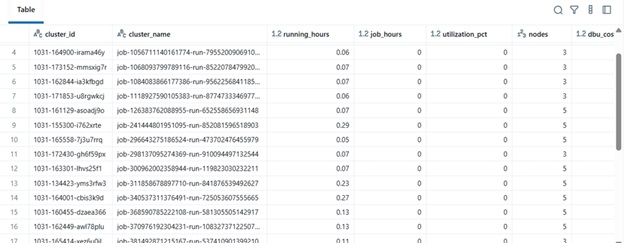
df = compute_utilization_and_cost(clusters, job_runs)

display(df.sort_values("utilization_pct", ascending=False))
This final block:
- Retrieves data
- Performs cost computation
- Displays the sorted Data Frame
In practice, this Data Frame can be :
-
Exported to Excel or Delta Table
-
Sent to Power BI dashboards
-
Integrated into FinOps automation pipelines
Results Example
|
cluster_name |
running_hours |
job_hours |
utilization_pct |
nodes |
total_cost |
|---|---|---|---|---|---|
|
etl-job-prod |
36.5 |
28.0 |
76.7% |
4 |
$142.8 |
|
dev-debug |
12.0 |
1.2 |
10.0% |
2 |
$18.4 |
|
nightly-adf |
48.0 |
45.0 |
93.7% |
6 |
$260.4 |
-
Real-World Benefit
By implementing this analyzer:
- Engineering teams can track cluster cost even without audit access.
- Managers get visibility into underutilized clusters.
- DevOps can automatically terminate low-usage clusters.
- Finance can validate Databricks invoices with internal metrics.
In our MSC project, we used this as part of our data platform observability stack — combining REST API data, ADF job logs, and cost trends into a unified dashboard.
[story continues]
tags