


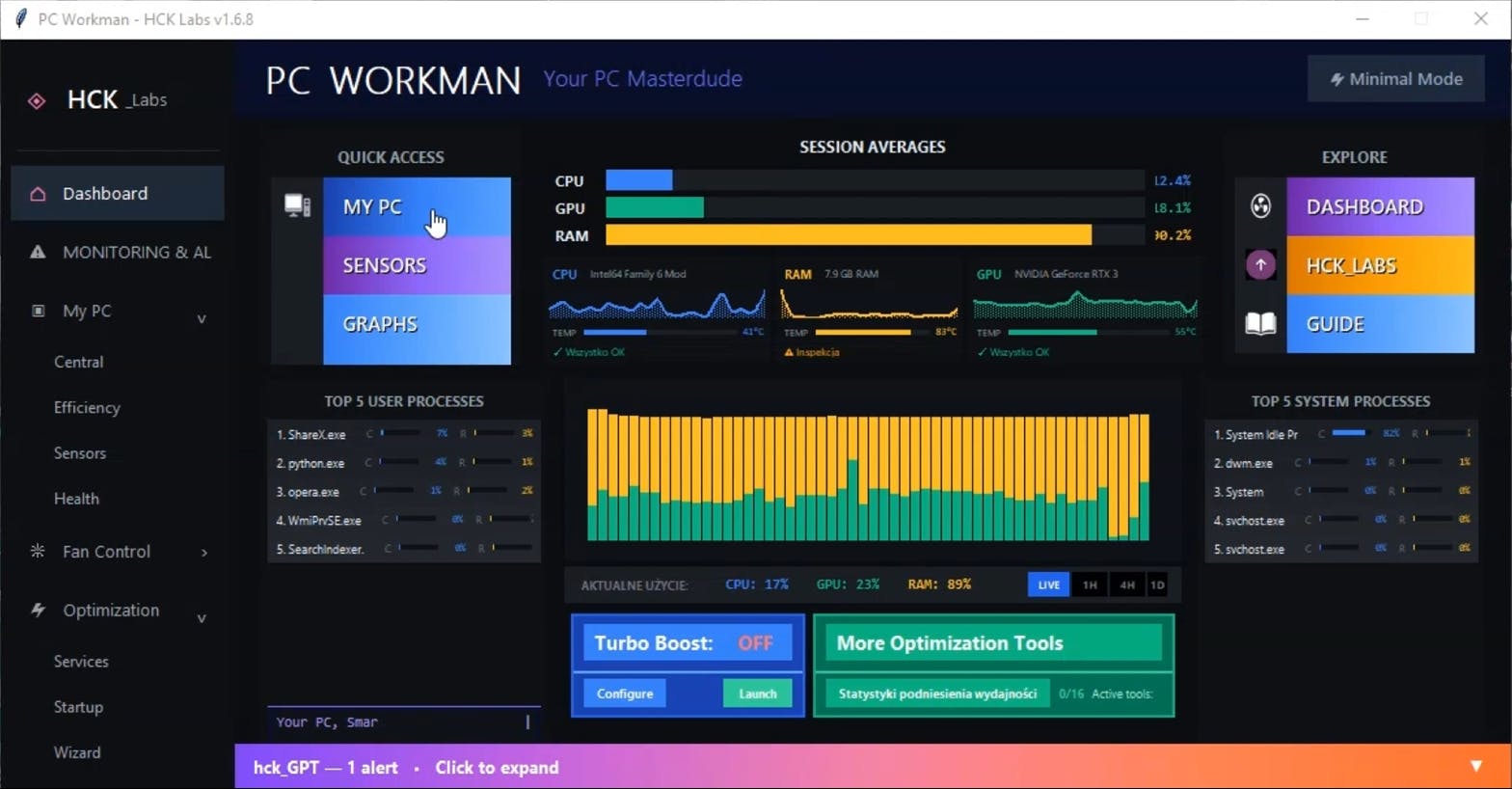
The Number That Changed Everything
Eighteen downloads.
On paper, that's nothing. Apps on the Microsoft Store get thousands in their first week.
Open source projects on GitHub hit triple digits on launch day.
But for PC_Workman - a system monitoring tool I built alone over eight months. 80 downloads meant something different.
It meant 60 people:
- Saw a project from an unknown developer
- Took a chance on software that could access their CPU, GPU, and RAM data
- Trusted code written by someone who learned PyQt5 while the app was being built
That's not "just 60 downloads."
That's 60 signals of trust.
And trust is exactly what's broken in system monitoring software today.
The Problem: Monitors That Show, Don't Explain
I started building PC_Workman because existing tools frustrated me.
MSI Afterburner shows "CPU: 87%" - but doesn't explain why.
HWMonitor logs temperature spikes, but doesn't help you prevent them.
Task Manager tells you what's consuming resources right now, but has no memory of what happened five minutes ago when your PC froze.
The pattern: these tools are reactive, not proactive.
They answer "what's happening?" but never "why is this happening?" or "how do I fix it?"
I needed something different. Not just for monitoring, for understanding.
So I built it.
Eight Months, Four Rebuilds, One Goal
June 2025: Started with spaghetti code and enthusiasm.
September 2025: First rebuild. Realized I didn't understand threading.
November 2025: Second rebuild. CSV files hit 500MB, app lagged.
December 2025: Third rebuild. Lost warehouse job three days before Christmas. Restarted that night.
January 2026: Fourth rebuild. Shipped v1.6.3 - the first actual release.
February 2026: Fourth rebuild. Shipped for testers v1.6.8 - the first actual release.
March 2026: Roadmap is published for milestone 1.7.8. (And 2.0, Microsoft Store Publish goal)
800+ hours between those dates.
Not because I'm slow. Because I was learning while building.
Technical Evolution: CSV -> SQLite
The biggest architectural change: migrating from CSV logging to SQLite.
Why it mattered:
In v1.5.x, PC_Workman wrote system stats to CSV files every minute:
timestamp,cpu,gpu,ram
2025-12-01 14:23:45,34.2,67.8,45.1
2025-12-01 14:24:45,36.1,68.2,44.9
After a week: 10,080 rows.
After a month: 43,200 rows.
After three months: CSV files hitting 500MB.
Reading that data to display historical charts? 3-5 second lag.
Users don't wait 5 seconds for a graph.
Solution: Stats Engine v2
Built a SQLite pipeline with tiered aggregation:
- Minute-level data: Kept for 7 days
- Hourly aggregates: Kept for 90 days
- Daily summaries: Kept forever
Database size after a month: 15MB instead of 500MB.
Chart load time: Under 200ms.
But the real win wasn't performance, it was intelligence.
From Data to Insights
With SQLite came pattern detection.
The engine now tracks:
- Which processes run at which times (recurring patterns over 7 days)
- CPU/GPU spikes correlated with specific applications
- Temperature trends during gaming vs. idle
- RAM usage patterns per application per day
Example: PC_Workman noticed I always launched Battlefield around 8 PM. Started pre-optimizing system resources at 7:55 PM.
That's not monitoring. That's learning.
What 60 Downloads Taught Me
January 19, 2026: Released v1.6.3 with the first .exe installer.
Download curve:
- Day 1: 25 downloads (launch spike)
- Week 1: Average 10/day
- Month 1: Average 5-7/day
- Month 2: Settled at 1-2/day (organic)
Total by mid-March: 60+ downloads.
Here's what the numbers showed:
1. Launch Momentum Fades Fast
25 downloads on day one felt like success.
Then 10. Then 5. Then 2.
Pattern: Launch spike -> exponential decay -> organic plateau.
Reality check: Initial excitement doesn't sustain growth. You need continuous discovery.
2. 40% Were Repeat Visitors
Traffic analysis revealed something unexpected:
Four out of ten downloads came from people who:
- Saw the initial post
- Clicked to GitHub
- Left
- Came back days or weeks later
- Then downloaded
Lesson: People don't need a perfect product. They need to see you're serious about building it.
The downloads that came back did so because:
- GitHub showed consistent commits (activity is seriousness!)
- Release notes were detailed (transparency in build in public is trust)
- Roadmap was public
3. Build-in-Public Drove 40% of Traffic
Tracked referral sources:
- LinkedIn posts: 40%
- Sourceforge listing: 20%
- HackerNoon: 25%
- Direct GitHub: 5%
- Other: 10%
LinkedIn worked because I shared:
- Technical problems and solutions
- Actual code snippets
- Honest struggles (bugs, rebuilds, failures)
- Incremental progress (commits, not just releases)
The worst-performing content? Generic announcements.
"Released v1.6.3!" - 50 views.
"Here's why I rebuilt the CSV logging system" + code screenshots - 600 views.
4. Trust Gaps Are Real
Every download required the user to:
- Bypass SmartScreen: "Windows protected your PC"
- Grant system access: CPU/GPU monitoring needs permissions
- Trust data privacy: No policy page, just MIT license
- Believe it won't break things: No company backing, no reviews
60 people cleared all four hurdles.
That's not trivial.
And it's exactly why Microsoft Store matters more than download counts.
Why 80 Downloads Isn't the Goal, Microsoft Store Is
Here's what changed my perspective:
I'm not chasing 100 downloads, or 1,000, or viral GitHub stars.
I'm chasing legitimacy.
And on Windows, legitimacy comes from one place: Microsoft Store.
The Competition Gap
Check the Microsoft Store for "system monitoring."
You'll find:
- Basic CPU meters
- Temperature widgets
- Generic task managers
You won't find:
- MSI Afterburner
- HWMonitor
- Core Temp
- GPU-Z
- Any serious monitoring tool
They're all distributed via:
- Direct downloads (executable files)
- Third-party sites (SourceForge, CNET)
- GitHub releases
Why does this matter?
Because 95% of Windows users will never download an .exe from a random GitHub repo.
They will click "Get" on the Microsoft Store.
Microsoft Store: Not Distribution, Validation
Getting PC_Workman on the Microsoft Store isn't about reaching more users.
It's about removing friction between software and trust.
Here's what most people don't understand about desktop software distribution in 2026:
When you download an .exe from GitHub:
- Windows shows: "Windows protected your PC"
- You click "More info" -> "Run anyway"
- Antivirus scans it suspiciously
- No update mechanism (you manually check for new versions)
- No accountability (developer could disappear tomorrow)
When you install from Microsoft Store:
- One click: "Get"
- Automatic updates
- Microsoft has verified the publisher
- Sandboxed (can't access system files without permission)
- Reviews visible (social proof)
- Uninstall is clean (no registry residue)
For a solo developer with zero brand recognition, that difference is everything.
The Technical Requirements (And Why They Matter)
Publishing to Microsoft Store isn't just uploading a file. Microsoft enforces security standards that prove you're legitimate.
1. Code Signing Certificate ($200-400/year)
Every executable must be digitally signed with a verified certificate.
What this proves:
- You're a real person/company (identity verified)
- The code hasn't been tampered with since signing
- You're accountable (certificate ties to legal identity)
Why it matters for users:
- No SmartScreen warning
- Clear "Publisher: Marcin Firmuga" instead of "Unknown Publisher"
- Trust signal: "This person stands behind this code"
Cost: €200-400/year depending on certificate authority.
For a free app with zero revenue, that's significant. But it's the price of legitimacy.
2. Privacy Policy (Required)
Microsoft requires a public privacy policy before Store approval.
For PC_Workman, this is actually good:
Current state:
- No telemetry
- No cloud sync
- No user tracking
- All data stored locally in
/data/
Privacy policy makes this explicit instead of assumed.
Users can read: "We don't collect anything. Your data never leaves your PC."
That's not a burden. That's a competitive advantage.
Competitors:
- Many system monitors phone home (crash reports, usage stats)
- Some sell "anonymized" hardware data
- Privacy policies buried or vague
PC_Workman:
- "We monitor your PC. We don't monitor you."
- One-sentence privacy policy possible
- Open source (code is auditable proof)
3. MSIX Packaging (Sandboxing Challenge)
Store apps use MSIX format instead of traditional .exe installers.
Key difference: Sandboxing.
Traditional .exe:
- Can access any file on system
- Can modify registry freely
- Can run background services
- Full system permissions
MSIX (Store app):
- Limited file access (app folder + specific directories)
- Registry changes are virtualized
- Background tasks require explicit permission
- Runs in AppContainer
Challenge for PC_Workman:
Some features need system-level access:
- Reading all process CPU/RAM usage
- Monitoring GPU temperatures
- Controlling fan speeds
- Managing Windows services (TURBO BOOST mode)
Solution:
Request specific capabilities in app manifest:
xml
<Capability Name="runFullTrust" />
<rescap:Capability Name="confirmAppClose" />
<DeviceCapability Name="lowLevel" />
Microsoft reviews these requests. You must justify why each capability is necessary.
Why this is good:
Users see exactly what permissions the app needs.
Not hidden in an installer. Not assumed. Explicit and reviewable.
4. Store Review Process (1-3 Weeks)
Microsoft reviews every submission:
- Automated security scan
- Manual testing by reviewers
- Policy compliance check
- Privacy policy verification
Possible rejection reasons:
- Crashes during testing
- Accessing more system resources than justified
- Unclear privacy policy
- Incomplete functionality
Benefit:
If Microsoft approves PC_Workman, it's a third-party validation that the software:
- Does what it claims
- Doesn't have obvious security issues
- Meets minimum quality standards
That's worth more than 1,000 downloads from random users.
The Path to v2.0: Building for the Store
Current state: v1.6.8 (February 2026)
Target: v2.0 on Microsoft Store (Q3 2026)
Between here and there: v1.7.9 roadmap.
16 Features in Research/Development
Not building randomly. Researching what actually works.
Studied optimization tools: Advanced SystemCare, Razer Cortex, CCleaner, Wise Game Booster.
Extracted 16 common features. Testing which deliver real performance gains.
TURBO BOOST Mode (5 core features confirmed):
Feature 1. Auto RAM Optimizer
Trigger: RAM usage >75% for 30+ seconds
Action: Clear standby memory (cached file data)
Expected gain: 300-800 MB freed
Status: Tested, works consistently
Feature 2. Background Process Sleeper
Trigger: Process idle >5 minutes (zero CPU, no focus)
Action: Suspend (not kill) via NtSuspendProcess
Expected gain: 10-20% CPU reduction
Status: Testing on different process types
Feature 3. Non-Essential Service Killer
Target: Print Spooler, Windows Search, Xbox services (20-30 services)
Action: Stop temporarily, restore on exit
Expected gain: Noticeable on HDDs, moderate on SSDs
Status: Safe service list finalized
Feature 4. CPU Core Unparking
Problem: Windows parks cores to save power
Solution: Unpark all cores, boost game priority
Expected gain: 5-15% FPS on mid-tier CPUs
Status: Registry tweak working, needs admin elevation
Feature 5. High Performance Power Plan
Trigger: Fullscreen game detected
Action: Auto-switch to High Performance plan
Expected gain: 10-20% overall performance
Status: Detection logic tested with 15+ games
11 more features in testing pipeline.
Not shipping until proven. No placebo toggles.
Auto-Update System
Current problem: Users on v1.6.3 don't know v1.6.8 exists.
Solution:
- Check GitHub releases API on startup
- Show dismissible banner if newer version available
- Click -> opens release page
- User decides: update now or later
Not doing:
- Auto-download (security risk)
- Forced updates (annoying)
- Background updates (Store handles this anyway)
This is a temporary bridge until Store version ships.
Code Quality Pass
v1.7.x focus: Clean, maintainable, auditable code.
Why this matters for Store submission:
- Reviewers may examine source (it's public)
- Crashes during review = rejection
- Sloppy code = perception of sloppy security
Changes:
- Remove all commented-out code (500+ lines deleted)
- Add type hints (Python 3.9+ everywhere)
- Extract magic numbers to named constants
- Document complex logic with inline comments
- Basic test coverage for critical paths
Not aiming for perfection. Aiming for professional.
What I Learned Building to 60 (That Applies to 1,000)
1. Transparency Compounds
Early on, I hid problems.
Rebuild #3 happened because of bad architecture. I just released v1.4 like nothing was wrong.
Later, I started sharing:
- "Rebuilt the stats engine because CSV files hit 500MB"
- "Threading model was wrong, causing UI lag"
- "Fan control crashed on AMD motherboards"
Result: More engagement, more trust, more helpful feedback.
Lesson: Users prefer honest struggle over polished perfection.
2. Metrics Lie, Signals Don't
60 downloads = metric.
40% repeat visitors = signal (they checked, thought about it, came back).
14 GitHub stars = metric.
11 watchers actively tracking development = signal (they care about updates).
Lesson: Optimize for signals, not metrics.
3. Infrastructure > Features (At First)
Most of v1.7.x isn't features. It's:
- CONTRIBUTING.md (shows project is welcoming)
- Issue templates (makes bug reports useful)
- Automated release notes (saves time)
- Public roadmap (shows direction)
These don't add functionality. They add credibility.
For a solo dev, credibility unlocks contributors, feedback, and trust.
4. The Store Isn't the Finish Line
Microsoft Store approval won't suddenly make PC_Workman popular.
But it will:
- Remove trust barriers (no SmartScreen, verified publisher)
- Enable organic discovery (1B+ Windows users search Store)
- Force quality standards (sandboxing, review process)
- Provide update infrastructure (automatic, seamless)
The real goal:
Create a feedback loop where:
- Store for easier to trust
- Easier to trust for more downloads
- More downloads for more feedback
- More feedback for better product
- Better product for easier to recommend
- Recommendations for more organic growth
80 downloads -> 200 -> 500 -> Microsoft featuring in "Utilities" category.
That's the path. Store is step one.
What's Next
v1.7.0 ships late March (auto-update check, UI polish).
v1.7.9 ships June (TURBO BOOST complete, code freeze).
v2.0 ships Q3 2026 (Microsoft Store, MSIX packaging, local AI).
Between now and then:
- Weekly roadmap updates (GitHub Discussions)
- Build-in-public posts (LinkedIn, Twitter)
- Technical deep-dives (DEV.to, Medium)
- Community feedback integration (Issues, Discussions)
800 hours so far.
Probably 400 more until Store submission.
Built on constraints. Optimized for reality. Shipped despite imperfection.
Not because I'm talented.
Because I'm stubborn.
If You're Building Something Similar
Don't wait for perfect.
Ship what you have. Improve it publicly.
Don't chase vanity metrics.
60 engaged users > 1,000 passive downloads.
Don't skip infrastructure.
CONTRIBUTING.md matters more than you think.
Don't underestimate legitimacy.
Microsoft Store approval = third-party validation worth more than self-promotion.
Don't build alone if you don't have to.
I built solo because I had no choice. You might.
Open source invites collaboration. Use it.
Links
PC_Workman on GitHub: https://github.com/HuckleR2003/PC_Workman_HCK
Development roadmap: https://github.com/users/HuckleR2003/projects/3
All my links (Twitter, LinkedIn, Ko-fi, etc.): https://linktr.ee/marcin_firmuga
Follow the journey:
Twitter: @hck_lab (daily updates)