
Abstract:
Docker containers are foundational to modern artificial intelligence (AI) and machine learning (ML) workflows, but the large size of typical ML images often results in significant start-up latency, much of which comes from image pulls during cold starts. This article outlines practical strategies to cut start-up latency, presented from simpler adjustments to more advanced options. We begin with image-level optimizations, such as eliminating unnecessary dependencies and employing multi-stage builds to reduce image size. We then explore infrastructure-based improvements, with a particular focus on Seekable OCI (SOCI). Finally, we discuss latency-offloading techniques like warm pools and pre-pulled images. Collectively, these strategies offer a flexible toolkit for improving the performance of AI/ML systems, enabling organizations to balance engineering effort and latency requirements to deliver faster containerized environments.
Introduction
Docker containers have become fundamental to modern software deployment due to their portability and ability to maintain consistency across diverse environments. In artificial intelligence (AI) and machine learning (ML), containerization plays an even more central role: it encapsulates frameworks, GPU drivers, custom dependencies, and runtime environments required for training and inference pipelines.
Cloud-based AI platforms such as Amazon SageMaker Studio rely heavily on Dockerized infrastructure to create stable environments for experimentation and deployment. These images are typically large (often several gigabytes) because they bundle data science toolkits, CUDA, distributed training libraries, and notebook interfaces. As a result, container start-up latency becomes a critical performance bottleneck, especially when workloads need to scale dynamically or when users expect interactive sessions.
A significant portion of this latency (often 30-60%, depending on network bandwidth and image size) comes from pulling the container image from a registry to a compute instance. The larger the image, the longer it takes for a user or workload to see any results.
This article explores several techniques, ranging from image optimization to infrastructure-level solutions, to reduce this latency and improve responsiveness. We will review these strategies in ascending order of complexity, helping you choose the best fit for your organization’s needs.
Strategies for Reducing Container Start-up Latency
The strategies below progress from small, image-focused changes to broader infrastructure and workload-level improvements.
1. Container Image Optimization
The most accessible and cost-effective way to reduce container start-up latency is to decrease the size of your image. Smaller images pull faster, start faster, and consume less storage. This process usually begins by evaluating the actual tooling and dependencies your engineers or data scientists need.
Large ML images (such as the open-source SageMaker Distribution images) often include extensive toolsets spanning multiple frameworks, versions, and workflows. In practice, most teams use only a subset of these tools. Engineers can significantly shrink image size by removing unnecessary Python packages, GPU libraries, system utilities, and bundled datasets.
A few practical approaches include:
- Choosing slimmer base images: Instead of a full Ubuntu base, teams can use a minimal Debian, Ubuntu-minimal, or an optimized CUDA base when GPU support is required. These options reduce the amount of software pulled in by default.
- Avoid embedding large artifacts: Model weights, datasets, and compiled objects add substantial bulk to images. Store these externally whenever possible, rather than baking them into the container.
Even modest reductions can significantly reduce start-up latency, especially in environments where containers are frequently created.
2. Runtime Configuration and Infrastructure Improvements
While image optimization focuses on reducing the amount of data transferred, the next level of optimization improves how images are loaded and handled at runtime. Network configuration, registry setup, and container runtime capabilities all shape start-up performance.
2.1 Make infrastructure paths efficient
Container pulls may slow down due to inefficient network paths or traffic bottlenecks. Optimizations include:
- Using VPC Endpoints (e.g., for Amazon ECR) to reduce the number of network hops
- Ensuring container pulls occur within the same region
- Using private registries or edge caches if the latency between compute and registry is high
These adjustments improve consistency and reduce variability. However, the most significant improvement in this category often comes from using Seekable OCI (SOCI).
2.2 Seekable OCI (SOCI): Lazy-Loading Container Images
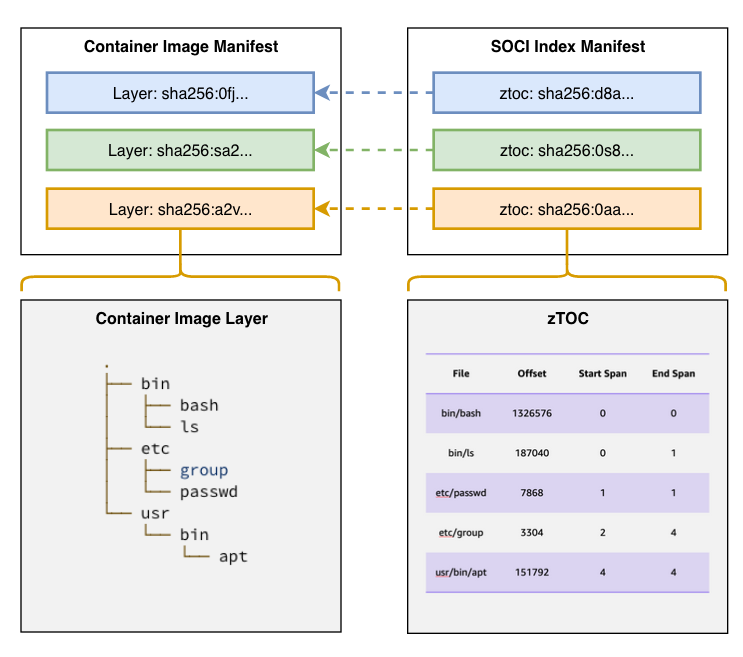
This technique dramatically cuts perceived start-up latency. For example:
- Amazon Fargate customers report 40-50% faster startup
- SageMaker Unified Studio and SageMaker AI environments see 40-70% reductions in container startup time
This strategy is particularly effective for AI/ML workloads, where images contain large libraries that are not needed immediately at launch. By delaying the download of unused layers, SOCI enables quicker response times while keeping the overall workflow unchanged.
For organizations that rely on fast autoscaling or interactive notebook environments, SOCI offers one of the highest impact-to-effort ratios among infrastructure-level strategies.
3. Latency Offloading
The most complex approach is to avoid image pull latency altogether by moving it out of the customer’s execution path. Instead of optimizing the pull or minimizing the data size, latency offloading focuses on ensuring that customers never experience cold starts.
This can be achieved through pre-warming compute environments and pre-pulling images.
3.1 Pre-Warmed Compute Instances
In this technique, a service provider maintains a pool of “warm” instances that are already running and ready to serve user workloads. When a user or job requests compute, the system assigns a warm instance instead of provisioning a new one. This removes 100% of the instance initialization latency for end users.
Warm pools exist in many managed services:
- AWS EC2 Auto Scaling Warm Pools
- Google Cloud Managed Instance Group (MIG) Warm Pools
- Container orchestrators (ECS Services with minTasks, Kubernetes Deployments with replicas)
These pools can keep containers or instances ready at various levels of readiness depending on operational needs.
3.3 Pre-Pulling Container Images
If most customers rely on a shared, common image, warm pool instances can also be configured to pre-pull that image. When assigned to a user, the instance is already running, and the needed image is locally cached. This method completely removes image pull time, providing the fastest possible startup experience.
These approaches are described in detail in Gillam, L. and Porter, B.’s work on performance analysis of various container environments (2021). Their work offers a clear comparison of cold vs warm container behavior and supports the validity of warm-pooling strategies.
Latency offloading incurs operational costs, including compute capacity, orchestration logic, and idle resources. Still, for systems where user experience or rapid scaling is at the highest priority, the benefits often outweigh the costs.
Conclusion
Container start-up latency can significantly slow down AI/ML workflows and degrade user experience in interactive environments. While image pull times frequently dominate this latency, organizations can choose from a spectrum of solutions to address and mitigate the issue.
Low-effort approaches like image optimization provide quick wins with little operational overhead. Infrastructure improvements, especially through technologies like SOCI, enable substantial latency reductions without requiring major architectural changes. Latency offloading provides the fastest user-facing start times, though it comes with ongoing costs and complexity.
Not every strategy is appropriate for every environment. For businesses where latency is not mission-critical, maintaining a warm pool may not justify the operational cost. However, companies delivering real-time AI capabilities, interactive notebooks, or dynamically scaled microservices can greatly improve user satisfaction by implementing these techniques.
Ultimately, accelerating container start-up is not just about improving performance. It also boosts developer efficiency, enhances user experience, and strengthens the responsiveness of modern AI-powered systems.
References:
- A. Kambar. (2023). How to Reduce Docker Image Pull Time by 80%: A Practical Guide for Faster CI/CD. Medium. https://medium.com/@kakamber07/how-to-reduce-docker-image-pull-time-by-80-a-practical-guide-for-faster-ci-cd-00a690d71bf0
- AWS. (n.d.). Amazon SageMaker Studio. https://aws.amazon.com/sagemaker/unified-studio/
- AWS. (2023). AWS Fargate Enables Faster Container Startup Using Seekable OCI. https://aws.amazon.com/blogs/aws/aws-fargate-enables-faster-container-startup-using-seekable-oci/
- AWS. (n.d.). SageMaker Distribution. https://github.com/aws/sagemaker-distribution
- AWS Labs. (n.d.). SOCI Snapshotter. https://github.com/awslabs/soci-snapshotter
- Gillam, L., & Porter, B. (2021). Warm-Started vs Cold Containers: Performance Analysis in Container-Orchestrated Environments. Proceedings of the 14th IEEE/ACM International Conference on Utility and Cloud Computing.
This story was published under HackerNoon’s Business Blogging Program.
[story continues]
tags