Log4Shell in December 2021 was patched within days. Finding where Log4j existed in production took much longer.
Most of affected Java projects had Log4j as an indirect dependency bundled with something else, not chosen directly. 80% of those had it five or more levels deep in their dependency tree. Security teams spent the holidays grepping through JARs/build and running recursive searches across hundreds of repos, trying to answer a question that should have been trivial: what's in our software?
The patch was available. The problem was inventory
Transitive Dependencies
You add express to a Node.js project. Express needs body-parser. Body-parser needs raw-body. Raw-body needs unpipe. One package becomes a tree.
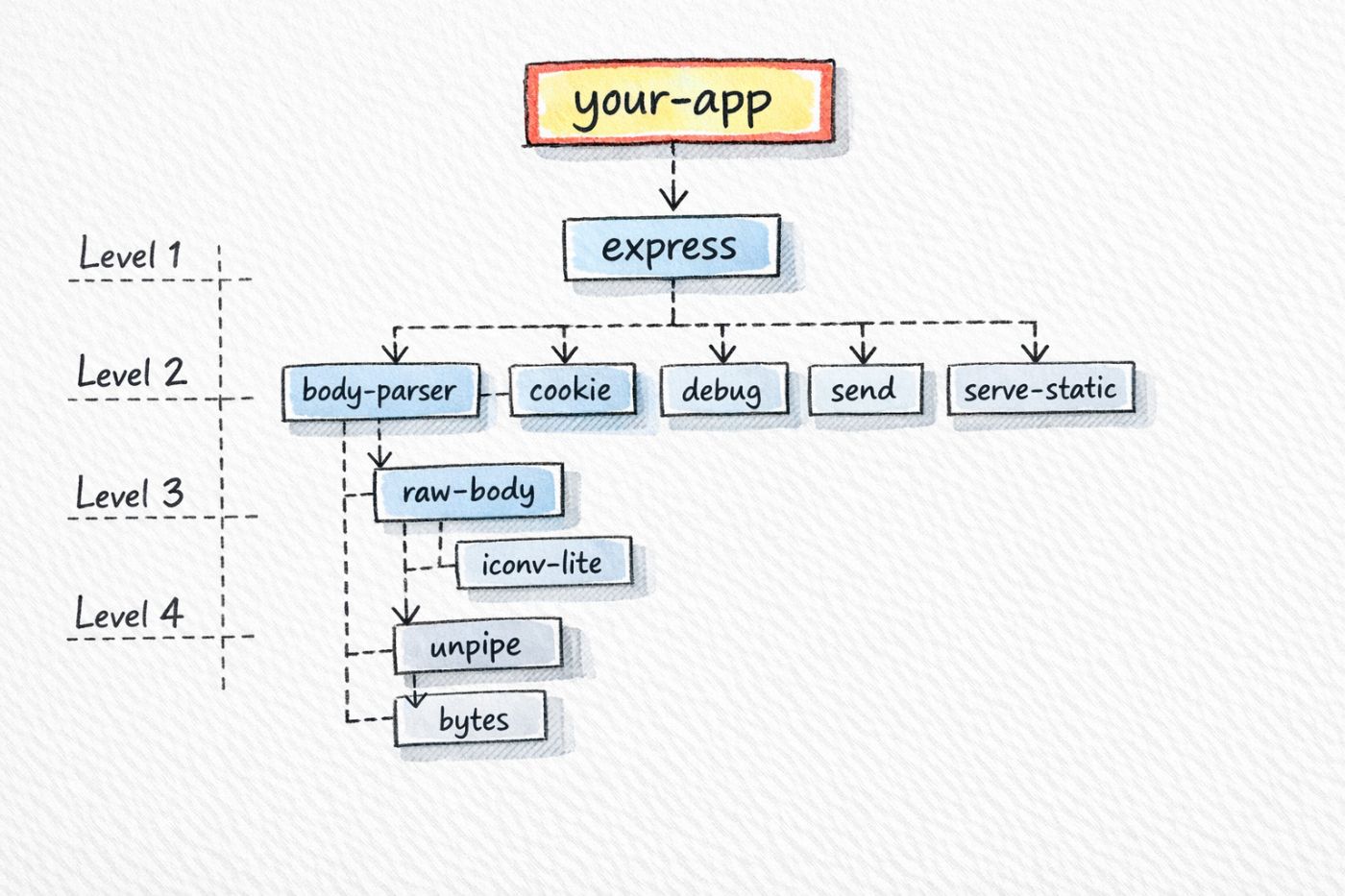
- Direct dependencies: What you put in package.json
- Transitive dependencies: Everything those packages pull in
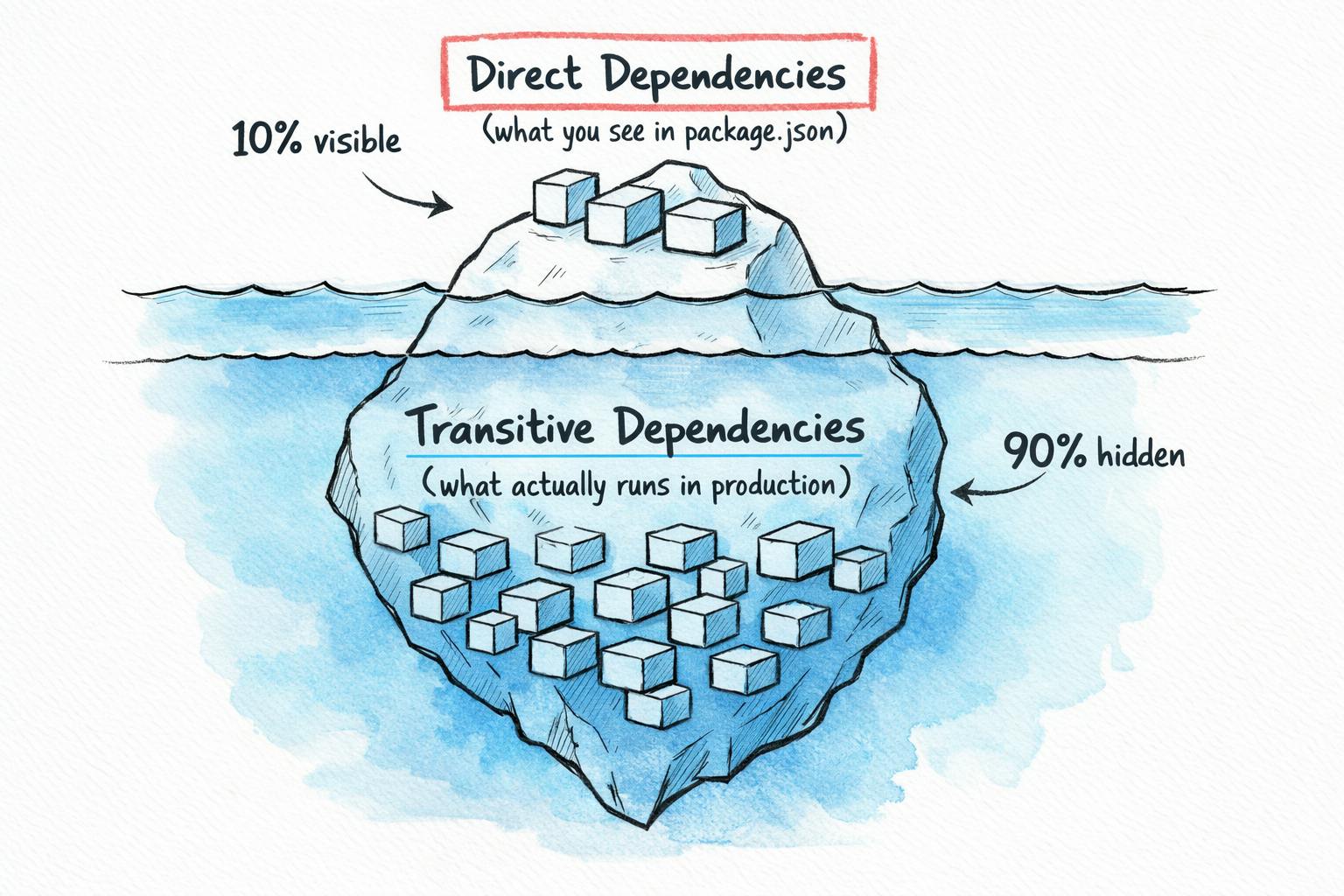
An Ivanti report found over 90% of dependencies in modern apps are indirect. The ratio varies by ecosystem, Maven amplifies dependencies more than npm, which amplifies more than PyPI,but the pattern holds,youe direct dependencies might number in the dozens. Your full dependency tree often numbers in the hundreds.
Each package in that tree has its own maintainers, release practices, and security posture. Some are maintained by teams at major companies. Others are side projects that haven't seen a commit in three years. From the perspective of your running application, they're all equally trusted.
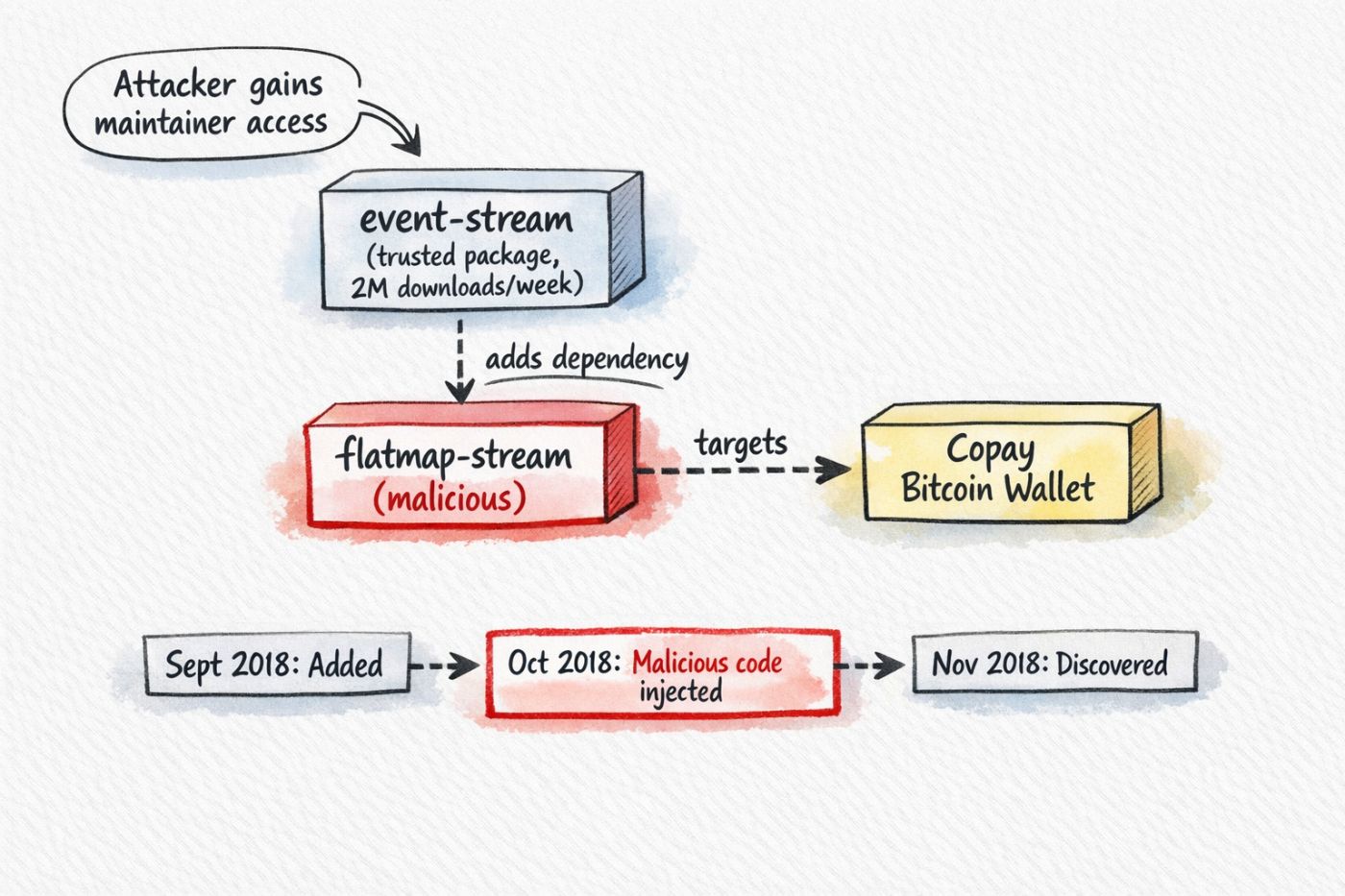
The event-stream attack in 2018 exploited this. A maintainer handed off a popular npm package to someone who offered to help. The new maintainer added flatmap-stream as a dependency, that package contained obfuscated code targeting Copay bitcoin wallets, two millions weekly downloads continued for months before anyone noticed
t malicious code wasnt in event-stream itself, It was one level deeper, hidden in a transitive dependency that nobody was watching.
Why I Built This?
Package managers install dependencies, They resolve version conflicts and download packages. They dont tell you what changed between yesterday and today. Running npm install twice produces the same result, but you cant easily compare Tuesdays dependency tree to Monday's
Vulnerability scanners find known CVEs, They match package versions against databases of disclosed vulnerabilities. They cant tell you about packages that arent vulnerable yet, packages that might become the next Log4j. By the time a CVE exists, youre in reactive mode.
Lock files pin versions. They ensure reproducible builds and prevent unexpected updates. They dont help you understand what 47 new packages just entered your codebase when someone added a new dependency, The lock file diff shows hundreds of lines of JSON..
Good luck reviewing that in a PR
Whats missing is comparison, generate a snapshot of your dependencies today. Generate another tomorrow. Diff them. See exactly what changed: new packages, removed packages, version updates, license changes
Thats what SBOMs enable. A Software Bill of Materials lists every component in your software, direct and transitive, with versions, licenses, and hashes. Compare two SBOMs and you get a clear picture of what's different
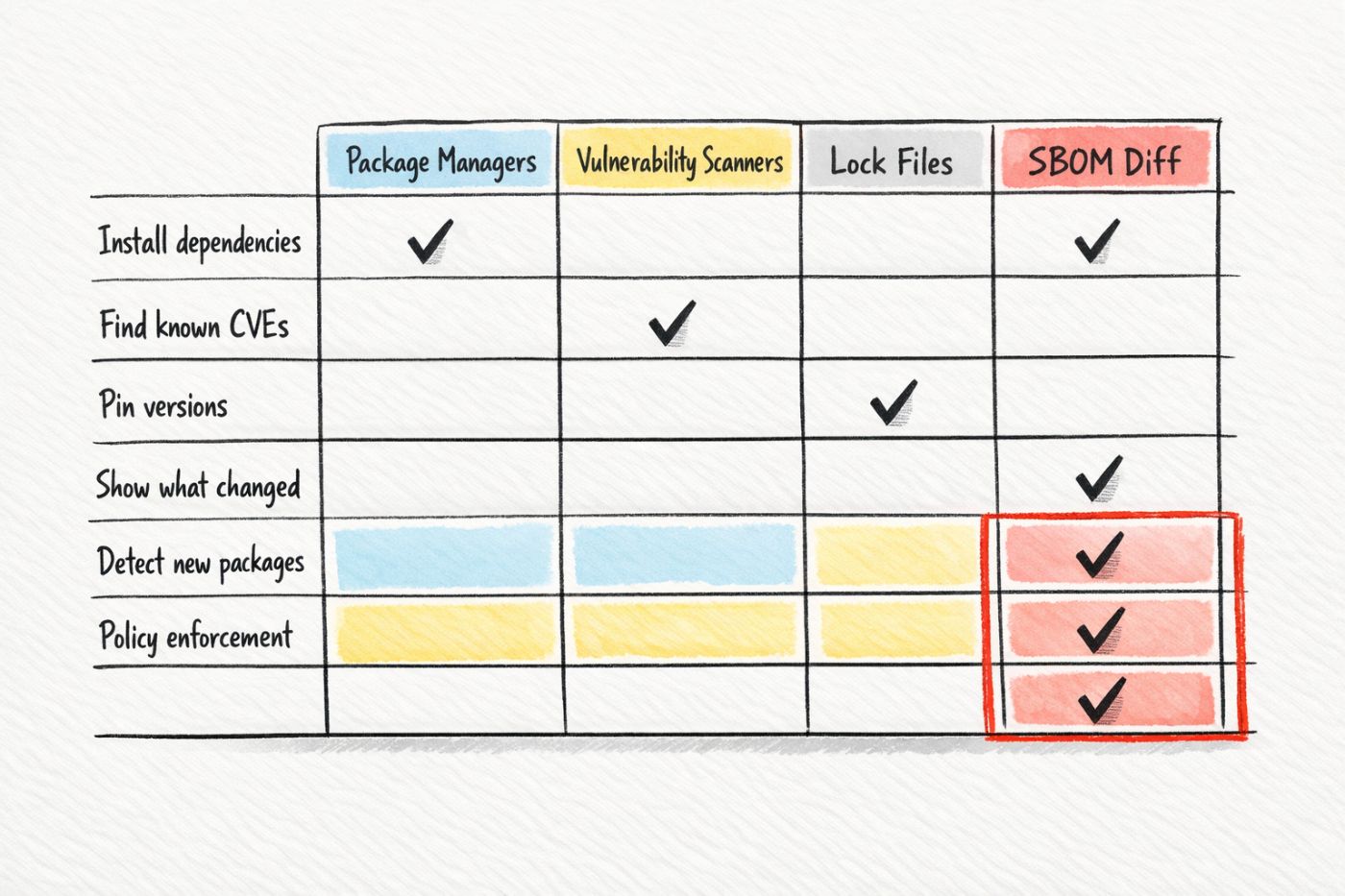
I wanted a tool to diff SBOMs, flag suspicious changes, and enforce policies in CI. I didnt find one that worked the way I wanted, so I built sbomlyze
Setup
# Install to ./bin
curl -sSfL https://raw.githubusercontent.com/rezmoss/sbomlyze/main/install.sh | sh

# Install to /usr/local/bin (requires sudo)
curl -sSfL https://raw.githubusercontent.com/rezmoss/sbomlyze/main/install.sh | sudo sh -s -- -b /usr/local/bin

# Install specific version
curl -sSfL https://raw.githubusercontent.com/rezmoss/sbomlyze/main/install.sh | sh -s -- -v 0.2.0
$ sbomlyze --version
sbomlyze v0.2.3
You'll need an SBOM generator. I use Syft, which supports most package ecosystems and container images (they’re best)
curl -sSfL https://raw.githubusercontent.com/anchore/syft/main/install.sh | sh -s -- -b /usr/local/bin
Syft outputs CycloneDX or SPDX formats. sbomlyze reads both.
Example: Adding Express
Heres a minimal example showing what happens when you add a single dependency.
V1 - lodash only:
package.json
---------------
{
  "name": "test-app",
  "version": "1.0.0",
  "dependencies": {
    "lodash": "^4.17.21"
  }
}
--------------
npm install
syft . -o cyclonedx-json > ../v1-sbom.json
V2 - add express:
package.json
---------------
{
  "name": "test-app",
  "version": "1.0.0",
  "dependencies": {
    "lodash": "^4.17.21",
    "express": "^4.18.2"
  }
}
---------------
npm install
syft . -o cyclonedx-json > ../v2-sbom.json
Diff:
sbomlyze v1-sbom.json v2-sbom.json
Output:
📊 Drift Summary:
  ⚠️  Integrity drift: 1 components (hash changed without version change!)

+ Added (68):
  + accepts 1.3.8
  + array-flatten 1.1.1
  + body-parser 1.20.4
  + bytes 3.1.2
  + call-bind-apply-helpers 1.0.2
  + call-bound 1.0.4
  + content-disposition 0.5.4
  + content-type 1.0.5
  + cookie 0.7.2
  + cookie-signature 1.0.7
  + debug 2.6.9
  + depd 2.0.0
  + destroy 1.2.0
  + dunder-proto 1.0.1
  + ee-first 1.1.1
  + encodeurl 2.0.0
  + es-define-property 1.0.1
  + es-errors 1.3.0
  + es-object-atoms 1.1.1
  + escape-html 1.0.3
  + etag 1.8.1
  + express 4.22.1
  + finalhandler 1.3.2
  + forwarded 0.2.0
  + fresh 0.5.2
  + function-bind 1.1.2
  + get-intrinsic 1.3.0
  + get-proto 1.0.1
  + gopd 1.2.0
  + has-symbols 1.1.0
  + hasown 2.0.2
  + http-errors 2.0.1
  + iconv-lite 0.4.24
  + inherits 2.0.4
  + ipaddr.js 1.9.1
  + math-intrinsics 1.1.0
  + media-typer 0.3.0
  + merge-descriptors 1.0.3
  + methods 1.1.2
  + mime 1.6.0
  + mime-db 1.52.0
  + mime-types 2.1.35
  + ms 2.0.0
  + negotiator 0.6.3
  + object-inspect 1.13.4
  + on-finished 2.4.1
  + parseurl 1.3.3
  + path-to-regexp 0.1.12
  + proxy-addr 2.0.7
  + qs 6.14.1
  + range-parser 1.2.1
  + raw-body 2.5.3
  + safe-buffer 5.2.1
  + safer-buffer 2.1.2
  + send 0.19.2
  + serve-static 1.16.3
  + setprototypeof 1.2.0
  + side-channel 1.1.0
  + side-channel-list 1.0.0
  + side-channel-map 1.0.1
  + side-channel-weakmap 1.0.2
  + statuses 2.0.2
  + toidentifier 1.0.1
  + type-is 1.6.18
  + unpipe 1.0.0
  + utils-merge 1.0.1
  + vary 1.1.2

! Duplicates in second SBOM (1):
  ! ms: [2.0.0 2.1.3]
One line change in package.json added 68 packages,the project went from 3 components to **71
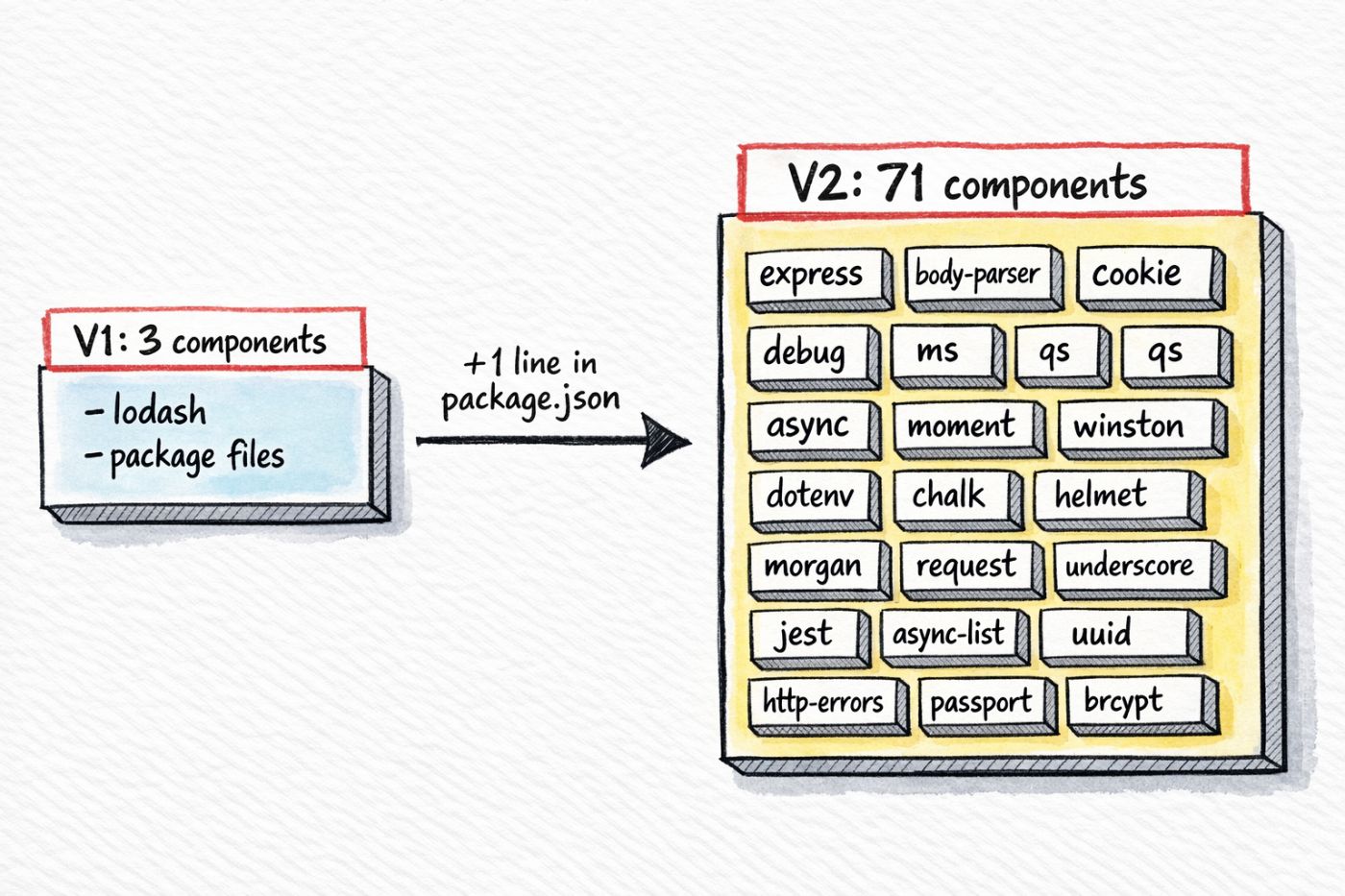
In a PR t diff shows "added express to dependencies" The 67 transitive packages dont show up anywhere in the code review, theyre invisible unless you generate SBOMs and compare them
This is typical. Most frameworks pull in dozens of transitive dependencies. React, Angular, Django, Rails,they all have deep dependency trees. Every one of those packages runs in production with the same privileges as your own code.
Understanding the Output
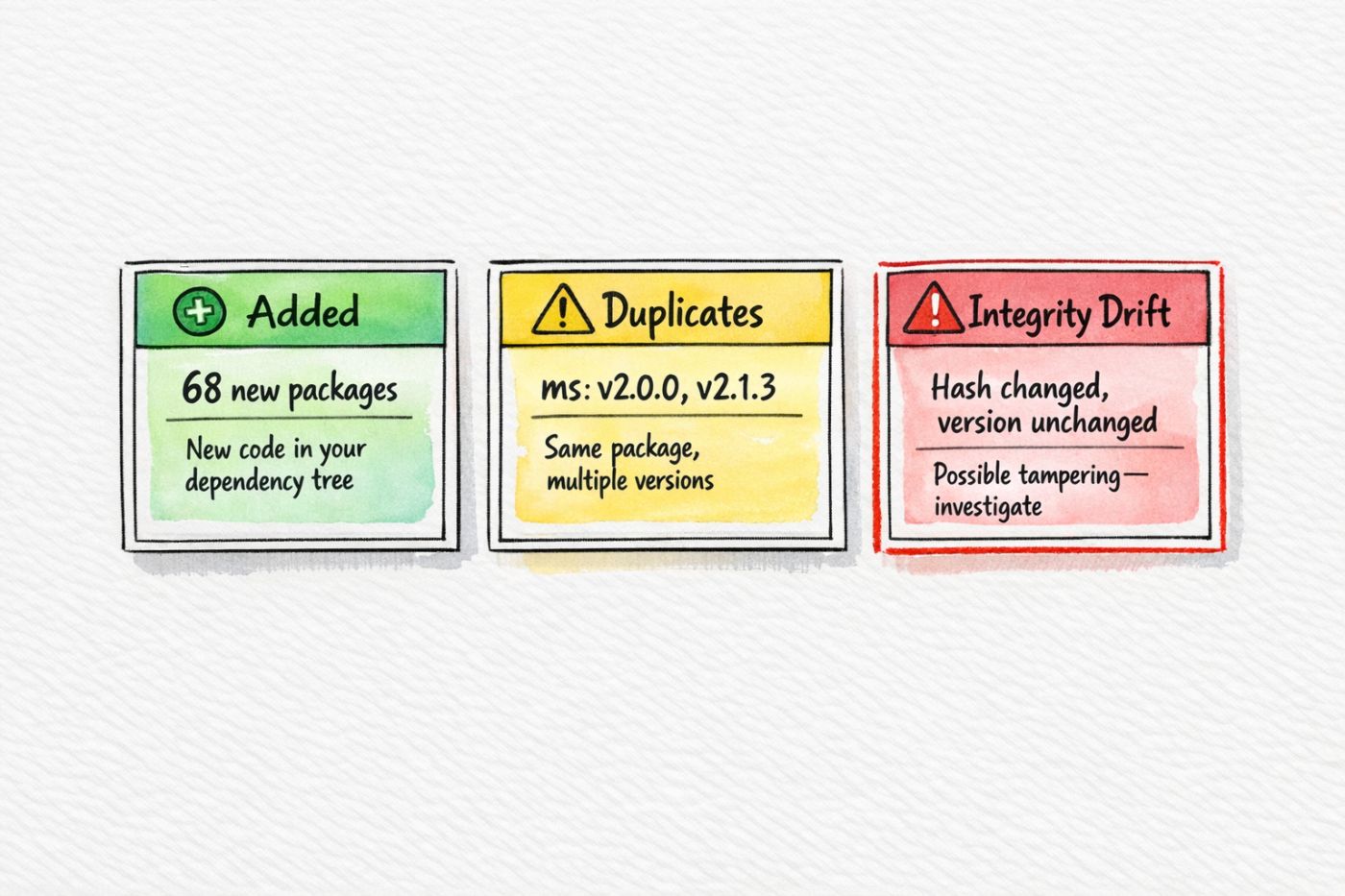
Added components lists every new package in your dependency tree, each one now runs in production. Some youve heard of (body-parser, cookie). Others you havent (dunder-proto, gopd, es-object-atoms). They all have equal access to your applications memory, network, and filesystem.
Duplicates flag packages that appear multiple times with different versions, in this output, ms shows up as both 2.0.0 and 2.1.3. Different parts of Express need different versions, and npm installs both. This works at runtime, but creates complications. If ms gets a CVE, you need to trace through your dependency tree to find every path that pulls it in, then update the packages along those paths. With one version, thats straightforward. With multiple versions nested at different depths, it gets tedious
Integrity drift catches components where the hash changed but the version stayed the same. This can happen legitimately a package maintainer rebuilds and republishes without bumping the version, it can also indicate tampering. Someone compromises a registry account, pushes modified code under an existing version number. The version looks unchanged, but the code is different. Integrity drift flags this for investigation
Policy Enforcement
You can define rules and fail builds that violate them. Policies let you codify organizational standards and enforce them automatically
policy.json
{
  "max_added": 5,
  "max_removed": 3,
  "max_changed": 10,
  "deny_licenses": ["GPL-3.0", "AGPL-3.0"],
  "require_licenses": false,
  "deny_duplicates": true
}
sbomlyze v1-sbom.json v2-sbom.json --policy policy.json
Output when violated
❌ Policy Errors (2):
  [max_added] too many components added: 68 > 5
  [deny_duplicates] found 1 duplicate components in result
Exit code 1 fails CI
|
Field |
Function |
|---|---|
|
|
Cap on new packages |
|
|
Cap on removed packages |
|
|
Cap on version changes |
|
|
Block specific licenses |
|
|
Require license info |
|
|
Fail on duplicate versions |
The thresholds depend on your codebase, A greenfield project might set max_added: 10, A established codebase with lockeddown dependencies might set max_added: 3, start loose, observe what normal PRs look like, then tighten
License blocking matters for compliance. Some organizations cant ship GPL code in proprietary products, some cant use AGPL in SaaS applications. The policy catches these before merge rather than during legal review months later.
Duplicate blocking is stricter,many legitimate dependency trees have duplicates. You might start with this disabled and enable it later as you clean up your dependency tree.
CI Integration
Here's a GitHub Actions workflow that generates SBOMs for both the base branch and the PR branch, then diffs them
name: SBOM Diff

on:
  pull_request:
    branches: [main]

jobs:
  sbom-diff:
    runs-on: ubuntu-latest
    steps:
      - uses: actions/checkout@v4
        with:
          fetch-depth: 0

      - name: Setup Go
        uses: actions/setup-go@v5
        with:
          go-version: '1.21'

      - name: Install tools
        run: |
          go install github.com/rezmoss/sbomlyze/cmd/sbomlyze@latest
          curl -sSfL https://raw.githubusercontent.com/anchore/syft/main/install.sh | sh -s -- -b /usr/local/bin

      - name: Generate baseline SBOM
        run: |
          git checkout origin/main
          npm ci
          syft . -o cyclonedx-json > baseline.json

      - name: Generate PR SBOM
        run: |
          git checkout ${{ github.head_ref }}
          npm ci
          syft . -o cyclonedx-json > pr.json

      - name: Diff
        run: sbomlyze baseline.json pr.json --policy policy.json
The workflow checks out both branches, generates an SBOM for each, and compares them,if the policy fails, the PR fails Developers see exactly which packages changed and why the build broke
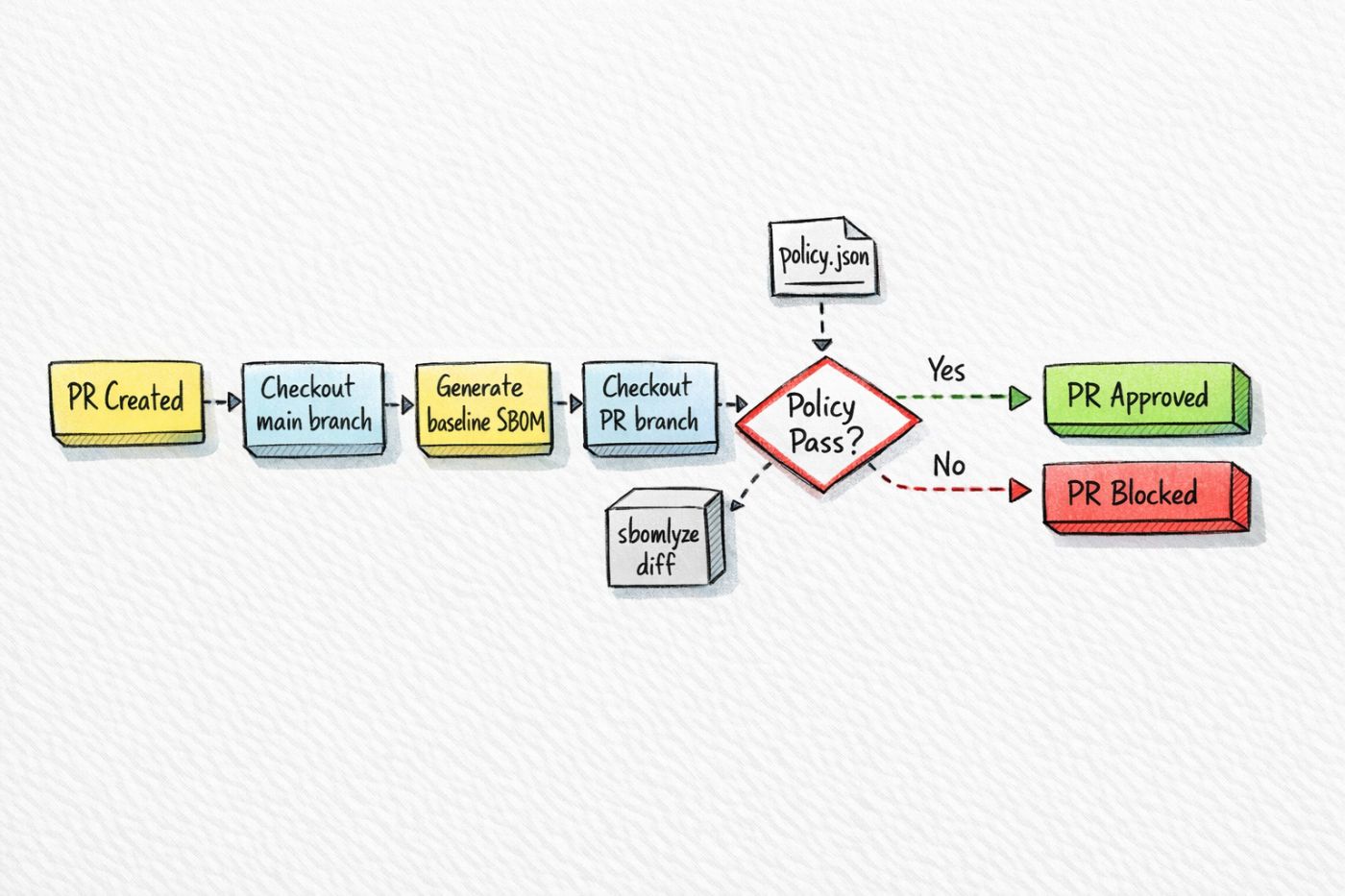
You can also run this without a policy file to get visibility without enforcement,the diff output appears in the CI logs. Reviewers can check it alongside the code diff
JSON Output
For scripting and custom tooling, sbomlyze outputs JSON:
sbomlyze v1-sbom.json v2-sbom.json --json > diff.json

jq '.diff.added | length' diff.json
jq '.diff.added[].name' diff.json
jq '.diff.duplicates' diff.json
You can build custom checks on top of this,flag pkgs from specific maintainers. Alert on packages with low download counts. Cross reference against an internal allowlist. The JSON gives you the data; you write the logic
Container Images
Container images contain more than your application code, the base image brings OS packages libc, openssl, coreutils. Your application adds its runtime and dependencies, a typical container has hundreds of components from multiple ecosystems
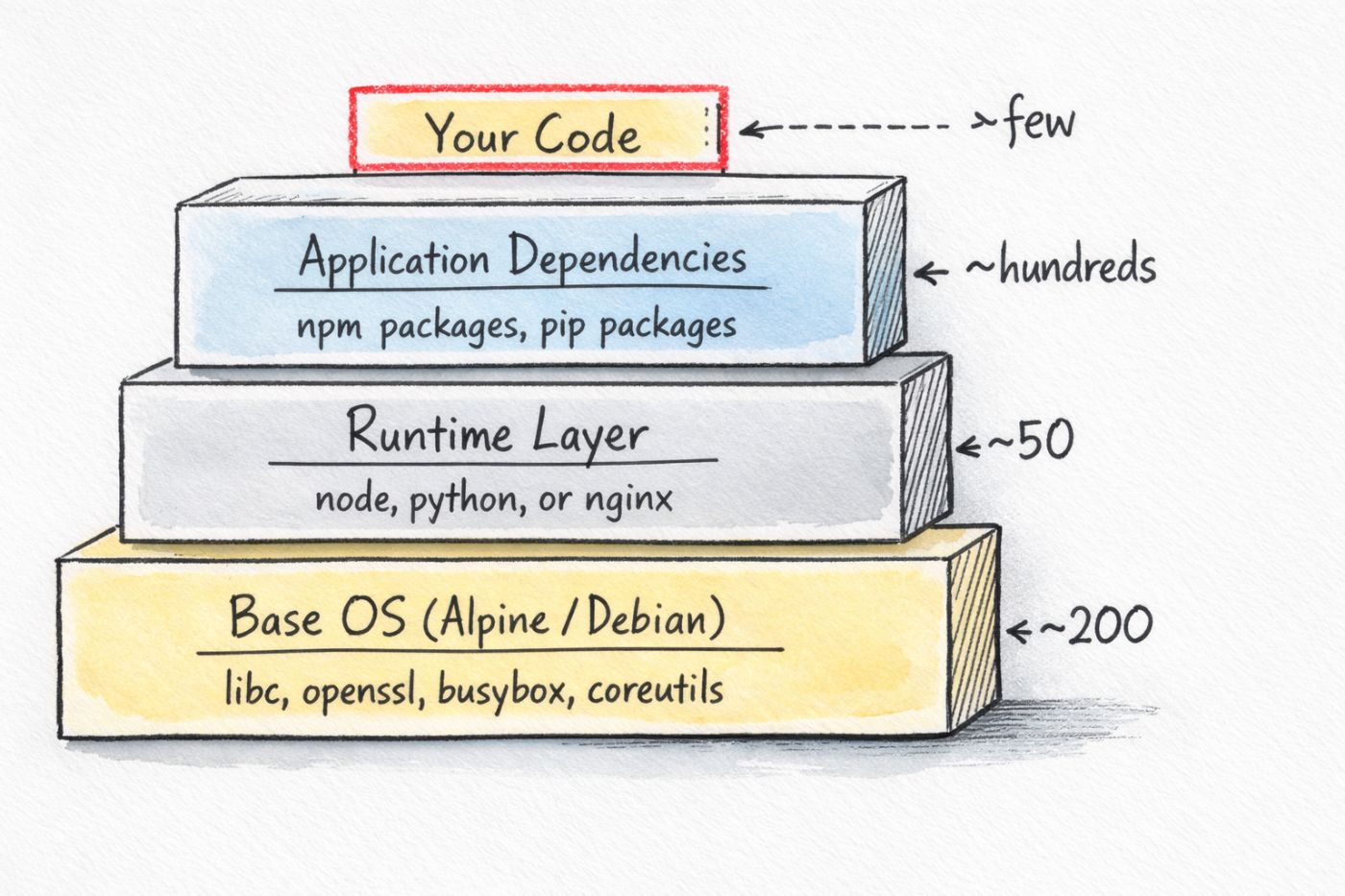
Syft scans container images directly
syft nginx:1.24-alpine -o cyclonedx-json > nginx-1.24.json
syft nginx:1.27-alpine -o cyclonedx-json > nginx-1.27.json
sbomlyze nginx-1.24.json nginx-1.27.json
nginx:1.24-alpine has 1,393 components. nginx:1.27-alpine has 1,047,the ver bunp changed hundreds of packages, Alpine base image updates, library upgrades, removed pkgs
These changes are invisible if you only track application dependencies,you Dockerfile says FROM nginx:1.27-alpine,the diff shows one line changed, the actual change to your deployed software is hundreds of pkgs.
sbomlyze works at the SBOM level, so it handles whatever Syft detects OS packages, application dependencies, binaries, configuration files, all in one diff
Single SBOM Stats
When you want an overview of one SBOM without comparison
sbomlyze v2-sbom.json
output
📦 SBOM Statistics
==================

Total Components: 71

By Package Type:
  npm          70
  unknown      1

Licenses:
  With license:    69
  Without license: 2

  Top Licenses:
    MIT                            66
    ISC                            2
    BSD-3-Clause                   1

Integrity:
  With hashes:    1
  Without hashes: 70

⚠️  Duplicates Found: 1
  ms: [2.0.0 2.1.3]
High "without license" counts suggest packages that may be unmaintained or poorly documented, legitimate pkgs usually have license files, missing licenses can also indicate compliance risk, youre shipping code with unclear legal status.
Low hash coverage limits your ability to verify integrity. Without hashes, you cant detect if a package was modified after it was published
Unexpected package types are worth investigating. If your Node.js application shows Python packages, something pulled them in. Maybe a build tool, maybe a testing framework, maybe something that shouldn't be there.
Recommendations
Store SBOMs for each release, you need baselines to diff against. Include SBOM generation in your release pipeline. Archive them alongside your build artifacts
syft . -o cyclonedx-json > sbom-v${VERSION}.json
When an incident happens, you can compare the affected version against previous versions,you can answer "when did this package enter our dependency tree?" without recreating old builds.
Diff on every PR. Even without blocking, visibility helps, reviewers can see the full impact of dependency changes. "Added axios" becomes "added axios and 12 transitive dependencies" That context changes the review
Document big additions. When you approve Express (68 packages), write down why link to the security review, note who approved it, six months later when someone asks about the dependency, the answer exists
Combine with vulnerability scanning. SBOM diffing shows what changed. Vulnerability scanning shows whats vulnerable. Different questions, both useful. Diffing catches new dependencies before they accumulate CVEs. Scanning catches existing dependencies when CVEs are disclosed.
Review quarterly. Look through your dependency tree. Research packages you dont recognize. Check maintenance status,last commit date, open issues, bus factor. Identify candidates for replacement or removal.
Summary
# Generate
syft . -o cyclonedx-json > sbom.json

# Compare
sbomlyze baseline.json current.json

# Enforce
sbomlyze baseline.json current.json --policy policy.json
A Note on Tooling
sbomlyze is something I built for my own day-to-day workflow. Plenty of other SBOM and dependency analysis tools exist; some may fit your needs better, some worse. I’m not claiming that nothing else works or that this is the only solution. I looked around, didn't find something that matched how I wanted to work, and built my own. If its useful to you, great. If you find something else that works better for your situation, then use that.
If you’re deeper into this space than I am, or you think theres a better approach, I'd genuinely like to hear it, open an issue, send a PR, or just tell me I'm wrong. I'm not attached to being right, I'm attached to solving the problem. If someone points me to a tool that does this better, I'll use it and recommend it.
Repo: https://github.com/rezmoss/sbomlyze
[story continues]
tags