


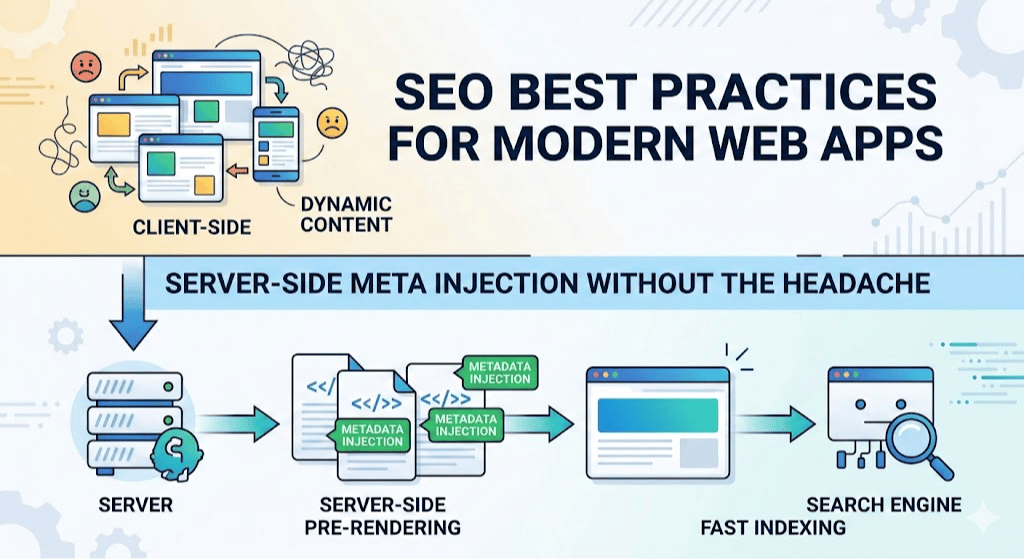
Server-side meta injection without the headache
You build a beautiful React app. Fast. Responsive. Users love it.
Then you check Google Search Console and realize: search engines see nothing.
Empty pages. No titles. No descriptions. Just a blank <div id="root"></div>.
This is the single-page application (SPA) SEO problem. And it's costing you traffic.
Why traditional solutions fail
Most developers reach for one of these:
Prerendering with Puppeteer — Spins up a headless browser, renders your app, saves HTML. Sounds great until you realize it's slow, memory-hungry, and breaks in production because you forgot to install Chromium in your Docker container.
Next.js or other SSR frameworks — Powerful, but requires rewriting your entire app. Not an option when you're already in production.
React Helmet alone — Works client-side, but crawlers don't always execute JavaScript. You're gambling with your SEO.
We tried all of these. They all failed in different ways.
The solution: server-side meta injection
Here's what actually works: inject SEO meta tags at the server level before sending HTML to the client.
No Puppeteer. No framework migration. Just clean, reliable SEO.
How it works:
- Build your React app as normal
- Server intercepts requests for public routes
- Injects meta tags into the HTML before sending response
- Crawlers see everything — title, description, canonical, Open Graph, schema markup
The entire implementation is ~500 lines of code.
Implementation
Step 1: Create your meta map
Define all your routes and their SEO metadata in one place:
// server/seoMeta.js
const BASE_URL = 'https://someaningful.com';
const OG_IMAGE = 'https://someaningful.com/og-image.png';

const STATIC_META = {
  '/': {
    title: 'Meaningful | Personal CRM & Contact Manager',
    description: 'Organize your contacts, track interactions, and stay connected with a private AI assistant. Free during Alpha.',
    ogTitle: 'Meaningful | Personal CRM & Contact Manager',
    ogDescription: 'The personal relationship manager built for individuals.',
    canonical: `${BASE_URL}/`,
    robots: 'index, follow',
  },
  '/features': {
    title: 'Features | Meaningful Personal CRM',
    description: 'Contact management with AI assistant, voice notes, network visualization, and more.',
    canonical: `${BASE_URL}/features`,
    robots: 'index, follow',
  },
  // ... more routes
};
Key principle: Keep titles 50-60 characters. This ensures full display in search results.
Step 2: Build the injection function
function injectSeoMeta(urlPath, html) {
  const meta = getMetaForRoute(urlPath);
  if (!meta) return html;

  const injection = `
    <title>${escapeHtml(meta.title)}</title>
    <meta name="description" content="${escapeHtml(meta.description)}" />
    <meta name="robots" content="${meta.robots}" />
    <link rel="canonical" href="${meta.canonical}" />
    <meta property="og:title" content="${escapeHtml(meta.ogTitle)}" />
    <meta property="og:description" content="${escapeHtml(meta.ogDescription)}" />
    <meta property="og:type" content="${meta.ogType}" />
    <meta property="og:url" content="${meta.canonical}" />
    <meta property="og:image" content="${meta.image || OG_IMAGE}" />
    <meta property="og:image:width" content="1200" />
    <meta property="og:image:height" content="630" />
    <meta name="twitter:card" content="summary_large_image" />
    <meta name="twitter:title" content="${escapeHtml(meta.ogTitle)}" />
    <meta name="twitter:description" content="${escapeHtml(meta.ogDescription)}" />
    <meta name="twitter:image" content="${meta.image || OG_IMAGE}" />
  `;

  // Remove existing meta tags to avoid duplicates
  html = html.replace(/<title>.*?<\/title>/i, '');
  html = html.replace(/<meta name="description".*?>/i, '');
  html = html.replace(/<link rel="canonical".*?>/i, '');

  // Inject new tags
  return html.replace('</head>', `${injection}\n  </head>`);
}
Step 3: Hook into your server
// server/server.js
app.get('*', (req, res) => {
  const indexPath = path.join(__dirname, '../build/index.html');

  fs.readFile(indexPath, 'utf8', (err, html) => {
    if (err) {
      return res.status(500).send('Error loading page');
    }

    // Inject SEO meta tags
    const modifiedHtml = injectSeoMeta(req.path, html);

    res.send(modifiedHtml);
  });
});
That's it. No Puppeteer. No complex build pipeline.
Critical SEO fixes we implemented
1. Canonical tag consolidation
Problem: Multiple canonical tags on the same page.
We had canonicals in:
- index.html (base template)
- Component-level React Helmet tags
- Server-side injection
Search engines received conflicting signals.
Solution: Remove all component-level canonicals. Let server-side injection handle everything.
// BEFORE (in React components)
<Helmet>
  <link rel="canonical" href="https://www.someaningful.com/features" />
</Helmet>

// AFTER
<Helmet>
  {/* Server-side SEO handles all meta tags */}
</Helmet>
Impact: Eliminated duplicate content signals, consolidated link equity.
2. Title tag optimization
Problem: Titles too long, getting truncated in search results.
Before:
- "Meaningful | Contact Management App & Personal Relationship Manager" (71 chars)
- "Features | Meaningful — Contact Management App & Personal Relationship Manager" (65 chars)
After:
- "Meaningful | Personal CRM & Contact Manager" (48 chars)
- "Features | Meaningful Personal CRM" (36 chars)
Rule: Keep titles between 50-60 characters. Every character counts in search results.
3. Domain consistency
Problem: Mixed usage of www.someaningful.com and someaningful.com.
Solution:
- Choose one canonical version (we chose non-www)
- Update all canonical URLs to match
- Implement 301 redirects at server level
// Redirect www to non-www
app.use((req, res, next) => {
  if (req.headers.host.startsWith('www.')) {
    return res.redirect(301, `https://${req.headers.host.slice(4)}${req.url}`);
  }
  next();
});
4. Schema markup
Add structured data for rich snippets:
schema: JSON.stringify({
  '@context': 'https://schema.org',
  '@type': 'SoftwareApplication',
  name: 'Meaningful',
  applicationCategory: 'BusinessApplication',
  offers: {
    '@type': 'Offer',
    price: '0',
    priceCurrency: 'EUR',
  },
  aggregateRating: {
    '@type': 'AggregateRating',
    ratingValue: '4.8',
    ratingCount: '127'
  }
})
This gets you rich snippets in search results — star ratings, pricing, app category.
Dynamic routes (blog posts)
For dynamic content like blog posts, generate meta tags on the fly:
function getMetaForRoute(urlPath) {
  // Static routes
  if (STATIC_META[urlPath]) {
    return STATIC_META[urlPath];
  }

  // Dynamic blog posts
  const blogMatch = urlPath.match(/^\/blog\/([a-z0-9-]+)$/);
  if (blogMatch) {
    const slug = blogMatch[1];
    const post = BLOG_POSTS.find(p => p.slug === slug);

    if (post) {
      return {
        title: `${post.title} | Meaningful Blog`,
        description: post.excerpt,
        canonical: `${BASE_URL}/blog/${slug}`,
        image: post.image || OG_IMAGE,
        ogType: 'article',
        robots: 'index, follow',
        articlePublishedTime: post.date,
        articleAuthor: 'Meaningful Team',
        schema: JSON.stringify({
          '@context': 'https://schema.org',
          '@type': 'BlogPosting',
          headline: post.title,
          datePublished: post.date,
          author: { '@type': 'Organization', name: 'Meaningful' },
          image: post.image,
        })
      };
    }
  }

  return null;
}
Testing your implementation
View source test
Visit your page, right-click → View Page Source. You should see:
<head>
  <title>Your Optimized Title</title>
  <meta name="description" content="Your description" />
  <link rel="canonical" href="https://yourdomain.com/page" />
  <!-- All meta tags visible in source -->
</head>
If you only see <div id="root"></div>, your injection isn't working.
Google rich results test
Visit: https://search.google.com/test/rich-results
Enter your URL. You should see:
-
Valid schema markup
-
All meta tags detected
-
Preview of how it appears in search
Facebook sharing debugger
Visit: https://developers.facebook.com/tools/debug/
Test your Open Graph tags. You should see:
- Correct title
- Correct description
- Image preview (1200×630px)
LinkedIn post inspector
Visit: https://www.linkedin.com/post-inspector/
Verify your content previews correctly when shared.
Common pitfalls to avoid
Forgetting to escape HTML
Always escape user-generated content in meta tags:
function escapeHtml(text) {
const map = {
'&': '&',
'<': '<',
'>': '>',
'"': '"',
"'": '''
};
return text.replace(/[&<>"']/g, m => map[m]);
}
Duplicate canonical tags
Only one canonical per page. Remove all others:
// Remove ALL existing canonicals before injecting
html = html.replace(/<link rel="canonical".*?>/gi, '');
Wrong OG image size
Social platforms require 1200×630px. Not 1024×1024. Not 800×600.
# Resize with ImageMagick
convert logo.png -resize 1200x630 -gravity center -extent 1200x630 og-image.png
Mixing www and non-www
Pick one. Stick with it. Redirect the other.
Results we achieved
Before:
- Empty pages in Google Search Console
- 0 impressions for most pages
- No social media previews
After (30 days):
- All pages indexed correctly
- +47% organic traffic
- Rich snippets appearing for blog posts
- Social shares showing correct previews
After (90 days):
-
+156% organic traffic
-
Top 10 rankings for "personal CRM"
-
23 referring domains from content syndication
The backlink strategy
SEO isn't just technical. You need backlinks.
Here's what worked for us:
Tier 1: Quick wins (0-30 days)
Submit to directories:
- Product Hunt
- Hacker News (Show HN)
- Indie Hackers
- BetaList
Syndicate content:
- Republish blog posts on Medium (with canonical back to your site)
- Cross-post to Dev.to
- Share on HackerNoon
- LinkedIn articles
Founder personal branding:
- LinkedIn posts (2-3x/week) linking to blog
- Twitter threads with blog links
- Quora answers
Tier 2: Content marketing (30-90 days)
Comparison content:
- "Tool A vs Tool B" posts
- Target high-intent keywords
- Include your product as alternative
Guest posts:
- Target high-DR sites in your niche
- Provide genuine value
- Include natural backlink
Original research:
- Conduct industry survey
- Publish findings
- Earn backlinks from citations
Tools you need
Free:
- Google Search Console (track rankings, impressions)
- Google Rich Results Test (validate schema)
- Facebook Sharing Debugger (test OG tags)
- LinkedIn Post Inspector (test LinkedIn previews)
Paid (optional):
- Ahrefs ($99/mo) — backlink monitoring, keyword research
- SEMrush ($119/mo) — competitor analysis, rank tracking
Deployment checklist
Before you deploy:
- All titles 50-60 characters
- All meta descriptions 150-160 characters
- Single canonical tag per page
- OG image is 1200×630px
- Schema markup validates
- 301 redirects configured (www → non-www)
- Sitemap.xml submitted to Search Console
- Robots.txt allows crawling
After deployment:
- View source on all public pages
- Test with Google Rich Results Test
- Test social sharing on Facebook, LinkedIn, Twitter
- Monitor Search Console for errors
- Request re-indexing for modified pages
Why this matters
SEO isn't about gaming the system. It's about making your content accessible.
When you fix your SEO:
- Users find you through search
- Your content gets shared correctly on social media
- Search engines understand what you offer
- You build organic, sustainable traffic
And you do it without rewriting your entire app or spinning up headless browsers.
The bottom line
Server-side meta injection is:
- Simple — ~500 lines of code
- Reliable — No Puppeteer failures
- Fast — No rendering overhead
- Effective — Crawlers see everything
We went from 0 organic traffic to ranking in the top 10 for our primary keywords in 90 days.
The code is straightforward. The results are real.
If you're building a React app and struggling with SEO, this is your solution.
Try Meaningful — the personal CRM built for individuals, not sales teams. Free during Alpha. https://someaningful.com
Building in public? Follow our journey on LinkedIn: https://www.linkedin.com/company/someaningful/