


Last March, I demo’d a customer support agent to a client. Built it with a framework I’d seen hyped on every AI newsletter for months. Looked great in my notebook.
Forty seconds into the demo, a user asked a follow-up question. The agent called the same API three times, hallucinated a refund policy we didn’t have, then got stuck in a loop asking for clarification it already had.
The client was polite. I was not invited back.
That failure cost me the contract and three weeks of rebuilding. But it taught me something: the framework you choose determines failure modes you won’t see until production. I’ve now shipped agents with eight different frameworks across a dozen projects. Here’s what actually works.
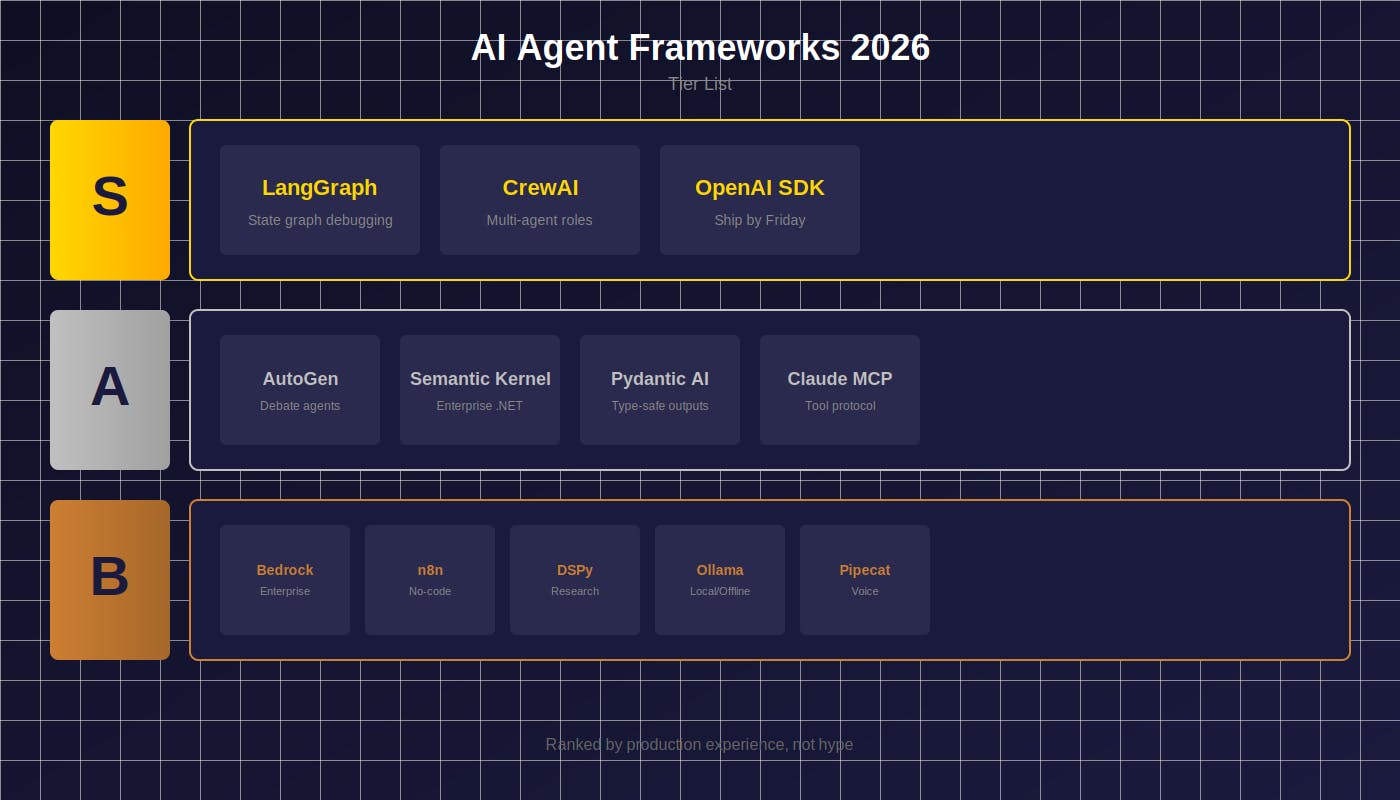
- S tier: Frameworks that survive real users
- A tier: Worth learning after you’ve shipped once
- B tier: Right tool for specific jobs
S Tier: The Ones That Survive Production
1 — LangGraph
The framework that saved my sanity. LangGraph models your agent as a state graph — nodes for actions, edges for transitions. Sounds academic until you’re debugging why your agent went off the rails.
Here’s the difference. With most frameworks, debugging looks like this:
# Somewhere in 200 lines of chain callbacks...
print(f"DEBUG: agent state = {state}")  # good luck
With LangGraph:
from langgraph.graph import StateGraph
graph = StateGraph(AgentState)
graph.add_node("research", research_node)
graph.add_node("analyze", analyze_node)
graph.add_edge("research", "analyze")
# Visualize the entire decision tree
graph.get_graph().draw_mermaid()
That visualization cut my debugging time from hours to minutes. When my research agent started skipping the validation step for certain queries, I could see the edge condition that was wrong.
I’ve written a complete guide to building your first agent with LangGraph, most read Data Science Collective article in 2025 because the pattern actually transfers to production.
Best for: Anything beyond chatbots. Multi-step workflows. Teams who’ll inherit your code.
The honest limitation: 2–3 day learning curve minimum. If you need a prototype by tomorrow, you’ll spend more time on LangGraph concepts than your actual agent.
2 — CrewAI
Last fall I built a content research system. Needed to pull sources, verify facts, synthesize findings, and draft summaries. Tried wiring it up manually. Spaghetti within a week.
CrewAI reframes the problem: define agents with roles, give them tools, let them collaborate.
researcher = Agent(
    role="Research Specialist",
    goal="Find accurate, recent sources on {topic}",
    tools=[search_tool, scrape_tool]
)
analyst = Agent(
    role="Fact Checker",
    goal="Verify claims against primary sources",
    tools=[search_tool]
)
crew = Crew(agents=[researcher, analyst], tasks=[...])
The mental model maps to how you’d brief humans. When I walked a PM through the system, she understood it in five minutes. (Try explaining a ReAct loop to a PM. I’ve tried. It doesn’t go well.)
Best for: Research pipelines. Content systems. Anywhere “multiple specialists collaborating” is the natural framing.
The honest limitation: Multi-agent adds latency (typically 2–4x single agent) and cost. For simple tasks, you’re paying for coordination overhead you don’t need.
3–OpenAI Agents SDK
When I need something working by end of day, this is what I reach for. Twenty lines to a functional agent:
from openai import OpenAI
from openai.types.beta import AssistantTool
client = OpenAI()
assistant = client.beta.assistants.create(
    name="Data Analyst",
    instructions="You analyze CSV files and answer questions.",
    tools=[{"type": "code_interpreter"}],
    model="gpt-4-turbo"
)
Built a quick data analysis bot for a friend’s startup in an afternoon. It’s been running for four months with zero maintenance.
Best for: Fast prototypes. Teams already paying OpenAI. When vendor support matters more than flexibility.
The honest limitation: Last November, OpenAI had three outages in two weeks. My agent was down for all of them. Zero fallback options. If uptime matters, you need a backup plan.
A Tier: Worth Learning After You’ve Shipped
4–AutoGen (Microsoft)
Agents that argue with each other. One proposes, another critiques, they iterate.
I used this for a code review system. The “reviewer” agent found 23% more bugs than a single-agent approach in my testing, the debate forces explicit reasoning that single agents skip.
(First time I tried AutoGen, I forgot to set termination conditions. Agents debated for 28 rounds on a trivial edge case. $12 in tokens before I noticed.)
reviewer = AssistantAgent("reviewer", system_message="Critique this code for bugs, security issues, and style.")
author = AssistantAgent("author", system_message="Defend your code or accept valid criticism.")
# They debate until convergence (usually 3-4 rounds)
reviewer.initiate_chat(author, message=code_to_review)
Best for: Complex reasoning. Code review. Anywhere “thinking out loud” catches errors.
The honest limitation: Without good termination conditions, agents debate forever. I’ve seen conversations hit 15+ rounds on edge cases. Set max_rounds or your token bill will hurt.
5 — Semantic Kernel
Microsoft’s enterprise play. If you’re integrating with existing .NET infrastructure, this makes it less painful than it deserves to be.
Best for: .NET/Java shops. Enterprise environments. Teams that want compile-time guarantees.
The honest limitation: Python SDK feels like a second-class citizen. You’ll be translating C# examples constantly. If you’re Python-native, expect friction.
6 — Pydantic AI
Newest on this list but earned its spot fast. Remember that malformed JSON that crashed your agent at 3am? Pydantic AI makes that impossible:
from pydantic_ai import Agent
from pydantic import BaseModel
class SearchResult(BaseModel):
    query: str
    sources: list[str]
    confidence: float
agent = Agent('openai:gpt-4', result_type=SearchResult)
result = await agent.run("Find recent AI agent papers")
# result is guaranteed to be valid SearchResult or raises
Every tool call validated. Every response typed. I sleep better.
Best for: Production systems. Teams already using Pydantic. Anyone burned by unvalidated LLM outputs.
The honest limitation: Documentation has gaps. Last month I spent two hours on something that should’ve been in the quickstart. You’ll read source code.
7 — Claude MCP (Model Context Protocol)
Not a framework, a protocol. Write your tool integration once, use it with any MCP-compatible agent. Anthropic is betting hard on this becoming the standard.
I wrote about the architecture and where it breaks. The design is sound. The security story needs work.
Best for: Tool-heavy agents. Reusable integrations. Anyone betting on Anthropic.
The honest limitation: Shared memory between agents creates attack surface. Don’t deploy MCP servers on production data without understanding prompt injection risks.
B Tier: Right Tool, Right Job
8 — For Enterprise Cloud: AWS Bedrock Agents
You define behavior, AWS handles infrastructure. The killer feature: IAM integration. Your agent inherits existing permissions. Security teams actually approve these. (If you’ve ever spent six weeks in InfoSec review for a custom deployment, you know how rare that is.)
Trade-off: Migrating away means rewriting everything. Not theoretical lock-in, actual lock-in.
09— For No-Code: n8n + Flowise
Visual builder that handles real workloads. Built a lead qualification agent for a marketing team, they’ve modified the workflow themselves 30+ times without calling me. That’s organizational leverage.
I wrote a complete n8n guide from scratch if you want to get started.
Trade-off: Complex branching logic gets ugly fast. Know when to graduate to code.
10 — For Research: DSPy
Prompts as learnable parameters. Define objectives, DSPy optimizes instructions automatically. In one experiment, DSPy-tuned prompts outperformed my hand-crafted ones by 18% on my eval set.
Trade-off: Research-grade tooling. The paradigm is unfamiliar. Budget time to understand before you’re productive.
11 — For Local/Offline: Ollama + Function Calling
Complete privacy. Data never leaves your machine. For regulated industries, sometimes the only option.
Trade-off: Llama 3 70B with function calling is maybe 60–70% of GPT-4 quality on complex tool use. You need good hardware, and you’re still making capability tradeoffs.
12 — For Voice: Pipecat
Only framework I’ve found that handles interruptions gracefully. Users talk over the agent, it adapts mid-sentence.
Trade-off: Voice adds 200–400ms latency minimum and a category of failure modes you won’t anticipate. Don’t use unless voice is actually your interface.
How I Actually Choose
After watching agents fail in ways I didn’t predict, my decision tree is simple:
- Starting fresh? LangGraph. Patterns transfer everywhere.
- Multi-agent needed? CrewAI for role-based, AutoGen for debate-based. Pick based on how you think about the problem.
- Enterprise constraints? Semantic Kernel for .NET, Bedrock for AWS-native.
- Demo by Friday? OpenAI Agents SDK. Fastest to working prototype.
The framework matters less than understanding the patterns underneath. ReAct, plan-and-execute, multi-agent — these appear in every framework. Learn them once, switching becomes trivial.
What No Framework Solves Yet
Evaluation. We have building tools, not testing tools. Every serious team builds custom eval harnesses. I’ve built three.
Memory. Still an afterthought everywhere. The gap between demo and production is usually memory management. I wrote 400 lines of memory handling code last month that should’ve been built-in.
Cost tracking. Token costs compound. A chatbot I built hit $200/day in API costs because nobody tracked per-action spending. I want cost awareness in the agent loop, not a billing surprise.
That’s the list. What’s missing from your experience?
Building production agents? I documented the full path in The Realistic Guide to Mastering AI Agents in 2026 — math foundations through deployment.