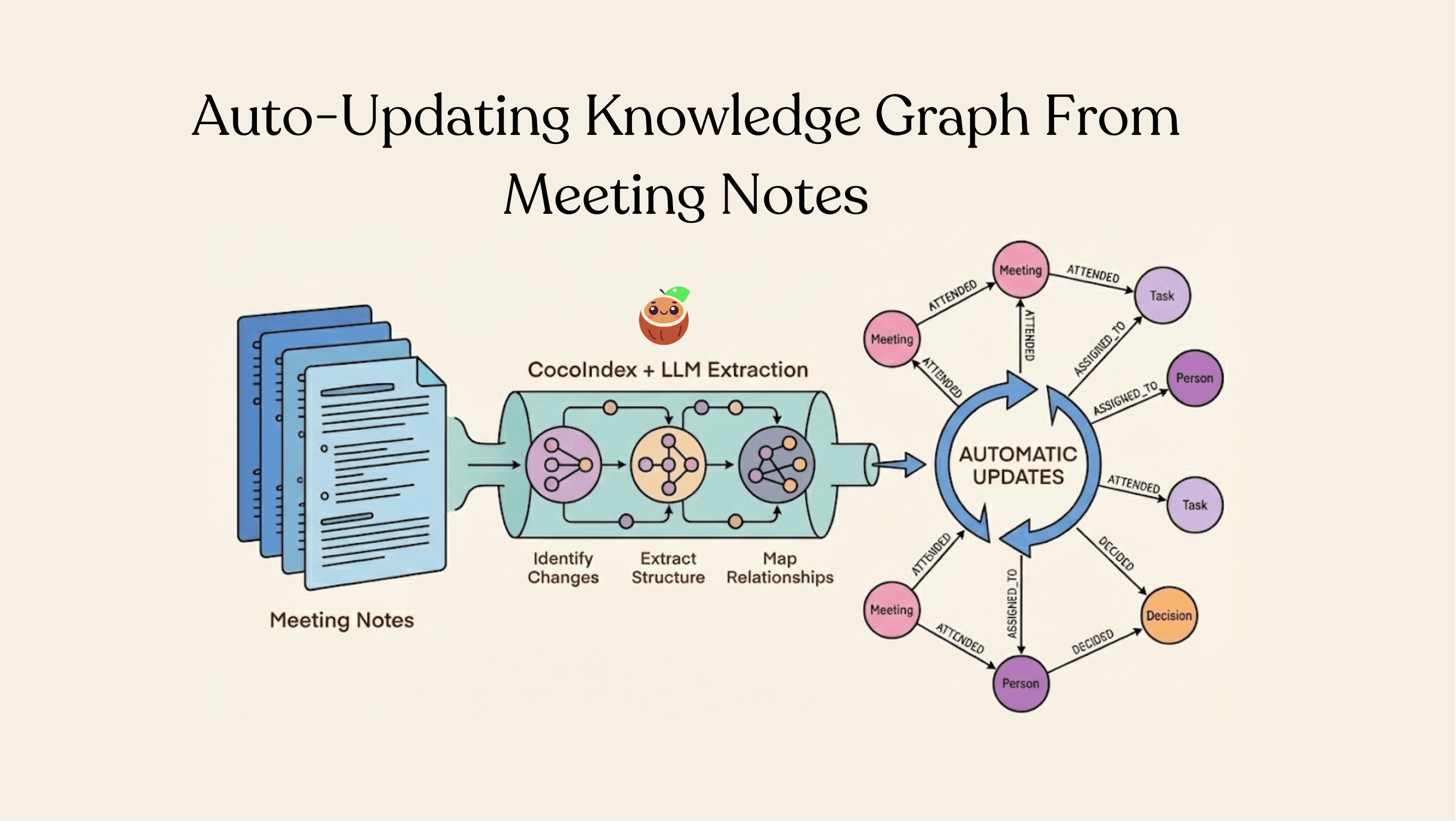
Most companies sit on an ocean of meeting notes, and treat them like static text files. But inside those documents are decisions, tasks, owners, and relationships — basically an untapped knowledge graph that is constantly changing. We just published a full walkthrough showing how to turn meeting notes in Drive into a 𝐥𝐢𝐯𝐞-𝐮𝐩𝐝𝐚𝐭𝐢𝐧𝐠 Neo4j 𝐤𝐧𝐨𝐰𝐥𝐞𝐝𝐠𝐞 𝐠𝐫𝐚𝐩𝐡 using CocoIndex + 𝐋𝐋𝐌 𝐞𝐱𝐭𝐫𝐚𝐜𝐭𝐢𝐨𝐧.
If this resonates, star https://github.com/cocoindex-io/cocoindex
Meeting notes are goldmines of organizational intelligence. They capture decisions, action items, participant information, and the relationships between people and tasks. Yet most organizations treat them as static documents—searchable only through basic text search. Imagine instead being able to query your meetings like a database: "Who attended meetings where the topic was 'budget planning'?" or "What tasks did Sarah get assigned across all meetings?"
This is where knowledge graphs shine. By extracting structured information from unstructured meeting notes and building a graph representation, you unlock powerful relationship-based queries and insights that would be impossible with traditional document storage.
In this post, we'll explore a practical CocoIndex example that demonstrates exactly this—building a knowledge graph of meetings from Markdown documents stored in Google Drive, powered by LLM-based extraction, and persisted in Neo4j.
The source code open sourced and available at Meeting Notes Graph Code.
The Problem: Unstructured Meeting Data at Enterprise Scale
Even for a conservative estimate, 80% of enterprise data resides in unstructured files, stored in data lakes that accommodate heterogeneous formats. Organizations hold 62-80 million meetings per day in the US.
At enterprise scale, document processing complexity explodes beyond the simple "write once, read many" model. Meeting note management reality involves three brutal challenges:
Scale problem - Enterprise meeting corpora span tens of thousands to millions of documents distributed across departments, teams, and fiscal years. Processing this volume naively means re-running expensive LLM calls and graph mutations on unchanged data.
Mutation problem - Meeting notes are mutable state, not immutable logs. Attendees fix typos in names, tasks get reassigned between people, decisions get revised as context changes. A single 10-person team can generate dozens of document edits weekly.
Fragmentation problem - Meeting data doesn't live in one canonical source. It's scattered across Google Drive, Notion, SharePoint, Confluence, email threads, and Slack canvases. Building a unified graph requires incremental sync from heterogeneous sources without full re-ingestion.
The math is punishing: in a 5,000-person enterprise with conservative 1% daily document churn, you're looking at 50+ documents changing per day, 1,500+ per month. Without incremental processing, you either:
-
Burn LLM budget re-extracting unchanged content (unsustainable cost)
-
Accept stale graphs that lag reality by days or weeks (unacceptable for operational use)
Architecture Overview
The pipeline follows a clear data flow with incremental processing built in at every stage:
Google Drive (Documents - with change tracking)
  → Identify changed documents
  → Split into meetings
  → Extract structured data with LLM (only for changed documents)
  → Collect nodes and relationships
  → Export to Neo4j (with upsert logic)
Prerequisites
- Install Neo4j and start it locally
- Default local browser: http://localhost:7474
- Default credentials used in this example: username
neo4j, passwordcocoindex
- Configure your OpenAI API key
- Prepare Google Drive:
- Create a Google Cloud service account and download its JSON credential
- Share the source folders with the service account email
- Collect the root folder IDs you want to ingest
- See Setup for Google Drive for details
Environment
Set the following environment variables:
export OPENAI_API_KEY=sk-...
export GOOGLE_SERVICE_ACCOUNT_CREDENTIAL=/absolute/path/to/service_account.json
export GOOGLE_DRIVE_ROOT_FOLDER_IDS=folderId1,folderId2
Notes:
GOOGLE_DRIVE_ROOT_FOLDER_IDSaccepts a comma-separated list of folder IDs- The flow polls recent changes and refreshes periodically
Let's break down each component:
Flow Definition
Overview
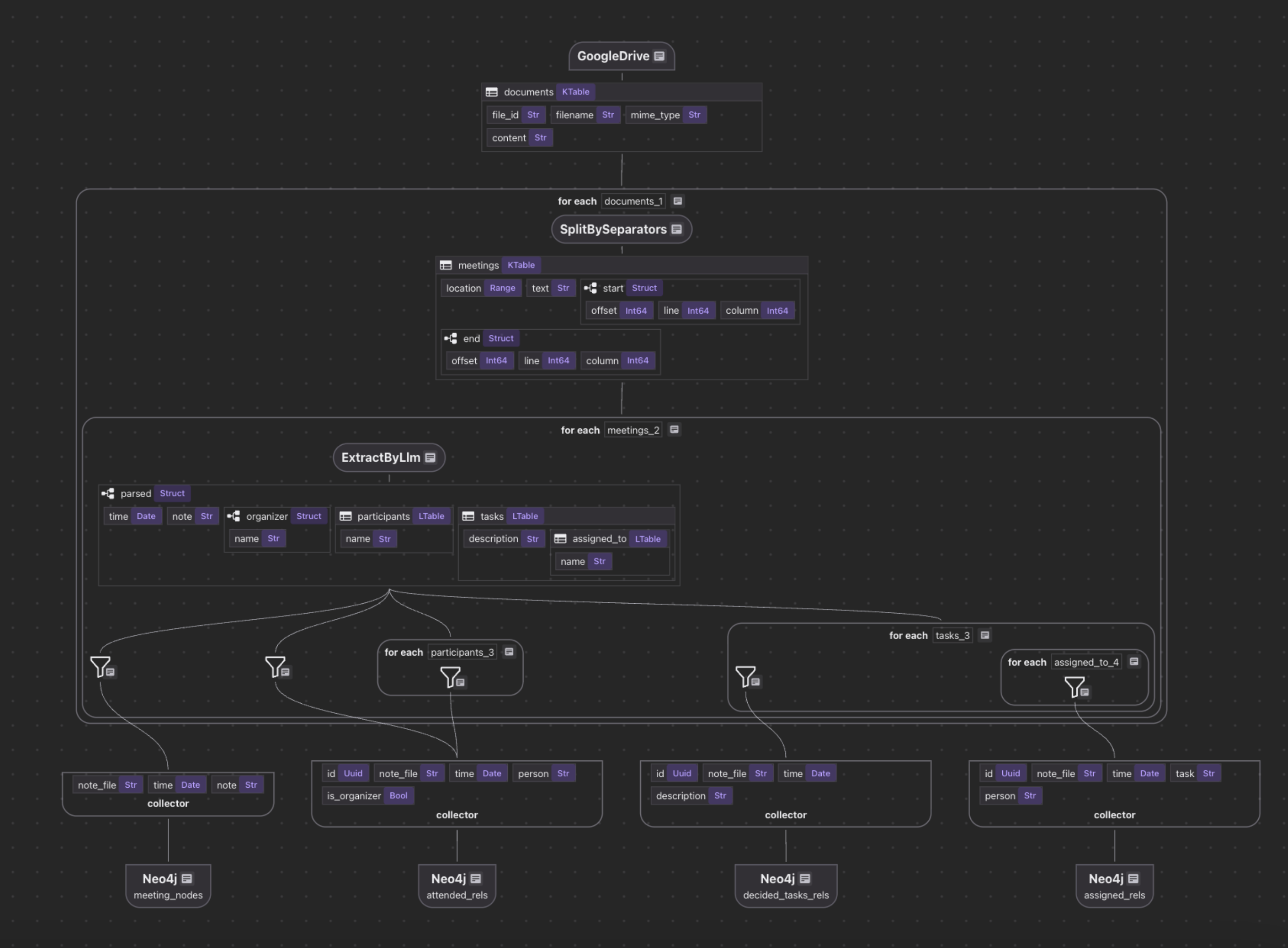
Add source and collector
@cocoindex.flow_def(name="MeetingNotesGraph")
def meeting_notes_graph_flow(
    flow_builder: cocoindex.FlowBuilder, data_scope: cocoindex.DataScope
) -> None:
    """
    Define an example flow that extracts triples from files and builds knowledge graph.
    """
    credential_path = os.environ["GOOGLE_SERVICE_ACCOUNT_CREDENTIAL"]
    root_folder_ids = os.environ["GOOGLE_DRIVE_ROOT_FOLDER_IDS"].split(",")

    data_scope["documents"] = flow_builder.add_source(
        cocoindex.sources.GoogleDrive(
            service_account_credential_path=credential_path,
            root_folder_ids=root_folder_ids,
            recent_changes_poll_interval=datetime.timedelta(seconds=10),
        ),
        refresh_interval=datetime.timedelta(minutes=1),
    )
The pipeline starts by connecting to Google Drive using a service account. CocoIndex's built-in source connector handles authentication and provides incremental change detection. The recent_changes_poll_interval parameter means the source checks for new or modified files every 10 seconds, while the refresh_interval determines when the entire flow re-runs (every minute).
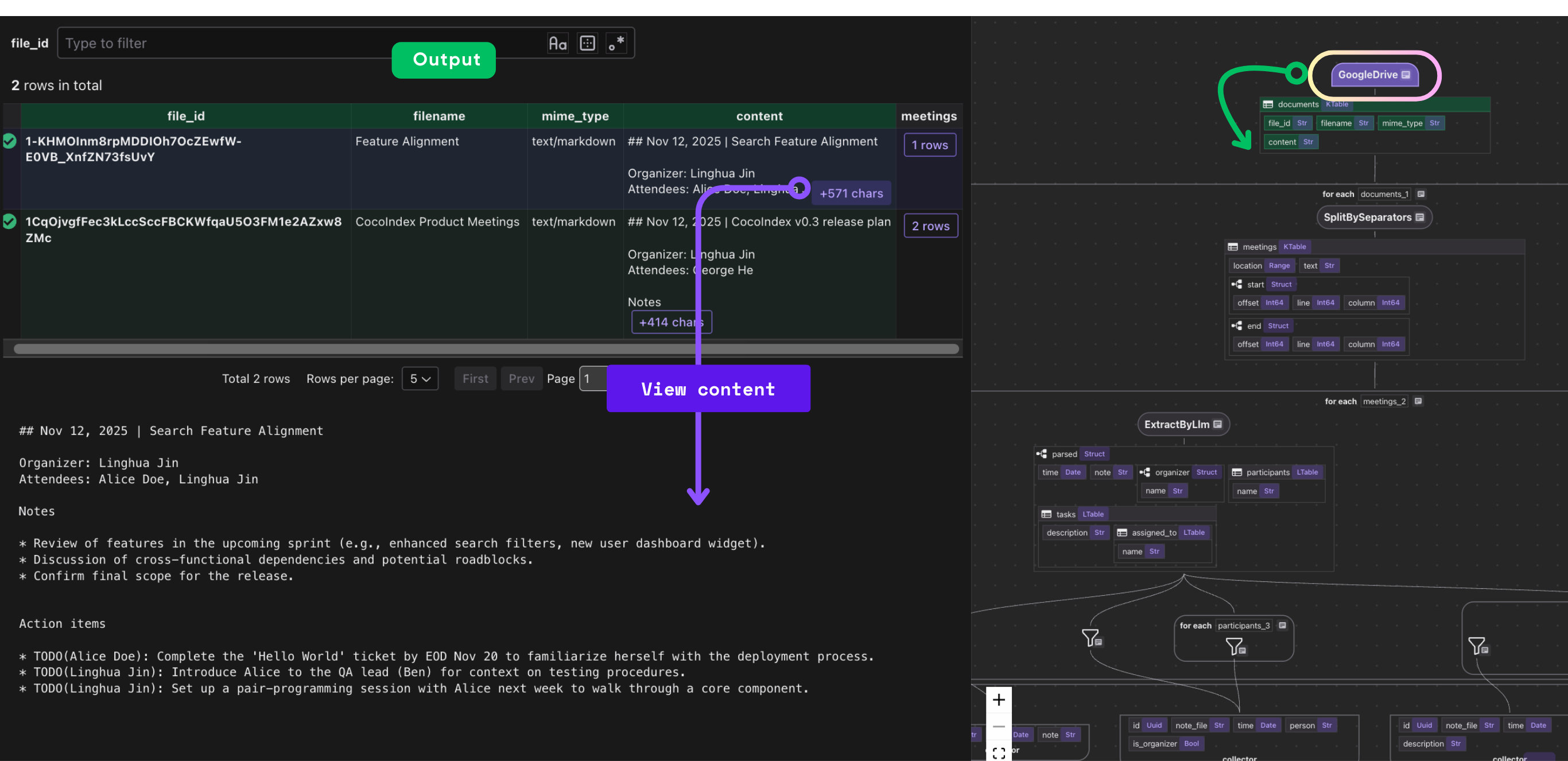
This is one of CocoIndex's superpowers: incremental processing with automatic change tracking. Instead of reprocessing all documents on every run, the framework:
- Lists files from Google Drive with last modified time
- Identifies only the files that have been added or modified since the last successful run
- Skips unchanged files entirely
- Passes only changed documents downstream
The result? In an enterprise with 1% daily churn, only 1% of documents trigger downstream processing. Unchanged files never hit your LLM API, never generate Neo4j queries, and never consume compute resources.
Add collector
meeting_nodes = data_scope.add_collector()
attended_rels = data_scope.add_collector()
decided_tasks_rels = data_scope.add_collector()
assigned_rels = data_scope.add_collector()
The pipeline then collects data into specialized collectors for different entity types and relationships:
- Meeting Nodes - Store the meeting itself with its date and notes
- Attendance Relationships - Capture who attended meetings and whether they were the organizer
- Task Decision Relationships - Link meetings to decisions (tasks that were decided upon)
- Task Assignment Relationships - Assign specific tasks to people
Process each document
Extract meetings
with data_scope["documents"].row() as document:
    document["meetings"] = document["content"].transform(
        cocoindex.functions.SplitBySeparators(
            separators_regex=[r"\n\n##?\ "], keep_separator="RIGHT"
        )
    )
Meeting documents often contain multiple meetings in a single file. This step splits documents on Markdown headers (## or #) preceded by blank lines, treating each section as a separate meeting. The keep_separator="RIGHT" means the separator (header) is kept with the right segment, preserving context.
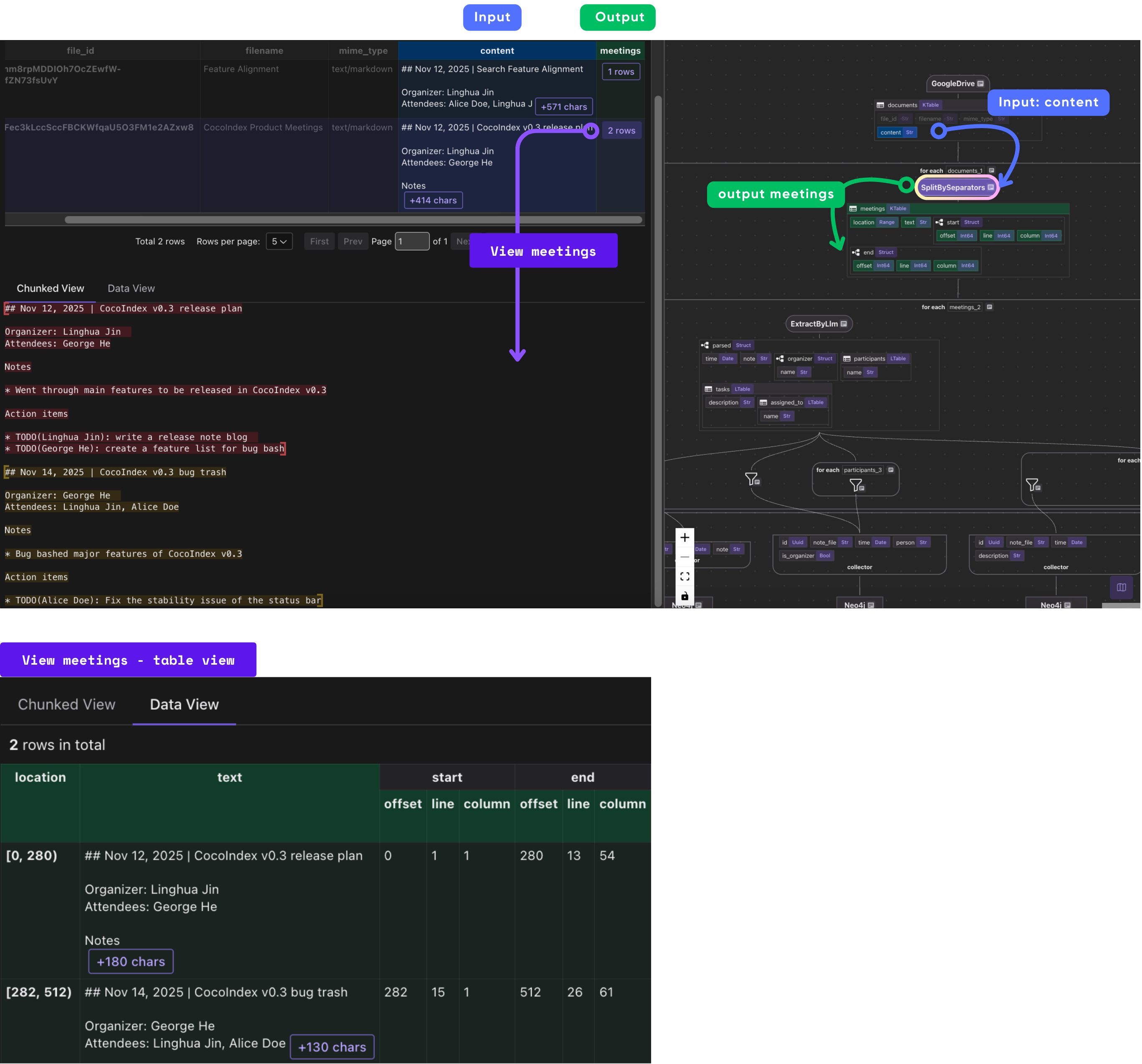
Extract meeting
Define Meeting schema
@dataclass
class Person:
    name: str

@dataclass
class Task:
    description: str
    assigned_to: list[Person]

@dataclass
class Meeting:
    time: datetime.date
    note: str
    organizer: Person
    participants: list[Person]
    tasks: list[Task]
The LLM uses the schema of this dataclass as its "extraction template," automatically returning structured data that matches the Python types. This provides direct guidance for the LLM about what information to extract and their schema. This is far more reliable than asking an LLM to generate free-form output, from which we cannot get structured information to build a knowledge graph.
Extract and collect relationship
with document["meetings"].row() as meeting:
    parsed = meeting["parsed"] = meeting["text"].transform(
        cocoindex.functions.ExtractByLlm(
            llm_spec=cocoindex.LlmSpec(
                api_type=cocoindex.LlmApiType.OPENAI, model="gpt-5"
            ),
            output_type=Meeting,
        )
    )
Importantly, this step also benefits from incremental processing. Since ExtractByLlm is a heavy step, we keep the output in cache, and as long as inputs (input data text, model, output type definition) have no change, we reuse the cached output without re-running the LLM.
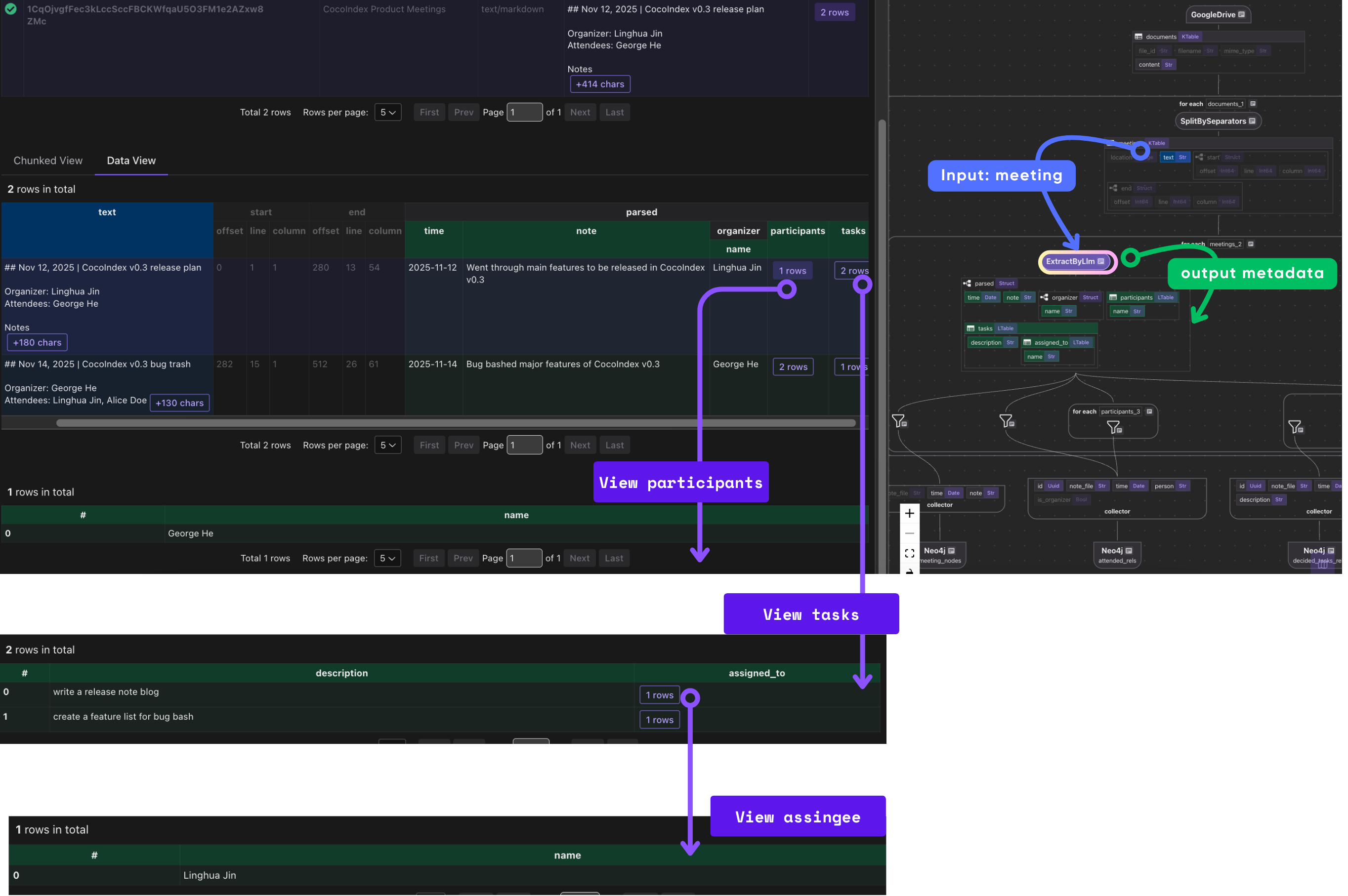
Collect relationship
meeting_key = {"note_file": document["filename"], "time": parsed["time"]}
meeting_nodes.collect(**meeting_key, note=parsed["note"])

attended_rels.collect(
    id=cocoindex.GeneratedField.UUID,
    **meeting_key,
    person=parsed["organizer"]["name"],
    is_organizer=True,
)

with parsed["participants"].row() as participant:
    attended_rels.collect(
        id=cocoindex.GeneratedField.UUID,
        **meeting_key,
        person=participant["name"],
    )

with parsed["tasks"].row() as task:
    decided_tasks_rels.collect(
        id=cocoindex.GeneratedField.UUID,
        **meeting_key,
        description=task["description"],
    )
    with task["assigned_to"].row() as assigned_to:
        assigned_rels.collect(
            id=cocoindex.GeneratedField.UUID,
            **meeting_key,
            task=task["description"],
            person=assigned_to["name"],
        )
Collectors in CocoIndex act like in‑memory buffers: you declare collectors for different categories (meeting nodes, attendance, tasks, assignments), then as you process each document you “collect” relevant entries.
This block collects nodes and relationships from parsed meeting notes to build a knowledge graph in Neo4j using CocoIndex:
-
Person → Meeting (ATTENDED)
Links participants (including organizers) to the meetings they attended.
-
Meeting → Task (DECIDED)
Links meetings to tasks or decisions that were made.
-
Person → Task (ASSIGNED_TO)
Links tasks back to the people responsible for them.
Map to graph database
Overview
We will be creating a property graph with following nodes and relationships:
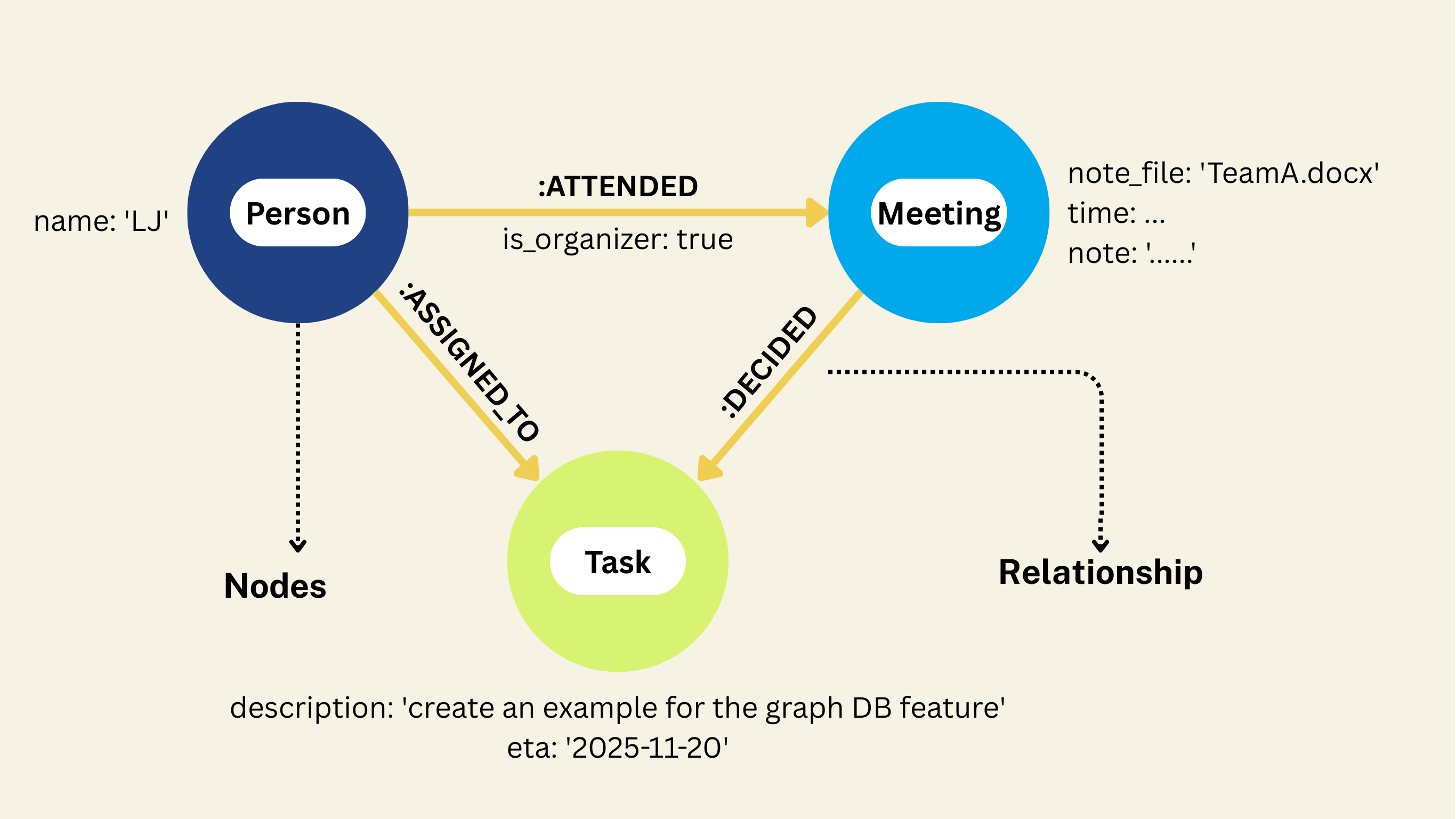
To learn more about property graph, please refer to CocoIndex's Property Graph Targets documentation.
Map Meeting Nodes
meeting_nodes.export(
    "meeting_nodes",
    cocoindex.targets.Neo4j(
        connection=conn_spec, mapping=cocoindex.targets.Nodes(label="Meeting")
    ),
    primary_key_fields=["note_file", "time"],
)
- This uses CocoIndex’s Neo4j target to export data to a graph database.
- The
mapping=cocoindex.targets.Nodes(label="Meeting")part tells CocoIndex: "Take each row collected inmeeting_nodesand map it to a node in the Neo4j graph, with labelMeeting." primary_key_fields=["note_file", "time"]instructs CocoIndex which fields uniquely identify a node. That way, if the same meeting (samenote_fileandtime) appears in different runs/updates, it will map to the same node — avoiding duplicates.
What “node export” means in CocoIndex → Neo4j context
|
Collector rows |
Graph entities |
|---|---|
|
Each collected row (meeting with its fields) |
One node in Neo4j with label |
|
Fields of that row |
Properties of the node (e.g. |
Declare Person and Task Nodes
flow_builder.declare(
    cocoindex.targets.Neo4jDeclaration(
        connection=conn_spec,
        nodes_label="Person",
        primary_key_fields=["name"],
    )
)
flow_builder.declare(
    cocoindex.targets.Neo4jDeclaration(
        connection=conn_spec,
        nodes_label="Task",
        primary_key_fields=["description"],
    )
)
- The
declare(...)method onflow_builderlets you pre‐declare node labels that may appear as source or target nodes in relationships — even if you don’t have an explicit collector exporting them as standalone node rows. Neo4jDeclarationis the specification for such declared nodes: you give it the connection, the node label (type), and theprimary_key_fieldsthat uniquely identify instances of that node
For example, for the Person Declaration,
- You tell CocoIndex: “We expect
Person‑labeled nodes to exist in the graph. They will be referenced in relationships (e.g. a meeting’s organizer or attendees, task assignee), but we don’t have a dedicated collector exporting Person rows.” - By declaring
Person, CocoIndex will handle deduplication: multiple relationships referencing the samenamewill map to the samePersonnode in Neo4j (becausenameis the primary key).
How declaration works with relationships & export logic
-
When you later export relationship collectors (e.g. ATTENDED, DECIDED, ASSIGNED_TO), those relationships will reference nodes of type
PersonorTask. CocoIndex needs to know how to treat those node labels so it can create or match the corresponding nodes properly.declare(...)gives CocoIndex that knowledge. -
CocoIndex handles matching & deduplication of nodes by checking primary‑key fields. If a node with the same primary key already exists, it reuses it rather than creating a duplicate.
Map ATTENDED Relationship
ATTENDED relationships
attended_rels.export(
    "attended_rels",
    cocoindex.targets.Neo4j(
        connection=conn_spec,
        mapping=cocoindex.targets.Relationships(
            rel_type="ATTENDED",
            source=cocoindex.targets.NodeFromFields(
                label="Person",
                fields=[
                    cocoindex.targets.TargetFieldMapping(
                        source="person", target="name"
                    )
                ],
            ),
            target=cocoindex.targets.NodeFromFields(
                label="Meeting",
                fields=[
                    cocoindex.targets.TargetFieldMapping("note_file"),
                    cocoindex.targets.TargetFieldMapping("time"),
                ],
            ),
        ),
    ),
    primary_key_fields=["id"],
)
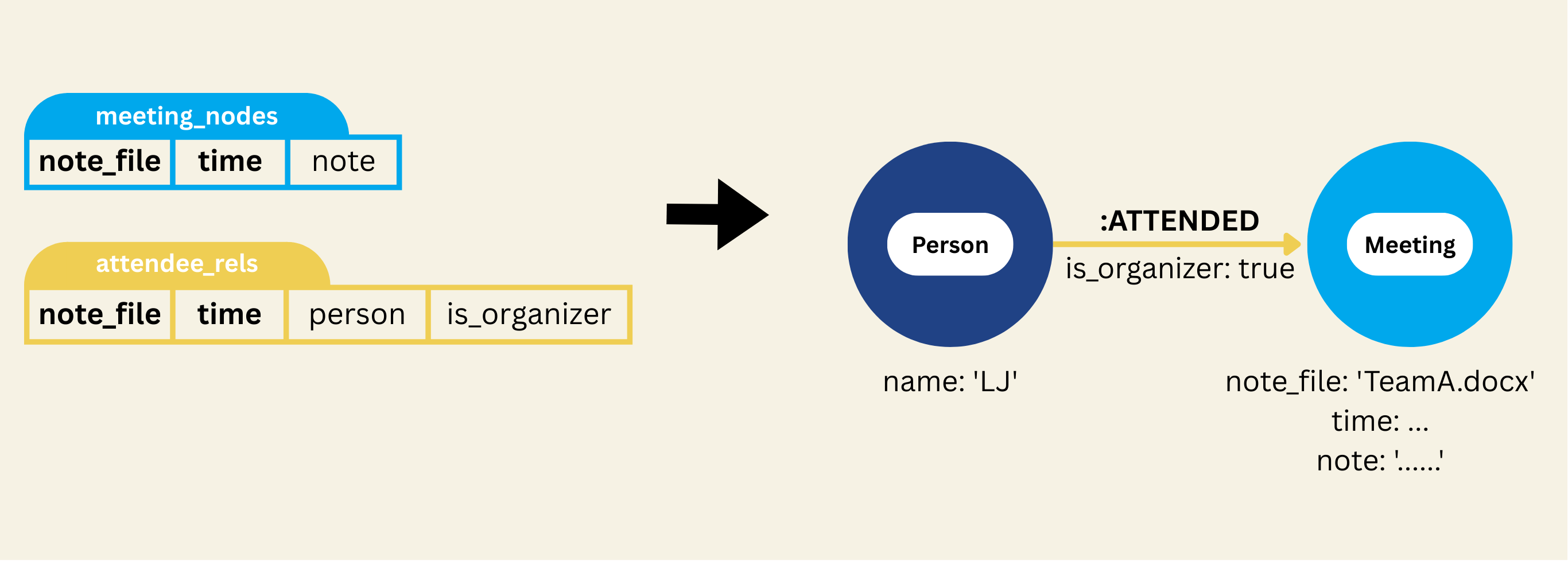
- This call ensures that ATTENDED relationships — i.e. “Person → Meeting” (organizer or participant → the meeting) — are explicitly encoded as edges in the Neo4j graph.
- It links
Personnodes withMeetingnodes viaATTENDEDrelationships, enabling queries like “which meetings did Alice attend?” or “who attended meeting X?”. - By mapping
PersonandMeetingnodes correctly and consistently (using unique keys), it ensures a clean graph with no duplicate persons or meetings. - Because relationships get unique IDs and are exported with consistent keys, the graph remains stable across incremental updates: re-runs won’t duplicate edges or nodes.
Map DECIDED Relationship
DECIDED relationships
decided_tasks_rels.export(
    "decided_tasks_rels",
    cocoindex.targets.Neo4j(
        connection=conn_spec,
        mapping=cocoindex.targets.Relationships(
            rel_type="DECIDED",
            source=cocoindex.targets.NodeFromFields(
                label="Meeting",
                fields=[
                    cocoindex.targets.TargetFieldMapping("note_file"),
                    cocoindex.targets.TargetFieldMapping("time"),
                ],
            ),
            target=cocoindex.targets.NodeFromFields(
                label="Task",
                fields=[
                    cocoindex.targets.TargetFieldMapping("description"),
                ],
            ),
        ),
    ),
    primary_key_fields=["id"],
)
- This call ensures that DECIDED relationships — i.e., “Meeting → Task” — are explicitly encoded as edges in the Neo4j graph.
- It links
Meetingnodes withTasknodes viaDECIDEDrelationships, enabling queries like:- “Which tasks were decided in Meeting X?”
- “From which meeting did Task Y originate?”
- By mapping
MeetingandTasknodes consistently (usingnote_file + timefor meetings anddescriptionfor tasks), it prevents duplicate tasks or meeting nodes in the graph. - Because relationships have unique IDs and are exported with consistent keys, the graph remains stable across incremental updates: re-running the pipeline won’t create duplicate edges or nodes.
Map ASSIGNED_TO Relationship
ASSIGNED_TO relationships
assigned_rels.export(
    "assigned_rels",
    cocoindex.targets.Neo4j(
        connection=conn_spec,
        mapping=cocoindex.targets.Relationships(
            rel_type="ASSIGNED_TO",
            source=cocoindex.targets.NodeFromFields(
                label="Person",
                fields=[
                    cocoindex.targets.TargetFieldMapping(
                        source="person", target="name"
                    ),
                ],
            ),
            target=cocoindex.targets.NodeFromFields(
                label="Task",
                fields=[
                    cocoindex.targets.TargetFieldMapping(
                        source="task", target="description"
                    ),
                ],
            ),
        ),
    ),
    primary_key_fields=["id"],
)
It takes all the task assignment data you collected (assigned_rels) — i.e., which person is responsible for which task.
- This explicitly encodes task ownership in the graph, linking people to the tasks they are responsible for.
- It enables queries like:
- "Which tasks is Alice assigned to?"
- "Who is responsible for Task X?"
- By using consistent node mappings (
nameforPerson,descriptionforTask), it prevents duplicate person or task nodes. - Unique IDs on relationships ensure the graph remains stable across incremental updates — re-running the flow won't create duplicate edges.
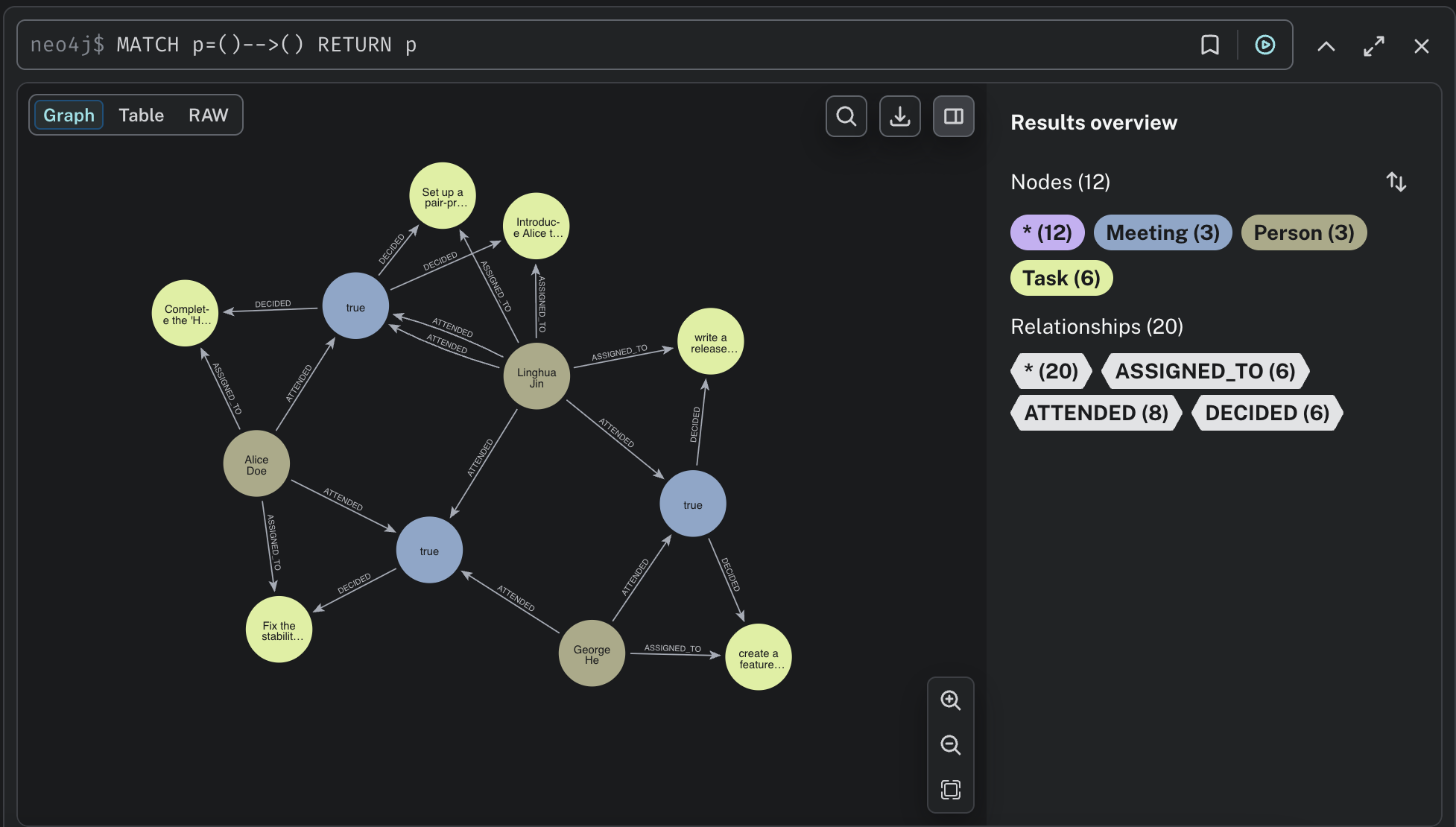
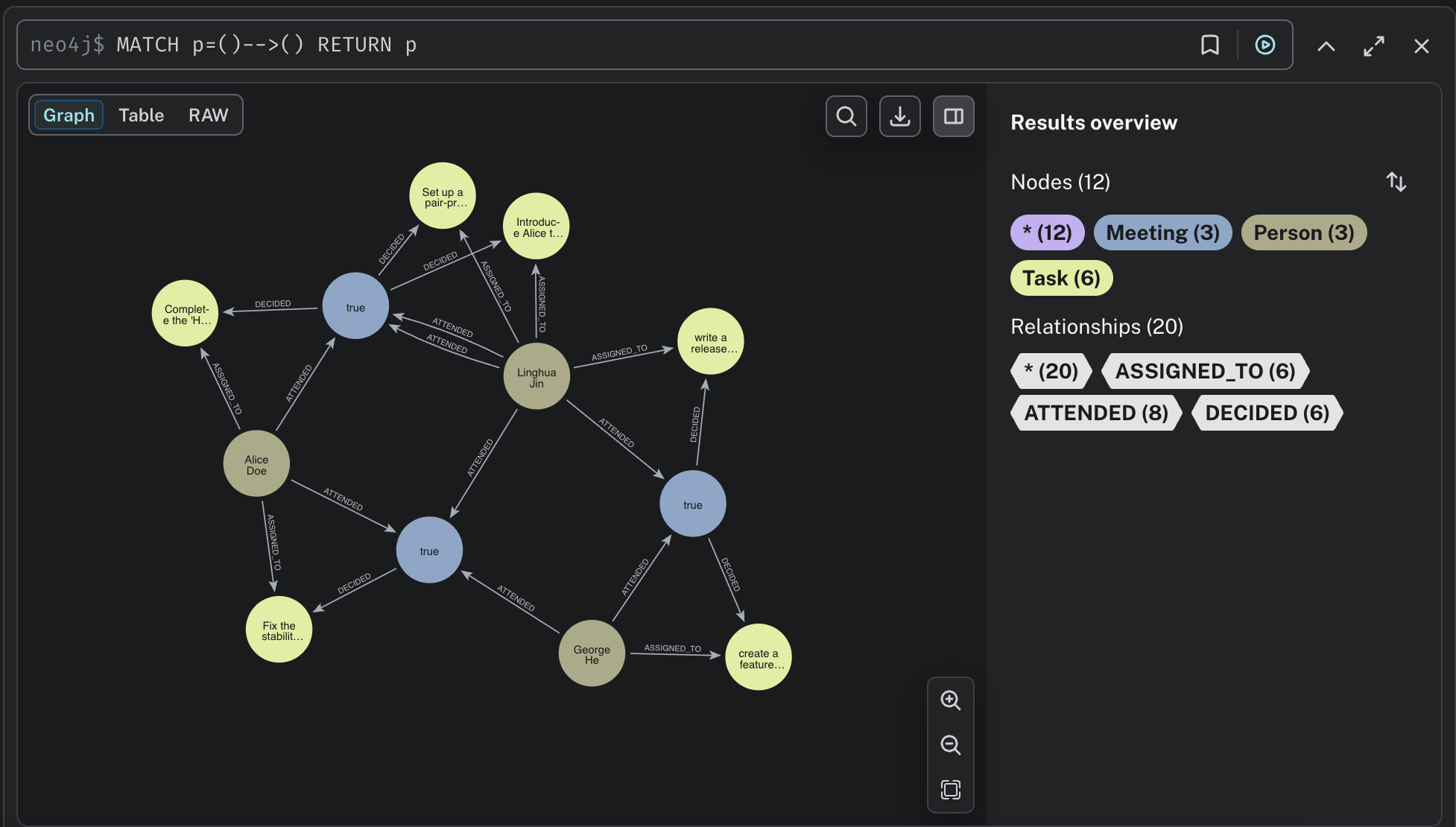
The Resulting Graph
After running this pipeline, your Neo4j database contains a rich, queryable graph:
Nodes:
Meeting- Represents individual meetings with properties like date and notesPerson- Represents individuals involved in meetingsTask- Represents actionable items decided in meetings
Relationships:
ATTENDED- Connects people to meetings they attendedDECIDED- Connects meetings to tasks that were decidedASSIGNED_TO- Connects people to tasks they're responsible for
Importantly, in the final step to export to the knowledge graph, CocoIndex also does this incrementally. CocoIndex only mutates the knowledge graph for nodes or relationships that have changes, and it's a no-op for unchanged stuff. This avoids unnecessary churning on the target database and minimizes the cost of target write operations.
Run
Build/update the graph
Install dependencies:
pip install -e .
Update the index (run the flow once to build/update the graph):
cocoindex update main
Browse the knowledge graph
Open Neo4j Browser at http://localhost:7474.
Sample Cypher queries:
// All relationships
MATCH p=()-->() RETURN p

// Who attended which meetings (including organizer)
MATCH (p:Person)-[:ATTENDED]->(m:Meeting)
RETURN p, m

// Tasks decided in meetings
MATCH (m:Meeting)-[:DECIDED]->(t:Task)
RETURN m, t

// Task assignments
MATCH (p:Person)-[:ASSIGNED_TO]->(t:Task)
RETURN p, t
CocoInsight
I used CocoInsight (Free beta now) to troubleshoot the index generation and understand the data lineage of the pipeline. It just connects to your local CocoIndex server, with Zero pipeline data retention.
Start CocoInsight:
cocoindex server -ci main
Then open the UI at https://cocoindex.io/cocoinsight.
Key CocoIndex Features Demonstrated
This example showcases several powerful CocoIndex capabilities, each critical for enterprise deployment:
1. Incremental Processing with Change Detection
Changes to only a few meeting notes files trigger re-processing of just those files, not the entire document set. This dramatically reduces:
- LLM API costs (99%+ reduction for typical 1% daily churn)
- Compute resource consumption
- Database I/O and storage operations
- Overall pipeline execution time
In large enterprises, this transforms knowledge graph pipelines from expensive luxury to cost-effective standard practice.
2. Data Lineage and Observability
CocoIndex tracks data transformations step-by-step. You can see where every field in your Neo4j graph came from—tracing back through LLM extraction, collection, and mapping. This becomes critical when meeting notes are edited: you can identify which changes propagated to the graph and when.
3. Declarative Data Flow
The entire pipeline is defined declaratively in Python without complex plumbing. The framework handles scheduling, error recovery, state management, and change tracking automatically. This reduces development time and operational burden compared to building incremental ETL logic from scratch.
4. Schema Management and Idempotency
CocoIndex automatically manages Neo4j schema based on your data transformations—creating nodes and relationships on-the-fly while enforcing primary key constraints for data consistency. Primary key fields ensure that document edits, section deletions, and task reassignments update existing records rather than creating duplicates—essential for maintaining data quality in large, evolving document sets.
5. Real-time Update Capability
By changing the execution mode from batch to live, the pipeline continuously monitors Google Drive for changes and updates your knowledge graph in near real-time. The moment a meeting note is updated, edited, or a section is deleted, the graph reflects those changes within the next polling interval.
Beyond Meeting Notes: The Incremental Graph Pattern for Enterprise Data
This source → extract → graph pipeline isn't meeting-specific—it's a general pattern for any high-churn document corpus. Here's where the same architecture delivers immediate ROI:
Research & IP Management
- Parse internal research papers, patents, and technical docs into concept graphs
- Track citation networks, author collaborations, and methodology evolution
- Incremental benefit: Papers get revised pre-publication; abstracts get rewritten; citations change as related work emerges
Support Intelligence
- Extract issues, resolutions, affected customers, and product components from ticket systems
- Build graphs linking recurring problems to root causes and KB articles
- Incremental benefit: Tickets mutate constantly—status changes, reassignments, solution updates, customer follow-ups
Email Thread Intelligence
- Parse millions of email threads into decision graphs: who decided what, when, and why
- Surface hidden knowledge: "What was the rationale for deprecating API v2?" lives in a 2022 email thread
- Incremental benefit: Threads continue, forwards add context, replies modify positions
Regulatory & Compliance Graphs
- Extract requirements from policies, regulations, audit reports, and standards docs
- Map requirement dependencies: which controls cascade when GDPR Article 17 changes
- Incremental benefit: Regulations get amended, internal policies get versioned, audit findings trigger doc updates
Market Intelligence
- Ingest competitor press releases, SEC filings, news articles, product announcements
- Build graphs of competitor products, partnerships, hiring patterns, market positioning
- Incremental benefit: News flows constantly, filings get amended, partnerships evolve
Contract & Legal Document Analysis
- Extract entities, obligations, dates, and dependencies from contracts and agreements
- Track amendment chains, renewal dates, party changes, obligation fulfillments
- Incremental benefit: Contracts get amended via riders, parties get acquired/renamed, terms get renegotiated
Codebase Documentation Graphs
- Parse READMEs, architecture docs, API specs, and inline comments into knowledge graphs
- Link code modules to architectural decisions, dependencies, and responsible teams
- Incremental benefit: Docs drift, code refactors cascade through doc updates, ownership changes
Clinical Trial & Research Data
- Extract protocols, adverse events, patient cohorts, and outcomes from trial documentation
- Build graphs linking interventions to outcomes, patients to cohorts, papers to trials
- Incremental benefit: Protocols get amended, safety reports accumulate, publications reference evolving data
The pattern holds: any document corpus with >1% monthly churn and complex entity relationships benefits from incremental graph construction over batch reprocessing.
Summary
The combination of CocoIndex's incremental processing, LLM-powered extraction, and Neo4j's graph database creates a powerful system for turning unstructured meeting notes into queryable, actionable intelligence. In enterprise environments where document volumes reach millions and change rates run into thousands daily, incremental processing isn't a nice-to-have—it's essential for cost-effective, scalable knowledge graph operations.
Rather than drowning in plain-text documents or reprocessing the entire corpus constantly, organizations can now explore meeting data as a connected graph, uncovering patterns and relationships invisible in static documents—without the prohibitive costs of full reprocessing.
This example demonstrates a broader principle: modern data infrastructure combines AI, databases, and intelligent orchestration. CocoIndex handles the orchestration with change detection and incremental processing, LLMs provide intelligent understanding, and Neo4j provides efficient relationship querying. Together, they form a foundation for knowledge extraction at enterprise scale.
Whether you're managing meetings, research, customer interactions, or any text-heavy domain, this pattern—source → detect changes → split → extract → collect → export—provides a reusable template for building knowledge graphs that scale with your data while remaining cost-effective as volumes and change rates grow.
Support CocoIndex ❤️
If this example was helpful, the easiest way to support CocoIndex is to give the project a ⭐ on GitHub.
Your stars help us grow the community, stay motivated, and keep shipping better tools for real-time data ingestion and transformation.
[story continues]
tags