Not long ago, going “live” meant picking just one platform, hoping for the best, and crossing your fingers that your audience would show up. If you were a YouTuber, you streamed to YouTube. Twitch streamer? You stayed on Twitch. That was just how it worked. But things have changed fast. Live streaming is arguably the most effective way to connect with an audience in real time. The global market for live streaming was worth more than US$1.49 billion in 2023,” Precedence Research found, and projected to grow at a CAGR of around 22% through 2032. That's not a trend. That’s a shift in how people consume content.
The business market has already been sucked in by it. It has turned from only gamers and influencers. Brands are turning to live streams for product launches, Q&As, internal events, and even for customer support. The playing field got a lot bigger. So naturally, the next question was “ why limit yourself to one platform?” You can broadcast to both at once, rather than to either your YouTube audience or your Twitch community. This means a single stream, in multiple destinations. But it’s the execution where people begin hitting walls. Imagine we’re going live and all you experience is watching you get on-air to a high viewership rate, which, in the event your show goes live, builds on the average. Your YouTube regulars are chatting, someone on TikTok recently sent a gift, and a new follower on Twitch has joined. All from one single broadcast. That takes some setup, though, to get there. That can be your internet upload speed, your CPU load, what software or hardware you’ve got, and whether a cloud relay service will just spare you a headache.
There are a few pieces to the puzzle, and if you miss parts, your stream’s quality is going to be bad. Step by step, this guide will break it down. You’ll get to know what multistreaming is, the tools available, and what, as a setup, finally makes sense.
Who Should Multistream?
Multistreaming is for anyone who wants to reach multiple audiences simultaneously without creating separate content for each platform. That's the short answer. But let's break down who actually gets the most out of it.
Content creators are the obvious fit. Gamers, podcasters, musicians, educators. If you're already going live on one platform and you've got followers on YouTube, Twitch, and TikTok, multistreaming lets you show up for all of them at once. You're already doing the work. You just need to combine the audiences.
Businesses benefit more than most people expect. A product launch, a live demo, or a company event streamed simultaneously to LinkedIn and YouTube means you're reaching professionals and general consumers in one shot. One broadcast, several completely different audiences.
Event hosts and organizers are a natural fit, too. Multistreaming, from the watcher’s perspective, means your audience watches on whatever platform they're already on. You're removing the load from people to show up somewhere new. Another relevant segment is independent educators and coaches running live workshops or Q&As, who also gain a lot here. If your audience is split between Facebook and YouTube, forcing them to migrate to a single platform costs you viewers.
Still, if you're brand new to streaming and still figuring out your setup, get comfortable on one platform first. Multistreaming adds benefits, but it's complex for starters. Your foundation needs to be solid before you scale it.
The Benefits of Multistreaming
The biggest benefit of multistreaming is reaching more people across multiple platforms. More people see your content without you doing more work. Instead of going live three separate times for three different audiences, you broadcast once, and every platform gets the same stream simultaneously. That's the core value proposition.
But the benefits go deeper than just reach.
You're not leaving money on the table anymore
Different platforms have different ways of paying you, and multistreaming lets you tap into all of them at once.
- YouTube has Super Chats, channel memberships, and ad revenue.
- TikTok lets viewers send gifts during live streams, which convert to real money.
- Twitch has subscriptions, Bits, and cheers. Facebook has Stars.
Each platform has built its own economy around live content, and right now, if you're only streaming to one, you're only accessing one revenue stream. To put some numbers on it, a mid-size creator going live on Twitch alone might pull in $50-$100 in subs and Bits during a two-hour stream. Add YouTube Super Chats and TikTok gifts, run simultaneously. That same stream could realistically bring in two to three times that. The content didn't change. The audience and the revenue did.
Your growth speeds up
When a new viewer discovers you on TikTok, they might follow you on YouTube too. Cross-platform exposure creates cross-platform growth. Creators who multistream consistently report building their secondary platform audiences significantly faster than creators who try to grow each platform separately through dedicated streams.
The tradeoff is that multistreaming requires a more intentional setup. Your internet, your hardware, and your software all need to be up to the task. But that's exactly what the rest of this guide covers.
Understanding the Basics | Streaming, Live Streaming, Multi-Streaming
Before jumping into setup and tools, it’s good to ensure we’re all on the same page. These terms are often tossed around, and the distinction matters in making decisions about your streaming setup. So…
What is Streaming vs Live Streaming?
Streaming is watching or listening as the data comes in via the internet, not having downloaded the entire file. That’s streaming when you watch a Netflix show or a YouTube video. The content already exists; it’s just delivered on demand via the internet. Live streaming, however, is different. As you watch it the content is simultaneously being created and broadcast. There’s no completed file sitting somewhere on a server. What you see on camera is what you’re seeing, with a few seconds of delay. That’s what gives it a sense of urgency, because it really is.
What is Multistreaming?
Multistreaming is the broadcast of one live stream to multiple platforms. Rather than live on only YouTube or only Twitch, your single stream streams to both — and any other platform you deem convenient — at the same time. You’re making the same broadcast available to viewers on either platform, just using whichever app or site they’re already on.
What are the Phases of Multi-Streaming?
Multistreaming isn't something you just switch on and figure out as you go. There's a clear process to it. Understanding the phases before you start will save you a lot of frustration mid-broadcast. Think of it in three stages: what you do before you go live, what you manage while you're live, and what you do after the stream ends.
Before You Multistream: Preparation
Before you go live on multiple platforms at once, you need to make sure your setup can actually handle it. Jumping into multistreaming without checking your foundation first is one of the most common mistakes people make — and it shows up fast in your stream quality.
Get Your Device Ready
Multistreaming is for people with a capable setup. That means either a solid PC or a dedicated hardware encoder. If you're on a PC, a good rule of thumb is at least an Intel Core i7 or AMD Ryzen 7 processor, 16GB of RAM, and a decent GPU. Multistreaming demands more from your PC because it needs to encode and send multiple streams at once. This puts extra pressure on your CPU, which is responsible for processing and encoding all the data. A weak processor can lead to dropped frames, lag, or a stream that crashes mid-broadcast.
Hardware encoders like the Elgato 4K60 Pro or AVerMedia Live Gamer are a separate device that handles the encoding workload so your PC doesn't have to. They're a good option if your computer is mid-range and you don't want to upgrade the whole machine just to multistream.
Pick Your Software
If you're going the software route, OBS Studio is the most widely used free option out there. It's an open-source broadcasting tool that lets you manage your scenes, audio, video sources, and stream settings all in one place. It has a learning curve, but once you get it, it's extremely powerful. And the price is hard to argue with.
Beyond OBS, there's vMix and Wirecast. Both are paid tools aimed at more professional productions. vMix starts around $60 and goes up depending on the tier, while Wirecast starts at $599. They offer more polished interfaces, built-in graphics, and better support for multiple cameras — worth it if you're running a professional broadcast or business event.
Choose Your Multistreaming Method
This is where things get interesting. You've got three real options — software, hardware, or cloud relay.
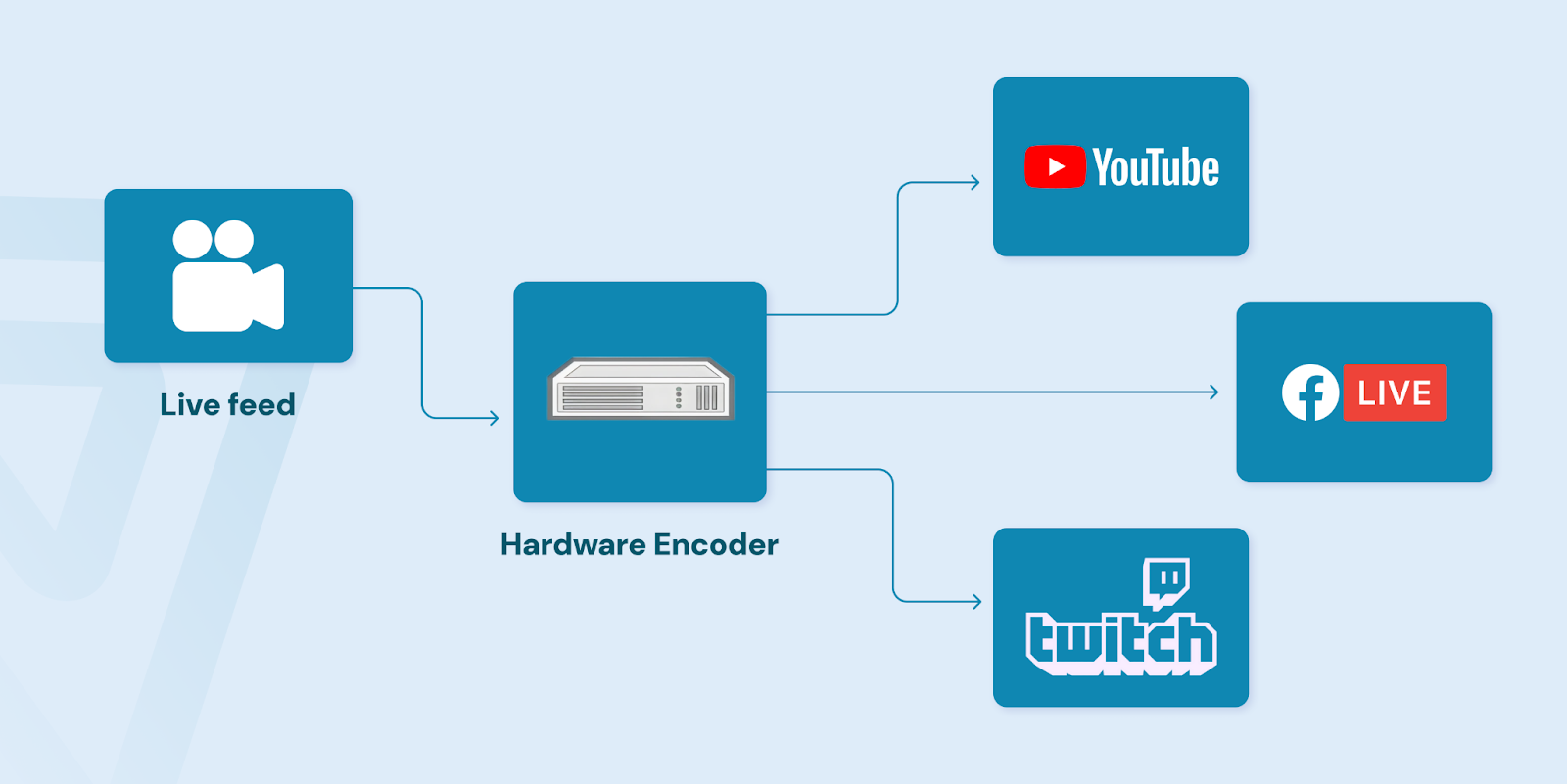
Software multistreaming means your PC handles everything directly. Hardware means an external encoder takes the load off your machine. Cloud relay is different — instead of your computer sending streams to multiple platforms, you send one stream to a cloud-based service, and that service distributes it to all your platforms. There are companies that specialize in exactly this, handling the heavy lifting on their end so your upload speed and CPU aren't stretched thin trying to push to five destinations at once. inoRain is one of those platforms, built specifically for multistreaming and OTT distribution at scale.
Each method has trade-offs, and we'll get into those in detail later in this guide.
Test Your Internet Upload Speed
This one gets skipped more than it should. Your upload speed is what determines how clean and stable your stream looks on the receiving end. For multistreaming, you generally want at least 10 Mbps upload speed — though 20 Mbps or more is where you start feeling comfortable. Each platform you stream to requires its own bitrate allocation. Streaming to three platforms at 4,000 kbps each means you need at least 12,000 kbps - or 12 Mbps - of stable upload speed just for the streams alone, not counting everything else running on your network. Getting this right before your first multistream saves you a lot of frustration down the line.
During Your Multistream: Engagement & Quality
Getting the stream live is one thing. Keeping people engaged across multiple platforms simultaneously is a whole different challenge. Here, the whole point is to connect with an audience.
Let's talk about what actually matters once you're live.
Chat is everything. If you’re streaming, say, to YouTube, Twitch, and TikTok all at once, you’ve got three individual chat feeds. Things worth paying attention to: platform-specific engagement tools. YouTube offers Super Chats, allowing viewers to pay to pin their messages in chat. Twitch has channel points and emotes that your community builds its identity around. TikTok has gifts and reactions that can drive visibility by way of its algorithm. If you’re multistreaming, all of these can help you across all of those at the same time, but only if you have the software to help you get on top of them. Reactions and emojis could be small items, but they spur interaction. The platforms that are surfacing high-engagement streams in their algorithms will reward this kind of behavior. More reactions, more visibility. Simple as that. Now the technical side.
Keep an eye on your CPU. Your CPU is basically the brain of your computer. It is responsible for every job that runs on your computer -- encoding your video, running your streaming software, processing your audio, and so on. Multistreaming requires it much more than single-platform streaming. When your CPU utilization stays above 80%, dropped frames, stuttering, and a drop in stream quality. Tools like OBS have a built-in performance monitor. Use it.
Bandwidth matters just as much. Bandwidth is the connection capacity of your internet. Most decent connections will be able to stream to one platform at 6 Mbps. However, if you’re encoding and sending multiple streams simultaneously through software, that number surges quickly. The bottom line of a multistream is this: continue to be on top of your chat, exploit the engagement tools each platform gives you, and keep a watch on your performance metrics the entire way.
After the Multi-stream: What’s Next?
A lot of creators hit "end stream" and just... move on. That's leaving a lot on the table. What you do after a multistream is almost as important as the stream itself. There are two things that should happen every single time without fail. Saving your content and reviewing your numbers.
Convert the Multi-stream to VOD.
Having saved your streaming for VOD (video on demand) reuse is one of the greatest things you can do for yourself as a multistreamer. Why allow it to live and die in one broadcast? If you set it up beforehand, OBS records locally to your hard drive automatically. Companies such as inoRain also offer cloud recording, so you're not just depending on your own storage. Once you have that recording, it’s raw material. Cut it down to a YouTube upload. Pull a five-minute highlight for TikTok. Clip a strong moment for a Twitter post. With that mindset, one two-hour stream can — if done correctly — produce a week’s worth of content, practically.
After Stream Analytics
Platform analytics lets you see what your audience reacted to and what they didn’t. YouTube Studio, for example, shows you the peak concurrent viewers, average watch time, and where people dropped off. Twitch gives you cheer data, subscriber activity, and viewer trends over the broadcast. TikTok LIVE analytics breaks down diamonds earned, viewer spikes, and follower conversions during the stream. The Yourelay company might has in-built analytics as well. Cross-platform comparison is also worth doing. If your TikTok pulled three times the viewers your YouTube did, that tells you something about where your audience actually lives right now. Adjust your promotion strategy accordingly next time.
Choosing What Multi-Streaming Method Fits You
When it comes to multistreaming, there's no one-size-fits-all setup. The right option depends on your budget, your hardware, and how much technical lifting you're willing to do. Three main routes exist - software, hardware, and cloud relay - and each comes with real trade-offs.
Software multistreaming gives you full control without extra hardware costs. OBS Studio is free and the most widely used. vMix and Wirecast are paid options with more production features. The flexibility is impressive, but here your CPU pays the price.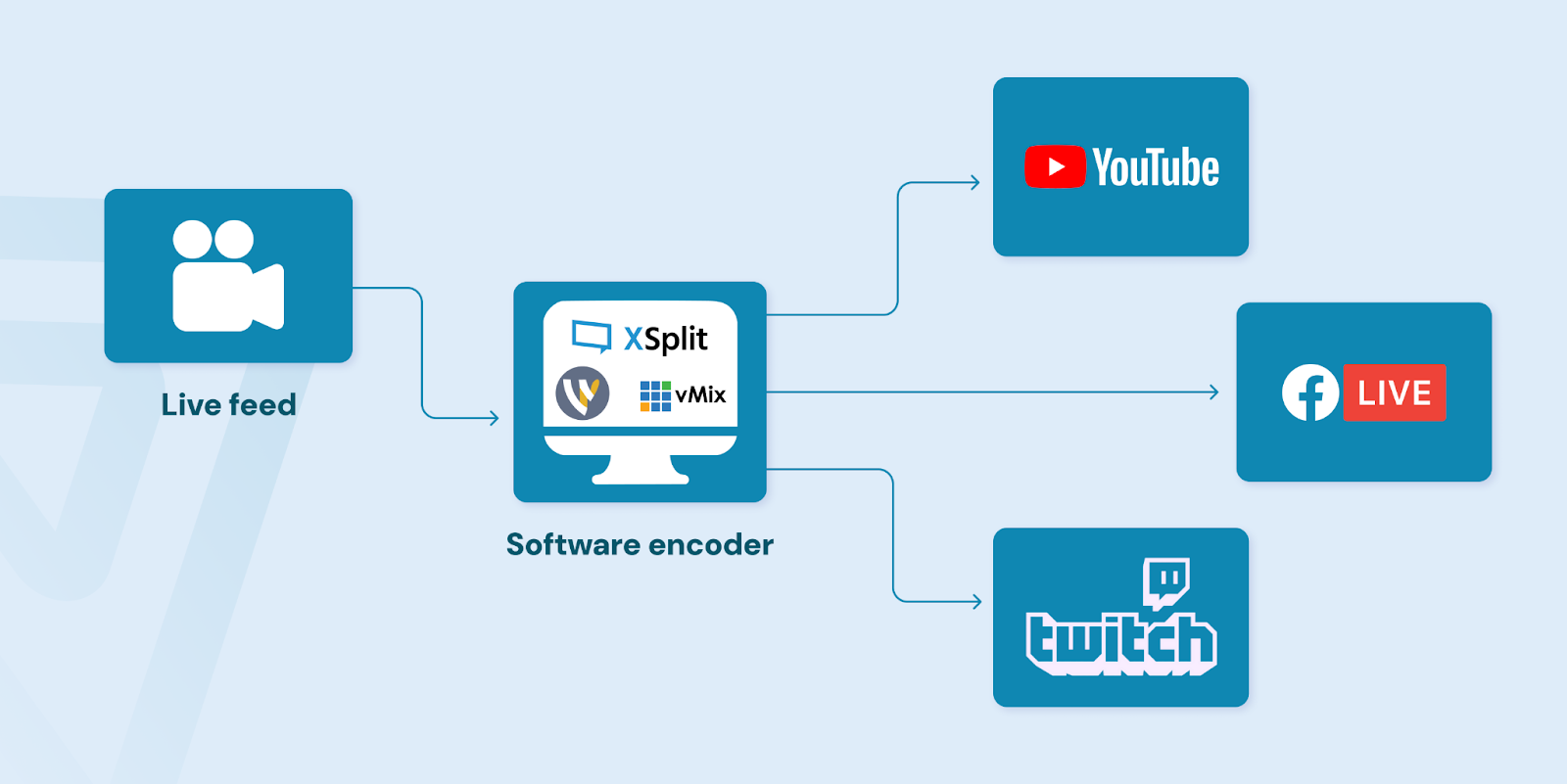
Hardware encoders handle all encoding independently of your computer. This means more stable streams and significantly less strain on your PC.
Cloud relay is the simplest route, and for a lot of people, it's the smartest starting point. Instead of your computer pushing streams to multiple platforms directly, you send one stream to a cloud server, and that server handles the distribution. Your CPU load drops significantly, your setup is simpler, and you can multistream from almost any machine.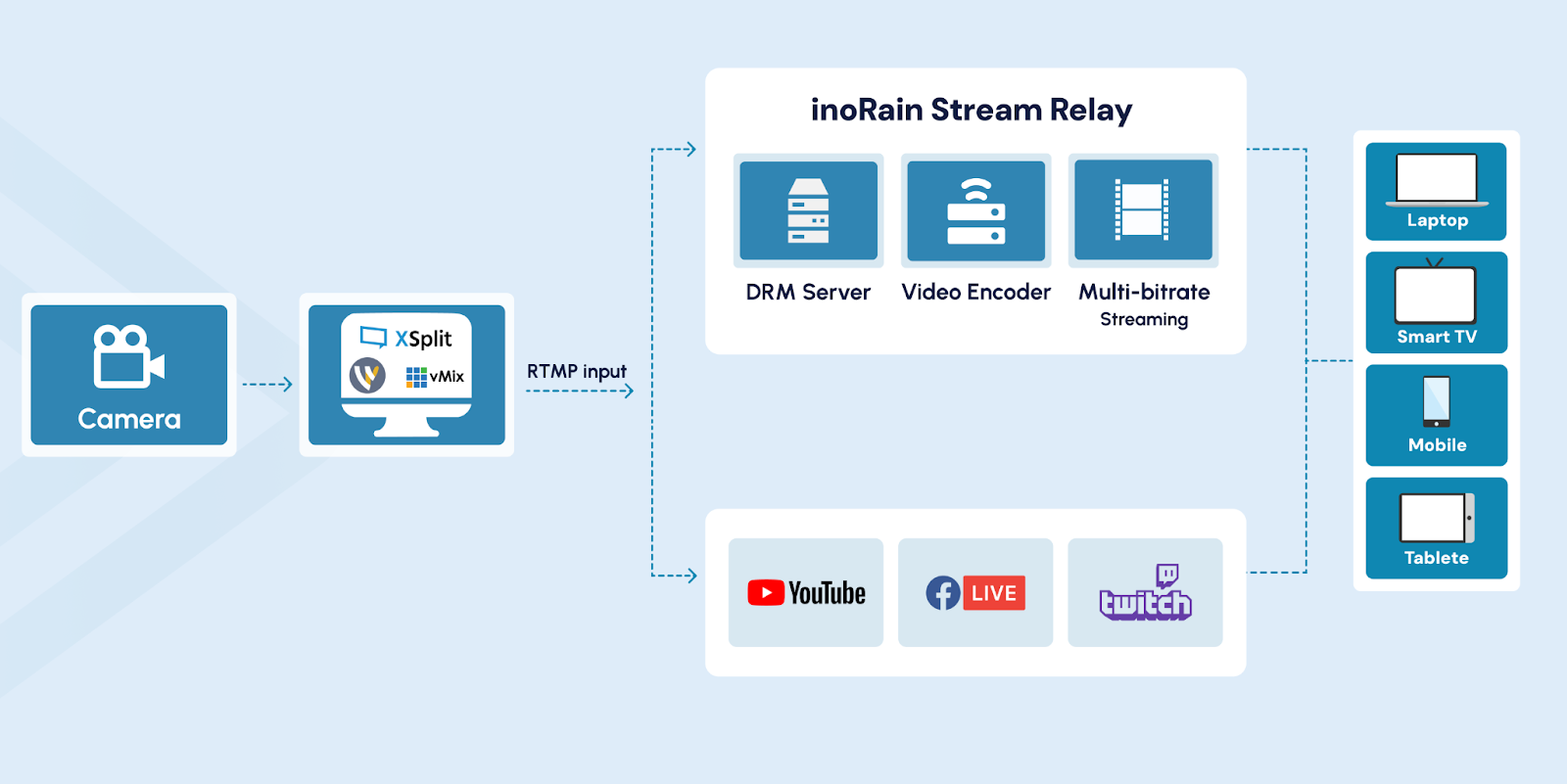
Note: For cloud relay and enterprise distribution, platforms like
Final Thoughts
Multistreaming allows you to broadcast once and show up on multiple different platforms at once. That’s the core idea. Increased reach with no need for separate streams. It is effective when your setup can bear the load. You’ll need a stable upload speed, reliable encoding, and software that doesn’t overload your CPU. If the fundamentals aren’t viable, the quality deteriorates quickly. There are three main approaches: software encoding, hardware encoding, and cloud relay. Software provides control but demands more system resources. Hardware offloads the work to a dedicated device. A cloud relay transmits one stream to a server, which distributes it for you. All available methods have cost, complexity, and stability implications. The right choice depends on your budget and technical level. While streaming, track performance statistics and handle chat across platforms. At the end of the stream, review analytics and repurpose this content as VOD. The plan is not that difficult: be prepared, select the correct technique and optimize in line with results. If your goal is broadening and diversifying your revenue base, then multistreaming is a realistic next step.
[story continues]
tags