
After spending months studying transformer architectures and building LLM applications, I realized something: most explanations are overwhelming or missing out some details. This article is my attempt to bridge that gap — explaining transformers the way I wish someone had explained them to me.
For an intro into what Large language model (LLM) means, refer this article I published previously.
By the end of this lesson, you will be able to look at any LLM architecture diagram and understand what is happening.
This is not just academic knowledge — understanding the Transformer architecture will help you make better decisions about model selection, optimize your prompts, and debug issues when your LLM applications behave unexpectedly.
How to Read This Lesson: You don't need to absorb everything in one read. Skim first, revisit later—this lesson is designed to compound over time. The concepts build on each other, so come back as you need deeper understanding.
What You Will Learn
- The complete Transformer architecture from input to output
- How positional encodings let models understand word order
- The difference between encoder-only, decoder-only, and encoder-decoder models
- Why layer normalization and residual connections matter
- How to read and interpret architecture diagrams
- Practical implications for choosing the right model type
Don't worry if some of these terms sound unfamiliar—we'll explain each concept step by step, starting with the basics. By the end of this lesson, these technical terms will make perfect sense, even if you're new to machine learning architecture.
The Big Picture
Let's start with a simple analogy. Imagine you're reading a book and trying to understand a sentence:
"The animal didn't cross the street because it was too tired."
To understand this, your brain does several things:
- Recognizes the words - You know what "animal", "street", and "tired" mean
- Understands word order - "The animal was tired" means something different from "Tired was the animal"
- Connects related words - You figure out that "it" refers to "animal", not "street"
- Grasps the overall meaning - The animal's tiredness caused it to not cross
A Transformer does something remarkably similar, but using math. Let me give you a simple explanation of how it works:
What goes in: Text broken into pieces (called tokens)
What's a token? Think of tokens as the basic building blocks that language models understand:
- Sometimes a token is a full word (like "cat" or "the")
- Sometimes it's part of a word (like "under" and "stand" for "understand")
- Even punctuation marks and spaces can be their own tokens
- For example, "I love AI!" might be split into tokens: ["I", " love", " AI", "!"]
What happens inside: The model processes this text through several stages (we'll explore each in detail):
- Converts words to numbers (because computers only understand math)
- Adds information about word positions (1st word, 2nd word, etc.)
- Figures out which words are related to each other
- Builds deeper understanding by repeating this process many times
What comes out: Depends on what you need:
- Understanding text (aka: encoding): A mathematical representation that captures meaning (useful for: "Is this email spam?" or "Find similar articles")
- Generating text (aka: decoding): Prediction of what word should come next (useful for: ChatGPT, code completion, translation)
Think of a Transformer like an assembly line where each station refines the product. Raw materials (words) enter, each station adds something (position info, relationships, meaning), and the final product emerges more polished at each step.
A Quick Visual Journey
Here's how text flows through a Transformer:
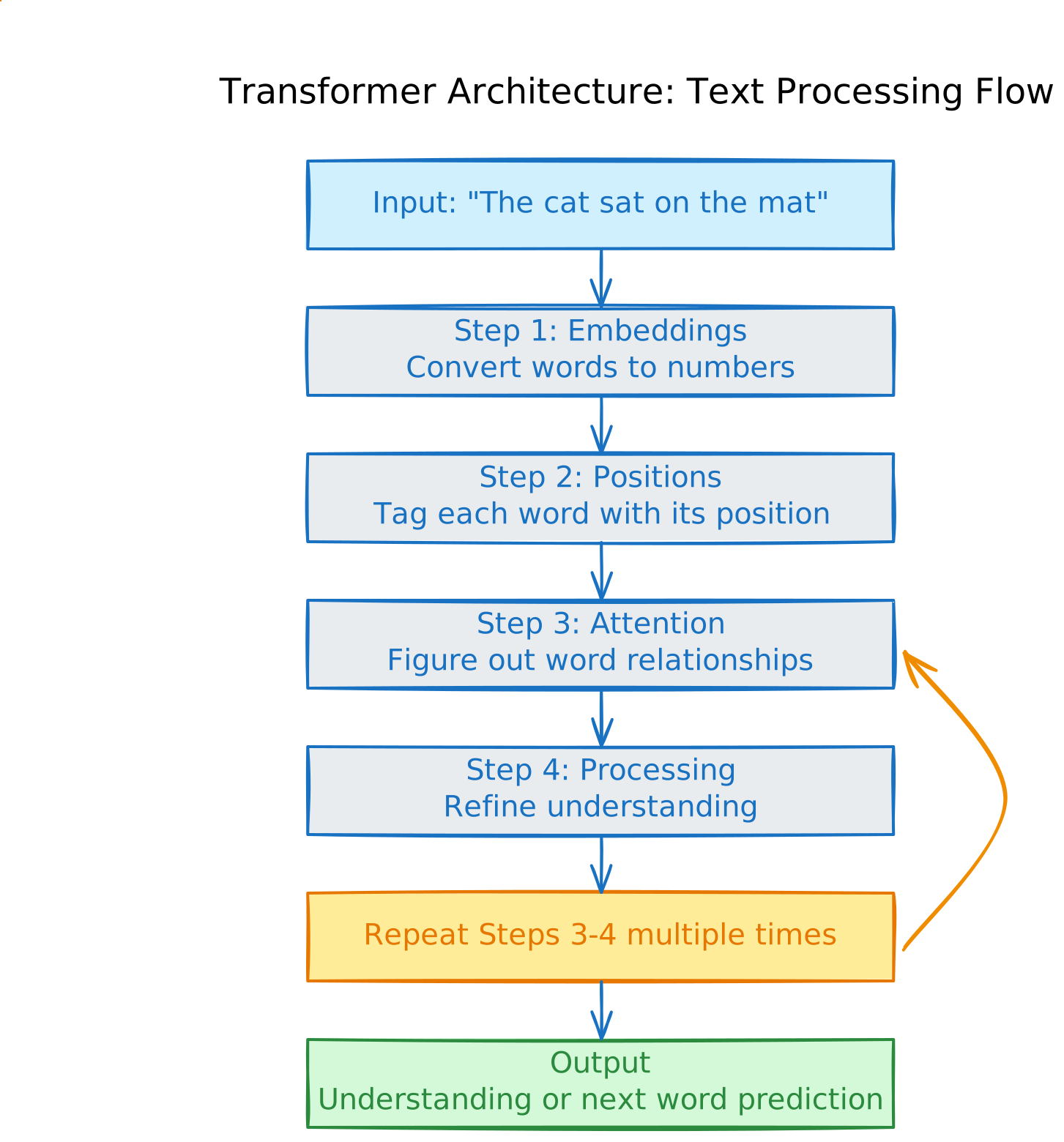
The diagram shows how a simple sentence like "The cat sat on the mat" gets processed through the transformer architecture - from tokenization to final output. The key steps include embedding the tokens into vectors, adding positional information, applying self-attention to understand relationships between words, and repeating the attention and processing steps multiple times to refine understanding.
Modern LLMs repeat the attention and processing steps many times:
- Small models: 12 repetitions (like BERT)
- Large models: 120+ repetitions (like GPT-4)
- Each repetition = one "layer" that deepens understanding
Now let's walk through each step in detail, starting from the very beginning.
Step 1: Tokenization and Embeddings
Before the model can process text, it needs to solve two problems: breaking text into pieces (tokenization) and converting those pieces into numbers (embeddings).
Part A: Tokenization - Breaking Text Into Pieces
The Problem: How do you break text into manageable chunks? You might think "just split by spaces into words," but that's too simple.
Why not just use words?
Consider these challenges:
- "running" and "runs" are related, but treating them as completely separate words wastes the model's capacity
- New words like "ChatGPT" appear constantly - you can't have infinite vocabulary
- Different languages don't use spaces (Chinese, Japanese)
The solution: Subword Tokenization
Modern models break text into subwords - pieces smaller than words but larger than individual characters. Think of it like Lego blocks: instead of needing a unique piece for every possible structure, you reuse common blocks.
Simple example:
Text: "I am playing happily"

Split by spaces (naive approach):
["I", "am", "playing", "happily"]
Problem: Need separate entries for "play", "playing", "played", "player", "plays"...

Subword tokenization (smart approach):
["I", "am", "play", "##ing", "happy", "##ly"]
Better: Reuse "play" and "##ing" for "playing", "running", "jumping"
        Reuse "happy" and "##ly" for "happily", "sadly", "quickly"
Why this matters - concrete examples:
- Handling related words:
- "unhappiness" → ["un", "##happy", "##ness"]
- Now the model knows: "un" = negative, "happy" = emotion, "ness" = state
- When it sees "uncomfortable", it recognizes "un" means negative!
- Handling rare/new words:
- Imagine the word "unsubscribe" wasn't in training
- Model breaks it down: ["un", "##subscribe"]
- It can guess meaning from pieces it knows: "un" (undo) + "subscribe" (join)
- Vocabulary efficiency:
- 50,000 tokens can represent millions of word combinations
- Like having 1,000 Lego pieces that make infinite structures
Real example of tokenization impact:
Input: "The animal didn't cross the street because it was tired"

Tokens (what the model actually sees):
["The", "animal", "didn", "'", "t", "cross", "the", "street", "because", "it", "was", "tired"]

Notice:
- "didn't" → ["didn", "'", "t"] (split to handle contractions)
- Each token gets converted to numbers (embeddings) next
Part B: Embeddings - Converting Tokens to Numbers
The Problem: Computers don't understand tokens. They only work with numbers. So how do we convert "cat" into something a computer can process?
Understanding Dimensions with a Simple Analogy
Before we dive in, let's understand what "dimensions" mean with a familiar example:
Describing a person in 3 dimensions:
- Height: 5.8 feet
- Weight: 150 lbs
- Age: 30 years
These 3 numbers (dimensions) give us a mathematical way to represent a person. Now, what if we want to represent a word mathematically?
Describing a word needs way more dimensions:
To capture everything about the word "cat", we need hundreds of numbers:
- Dimension 1: How "animal-like" is this word? (0.9 - very animal-like)
- Dimension 2: How "small" is this? (0.7 - fairly small)
- Dimension 3: How "domestic" is it? (0.8 - very domestic)
- Dimension 4: How "fluffy" is this? (0.6 - somewhat fluffy)
- ... (and hundreds more capturing different aspects)
Modern models use 768 to 4096 dimensions because words are complex! But here's the key: you don't need to understand what each dimension represents. The model figures this out during training.
How Words Get Converted to Numbers
Let's walk through a concrete example:
# This is a simplified embedding table (real ones have thousands of words)
# Each word maps to a list of numbers (a "vector")
embedding_table = {
    "cat": [0.2, -0.5, 0.8, ..., 0.1],    # 768 numbers total
    "dog": [0.3, -0.4, 0.7, ..., 0.2],    # Notice: similar to "cat"!
    "bank": [0.9, 0.1, -0.3, ..., 0.5],   # Very different from "cat"
}

# When we input a sentence:
sentence = "The cat sat"

# Step 1: Break into tokens
tokens = ["The", "cat", "sat"]

# Step 2: Look up each token's vector
embedded = [
    embedding_table["The"],   # Gets: [0.1, 0.3, ..., 0.2]  (768 numbers)
    embedding_table["cat"],   # Gets: [0.2, -0.5, ..., 0.1] (768 numbers)
    embedding_table["sat"],   # Gets: [0.4, 0.2, ..., 0.3]  (768 numbers)
]

# Result: We now have 3 vectors, each with 768 dimensions
# The model can now do math with these!
Where Does This Table Come From?
Great question! The embedding table isn't written by hand. Here's how it's created:
- Start with random numbers: Initially, every word gets random numbers
- "cat" → [0.43, 0.12, 0.88, ...] (random)
- "dog" → [0.71, 0.05, 0.33, ...] (random)
- Training adjusts these numbers: As the model trains on billions of text examples, it learns:
- "cat" and "dog" appear in similar contexts → Their numbers become similar
- "cat" and "bank" appear in different contexts → Their numbers stay different
- After training: Words with similar meanings have similar number patterns
- "cat" → [0.2, -0.5, 0.8, ...]
- "dog" → [0.3, -0.4, 0.7, ...] ← Very similar to "cat"!
- "happy" → [0.5, 0.8, 0.3, ...]
- "joyful" → [0.6, 0.7, 0.4, ...] ← Similar to "happy"!
Why This Matters
These embeddings capture word relationships mathematically:
- "king" - "man" + "woman" ≈ "queen" (this actually works with the vectors!)
- Similar words cluster together in this high-dimensional space
- The model can now reason about word meanings using math
Key Insight: Embeddings as Parameters
When we say GPT-3 has 175 billion parameters, where are they? A significant chunk lives in the embedding table.
What happens in the embedding layer:
- Each token in your vocabulary (like "cat" or "the") gets its own vector of numbers
- These numbers ARE the parameters - they're what the model learns during training
- For a model with 50,000 tokens and 1,024 dimensions per token, that's 51.2 million parameters just for embeddings
Example: If "cat" = token #847, the model looks up row #847 in its embedding table and retrieves a vector like [0.2, -0.5, 0.7, ...] with hundreds or thousands of numbers. Each of these numbers is a parameter that was optimized during training.
This is why embeddings contain so much "knowledge" - they encode the meaning and relationships between words that the model learned from massive amounts of text.
Step 2: Adding Position Information
The Problem: After converting words to numbers, we have another issue. Look at these two sentences:
- "The cat sat"
- "sat cat The"
They have the same words, just in different order. But right now, the model sees them as identical because it just has three vectors with no order information!
Real-world example:
- "The dog bit the man" vs "The man bit the dog"
- Same words, completely different meanings!
Transformers process all words at the same time (unlike reading left-to-right), so we need to explicitly tell the model: "This is word #1, this is word #2, this is word #3."
How We Add Position Information
Think of it like adding page numbers to a book. Each word gets a "position tag" added to its embedding.
Simple Example:
# We have our word embeddings from Step 1:
word_embeddings = [
    [0.1, 0.3, 0.2, ...],  # "The" (768 numbers)
    [0.2, -0.5, 0.1, ...], # "cat" (768 numbers)
    [0.4, 0.2, 0.3, ...],  # "sat" (768 numbers)
]

# Now add position information:
position_tags = [
    [0.0, 0.5, 0.8, ...],  # Position 1 tag (768 numbers)
    [0.2, 0.7, 0.4, ...],  # Position 2 tag (768 numbers)
    [0.4, 0.9, 0.1, ...],  # Position 3 tag (768 numbers)
]

# Combine them (add the numbers together):
final_embeddings = [
    [0.1+0.0, 0.3+0.5, 0.2+0.8, ...],  # "The" at position 1
    [0.2+0.2, -0.5+0.7, 0.1+0.4, ...], # "cat" at position 2
    [0.4+0.4, 0.2+0.9, 0.3+0.1, ...],  # "sat" at position 3
]

# Now each word carries both:
# - What the word means (from embeddings)
# - Where the word is located (from position tags)
How Are Position Tags Created?
The original Transformer paper used a mathematical pattern based on sine and cosine waves. You don't need to understand the math — just know that:
- Each position gets a unique pattern - Position 1 gets one pattern, position 2 gets another, etc.
- The pattern encodes relative distance - The model can figure out "word 5 is 2 steps after word 3"
- It works for any length - The mathematical pattern can extend beyond what the model saw during training, so a model trained on 100-word sentences can still understand the position of words in much longer documents like 1000-word documents
Modern Improvement: Rotary Position Embeddings (RoPE)
Newer models like Llama and Mistral use an improved approach called RoPE (Rotary Position Embeddings).
Simple analogy: Think of a clock face with moving hands:
Word at position 1: Clock hand at 12 o'clock (0°)
Word at position 2: Clock hand at 1 o'clock (30°)
Word at position 3: Clock hand at 2 o'clock (60°)
Word at position 4: Clock hand at 3 o'clock (90°)
...
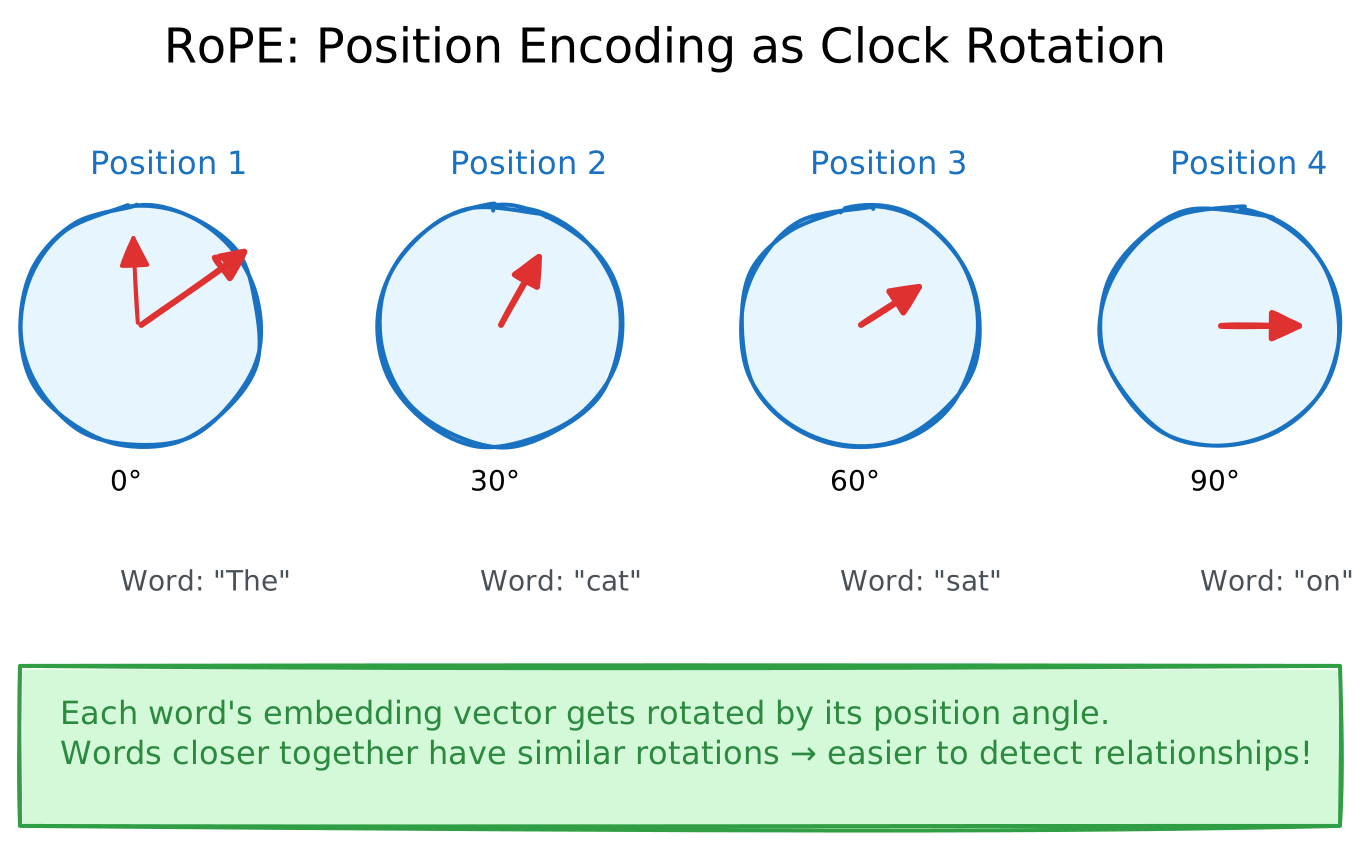
How this connects to RoPE: Just like the clock hands rotate to show different times, RoPE literally rotates each word's embedding vector based on its position. Word 1 gets rotated 0°, word 2 gets rotated 30°, word 3 gets rotated 60°, and so on. This rotation encodes position information directly into the word vectors themselves.
Why this works:
- Words next to each other have clock hands that are close (12 o'clock vs 1 o'clock)
- Words far apart have very different clock positions (12 o'clock vs 6 o'clock)
- Just by looking at the clock hands, the model can tell:
- Where each word is: "This word is at the 5 o'clock position"
- How far apart words are: "These two words are 3 hours apart"
Why this matters in practice:
- Better performance on long documents
- Enables "context extension" tricks (train on 4K words, use with 32K words)
- More natural understanding of word distances
Key takeaway: Position encoding ensures the model knows "The cat sat" is different from "sat cat The". Without this, word order would be lost!
Step 3: Understanding Which Words Are Related (Attention)
This is the magic that makes Transformers work! Let's understand it with a story.
The Dinner Party Analogy
Imagine you're at a dinner party with 10 people. Someone mentions "Paris" and you want to understand what they mean:
- You scan the room (looking at all other conversations)
- You notice someone just said "France" and another said "Eiffel Tower"
- You connect the dots - "Ah! They're talking about Paris the city, not Paris Hilton"
- You gather information from those relevant conversations
Attention does exactly this for words in a sentence!
Example
Let's process this sentence:
"The animal didn't cross the street because it was too tired."
When the model processes the word "it", it needs to figure out: What does "it" refer to?
Step 1: The word "it" asks questions
- "I'm a pronoun. Who do I refer to? I'm looking for nouns that came before me."
Step 2: All other words offer information
- "The" says: "I'm just an article, not important"
- "animal" says: "I'm a noun! I'm a subject! Pay attention to me!"
- "didn't" says: "I'm a verb helper, not what you're looking for"
- "street" says: "I'm a noun too, but I'm the location, not the subject"
- "tired" says: "I describe a state, might be relevant"
Step 3: "it" calculates relevance scores
- "animal": 0.45 (45% relevant - very high!)
- "street": 0.08 (8% relevant - somewhat relevant)
- "tired": 0.15 (15% relevant - moderately relevant)
- All others: ~0.02 (2% each - barely relevant)
Step 4: "it" gathers information The model now knows: "it" = mostly "animal" + a bit of "tired" + tiny bit of others
How This Works Mathematically ?
The model creates three versions of each word:
- Query (Q): "What am I looking for?"
- For "it": Looking for nouns, subjects, things that can be tired
- Key (K): "What do I contain?"
- For "animal": I'm a noun, I'm the subject, I can get tired
- For "street": I'm a noun, but I'm an object/location
- Value (V): "What information do I carry?"
- For "animal": Carries the actual meaning/features of "animal"
The matching process:
# Simplified example (real numbers would be 768-dimensional)

# Word "it" creates its Query:
query_it = [0.8, 0.3, 0.9]  # Looking for: subject, noun, living thing

# Word "animal" has this Key:
key_animal = [0.9, 0.4, 0.8]  # Offers: subject, noun, living thing

# How well do they match? Multiply and sum:
relevance = (0.8×0.9) + (0.3×0.4) + (0.9×0.8)
          = 0.72 + 0.12 + 0.72
          = 1.56  # High match!

# Compare with "street":
key_street = [0.1, 0.4, 0.2]  # Offers: not-subject, noun, non-living thing
relevance = (0.8×0.1) + (0.3×0.4) + (0.9×0.2)
          = 0.08 + 0.12 + 0.18
          = 0.38  # Lower match

# Convert to percentages (this is what "softmax" does):
# "animal" gets 45%, "street" gets 8%, etc.
Where Does The Formula Come From?
You might see this formula in papers:
Attention(Q, K, V) = softmax(Q × K^T / √d_k) × V
What it means in plain English:
- Q × K^T: Match each word's Query against all other words' Keys (like our multiplication above)
- / √d_k: Scale down the numbers (prevents them from getting too big)
- softmax: Convert to percentages that add up to 100%
- × V: Gather information from relevant words based on those percentages
Where it comes from: Researchers from Google Brain discovered in 2017 that this mathematical formula effectively models how words should pay attention to each other. It's inspired by information retrieval (like how search engines find relevant documents).
You don't need to memorize this! Just remember: attention = figuring out which words are related and gathering information from them.
Complete Example Walkthrough
Let's see attention in action with actual numbers:
Sentence: "The animal didn't cross the street because it was tired"
When processing "it", the attention mechanism calculates:
Word         Relevance Score    What This Means
─────────────────────────────────────────────────────────
"The"        →  2%              Article, not important
"animal"     → 45%              Main subject! Likely referent
"didn't"     →  3%              Verb helper, not the focus
"cross"      →  5%              Action, minor relevance
"the"        →  2%              Article again
"street"     →  8%              Object/location, somewhat relevant
"because"    →  2%              Connector word
"it"         → 10%              Self-reference (checking own meaning)
"was"        →  8%              Linking verb, somewhat relevant
"tired"      → 15%              State description, quite relevant
                ─────
Total        = 100%              (Scores sum to 100%)
Result: The model now knows "it" primarily refers to "animal" (45%), with some connection to being "tired" (15%). This understanding gets encoded into the updated representation of "it".
How does this actually update "it"? The model takes a weighted average of all words' Value vectors using these percentages:
# Each word has a Value vector (what information it contains)
value_animal = [0.9, 0.2, 0.8]  # Contains: mammal, four-legged, animate
value_tired = [0.1, 0.3, 0.9]   # Contains: state, adjective, fatigue
value_street = [0.2, 0.8, 0.1]  # Contains: place, concrete, inanimate
# ... (other words)

# Updated representation of "it" = weighted combination
new_it = (45% × value_animal) + (15% × value_tired) + (8% × value_street) + ...
       = (0.45 × [0.9, 0.2, 0.8]) + (0.15 × [0.1, 0.3, 0.9]) + ...
       = [0.52, 0.19, 0.61]  # Now "it" carries meaning from "animal" + "tired"
The word "it" now has a richer representation that includes information from "animal" (heavily weighted) and "tired" (moderately weighted), helping the model understand the sentence better.
Why "Multi-Head" Attention?
Simple analogy: When you read a sentence, you notice multiple things simultaneously:
- Grammar relationships (subject → verb)
- Meaning relationships (dog → animal)
- Reference relationships (it → what does "it" mean?)
- Position relationships (which words are nearby?)
Multi-head attention lets the model do the same thing! Instead of one attention mechanism, models use 8 to 128 different attention "heads" running in parallel.
Example with the sentence "The fluffy dog chased the cat":
- Head 1 might focus on: "dog" ↔ "chased" (subject-verb)
- Head 2 might focus on: "fluffy" ↔ "dog" (adjective-noun)
- Head 3 might focus on: "chased" ↔ "cat" (verb-object)
- Head 4 might focus on: nearby words (local context)
- Head 5 might focus on: animate things (dog, cat)
Important: These specializations aren't programmed! During training, different heads naturally learn to focus on different relationships. Researchers discovered this by analyzing trained models—it emerges automatically.
How they combine:
# Each head produces its own understanding:
head_1_output = attention_head_1(text)  # Finds subject-verb
head_2_output = attention_head_2(text)  # Finds adjective-noun
head_8_output = attention_head_8(text)  # Finds other patterns

# Combine all heads into a rich understanding:
final_output = combine([head_1_output, head_2_output, ..., head_8_output])

# Now each word has information from all types of relationships!
Why this matters: Having multiple attention heads is like having multiple experts analyze the same text from different angles. The final result is much richer than any single perspective.
Step 4: Processing the Information (Feed-Forward Network)
After attention gathers information, each word needs to process what it learned. This is where the Feed-Forward Network (FFN) comes in.
Simple analogy:
- Attention = Gathering ingredients from your kitchen
- FFN = Actually cooking with those ingredients
What happens:
After "it" gathered information that it refers to "animal" and relates to "tired", the FFN processes this:
# Simplified version
def process_word(word_vector):
    # Step 1: Expand to more dimensions (gives more room to think)
    bigger = expand(word_vector)     # 768 numbers → 3072 numbers

    # Step 2: Apply complex transformations (the "thinking")
    processed = activate(bigger)      # Non-linear processing

    # Step 3: Compress back to original size
    result = compress(processed)      # 3072 numbers → 768 numbers

    return result
What's it doing? Let's trace through a concrete example using our sentence:
Example: Processing "it" in "The animal didn't cross the street because it was tired"
After attention, "it" has gathered information showing it refers to "animal" (45%) and relates to "tired" (15%). Now the FFN enriches this understanding:
Step 1 - What comes in:
Vector for "it" after attention: [0.52, 0.19, 0.61, ...]
This already knows: "it" refers to "animal" and connects to "tired"
Step 2 - FFN adds learned knowledge:
Think of the FFN as having millions of pattern detectors (neurons) that learned from billions of text examples. When "it" enters with its current meaning, specific patterns activate:
Input pattern: word "it" + animal reference + tired state

FFN recognizes patterns:
- Pattern A activates: "Pronoun referring to living creature" → Strengthens living thing understanding
- Pattern B activates: "Subject experiencing fatigue" → Adds physical/emotional state concept
- Pattern C activates: "Reason for inaction" → Links tiredness to not crossing
- Pattern D stays quiet: "Object being acted upon" → Not relevant here
What the FFN is really doing: It's checking "it" against thousands of patterns it learned during training, like:
- "When a pronoun refers to an animal + there's a state like 'tired', the pronoun is the one experiencing that state"
- "Tiredness causes inaction" (learned from millions of examples)
- "Animals get tired, streets don't" (learned semantic knowledge)
Step 3 - What comes out:
Enriched vector: [0.61, 0.23, 0.71, ...]
Now contains: pronoun role + animal reference + tired state + causal link (tired → didn't cross)
The result: The model now has a richer understanding: "it" isn't just referring to "animal"—it understands the animal is tired, and this tiredness is causally linked to why it didn't cross the street.
Here's another example showing how FFN removes uncertainty of word meanings:
Example - "bank":
- Input sentence: "I sat on the river bank"
- After attention: "bank" knows it's near "river" and "sat"
- FFN adds: bank → shoreline → natural feature → place to sit
- Output: Model understands it's a river bank (not a financial institution!)
Think of FFN as the model's "knowledge base" where millions of facts and patterns are stored in billions of network weights (the connections between neurons). Unlike attention (which gathers context from other words), FFN applies learned knowledge to that context.
It's the difference between:
- Attention: "What words are nearby?" → Finds "river" and "sat"
- FFN: "What does 'bank' mean here?" → Applies knowledge: must be shoreline, not finance
Key insight:
- Attention = figures out which words are related
- FFN = applies knowledge and reasoning to those relationships
Modern improvement: Newer models use something called "SwiGLU" instead of older activation functions. It provides better performance, but the core idea remains: process the gathered information to extract deeper meaning.
Step 5: Two Important Tricks (Residual Connections & Normalization)
These might sound technical, but they solve simple problems. Let me explain with everyday analogies.
Residual Connections: The "Don't Forget Where You Started" Trick
The Problem: Imagine you're editing a document. You make 96 rounds of edits. By round 96, you've completely forgotten what the original said! Sometimes the original information was important.
The Solution: Keep a copy of the original and mix it back in after each edit.
In the Transformer:
# Start with a word's representation
original = [0.2, 0.5, 0.8, ...]  # "cat" representation

# After attention + processing, we get changes
changes = [0.1, -0.2, 0.3, ...]  # What we learned

# Residual connection: Keep the original + add changes
final = original + changes
      = [0.2+0.1, 0.5-0.2, 0.8+0.3, ...]
      = [0.3, 0.3, 1.1, ...]  # Original info preserved!
Better analogy: Think of editing a photo:
- Without residual: Each filter completely replaces the image (after 50 filters, original is lost)
- With residual: Each filter adds to the image (original always visible + 50 layers of enhancements)
Why this matters: Deep networks (96-120 layers) need this. Otherwise, information from early layers disappears by the time you reach the end.
Layer Normalization: The "Keep Numbers Reasonable" Trick
The Problem: Imagine you're calculating daily expenses:
- Day 1: ₹500
- Day 2: ₹450
- Day 3: ₹520
- Then suddenly Day 4: ₹50,00,00,000 (a bug in your calculator!)
The huge number breaks everything.
The Solution: After each step, check if numbers are getting too big or too small, and adjust them to a reasonable range.
What normalization does:
Before normalization:
Word vectors might be:
"the":  [0.1, 0.2, 0.3, ...]
"cat":  [5.2, 8.9, 12.3, ...]      ← Too big!
"sat":  [0.001, 0.002, 0.001, ...] ← Too small!
After normalization:
"the":  [0.1, 0.2, 0.3, ...]
"cat":  [0.4, 0.6, 0.8, ...]      ← Scaled down to reasonable range
"sat":  [0.2, 0.4, 0.1, ...]      ← Scaled up to reasonable range
How it works (simplified):
# For each word's vector:
# 1. Calculate average and spread of numbers
average = 5.0
spread = 3.0

# 2. Adjust so average=0, spread=1
normalized = (original - average) / spread

# Now all numbers are in a similar range!
Why this matters:
- Prevents numbers from exploding or vanishing
- Makes training faster and more stable
- Like cruise control for your model's internal numbers
Key takeaway: These two tricks (residual connections + normalization) are like safety features in a car—they keep everything running smoothly even when the model gets very deep (many layers).
Three Types of Transformer Models
Transformers come in three varieties, like three different tools in a toolbox. Each is designed for specific jobs.
Type 1: Encoder-Only (BERT-style) - The "Understanding" Expert
Think of it like: A reading comprehension expert who thoroughly understands text but can't write new text.
How it works: Sees the entire text at once, looks at relationships in all directions (words can look both forward and backward).
Training example:
Show it: "The [MASK] sat on the mat"
It learns: "The cat sat on the mat"

By filling in blanks, it learns deep understanding!
Real-world uses:
- Email spam detection: "Is this email spam or legitimate?"
- Needs: Deep understanding of the entire email
- Example: Gmail's spam filter
- Search engines: "Find documents similar to this query"
- Needs: Understanding what documents mean
- Example: Google Search understanding your query
- Sentiment analysis: "Is this review positive or negative?"
- Needs: Understanding the overall tone
- Example: Analyzing customer feedback
Popular models: BERT, RoBERTa (used by many search engines)
Key limitation: Can understand and classify text, but cannot generate new text. It's like a reading expert who can't write.
Type 2: Decoder-Only (GPT-style) - The "Writing" Expert
Think of it like: A creative writer who generates text one word at a time, always building on what came before.
How it works: Processes text from left to right. Each word can only "see" previous words, not future ones (because future words don't exist yet during generation!).
Training example:
Show it: "The cat sat on the"
It learns: Next word should be "mat" (or "floor", "chair", etc.)

By predicting next words billions of times, it learns to write!
Why only look backward? Because when generating text, future words don't exist yet—you can only use what you've written so far. It's like writing a story one word at a time: after "The cat sat on the", you can only look back at those 5 words to decide what comes next.
When predicting "sat":
  Can see: "The", "cat"  ← Use these to predict
  Cannot see: "on", "the", "mat"  ← Don't exist yet during generation
Real-world uses:
- ChatGPT / Claude: Conversational AI assistants
- Task: Generate helpful responses to questions
- Example: "Explain quantum physics simply" → generates explanation
- Code completion: GitHub Copilot
- Task: Complete your code as you type
- Example: You type
def calculate_→ it suggests the rest
- Content creation: Blog posts, emails, stories
- Task: Generate coherent, creative text
- Example: "Write a product description for..." → generates description
Popular models: GPT-4, Claude, Llama, Mistral (basically all modern chatbots)
Why this is dominant: These models can both understand AND generate, making them incredibly versatile. This is what you use when you chat with AI.
Type 3: Encoder-Decoder (T5-style) - The "Translator" Expert
Think of it like: A two-person team: one person reads and understands (encoder), another person writes the output (decoder).
How it works:
- Encoder (the reader): Thoroughly understands the input, looking in all directions
- Decoder (the writer): Generates output one word at a time, consulting the encoder's understanding
Training example:
Input (to encoder):  "translate English to French: Hello world"
Output (from decoder): "Bonjour le monde"

Encoder understands English, Decoder writes French!
Real-world uses:
- Translation: Google Translate
- Task: Convert text from one language to another
- Example: English → Spanish, preserving meaning
- Summarization: News article summaries
- Task: Read long document (encoder), write short summary (decoder)
- Example: 10-page report → 3-sentence summary
- Question answering:
- Task: Read document (encoder), generate answer (decoder)
- Example: "Based on this article, what caused...?" → generates answer
Popular models: T5, BART (less common nowadays)
Why less popular now: Decoder-only models (like GPT) turned out to be more versatile—they can do translation AND chatting AND coding, all in one architecture. Encoder-decoder models are more specialized.
Quick Decision Guide: Which Type Should You Use?
Need to understand/classify text? → Encoder (BERT)
- Spam detection
- Sentiment analysis
- Search/similarity
- Document classification
Need to generate text? → Decoder (GPT)
- Chatbots (ChatGPT, Claude)
- Code completion
- Creative writing
- Question answering
- Content generation
Need translation/summarization only? → Encoder-Decoder (T5)
- Language translation
- Document summarization
- Specific input→output transformations
Not sure? → Use Decoder-only (GPT-style)
- Most versatile
- Can handle both understanding and generation
- This is what most modern AI tools use
Bottom line: If you're building something today, you'll most likely use a decoder-only model (like GPT, Claude, Llama) because they're the most flexible and powerful.
Scaling the Architecture
Now that you understand the components, let us see how they scale:
What Gets Bigger?
As models grow from small to large, here's what changes:
|
Component |
Small (125M params) |
Medium (7B params) |
Large (70B params) |
|---|---|---|---|
|
Layers (depth) |
12 |
32 |
80 |
|
Hidden size (vector width) |
768 |
4,096 |
8,192 |
|
Attention heads |
12 |
32 |
64 |
Key insights:
1. Layers (depth) - This is how many times you repeat Steps 3 & 4
- Each layer = one pass of Attention (Step 3) + FFN (Step 4)
- Small model with 12 layers = processes the sentence 12 times
- Large model with 80 layers = processes the sentence 80 times
- Think of it like editing a document: more passes = more refinement and deeper understanding
Example: Processing "it" in our sentence:
- Layer 1: Figures out "it" refers to "animal"
- Layer 5: Understands the tiredness connection
- Layer 15: Grasps the causal relationship (tired → didn't cross)
- Layer 30: Picks up subtle implications (the animal wanted to cross but couldn't)
2. Hidden size (vector width) - How many numbers represent each word
- Bigger vectors = more "memory slots" to store information
- 768 dimensions vs 8,192 dimensions = like having 768 notes vs 8,192 notes about each word
- Larger hidden size lets the model capture more nuanced meanings and relationships
3. Attention heads - How many different perspectives each layer examines
- 12 heads = looking at the sentence in 12 different ways simultaneously
- 64 heads = 64 different ways (grammar, meaning, references, dependencies, etc.)
- More heads = catching more types of word relationships in parallel
Where do the parameters live?
Surprising fact: The Feed-Forward Network (FFN) actually takes up most of the model's parameters, not the attention mechanism!
Why? In each layer:
- Attention parameters: relatively small (mostly for Q, K, V transformations)
- FFN parameters: huge (expands 4,096 dimensions to 16,384 then back, with millions of learned patterns)
In large models, FFN parameters outnumber attention parameters by 3-4x. That's where the "knowledge" is stored!
Why Self-Attention is Expensive: The O(N²) Problem
Simple explanation: Every word needs to look at every other word. If you have N words, that's N × N comparisons.
Concrete example:
3 words: "The cat sat"
- "The" looks at: The, cat, sat (3 comparisons)
- "cat" looks at: The, cat, sat (3 comparisons)
- "sat" looks at: The, cat, sat (3 comparisons)
Total: 3 × 3 = 9 comparisons

6 words: "The cat sat on the mat"
- Each of 6 words looks at all 6 words
Total: 6 × 6 = 36 comparisons (4x more for 2x words!)

12 words:
Total: 12 × 12 = 144 comparisons (16x more for 4x words!)
The scaling problem:
|
Sentence Length |
Attention Calculations |
Growth Factor |
|---|---|---|
|
512 tokens |
262,144 |
1x |
|
2,048 tokens |
4,194,304 |
16x more |
|
8,192 tokens |
67,108,864 |
256x more |
Why this matters: Doubling the length doesn't double the work—it quadruples it! This is why:
- Long documents are expensive to process
- Context windows have hard limits (memory/compute)
- New techniques are needed for longer contexts
Solutions being developed:
- Flash Attention: Clever memory tricks to compute attention faster
- Sliding window attention: Each word only looks at nearby words (not all words)
- Sparse attention: Skip some comparisons that matter less
These tricks help models handle longer texts without the exponential cost!
Understanding the Complete Architecture Diagram
Important: This diagram represents the universal Transformer architecture. All Transformer models (BERT, GPT, T5) follow this basic structure, with variations in how they use certain components.
Let's walk through the complete flow step by step:
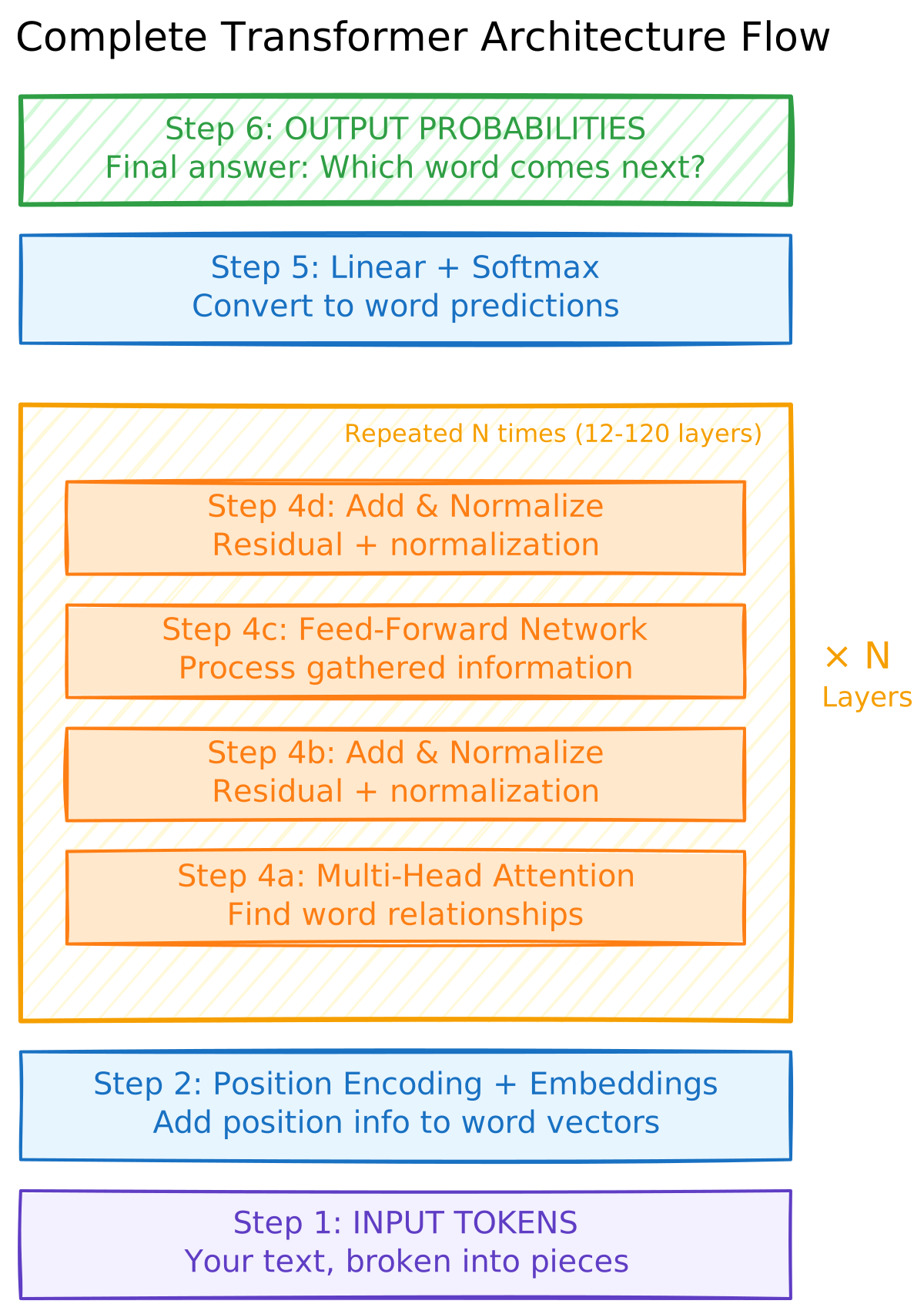
Detailed Walkthrough with Example
Let's trace "The cat sat" through this architecture:
Step 1: Input Tokens
Your text: "The cat sat"
Tokens: ["The", "cat", "sat"]
Step 2: Embeddings + Position
"The" → [0.1, 0.3, ...] + position_1_tag → [0.1, 0.8, ...]
"cat" → [0.2, -0.5, ...] + position_2_tag → [0.4, -0.2, ...]
"sat" → [0.4, 0.2, ...] + position_3_tag → [0.8, 0.5, ...]

Now each word is a 768-number vector with position info!
Step 3: Through N Transformer Layers (repeated 12-120 times)
Each layer does this:
Step 4a: Multi-Head Attention
- Each word looks at all other words
- "cat" realizes it's the subject
- "sat" realizes it's the action "cat" does
- Words gather information from related words
Step 4b: Add & Normalize
- Add original vector back (residual connection)
- Normalize numbers to reasonable range
- Keeps information stable
Step 4c: Feed-Forward Network
- Process the gathered information
- Apply learned knowledge
- Each word's vector gets richer
Step 4d: Add & Normalize (again)
- Add vector from before FFN (another residual)
- Normalize again
- Ready for next layer!
After going through all N layers, each word's representation is incredibly rich with understanding.
Step 5: Linear + Softmax
Take the final word's vector: [0.8, 0.3, 0.9, ...]

Convert to predictions for EVERY word in vocabulary (50,000 words):
"the"    → 5%
"a"      → 3%
"on"     → 15%  ← High probability!
"mat"    → 12%
"floor"  → 8%
...
(All probabilities sum to 100%)
Step 6: Output
Pick the most likely word: "on"

Complete sentence so far: "The cat sat on"

Then repeat the whole process to predict the next word!
How the Three Model Types Use This Architecture
Now that you've seen the complete flow, here's how each model type uses it differently:
1. Encoder-Only (BERT):
- Uses: Steps 1-4 (everything except the final output prediction)
- Attention: Bidirectional - each word sees ALL other words (past AND future)
- Training: Fill-in-the-blank ("The [MASK] sat" → predict "cat")
- Purpose: Rich understanding for classification, search, sentiment analysis
2. Decoder-Only (GPT, Claude, Llama):
- Uses: All steps 1-6 (the complete flow we just walked through)
- Attention: Causal/Unidirectional - each word only sees PAST words
- Training: Next-word prediction ("The cat sat" → predict "on")
- Purpose: Text generation, chatbots, code completion
3. Encoder-Decoder (T5):
- Uses: TWO stacks - one encoder (steps 1-4), one decoder (full steps 1-6)
- Encoder: Bidirectional attention to understand input
- Decoder: Causal attention to generate output, also attends to encoder
- Training: Input→output mapping ("translate: Hello" → "Bonjour")
- Purpose: Translation, summarization, transformation tasks
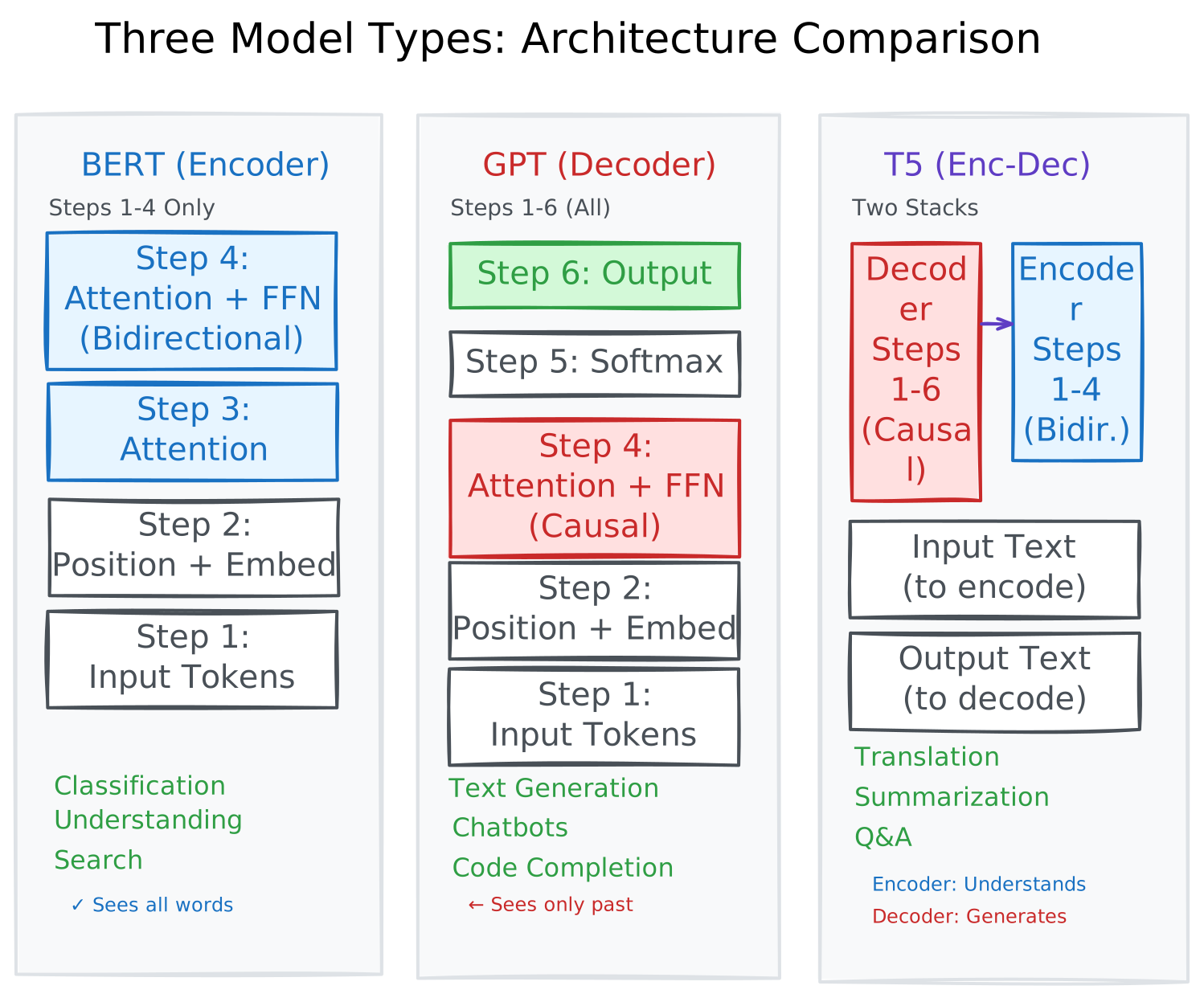
The key difference: Same architecture blocks, different attention patterns and how they're connected!
Additional Key Insights
It's a loop: For generation, this process repeats. After predicting "on", the model adds it to the input and predicts again.
The "N" matters:
- Small models: N = 12 layers
- GPT-3: N = 96 layers
- GPT-4: N = 120+ layers
- More layers = deeper understanding but slower/more expensive
This is universal: Whether you're reading a research paper about a new model or trying to understand GPT-4, this diagram applies. The core architecture is the same!
Practical Implications
Understanding the architecture helps you make better decisions:
1. Context Window Limitations
The context window is not just a number—it is a hard architectural limit. A model trained on 4K context cannot magically understand 100K tokens without modifications (RoPE interpolation, fine-tuning, etc.).
2. Why Position Matters
Tokens at the beginning and end of context often get more attention (primacy and recency effects). If you have critical information, consider its placement in your prompt.
3. Layer-wise Understanding
Early layers capture syntax and basic patterns. Later layers capture semantics and complex reasoning. This is why techniques like layer freezing during fine-tuning work—early layers transfer well across tasks.
4. Attention is Expensive
Every extra token in your prompt increases compute quadratically. Be concise when you can.
Key Takeaways
- Transformers process all tokens in parallel, using positional encoding to preserve order
- Self-attention lets each token gather information from all other tokens
- Multi-head attention captures different types of relationships simultaneously
- Residual connections and layer normalization enable training very deep networks
- Encoder-only models (BERT) excel at understanding; decoder-only (GPT) at generation
- Modern LLMs are decoder-only with causal masking
- Context window limitations come from O(n²) attention complexity
- Understanding architecture helps you write better prompts and choose appropriate models
[story continues]
tags