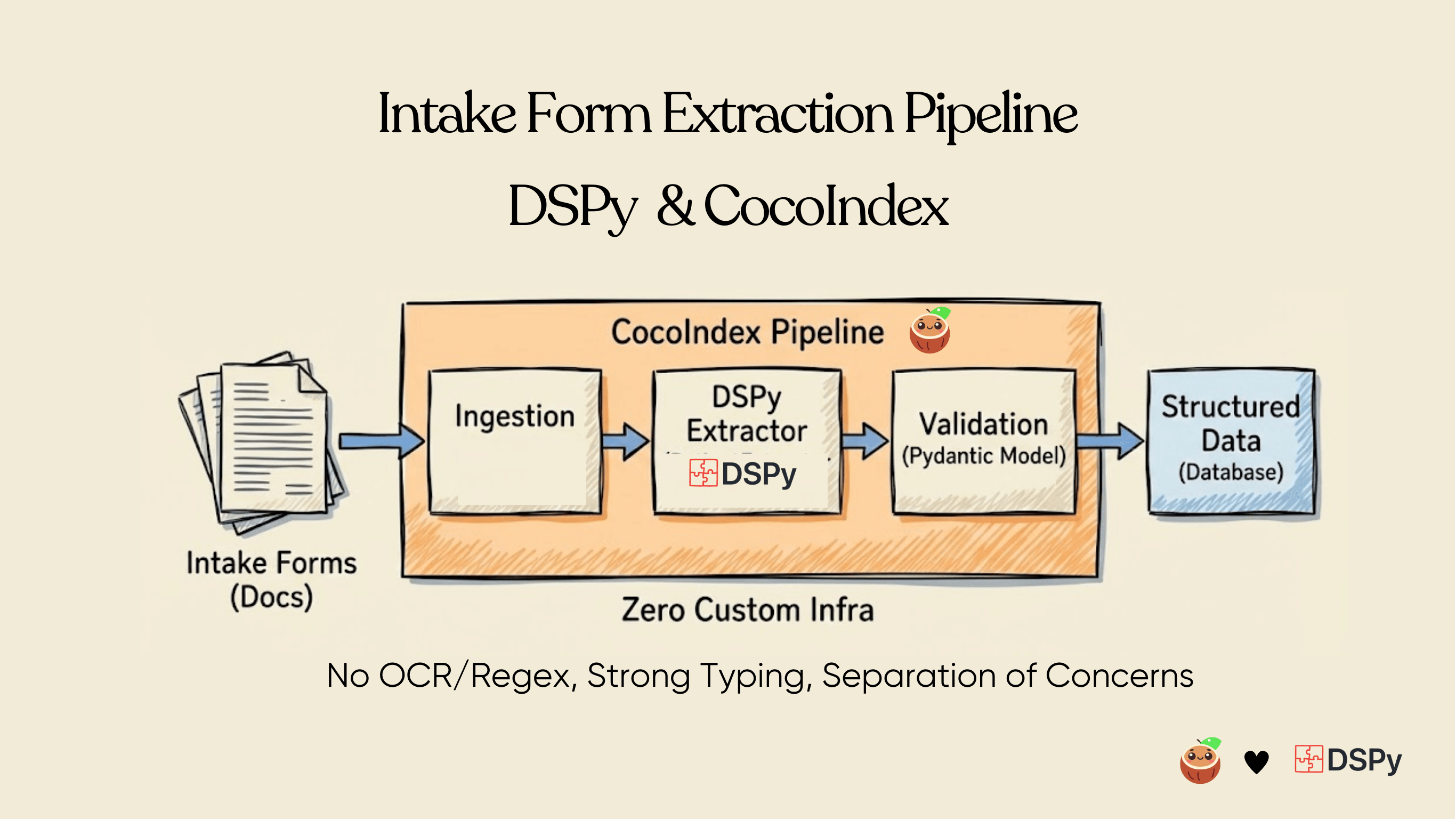
Complex intake forms contain rich structured data, but that structure is implicit rather than explicit: nested sections, conditional fields, repeated entities, and layout-dependent semantics. Conventional OCR pipelines flatten these documents into plain text, after which regexes or heuristic parsers attempt to reconstruct structure that was already lost. This approach is inherently brittle and fails under schema variation, layout drift, or partial updates.
In this article, we present an end-to-end pipeline for direct structured extraction from PDFs that emits typed, Pydantic-validated models, without intermediate text normalization, markdown conversion, or layout-specific rules.
The system combines:
- DSPy for multimodal, schema-constrained extraction using Gemini 2.5 Flash (vision)
- CocoIndex for incremental execution, content-addressed caching, and persistence into databases
Rather than treating PDFs as unstructured text, we treat them as structured visual inputs and extract data directly into application-level schemas. This enables deterministic validation, incremental reprocessing, schema evolution, and production-grade reliability across heterogeneous document formats.
The entire code is open sourced with Apache 2.0 license. To see more examples build with CocoIndex, you could refer to the examples page. ⭐ Star the project if you find it helpful!

Why DSPy + CocoIndex?
This pipeline combines two complementary abstractions: schema-constrained LLM computation and incremental dataflow execution. Each addresses a different failure mode in production document extraction systems.
DSPy: A programming model for LLM pipelines
🔗 https://github.com/stanfordnlp/dspy
Most LLM-based extraction systems are built around prompt engineering: hand-written prompts with instructions, few-shot examples, and ad-hoc output parsing. This approach does not scale operationally:
- Output correctness is sensitive to prompt wording, model upgrades, and input distribution shifts
- Business logic is embedded in strings, making it difficult to test, refactor, or version
- Validation and retries are bolted on after the fact
DSPy replaces prompts-as-strings with a declarative programming model. Instead of specifying how to prompt the model, you specify what each step must produce: typed inputs, structured outputs, constraints, and validation rules. DSPy then automatically synthesizes and optimizes the underlying prompts to satisfy that specification.
In practice, this enables:
- Schema-driven extraction with explicit contracts
- Deterministic validation (e.g. via Pydantic) at every LLM boundary
- Composable, testable LLM modules that behave like regular functions
This makes multimodal extraction pipelines substantially more robust to change.
CocoIndex: Incremental execution engine for AI data pipelines
🔗 https://github.com/cocoindex-ai/cocoindex
CocoIndex is a high-performance data processing engine designed for AI workloads with incremental recomputation as a first-class primitive. Developers write straightforward Python transformations over in-memory objects; CocoIndex executes them as a resilient, scalable pipeline backed by a Rust engine.
Key properties:
- Content-aware incremental recompute: only affected downstream nodes are re-executed when sources or logic change
- Low-latency backfills: cold-start recomputation drops from hours to seconds
- Cost efficiency: minimizes redundant LLM and GPU calls
- Production parity: the same flow defined in a notebook can be promoted directly to live execution
In production, CocoIndex runs in “live” mode using polling or change data capture. Derived targets—databases, vector stores, or APIs—are continuously kept in sync with evolving unstructured sources such as PDFs, code repositories, and multi-hop API graphs.
Because every transformation is tracked with lineage and observability, the system provides built-in auditability and explainability—critical for regulated or compliance-sensitive workflows, but equally valuable for debugging and long-term maintenance.
Why the combination works
DSPy guarantees correctness at the model boundary.
CocoIndex guaranteescorrectness over time.
Together, they form a pipeline where structured extraction is:
- Typed and validated
- Incrementally maintained
- Observable and reproducible
- Safe to operate in production under change
Flow Overview
Prerequisites
Before getting started, make sure you have the following set up:
- Install Postgres if you don't have one, ensure you can connect to it from your development environment.
- Python dependencies
pip install -U cocoindex dspy-ai pydantic pymupdf
- Create a
.envfile:
# Postgres database address for cocoindex
COCOINDEX_DATABASE_URL=postgres://cocoindex:cocoindex@localhost/cocoindex

# Gemini API key
GEMINI_API_KEY=YOUR_GEMINI_API_KEY
Pydantic Models: Define the structured schema
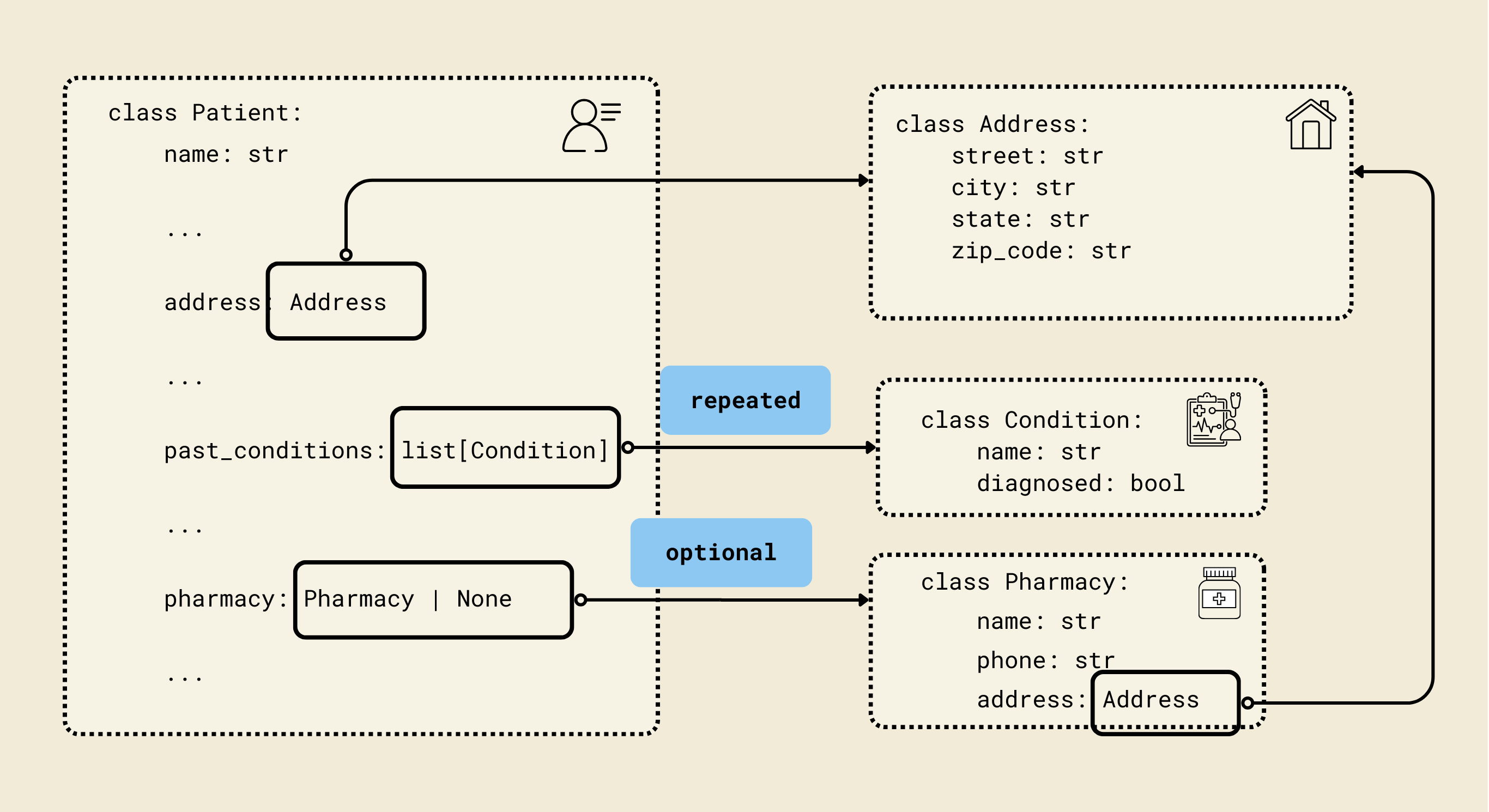
We defined Pydantic-style classes (Contact, Address, Insurance, etc.) to match a FHIR-inspired patient schema, enabling structured and validated representations of patient data. Each model corresponds to a key aspect of a patient's record, ensuring both type safety and nested relationships.
1. Contact Model
class Contact(BaseModel):
    name: str
    phone: str
    relationship: str
- Represents an emergency or personal contact for the patient.
- Fields:
name: Contact's full name.phone: Contact phone number.relationship: Relation to the patient (e.g., parent, spouse, friend).
2. Address Model
class Address(BaseModel):
    street: str
    city: str
    state: str
    zip_code: str
- Represents a postal address.
- Fields:
street,city,state,zip_code: Standard address fields.
3. Pharmacy Model
class Pharmacy(BaseModel):
    name: str
    phone: str
    address: Address
- Represents the patient’s preferred pharmacy.
- Fields:
name: Pharmacy name.phone: Pharmacy contact number.address: Uses theAddressmodel for structured address information.
4. Insurance Model
class Insurance(BaseModel):
    provider: str
    policy_number: str
    group_number: str | None = None
    policyholder_name: str
    relationship_to_patient: str
- Represents the patient’s insurance information.
- Fields:
provider: Insurance company name.policy_number: Unique policy number.group_number: Optional group number.policyholder_name: Name of the person covered under the insurance.relationship_to_patient: Relationship to patient (e.g., self, parent).
5. Condition Model
class Condition(BaseModel):
    name: str
    diagnosed: bool
- Represents a medical condition.
- Fields:
name: Condition name (e.g., Diabetes).diagnosed: Boolean indicating whether it has been officially diagnosed.
6. Medication Model
class Medication(BaseModel):
    name: str
    dosage: str
- Represents a current medication the patient is taking.
- Fields:
name: Medication name.dosage: Dosage information (e.g., "10mg daily").
7. Allergy Model
class Allergy(BaseModel):
    name: str
- Represents a known allergy.
- Fields:
name: Name of the allergen (e.g., peanuts, penicillin).
8. Surgery Model
class Surgery(BaseModel):
    name: str
    date: str
- Represents a surgery or procedure the patient has undergone.
- Fields:
name: Surgery name (e.g., Appendectomy).date: Surgery date (as a string, ideally ISO format).
9. Patient Model
class Patient(BaseModel):
    name: str
    dob: datetime.date
    gender: str
    address: Address
    phone: str
    email: str
    preferred_contact_method: str
    emergency_contact: Contact
    insurance: Insurance | None = None
    reason_for_visit: str
    symptoms_duration: str
    past_conditions: list[Condition] = Field(default_factory=list)
    current_medications: list[Medication] = Field(default_factory=list)
    allergies: list[Allergy] = Field(default_factory=list)
    surgeries: list[Surgery] = Field(default_factory=list)
    occupation: str | None = None
    pharmacy: Pharmacy | None = None
    consent_given: bool
    consent_date: str | None = None
- Represents a complete patient record with personal, medical, and administrative information.
- Key fields:
name,dob,gender: Basic personal info.address,phone,email: Contact info.preferred_contact_method: How the patient prefers to be reached.emergency_contact: NestedContactmodel.insurance: Optional nestedInsurancemodel.reason_for_visit,symptoms_duration: Visit details.past_conditions,current_medications,allergies,surgeries: Lists of nested models for comprehensive medical history.occupation: Optional job info.pharmacy: Optional nestedPharmacymodel.consent_given,consent_date: Legal/administrative consent info.
Why Use Pydantic Here?
- Validation: Ensures all fields are the correct type (e.g.,
dobis adate). - Structured Nested Models: Patient has nested objects like
Address,Contact, andInsurance. - Default Values & Optional Fields: Handles optional fields and defaults (
Field(default_factory=list)ensures empty lists if no data). - Serialization: Easily convert models to JSON for APIs or databases.
- Error Checking: Automatically raises errors if invalid data is provided.
DSPy Vision Extractor
DSPy Signature
Let’s define PatientExtractionSignature. A Signature describes what data your module expects and what it will produce. Think of it as a schema for an AI task.
PatientExtractionSignature is a dspy.Signature, which is DSPy's way of declaring what the model should do, not how it does it.
# DSPy Signature for patient information extraction from images
class PatientExtractionSignature(dspy.Signature):
    """Extract structured patient information from a medical intake form image."""

    form_images: list[dspy.Image] = dspy.InputField(
        desc="Images of the patient intake form pages"
    )
    patient: Patient = dspy.OutputField(
        desc="Extracted patient information with all available fields filled"
    )
This signature defines task contract for patient information extraction.
- Inputs:
form_images– a list of images of the intake form. - Outputs:
patient– a structuredPatientobject.
From DSPy's point of view, this Signature is a "spec": a mapping from an image-based context to a structured, Pydantic-backed semantic object that can later be optimized, trained, and composed with other modules.
PatientExtractor Module
PatientExtractor is a dspy.Module, which in DSPy is a composable, potentially trainable building block that implements the Signature.
class PatientExtractor(dspy.Module):
    """DSPy module for extracting patient information from intake form images."""

    def __init__(self) -> None:
        super().__init__()
        self.extract = dspy.ChainOfThought(PatientExtractionSignature)

    def forward(self, form_images: list[dspy.Image]) -> Patient:
        """Extract patient information from form images and return as a Pydantic model."""
        result = self.extract(form_images=form_images)
        return result.patient  # type: ignore
- In
__init__,ChainOfThoughtis a DSPy primitive module that knows how to call an LLM with reasoning-style prompting to satisfy the given Signature. In other words, it is a default "strategy" for solving the "extract patient from images" task. - The
forwardmethod is DSPy's standard interface for executing a module. You passform_imagesintoself.extract(). DSPy then handles converting this call into an LLM interaction (or a trained program) that produces apatientfield as declared in the Signature.
Conceptually, PatientExtractor is an ETL operator: the Signature describes the input/output types, and the internal ChainOfThought module is the function that fills that contract.
Single-Step Extraction
Now let’s wire the DSPy Module to extract from a single PDF. From high level,
- The extractor receives PDF bytes directly
- Internally converts PDF pages to DSPy Image objects using PyMuPDF
- Processes images with vision model
- Returns Pydantic model directly
@cocoindex.op.function(cache=True, behavior_version=1)
def extract_patient(pdf_content: bytes) -> Patient:
    """Extract patient information from PDF content."""

    # Convert PDF pages to DSPy Image objects
    pdf_doc = pymupdf.open(stream=pdf_content, filetype="pdf")

    form_images = []
    for page in pdf_doc:
        # Render page to pixmap (image) at 2x resolution for better quality
        pix = page.get_pixmap(matrix=pymupdf.Matrix(2, 2))
        # Convert to PNG bytes
        img_bytes = pix.tobytes("png")
        # Create DSPy Image from bytes
        form_images.append(dspy.Image(img_bytes))

    pdf_doc.close()

    # Extract patient information using DSPy with vision
    extractor = PatientExtractor()
    patient = extractor(form_images=form_images)

    return patient  # type: ignore
This function is a CocoIndex function (decorated with @cocoindex.op.function) that takes PDF bytes as input and returns a fully structured Patient Pydantic object.
cache=Trueallows repeated calls with the same PDF to reuse results.behavior_version=1ensures versioning of the function for reproducibility.
Create DSPy Image objects
We open PDF from bytes using PyMuPDF (pymupdf), then we iterate over each page.
- Useful trick: Render the page as a high-resolution image (
2x) for better OCR/vision performance. - Convert the rendered page to PNG bytes.
- Wrap the PNG bytes in a DSPy
Imageobject.
DSPy Extraction
The list of form_images is passed to the DSPy module:
- ChainOfThought reasoning interprets each image.
- Vision + NLP extract relevant text fields.
- Populate Pydantic
Patientobject with structured patient info.
CocoIndex Flow
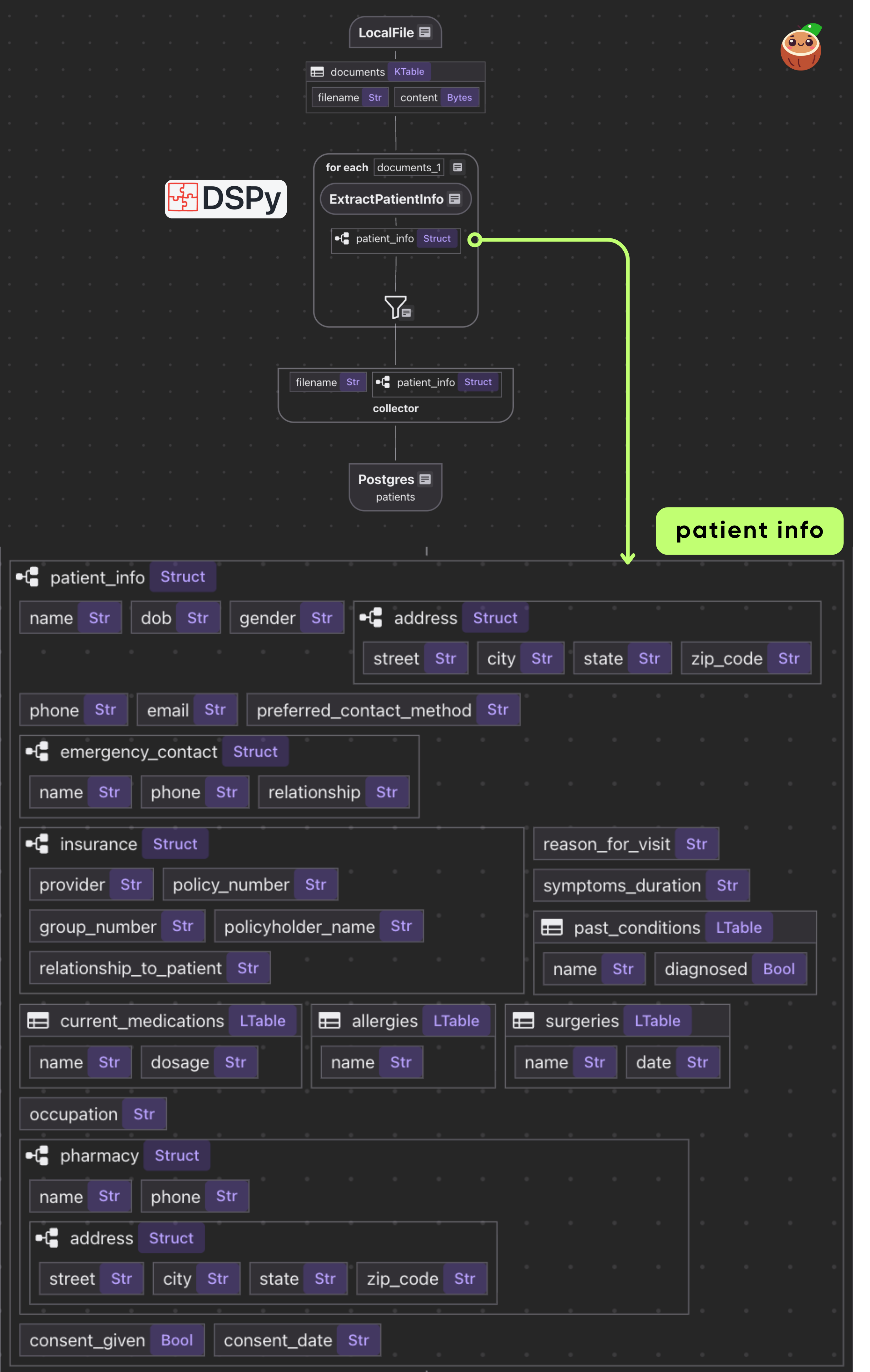
- Loads PDFs from local directory as binary
- For each document, applies single transform: PDF bytes → Patient data
- Exports the results in a PostgreSQL table
Declare Flow
Declare a CocoIndex flow, connect to the source, add a data collector to collect processed data.
@cocoindex.flow_def(name="PatientIntakeExtractionDSPy")
def patient_intake_extraction_dspy_flow(
    flow_builder: cocoindex.FlowBuilder, data_scope: cocoindex.DataScope
) -> None:
    data_scope["documents"] = flow_builder.add_source(
        cocoindex.sources.LocalFile(path="data/patient_forms", binary=True)
    )

    patients_index = data_scope.add_collector()
@cocoindex.flow_deftells CocoIndex that this function is a flow definition, not regular runtime code.add_source()registers aLocalFilesource that traversesdata/patient_formsdirectory and creates a logical table nameddocuments
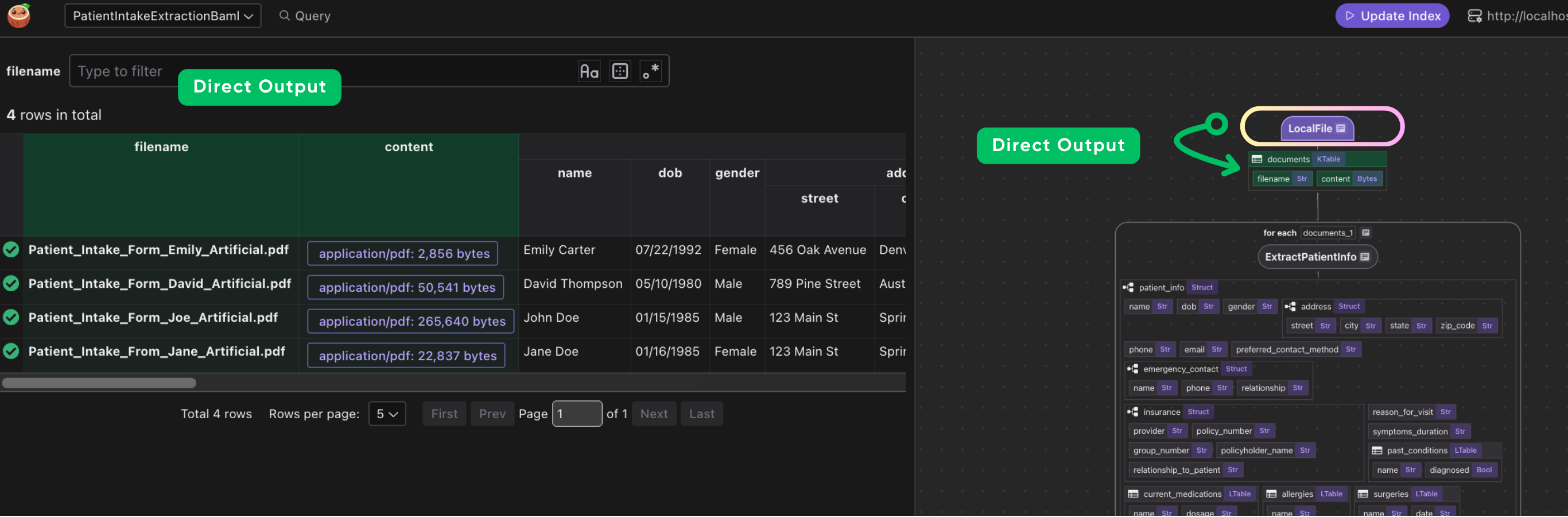
You can connect to various sources, or even custom source with CocoIndex if native connectors are not available. CocoIndex is designed to keep your indexes synchronized with your data sources. This is achieved through a feature called live updates, which automatically detects changes in your sources and updates your indexes accordingly. This ensures that your search results and data analysis are always based on the most current information. You can read more here https://cocoindex.io/docs/tutorials/live_updates
Process documents
with data_scope["documents"].row() as doc:
    # Extract patient information directly from PDF using DSPy with vision
    # (PDF->Image conversion happens inside the extractor)
    doc["patient_info"] = doc["content"].transform(extract_patient)

    # Collect the extracted patient information
    patients_index.collect(
        filename=doc["filename"],
        patient_info=doc["patient_info"],
    )
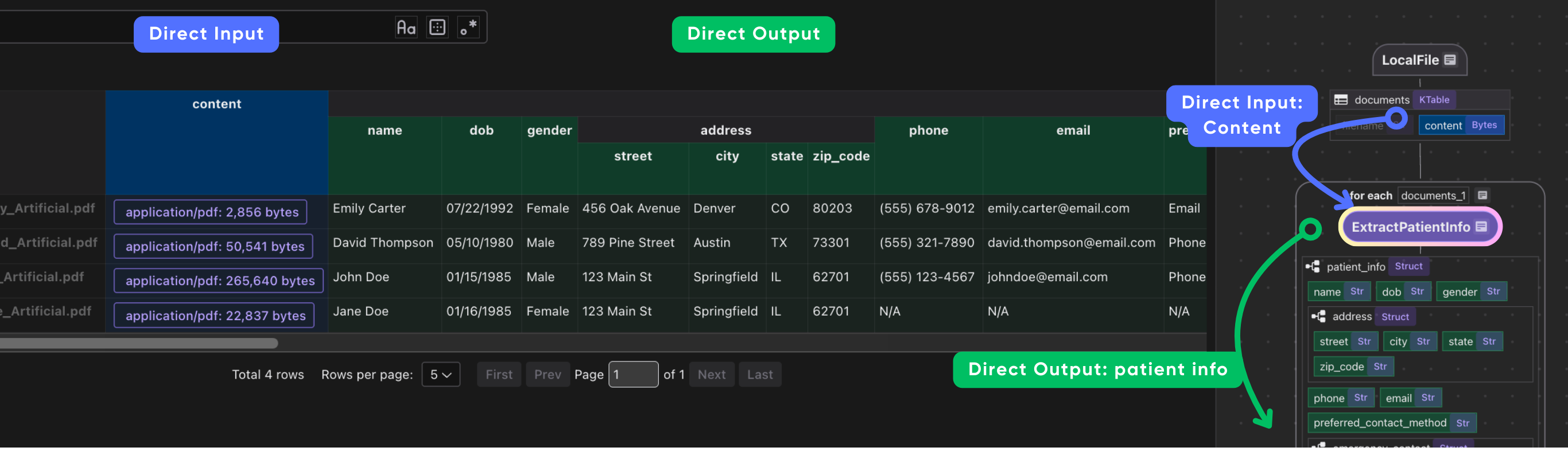
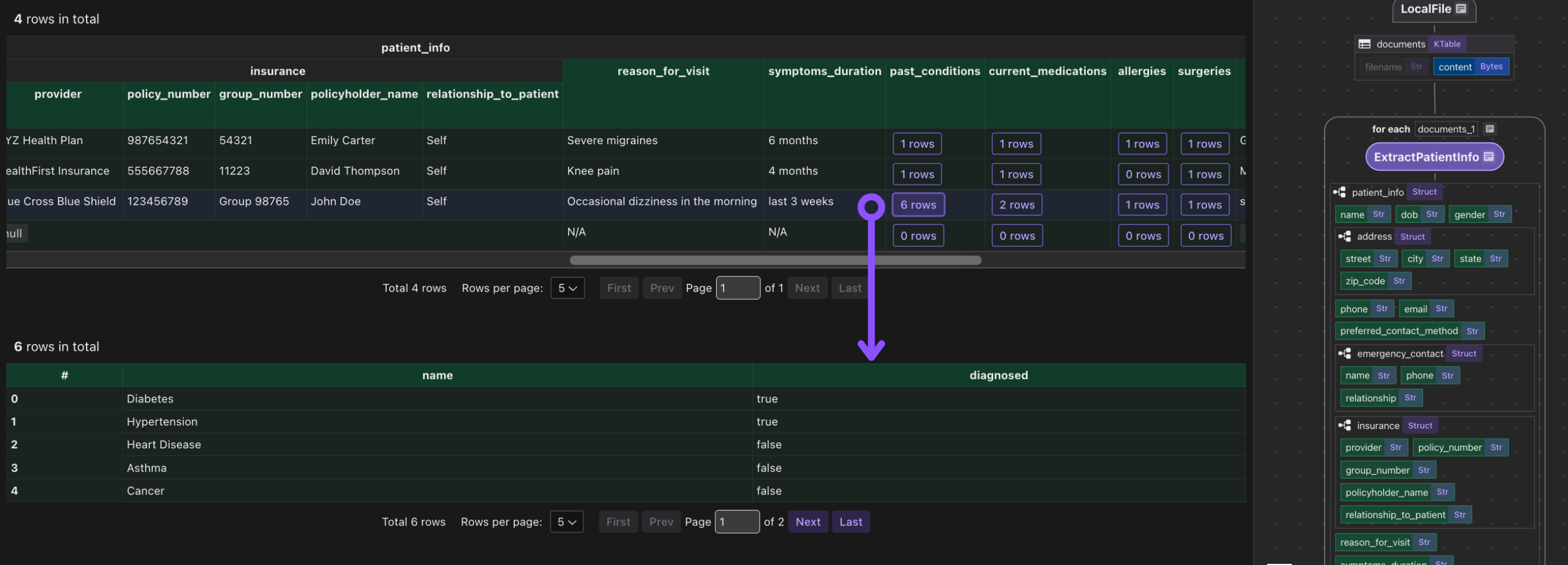
This iterates over each document. We transform doc["content"] (the bytes) by our extract_patient function. The result is stored in a new field patient_info.
Then we collect a row with the filename and extracted patient_info.
Export to Postgres
patients_index.export(
    "patients",
    cocoindex.storages.Postgres(table_name="patients_info_dspy"),
    primary_key_fields=["filename"],
)
We export the collected index to Postgres. This will create/maintain a table patients keyed by filename, automatically deleting or updating rows if inputs change.
Because CocoIndex tracks data lineage, it will handle updates/deletions of source files incrementally.
Configure CocoIndex settings
Define a CocoIndex settings function that configures the AI model for DSPy:
@cocoindex.settings
def cocoindex_settings() -> cocoindex.Settings:
    # Configure the model used in DSPy
    lm = dspy.LM("gemini/gemini-2.5-flash")
    dspy.configure(lm=lm)

    return cocoindex.Settings.from_env()
It returns a cocoindex.Settings object initialized from environment variables, enabling the system to use the configured model and environment settings for all DSPy operations.
Running the Pipeline
Update the index:
cocoindex update main
CocoInsight
I used CocoInsight (Free beta now) to troubleshoot the index generation and understand the data lineage of the pipeline. It just connects to your local CocoIndex server, with zero pipeline data retention.
cocoindex server -ci main
Scalable open ecosystem (not a closed stack)
CocoIndex is designed to be composable by default. It provides a high-performance, incremental execution engine and a minimal flow abstraction, without coupling users to a specific model provider, vector database, transformation framework, or orchestration system.
All core concepts—sources, operators, and storage targets—are expressed as pluggable interfaces rather than proprietary primitives. A flow can ingest data from local files, object storage (e.g. S3), APIs, or custom sources; apply arbitrary transformation logic (SQL, DSPy modules, generated parsers, or general Python); and materialize results into relational databases, vector stores, search indexes, or custom sinks via the storage layer.
This design keeps CocoIndex opinionated about execution semantics (incrementality, caching, lineage), but intentionally unopinionated about modeling choices.
Why DSPy + CocoIndex aligns with this model
DSPy is itself a compositional programming framework for LLMs. Developers define typed Signatures and reusable Modules, and DSPy learns how to implement those contracts using the underlying model. This makes the LLM layer explicit, testable, and optimizable, rather than embedded in opaque prompt strings.
CocoIndex treats DSPy modules as first-class operators in a dataflow graph. This creates a clean separation of responsibilities:
- DSPy defines what an LLM computation must produce and how it can be optimized
- CocoIndex defines when that computation runs, how results are cached, how failures are retried, and how outputs propagate to downstream targets as inputs change
Neither system attempts to own the full stack. CocoIndex does not prescribe a prompt or LLM framework, and DSPy does not provide a pipeline engine. Instead, they interlock: DSPy modules become composable, typed transformation nodes inside CocoIndex flows, while CocoIndex supplies production guarantees such as batching, retries, incremental recomputation, and live updates over evolving PDFs, codebases, or APIs.
Support CocoIndex ❤️
If this example was helpful, the easiest way to support CocoIndex is to give the project a ⭐ on GitHub.
Your stars help us grow the community, stay motivated, and keep shipping better tools for real-time data ingestion and transformation.
[story continues]
tags