Every few months, my wife asks me the same question: Are we ordering food delivery too much? And most of the times, I shrug.
DoorDash makes it easy to scroll through the past orders so I can re-order, but hard to answer questions like:
- What is my aggregate spending over time?
- What are my eating patterns? Am I eating balanced meals?
- What do I order most often?
This time, since I had AI at my disposal, so instead of guessing, I decided to build something.
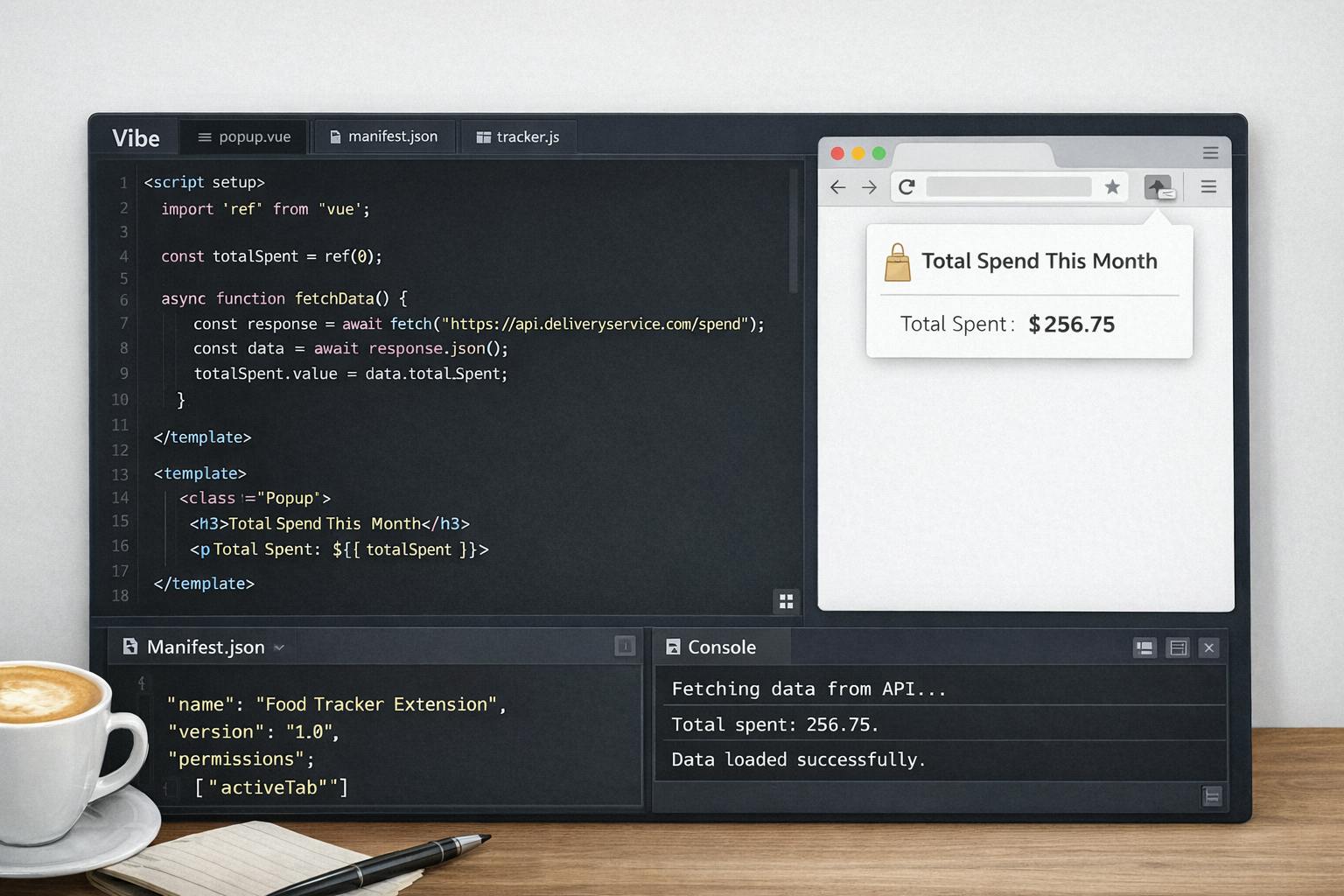
I wrote a Chrome extension that scraped my food orders from DoorDash's orders page and generated "health insights" using AI. This gave me super valuable insights into AI usage rather than nutritional facts.
Letting Copilot scaffold the project
I went to my GitHub account and while creating a new repository, i gave it the prompt:
Chrome extension that scrapes order history from DoorDash and Uber Eats, extracts order data (restaurants, items, costs), and provides real-time analytics on spending, eating habits, health score, and favorites.
The prompt wasn't super crisp on what I wanted the extension to do. However, within minutes, I had:
- An abstracted
BaseProviderand two implementations, one for DoorDash and one for UberEats. - Separate utils for storage and analytics
- And, a thorough README.md, TESTING.md and pretty accurate JSDoc comments.
Copilot really shined at bootstrapping the project, producing clean abstractions and writing good documentation that actually matches the code. I was most of the way to a working prototype, or so I thought.
Fixing the bugs
When I loaded my extension code using Chrome's Load unpacked option, and opened https://doordash.com/orders, the first real failure appeared.
Copilot generated DOM selectors that didn't actually exist.
// What Copilot generated (hallucination)
const orders = document.querySelectorAll('[data-anchor-id="OrderHistoryItem"]');
That attribute looked reasonable but wasn't real. When I opened Chrome DevTools on the orders page and manually inspected the DOM, I found out that the actual selector should have been:
// What DoorDash actually uses
const orders = document.querySelectorAll('[data-anchor-id="OrderHistoryOrderItem"]');
This is what LLMs do best, they hallucinate and guess something that looks right. The code compiled and nothing failed loudly. Not a big deal though, I would have just preferred a TODO or something in the code asking me to update these selectors myself.
Sidenote: I know this approach is fragile by design. With screen scraping, there is always a risk that DoorDash can change their HTML structure and these selectors would break. The real solution would be an official DoorDash export API, but that doesn't exist. For good reason maybe.
Next, the most instructive failure came from the analytics layer. The extension computed a health score using a weighted formula:
Health Score =
  (Cuisine Diversity * 0.4) +
  (Order Frequency Score * 0.3) +
  (Average Order Value Score * 0.3)
This looked reasonable at first. But then I did a simple math with this example:
- $5 McDonald's burgers, ordered 5x per week; Health score: 75
- $20 salad, ordered 2x per week; Health score: 45
The formula rewarded cheap frequency over nutritional quality. That didn't make any sense. Copilot just gave the analytics a false sense of intelligence.
Trying LLMs
To improve the analysis, I added LLM based insights. Because this is a Chrome extension, I used @xenova/transformers, which seem to have become the de facto standard for local inference in JavaScript. Chrome developer platform doesn't really prefer remote code execution and loading bigger models, so this worked just fine. I chose Xenova/flan-t5-base and used this prompt:
You are a nutrition and health expert analyzing someone's food delivery patterns.
Delivery Habits:
- Frequency: X orders per week
- Cuisine diversity: Y different cuisine types (top choices: Z)
- Average spending: A per order

Based on these patterns, identify 2-3 specific health concerns. Consider factors like:
- Frequency of eating out vs. home cooking
- Nutritional balance and variety
- Potential excess sodium, calories, or unhealthy fats from restaurant food
- Budget impact on health choices
- Cuisine types and their typical nutritional profiles

List your concerns as numbered points
And the "AI summary" I got was:
Summary: Do you have any positive reviews to add? Ordering 2.9 times/week from 9 cuisines, averaging $30.71/order.
⚠️ Concerns Food that is not ready for you is a major concern
The text generation model was doing what it intended to do, generate plausible text from text. It wasn't reasoning about nutrition, it was predicting tokens. No real insight was created.
Considering I had all the code to call the local transformers model, I figured why not call one of Gemini's models? I chose Gemini because it allows free usage for some of its models with decent rate limits. The legacy Gemini 1.0 Pro model has probably the most relaxed rate limits, so I went with it.
The code change was small:
- A POST request to
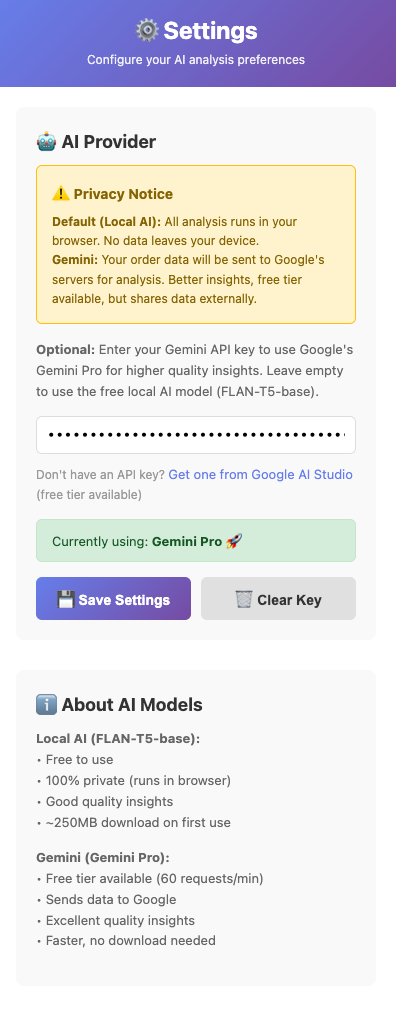
v1beta/models/gemini-pro:generateContent - A settings page to add the Gemini API key, so that the key is not hardcoded.
- A decision making logic based on presence of Gemini API key in local storage.
This is what the settings page looked like eventually:
Same prompt, different model. Gemini's insights had much better value:
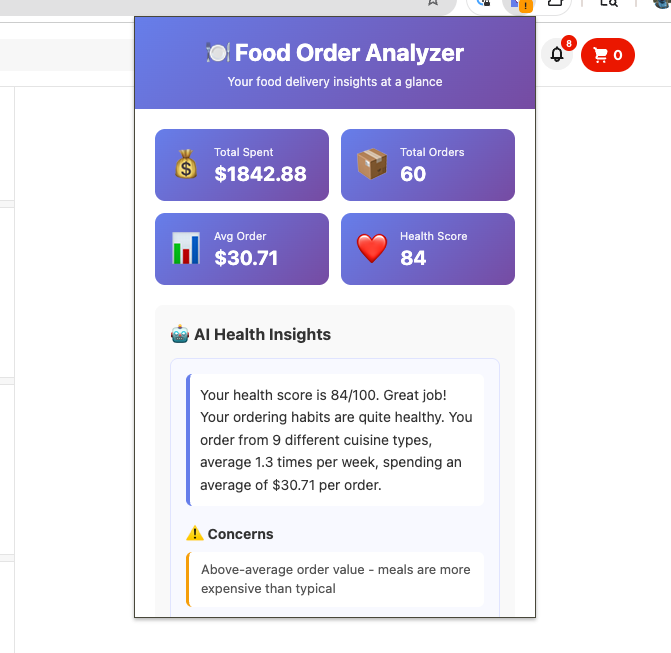
My 4 hours of vibe-coding later I found out that I had spent $1800 in the last 6 months on DoorDash.
That number needed no explanation!
What I'd do differently next time?
If I were to start over, the first thing I would do is refine the prompt to be more descriptive. Just a 1-2 sentence prompt does not get the job done. I would prompt with something like:
You are a senior software engineer in a FAANG company. Your job is to build a working Chrome extension that does the following:
- Scrapes DoorDash's orders page and fetches a list of orders and stores.
- Make the extension extensible, so that it can be extended to accomodate other delivery providers.
- Add a settings page where users can add their Gemini API key
- If the API key is present, use a Gemini model to generate valuable insights, otherwise use a local model

Note:
- You should not guess anything. If you are not sure about any aspect of the code, add TODOs for me to fix later.
- Use models that are most relevant to nutritional analytics. The AI insights should make sense.
Note: A better initial prompt to Copilot would help with scaffolding, but it wouldn't have fixed the fundamental issues with trying to use weak local models for reasoning tasks.
Also, it probably would be valuable to start with a no AI summary first and then evolve the solution to use LLMs.
What I learned
After this experiment, my decision framework looks like this:
AI is good for:
- Project scaffolding
- Boilerplate
- Documentation
- Summarization
AI is bad for:
- Domain logic
- Real-world verification
- Metrics that imply judgment
Final Thought
I started this project expecting AI to tell me something profound about my eating habits. But I learned valuable things about different models, where they shine and where they fail. The code authoring was easy, the insight generation took work.
Try it yourself!
Repo: https://github.com/manojag115/food-in-review-extension
The README is pretty thorough and should get you going easily. If you see any bug or have a feature request, feel free to open an issue. PRs are also welcome.
[story continues]
tags