It's fairly likely that you've heard the term "AI Agent" or "Agentic" used in the last few months, and for a number of folks, it's possible that you've used an AI Agent before. But do you know how they work, and how straightforward it can be to implement a fairly basic version?
I'm a self-declared "cautious skeptic" about AI and Large Language Models (LLMs), and so I've not delved too far into the tools and workflows as some of my colleagues have.
Late last year, Thomas Ptacek wrote You Should Write An Agent, which piqued my interest into digging into how they work.
Earlier in 2025, I read Thorsten Ball's How to Build an Agent? and although I hadn't gone and implemented it following Thorsten's steps, I was a little surprised at how straightforward it seemed.
As an opportunity to "kick the tyres" of what agents are and how they work, I set aside a couple of hours to see build one - and it blew me away.
I thought it was a good idea to share this with y'all, and reiterate how you can get something working quickly.
What's Renovate?
For those who aren't aware, Mend Renovate (aka Renovate CLI aka Renovate) is an Open Source project for automating dependency updates across dozens of package managers and package ecosystems, 9 different platforms (GitHub, GitLab, Azure DevOps and more), and boasts support for tuning its behaviour to fit how you want dependency updates.
Mend's cloud hosted Renovate is used by 1.3M+ repositories, and the Renovate CLI is used by millions of repositories in a self-hosted fashion, too.
What's an agent?
Despite the buzzword hype around what agents actually are, I've found Simon Willison's definition to be nice and digestible:
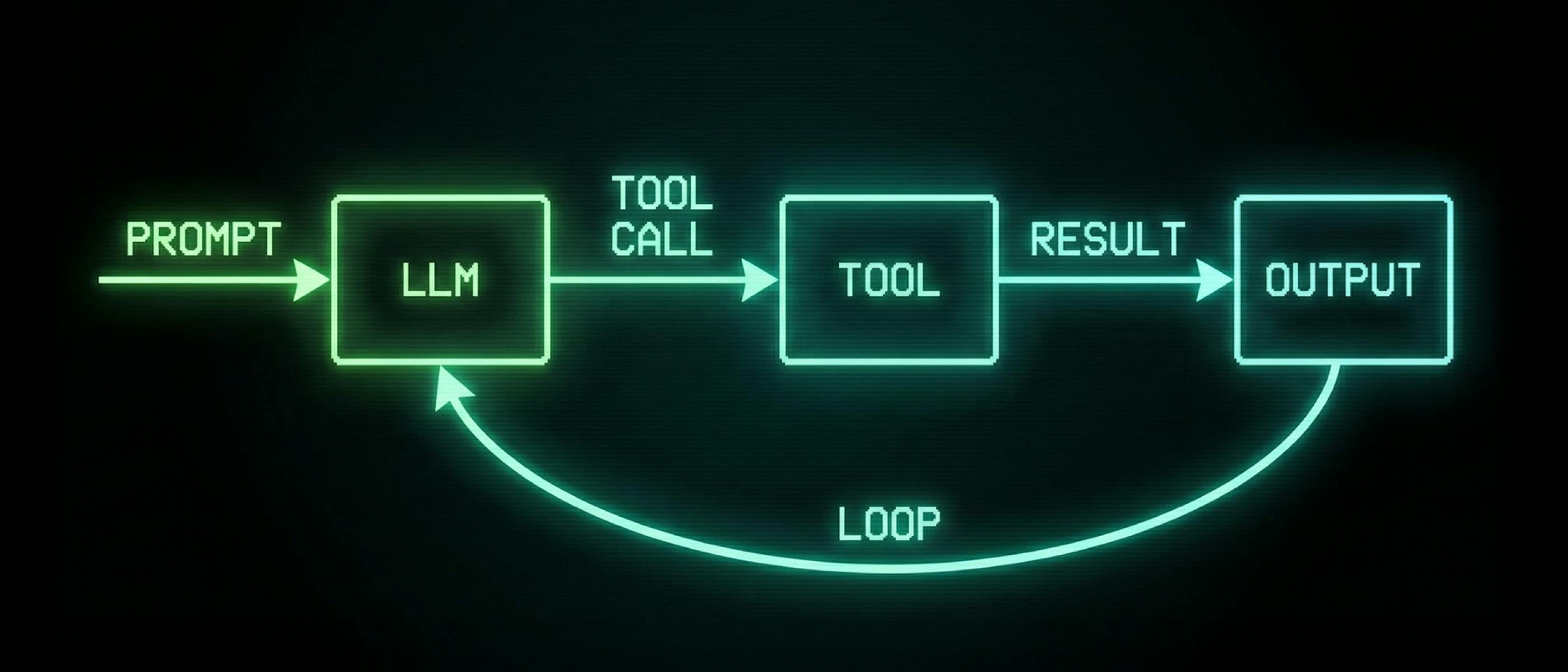
An LLM agent runs tools in a loop to achieve a goal.
This takes our LLM and gives it the ability to call tools (aka "tool calling"), which are provided to it directly (as we'll implement ourselves) or through the Model Context Protocol (MCP) standard.
As the state-of-the-art models are now trained on "tool calling", it means that we can provide the model a tool, and it'll understand how to call it.
What do we want to build?
I thought that a good way of exploring this would be to teach an LLM a bit more about how to craft Renovate configuration.
Because Renovate boasts support for many ecosystems and has a number of configurations to tune the behaviour to exactly what you want, there are a lot of different possibilities for configuration you could add to your repository.
LLMs already have a good understanding of Renovate configuration based on their training data, and if they have the ability to search the web, our current documentation, but they may not have the exact documentation for the version of Renovate we’re using.
We have a vibrant community, and because of the fast-paced nature of contributions into the project, it can be hard to keep up with the latest changes - even for me as one of the maintainers!
With this in mind, I'd decided on the following features I wanted out of my agent:
- the ability to tune the agent to a specific Renovate version
- the understanding of functionality available in that version
- the ability to propose configuration changes
- the knowledge of what is a valid configuration (using
renovate-config-validator, which is shipped as part of the Renovate npm package) - The ability to check what the configuration changes would mean, by running
renovate, and confirm that the expected changes occurred, using the same workflow I would take
Building the agent
Creating the basic input loop
To start with, I very closely followed Thorsten's post (and Geoffrey Huntley's workshop, based on the blog post) to get a basic shell of my agent up and running.
To save myself from needing to create a separate Anthropic subscription, I made a couple of tweaks to use our AWS Bedrock setup, and was up-and-running!
Thorsten's post is excellent, and the step-by-step nature, combined with a writing style to be jealous of, gives a really good primer on the basics.
Teaching the agent what "valid" config looks like
Once I had a basic loop running with a minimal read_file tool, I started having conversations to get a baseline of what the model already knew about Renovate configuration.
I'd noticed that some of the configurations being suggested would be using deprecated features, which I know as a "power user" of Renovate, but not everyone would do, until they run Renovate.
As a quick aside, due to Renovate's continuous development, we sometimes rename or refactor existing options. Instead of making this a breaking change, we provide an automated "config migration" to amend the configuration to i.e., use the new name of the configuration field. This is both applied when Renovate is running, to not force users to immediately make config file changes - but is also suggested to be committed to the repository.
Renovate has a tool, renovate-config-validator which can both report when using invalid configuration, but can also highlight when using something deprecated that needs a config migration.
My first Renovate-y tool I set about adding to the agent was validate_config, to teach the LLM how to make sure it's only providing valid, migrated configuration.
After implementing the tool and providing it to the LLM, I saw the LLM reliably use the tool, but it didn't seem to listen to the warnings about config migration.
To nudge the agent to follow this more clearly, I made sure that my system prompt included:
[...] You should make sure that any configuration you present is then validated by the validate_config tool, and that any config migration suggested in the response is adapted - do not leave users with configuration that needs migration!Unsurprisingly, the agent got a lot better at it, and started to return the config in the migrated form 🎉
With this functionality in place, the agent was already significantly more helpful, as it now couldn't "hallucinate" a configuration field and return it to the user, as it would run it through validate_config, realise it had returned invalid config, and try again, until we had a valid config.
Polishing the text rendering
At this point, we had an agent that could start to answer some reasonable questions from me, and provide valid configuration, and I was able to start using it a little.
LLMs largely reply to questions with Markdown, and although it's second nature to read, I'd prefer for it to be rendered Markdown, especially as we have many libraries to do that!
At this point, I integrated in Charm Bracelet's Glamour library to render the Markdown, resulting in a change from:
![A screenshot of a session with the agent in the user's terminal. The user asks "should I make any changes to this Renovate config? `{"extends": ["config:base"]}`", and Claude first attempts to validate the config (via a tool call) after which it sees it needs migrating, so it returns the new configuration, and then explains what it does. This version contains raw Markdown syntax from the LLM, for instance including fenced code blocks for the JSON code snippet, and raw Markdown lists.](https://cdn.hackernoon.com/images/chowa-ediotor_7a3ptik.png)
To the more pretty version:
![A screenshot of a session with the agent in the user's terminal. The user asks "should I make any changes to this Renovate config? `{"extends": ["config:base"]}`", and Claude first attempts to validate the config (via a tool call) after which it sees it needs migrating, so it returns the new configuration, and then explains what it does. This version contains a rendered view of the Markdown syntax returned by the LLM, with code snippets rendered in different colour + font to the regular text, as well as the JSON configuration snippet being rendered as formatted and pretty-printed JSON, with colours for the syntax highlighting.](https://cdn.hackernoon.com/images/chowa-ediotor_fob7mfbo.png)
Packaging the tools
I wanted to be a little bit more explicit about the versions of Renovate, its tooling and documentation, but couldn't as easily do that when I had a few versions of Renovate installed on my machine.
To simplify the packaging, I ended up creating a lightweight Docker image that would allow my agent to:
- have a specific version of
renovateandrenovate-config-validatorinstalled - know what version of Renovate we're running (and tell the agent)
- have a copy of the docs for that version downloaded
Now there's an explicit version of Renovate, I amended my system prompt to tell the agent that:
		System: []anthropic.TextBlockParam{
			// ...
			{
				Text: "Renovate is a fast-moving project, so you may know about outdated configuration at any time. You are currently running as Renovate " + a.meta.Version + ", which may not be the latest at this point in time. [config validation prompt as above]",
			}
Reading docs
The next logical step would be to have the LLM able to use the documentation for the given Renovate version appropriately, and be able to query usage examples for different configurations to tune its responses.
I implemented a read_docs tool, which would return all the docs (~66k lines of Markdown), which unsurprisingly didn't work, because LLMs have a limited set of context (AKA their "context window"), and throwing that much data would cost a lot of money, as well as reducing the context available to process the rest of the conversation.
Even looking at the documentation for all repository config settings, which would likely be the most helpful page of docs, that was currently ~13k lines of Markdown, and so I needed to consider a way to split this file in a way that an LLM would be able to digest it more easily.
This is one I've not yet finished off solving, but it has been interesting to consider how to break down large files into smaller sizes that will work better for LLMs, and possibly also humans.
I've started by introducing a list_docs tool, which can list all files in the docs directory (downloaded from the GitHub release for Renovate), and then we can use read_file to read each individual file, albeit we can still hit context length issues with some docs files.
Actually running Renovate
The final feature I wanted to implement would give the ability to run Renovate (in a dry run mode) and validate whether the changes that the agent was proposing would actually work.
To do this as a human, I would run Renovate in its dryRun mode, and then check the logs to see if the relevant change was made.
Fortunately, the agent could be told to do exactly the same, with a tool call, run_renovate, which would execute the Renovate CLI against a local copy of a repository, based on the configuration that the agent is suggesting.
Once the command completes, the agent receives a special log line (packageFiles with updates) which provides information around the files Renovate has parsed, and any updates detected, and is hugely useful when debugging.
As we're finding, each incremental tool being provided to the agent makes it more powerful, and I started to see it more reasonably able to confirm if, i.e., adding a regex to parse the golangci-lint version from a Makefile would actually detect the current version and pending version updates.
I've not yet finished tuning the system prompt to teach it exactly what I'd be looking for when looking through the log lines, but it's interesting how much it can already do.
Lessons learned
Through this process, I've learned a lot more about agents and LLMs, and it's taught me that there isn't as much "magic" as it sometimes seems, and that it can be straightforward to do something interesting.
Surprisingly straightforward
I was surprised to see how straightforward it was to get to a minimal agent loop (based on Thorsten's post) and then how it was only a couple of hundred extra lines of Go to get to the final result, totaling ~700 lines of code.
I realise that a lot of the work is being done by the LLM under the hood, but it's still impressive!
Incremental building was fun
I really enjoyed seeing how incremental changes like the addition of a new tool or a tweak to the system prompt would improve the overall viability of the agent.
As I made changes, I re-ran the same prompts to get a feel for the difference (while remembering LLMs are non-deterministic).
Getting the UX right is easier with a specialised agent
When you have an agent that is specialised for specific features, you can more easily control what this looks like.
In my case, we're largely making tweaks to a JSON file that sits within a repository, and looking at what changes the Renovate CLI sees after these changes.
I've not yet ended up implementing it, but what I really want is to have a side pane on the agent's interface, which shows the current Renovate configuration we're currently talking about, so as it changes based on the LLM's feedback, it changes on the UI.
Context is hard
As noted above, trying to juggle the size of our documentation with the context window an LLM has was a bit tricky.
Add this on to the fact that some of Renovate's log lines can be particularly long (especially in a large repository) and we then have additional places to consider how to limit the token usage at a given point.
I've also found that although my system prompt nudges the LLM towards a specific action based on wording (i.e. in the JSON Schema used for a given tool's definition), I sometimes have to nudge more heavily, i.e. can you lookup what updates are available if I'm expecting it to run with --dry-run=lookup.
This could be an MCP Server
Those of you more familiar with LLMs, agents, and the Model Context Protocol will have noticed that a lot of this isn’t actually agent-specific, and that the tools themselves could be extracted into an MCP Server.
That’s absolutely the plan, but for the purpose of this blog post, it made sense to show that it was simpler to implement it all within a single agent, than trying to also add in an MCP server that needed interacting with.
I now have a lot more to do
Unfortunately, I now have a lot of other things I want to do with this!
I'm also looking at how this can be used to improve my own life, working as the Renovate Community Manager, answering user questions.
And keep your eyes peeled, I very much want to get this Open Source'd when it's in a better place.
Conclusion
As someone who hasn't done a lot with LLMs and agents, I've found it really eye-opening to see how straightforward it can actually be.
I'll leave you with another reminder that you should build an agent.
Written by Jamie Tanna, Senior Developer & Open Source Project maintainer
Jamie is a maintainer of Mend Renovate, where he also holds the role of community manager, so you'll probably see him around! He's been maintaining Open Source projects you may have heard of for the last decade, and has spent the last ~5 years working heavily in the dependency management space and helping enterprises ship better software.
[story continues]
tags